
M5Stack C008-C
M5Stack Atom Echo スマートスピーカー開発キット ユーザーマニュアル
Model: C008-C
1. はじめに
The M5Stack Atom Echo is a compact and portable smart speaker development kit designed for voice interaction and AI capabilities. It integrates a microphone and speaker, enabling functions such as voice control and audio playback. This device is ideal for rapid prototyping in various applications including IIoT, home automation, smart retail, and STEM education.
主な機能は次のとおりです。
- コンパクトで持ち運びに便利: Measuring only 24 x 24 x 17 mm, it is highly convenient for on-the-go use.
- Voice Interaction and AI Capabilities: Built-in microphone and speaker support voice control, story-telling, and integration with cloud platforms like AWS and Baidu.
- ワイヤレス音楽再生: Utilizes ESP32's BT capabilities for seamless audio streaming from mobile devices.
- 多彩な接続性: Supports 2.4G Wi-Fi IEEE 802.11b/g/n for reliable wireless connection.
- RGB LED Status Display: An embedded SK6812 RGB LED provides visual indication of the device's operational status.

Figure 1: M5Stack Atom Echo Smart Speaker Dev Kit, a compact and portable device.
2. 製品の構成と寸法
The Atom Echo features several key components and a compact design, as detailed below.
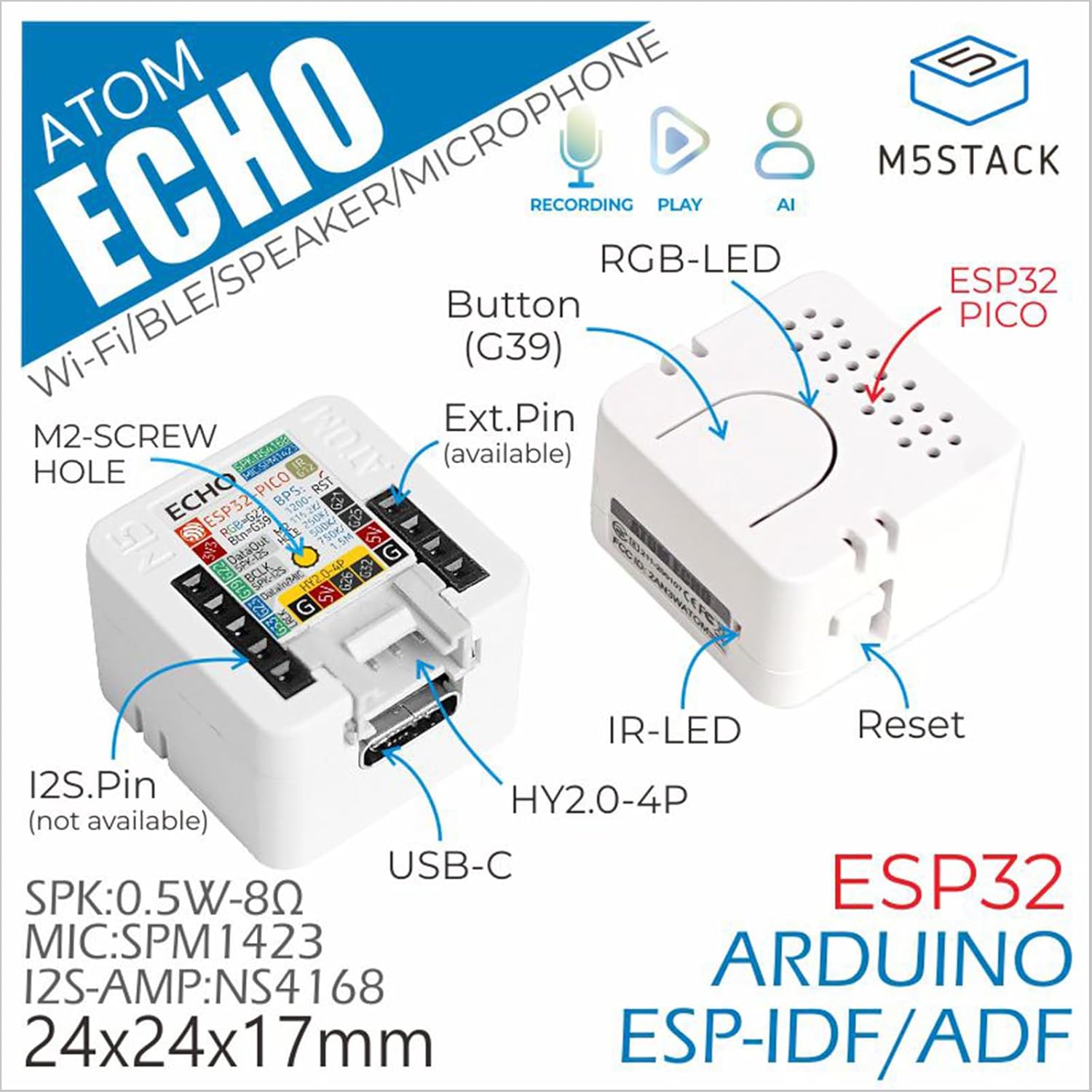
Figure 2: Detailed component diagram of the Atom Echo, highlighting the Button (G39), RGB-LED, ESP32 PICO, IR-LED, Reset button, USB-C port, Extension Pins, M2-screw hole, and I2S.Pin.

Figure 3: Dimensions of the Atom Echo, measuring 24mm (0.94in) in width and depth, and 17mm (0.67in) in height.

Figure 4: Size comparison of the Atom Echo next to a US Quarter, illustrating its compact form factor.
3. セットアップと接続
The Atom Echo is designed for easy setup and versatile connectivity. It supports both Wi-Fi and Bluetooth for communication.
3.1電源オン
Connect the Atom Echo to a 5V DC power source using the USB-C port. The device will power on automatically.
3.2 ワイヤレス接続
The device supports 2.4G Wi-Fi (IEEE 802.11b/g/n) and Bluetooth. Specific connection procedures will depend on the firmware loaded onto the device. Refer to the official M5Stack documentation for detailed programming and connection guides.
For detailed tutorials and quick start guides, please visit the official M5Stack webサイト:
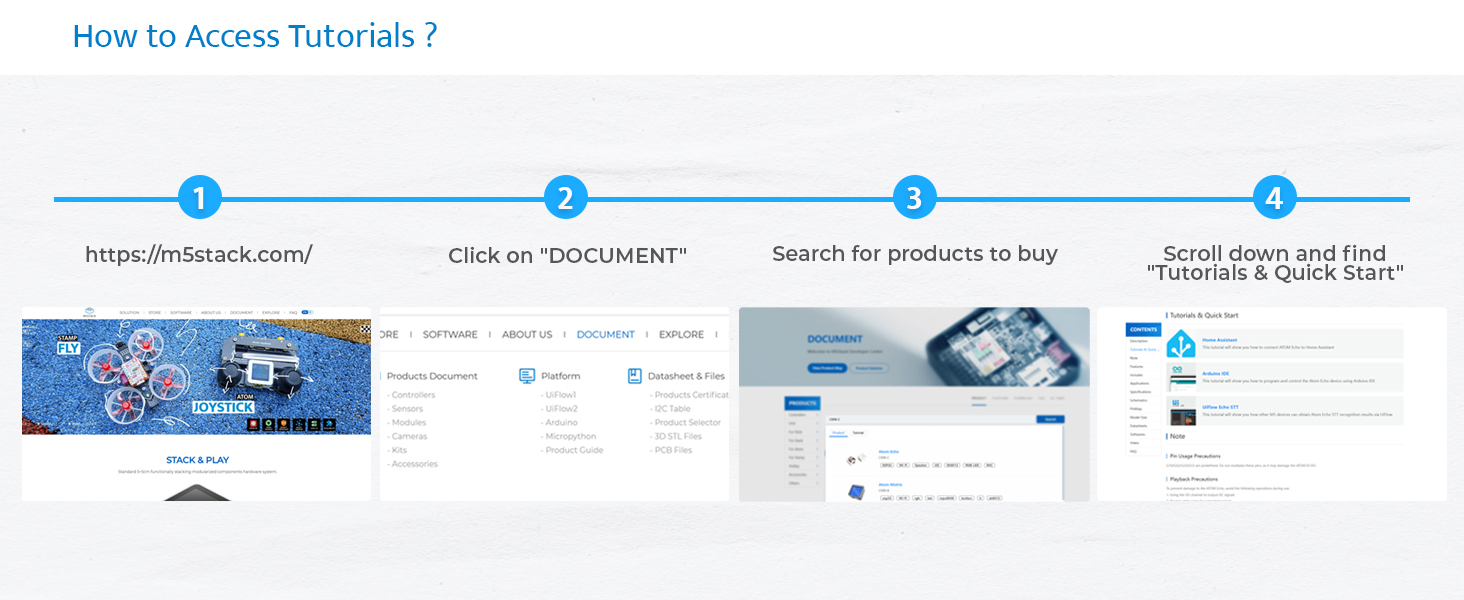
Figure 5: Steps to access tutorials and quick start guides on the M5Stack website (m5stack.com).
4. Operating the Atom Echo
The Atom Echo is primarily operated through its programmable button and voice commands, depending on the loaded application.
4.1 音声インタラクション
The built-in microphone allows for voice input. Depending on the programmed functionality, you can use voice commands for control, ask questions, or interact with AI services.
4.2 オーディオ再生
The integrated speaker enables audio output. This can be used for playing music wirelessly via Bluetooth, delivering voice responses, or playing system notifications.
4.3 RGB LED Indicator
The RGB LED (SK6812) provides visual feedback on the device's status, such as connection status, active listening mode, or error indications. The specific color patterns and their meanings are defined by the loaded firmware.

Figure 6: Key features of the Atom Echo, including support for STT services, RGB LED status display, compact and lightweight design, and a GROVE expansion interface.
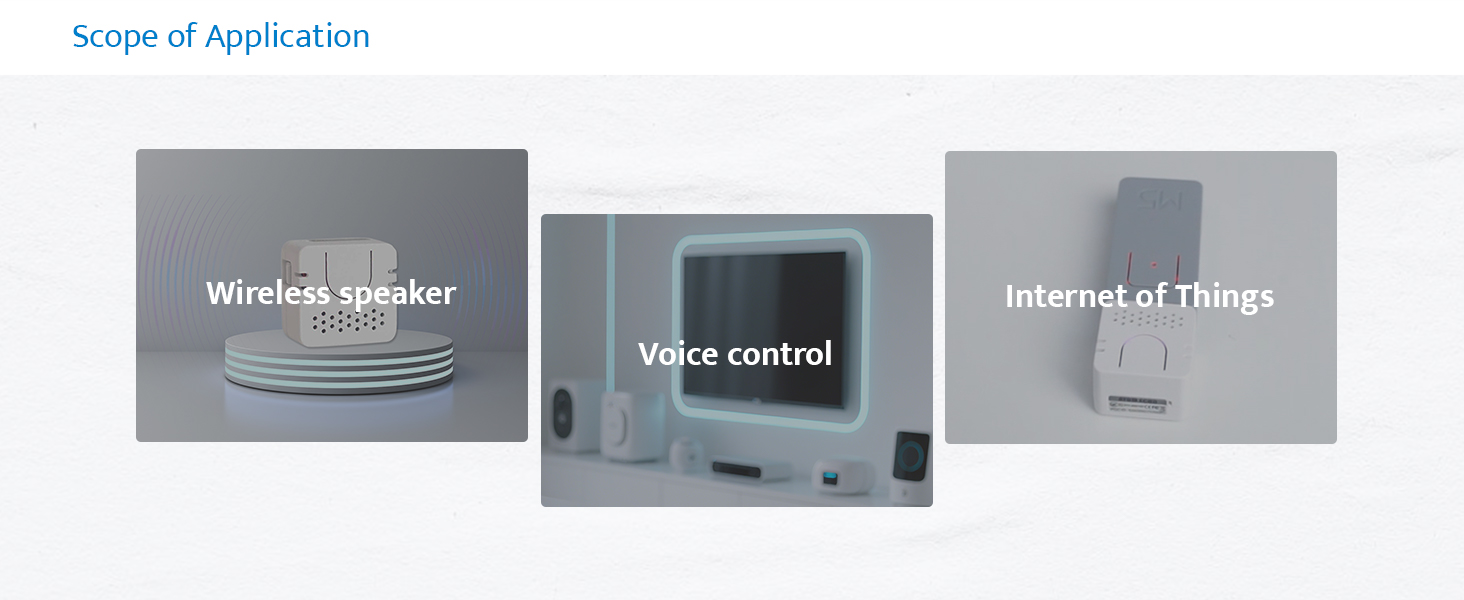
図7:例amples of Atom Echo applications, including use as a wireless speaker, for voice control, and in Internet of Things (IoT) projects.
5. メンテナンス
The M5Stack Atom Echo requires minimal maintenance. Keep the device clean and free from dust and moisture.
- クリーニング: デバイスの外装を清掃する際は、柔らかく乾いた布をご使用ください。液体クリーナーや溶剤は使用しないでください。
- ストレージ: デバイスを使用しないときは、涼しく乾燥した場所に保管してください。
- 環境条件: デバイスを極端な温度、直射日光、または高湿度にさらさないでください。
6。 トラブルシューティング
If you encounter issues with your Atom Echo, consider the following common troubleshooting steps:
- デバイスの電源が入っていない:
- Ensure the USB-C cable is securely connected to both the device and a working 5V power source.
- 別の USB-C ケーブルまたは電源アダプターを試してください。
- オーディオ出力なし:
- Verify that the device is properly programmed to output audio.
- Check the volume settings within your application or connected device.
- Ensure the speaker is not physically obstructed.
- マイクが応答しません:
- Confirm that the microphone functionality is enabled and correctly configured in your firmware.
- Ensure there are no physical obstructions covering the microphone.
- Test in a quiet environment, as excessive background noise can affect performance.
- 接続の問題 (Wi-Fi/Bluetooth):
- Ensure the device is within range of your Wi-Fi router or Bluetooth device.
- Verify Wi-Fi credentials or Bluetooth pairing status in your firmware.
- Restart the Atom Echo and your router/Bluetooth device.
- 予期しない動作:
- Perform a soft reset using the reset button if available, or by power cycling the device.
- Review your loaded firmware for any programming errors or conflicts.
- Consult the M5Stack official documentation and community forums for specific programming and debugging assistance.
7. 仕様
Detailed technical specifications for the M5Stack Atom Echo:

図8:以上view of the Atom Echo's key specifications.
| 仕様 | 価値 |
|---|---|
| 入力ボリュームtage | 5 ボルト (DC) |
| 取り付けタイプ | 壁掛け |
| 材料 | プラスチック |
| モデル名 | Atom Echo |
| スピーカータイプ | マルチメディア |
| 特集 | プログラム可能 |
| 推奨用途 | Smart Speaker Development Kit |
| 対応デバイス | スマートフォン、タブレット |
| ユニット数 | 1.0 カウント |
| コントローラータイプ | ボタン |
| サラウンドサウンドチャンネル構成 | 2.0 |
| 色 | 白 |
| 含まれるコンポーネント | 1x ATOM ECHO |
| 製品寸法 | 奥行き0.94インチ x 幅0.94インチ x 高さ0.67インチ |
| 年齢範囲(説明) | 全年齢対象 |
| 防水です | 間違い |
| 保証タイプ | 限定 |
| アイテム数 | 1 |
| 制御方法 | 声 |
| 無線通信技術 | Bluetooth wifi |
| スピーカーサイズ | 16ミリメートル |
| 電源 | USB-C |
| ウーファー直径 | 40.2ミリメートル |
| 耐水性レベル | 耐水性はありません |
| 顧客パッケージタイプ | ファストフード |
| オーディオドライバータイプ | ダイナミックドライバ |
| Bluetooth範囲 | 10メートル |
| マイクの数 | 1 |
| サブウーファー接続技術 | 無線 |
| 接続プロトコル | Bluetooth、Wi-Fi、USB |
| MP3プレーヤーは付属していますか? | いいえ |
| 回路数 | 1 |
| パワーレベルの数 | 1 |
| プロセッサ数 | 1 |
| メーカー | M5Stack Technology Co., Ltd. |
| アイテム重量 | 1.13オンス |
| 商品型番 | C008-C |
| 初回利用可能日 | 12年2023月XNUMX日 |
| 原産国 | 中国 |
| ブランド | M5スタック |
| スピーカー最大出力 | 0.5ワット |
| 周波数応答 | 240Hz |
| 接続技術 | Bluetooth, Wi-Fi, USB, IR |
| オーディオ出力モード | 単核症 |
8. 箱の中身
The M5Stack Atom Echo package includes the following items:
- 1x ATOM ECHO unit

Figure 9: Visual representation of the Atom Echo unit included in the package.
9. 保証とサポート
The M5Stack Atom Echo comes with a limited warranty. For specific warranty terms and conditions, please refer to the documentation provided with your purchase or visit the official M5Stack webサイト。
For technical support, additional resources, and community forums, please visit the M5Stack official webサイト:
Ask a question about this manual
Ask about setup, troubleshooting, compatibility, parts, safety, or missing instructions. Manuals+ will review the question and use this page’s manual context to help answer it.