
導入
The SZELAM SZ-8853A-GD Digital Alarm Clock is designed to provide clear time display, customizable lighting, and convenient charging capabilities. This manual provides instructions for setup, operation, and maintenance to ensure optimal performance of your device.

Figure 1: SZELAM SZ-8853A-GD Digital Alarm Clock.
パッケージ内容
以下にリストされているすべてのアイテムがパッケージに含まれていることを確認してください。
- 1 x SZELAM Digital Alarm Clock (Model SZ-8853A-GD)
- 電源アダプター x 1
- 1 x USB充電ケーブル(Type-C)
- 製品マニュアル x 1

Figure 2: Contents of the SZELAM Alarm Clock package.
製品終了view
The SZELAM Digital Alarm Clock features a 7.4-inch mirror display with large, easy-to-read digits. It includes multiple buttons on the top for various settings and two charging ports on the side.
主な特徴:
- 11-Color RGB Digital Display: Choose from 4 dynamic RGB modes and 7 fixed color modes for the time display.
- 10-Color Modes Night Light: Integrated LED light with 3 dynamic RGB colors and 7 fixed color modes, adjustable to 5 brightness levels.
- USB-C充電ポート: Equipped with one USB Type-C and one USB-A output port for simultaneous charging of two electronic devices.
- 7.4-Inch Mirror Display: High-definition display with large digital fonts, also functions as a makeup mirror.
- Automatic/Manual Dimming: 6 levels of brightness adjustment. Automatic light sensing mode adjusts display brightness based on ambient light.
- 5 Levels Volume Adjustable: Alarm volume options from 55-95dB, suitable for various sleep depths.
- Snooze + 12/24h Mode: Snooze function (5-60 minutes) and selectable 12-hour or 24-hour time display.
図3: 前面 view 目覚まし時計の。
設定
- 電源接続: Connect the provided USB Type-C charging cable to the "INPUT" port on the side of the alarm clock and plug the power adapter into a standard wall outlet. The display will illuminate.
- 初期時間設定: Upon first power-on, the clock may display a default time. Refer to the "Operating Instructions" section for detailed steps on setting the correct time.
- メモリーバッテリー: The clock includes a memory battery to retain time settings during power outages. Ensure the protective strip is removed from the battery compartment (located on the bottom) if applicable.
操作手順
1. Setting Time and 12/24h Mode
- Press and hold the "SET" button (usually located on the top) for 2 seconds to enter time setting mode. The hour digits will flash.
- 「+」または「-」ボタンを使用して時間を調整します。
- Press "SET" again to confirm the hour and move to minute setting. The minute digits will flash.
- 「+」または「-」ボタンを使用して分を調整します。
- Press "SET" a third time to confirm minutes and enter 12/24h mode selection.
- Use the "+" or "-" buttons to switch between 12-hour and 24-hour display.
- Press "SET" to exit time setting.

Figure 4: Time display with various color modes.
2. Adjusting RGB Digital Display Colors
In normal time display mode, press the "Light" button (often combined with snooze) to cycle through the 11 available color modes for the time digits. These include 4 dynamic RGB modes and 7 fixed color modes.
Video 1: Demonstrates how to change the RGB digital display colors on the SZELAM EN8853A Digital Alarm Clock.
3. Setting RGB Night Light Modes
The clock features a bottom atmosphere light. Press the "Light" button (separate from the display color button, or a long press on the same button depending on model) to cycle through 10 night light modes (3 dynamic RGB, 7 fixed colors). The brightness of the night light can also be adjusted through 5 levels.

Figure 5: Various 10-color RGB night light modes.
4. Brightness Adjustment (Auto/Manual)
The display brightness has 6 adjustable levels. In manual mode, repeatedly press the "Brightness" button (often combined with snooze) to cycle through the levels. For automatic adjustment, activate the auto-dimming feature (refer to specific button functions in the included manual) which adjusts brightness based on ambient light.

Figure 6: Six levels of brightness adjustment for the display.
5. Alarm Setting, Snooze, and Volume
- 目覚ましを設定する: Press and hold the "AL" (Alarm) button for 2 seconds. The hour digits will flash. Use "+" or "-" to set the alarm hour. Press "AL" again to set minutes, then use "+" or "-" to adjust. Press "AL" a third time to set snooze duration (5-60 minutes). Press "AL" to save and exit.
- アラームのアクティブ化/非アクティブ化: Briefly press the "AL" button to turn the alarm on or off. An alarm icon will appear/disappear on the display.
- スヌーズ機能: When the alarm sounds, press the large "SNOOZE" button on top to activate snooze. The alarm will sound again after the set snooze duration.
- アラーム音量を調整する: In normal time display mode, press the "VOL" button to cycle through 5 volume levels (55-95dB).
Video 2: Instructions for setting the alarm on the SZELAM EN8853A Digital Alarm Clock.

Figure 7: Snooze button on top of the alarm clock.
6. USB充電ポート
The alarm clock is equipped with one USB Type-C output port and one USB-A output port. These ports can be used to charge compatible electronic devices simultaneously.
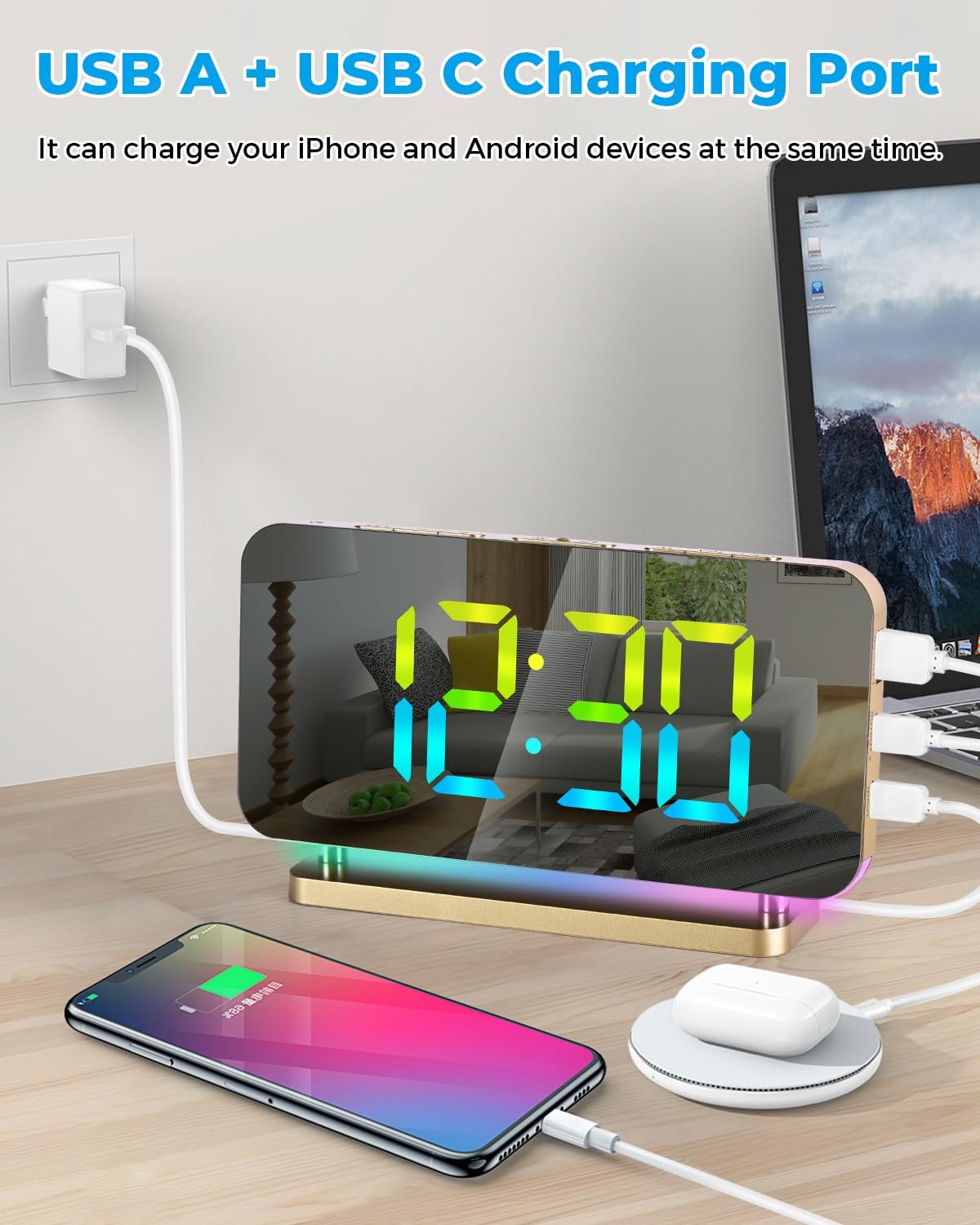
Figure 8: USB A and USB C charging ports on the side of the clock.
メンテナンス
- Clean the mirror display and body with a soft, dry cloth. Avoid abrasive cleaners or solvents.
- デバイスを水や高湿度に近づけないでください。
- 本装置を分解しないでください。修理は資格のある担当者にご相談ください。
トラブルシューティング
| 問題 | 解決 |
|---|---|
| 表示が空白です。 | Ensure the power adapter is securely connected to the clock and a working power outlet. Check if the brightness is set to OFF. |
| アラームは鳴りません。 | Verify the alarm is activated (alarm icon visible). Check the alarm volume setting. Ensure the alarm time is correctly set. |
| 電源を切った後の時刻が正しくないtage. | Ensure the memory battery's protective strip is removed. If the battery is depleted, replace it or reset the time manually. |
| USB ポートでデバイスが充電されません。 | Ensure the clock is powered on. Check the charging cable and device compatibility. |
仕様
| 特徴 | 詳細 |
|---|---|
| ブランド | シェラム |
| モデル番号 | SZ-8853A-GD |
| 表示タイプ | Digital LED (Mirror Surface) |
| 表示サイズ | 7.4インチ |
| 時間表示モード | 12h / 24h |
| Digital Display Colors | 11 (4 Dynamic RGB + 7 Fixed) |
| ナイトライトモード | 10 (3 Dynamic RGB + 7 Fixed) |
| 明るさレベル | 6 (Automatic/Manual) |
| アラーム音量レベル | 5(55~95dB) |
| スヌーズ時間 | 調整可能(5~60分) |
| 充電ポート | 1 x USB Type-C Output, 1 x USB-A Output |
| 電源 | コード式電気 |
| 製品寸法 | 幅6.6インチ x 高さ3.8インチ |
| 材料 | アクリル、アクリロニトリルブタジエンスチレン |
保証とサポート
The SZELAM SZ-8853A-GD Digital Alarm Clock comes with a 30-day unconditional money-back/exchange policy そして 1年間保証 メーカーより。
For any product inquiries, issues, or support needs, please contact SZELAM customer service via email. A solution will be provided within 24 hours.