
Deiss DT-116A
Deiss PRO Bluetooth Meat Thermometer Wireless - Instruction Manual
ブランド: Deiss | モデル: DT-116A
1.製品オーバーview
The Deiss PRO Bluetooth Meat Thermometer is designed to provide precise, instant-read temperatures for various meats, ensuring perfect cooking results. It features dual probes for multi-zone cooking and connects wirelessly to your smartphone via a dedicated app, allowing remote monitoring and alerts.

Figure 1: Deiss PRO Bluetooth Meat Thermometer and App Interface.
主な特徴:
- 正確な温度測定: Provides precise, instant-read temperatures for various food types.
- デュアルプローブ設計: Allows simultaneous monitoring of two different temperatures, such as two cuts of meat or meat and ambient oven/smoker temperature.
- Bluetooth接続: Connects to iOS/Android devices for remote monitoring and alerts.
- USDA-Recommended Presets: Includes pre-programmed temperature settings for common meats, with options to create custom settings.
- 広い温度範囲: Operates from 32°F to 572°F (0°C to 300°C) with probes built to withstand up to 716°F (380°C).
- 複数の取り付けオプション: Features anti-slip pads, a hanging hole, and an internal magnet for versatile placement.
2. 箱の中身
パッケージを開封したら、すべてのコンポーネントが揃っていることを確認してください。
- Deiss PRO Bluetooth Meat Thermometer Unit
- 2 x Stainless Steel Probes with Waterproof Probe Cables
- 単4電池2本(プリインストールまたは別途付属)
- 取扱説明書(本書)

図 2: パッケージの内容。
3.セットアップガイド
3.1. 初期設定
- バッテリーの挿入: If not already installed, open the battery compartment on the back of the thermometer unit and insert 2 AAA batteries, observing polarity.
- 電源オン: 温度計本体の電源ボタンを押して電源を入れます。
- アプリをダウンロード: Scan the QR code provided in the product packaging or search for "Deiss Thermo" in your device's app store (iOS or Android). Download and install the application.

Download the Deiss Thermo App.
- プローブを接続する: Insert the probe cables into the corresponding ports (Probe 1 and Probe 2) on the side of the thermometer unit. Ensure they are securely connected.

Connect the probes.
3.2.Bluetoothペアリング
- Bluetoothを有効にする: スマートフォンでBluetoothが有効になっていることを確認します。
- アプリを開く: Launch the "Deiss Thermo" app. The app will automatically scan for and connect to your thermometer unit.
- 接続を確認: 接続すると、アプリはプローブからの現在の温度を表示します。

Figure 3: Connecting the thermometer to the app.
3.3. 製品デモビデオ
ビデオ1: オーバーview and demonstration of the Deiss PRO Bluetooth Meat Thermometer, showing unboxing, setup, and usage.
4. 操作手順
4.1. プローブの使用
- プローブの挿入: Carefully insert the stainless steel probe into the thickest part of the meat, avoiding bones. For dual probe use, insert the second probe into another piece of meat or position it to measure ambient oven/smoker temperature.

プローブを食品に挿入します。
- 温度を監視します: The thermometer unit and the app will display real-time temperatures from both probes.

Figure 4: Proper probe insertion for accurate readings.
4.2. Using the Deiss Thermo App
- 食品の種類を選択: In the app, tap on the probe you wish to configure (P1 or P2). Select a food type from the USDA-recommended presets (e.g., Beef, Chicken, Pork, Fish, Turkey, Lamb, Hamburger, BBQ Smoke, Hot Smoke, Cold Smoke, Bread).

Select food type in the app.
- Customize Temperature (Optional): For certain food types like beef, you can select desired doneness (Rare, Medium Rare, Medium, Medium Well, Well Done). You can also create custom temperature alerts by setting a specific target temperature.
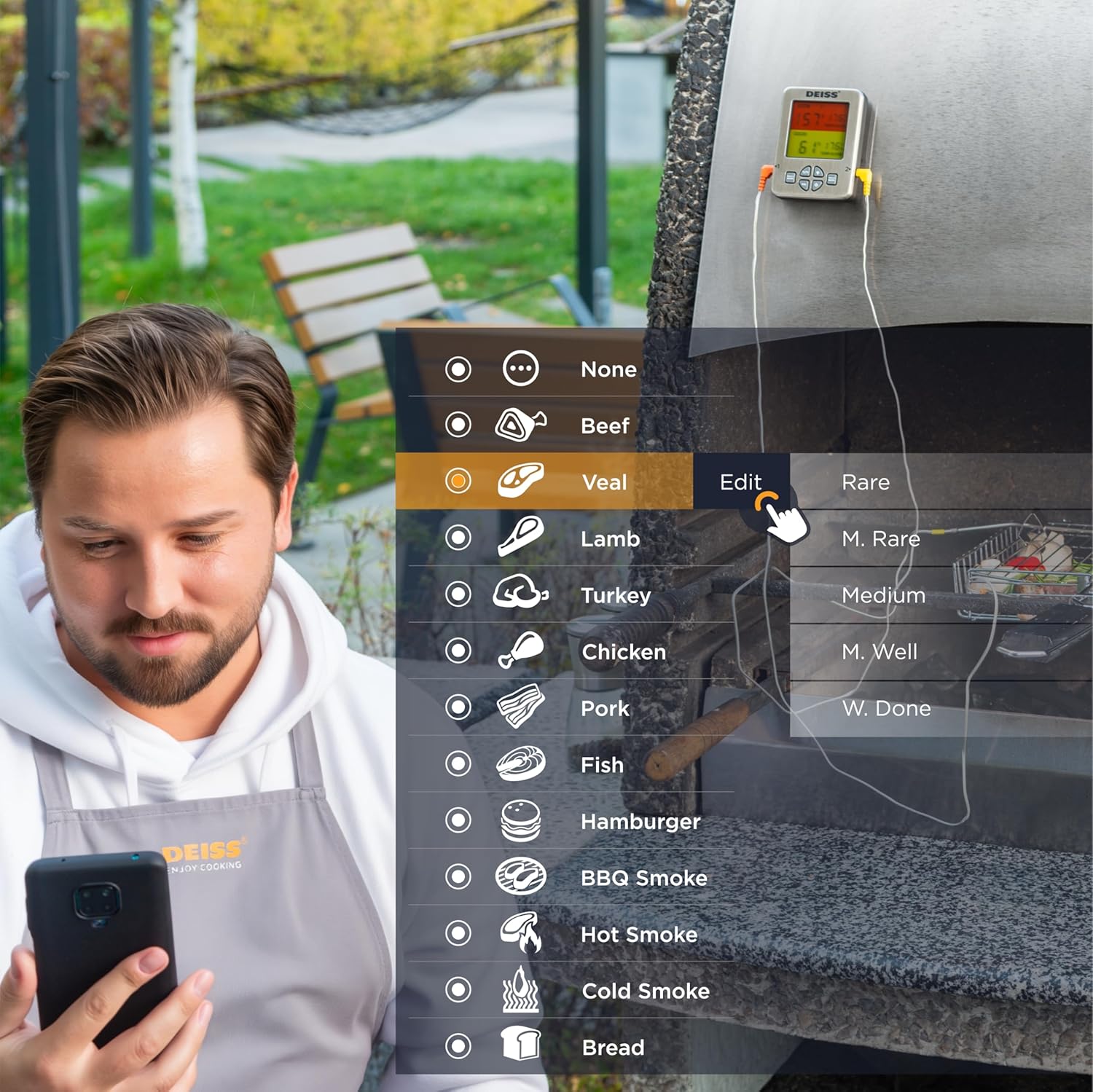
Figure 5: Customizing temperature settings in the app.
- タイマーの設定: The app allows you to set a countdown timer for your cooking.

Utilize the timer function.
- 温度グラフ: View a historical graph of the temperature readings for better cooking insights.

View temperature trends.
- アラートを受信する: The app will send real-time alerts to your phone when the target temperature is reached, or if the temperature deviates significantly. The thermometer unit also has an audible alarm.

Receive alerts for perfect doneness.
4.3. Unit Controls
- °C/°F スイッチ: Press the "C/F" button on the unit to toggle between Celsius and Fahrenheit temperature display.

摂氏と華氏を切り替えます。
- 音量コントロール: Use the "VOL" button to adjust the alarm volume.
- バックライト: The unit features a backlight for easy reading in low light conditions.

Figure 6: Thermometer unit controls and features.
5. お手入れとメンテナンス
- クリーニングプローブ: The stainless steel probes are food-safe and designed to withstand high temperatures. After each use, wipe the probes clean with a damp cloth and mild detergent. Rinse thoroughly and dry completely before storage. Do not immerse the entire probe cable or the main unit in water.
- クリーニングユニット: 体温計本体を柔らかくて乾いた布で拭いてください。amp 布で拭いてください。研磨剤入りの洗剤を使用したり、本体を水に浸したりしないでください。
- ストレージ: Store the thermometer and probes in a clean, dry place when not in use. The unit has a hanging hole and internal magnets for convenient storage.

Figure 7: Multiple mounting and storage options.
- バッテリー交換: Replace AAA batteries when the display indicates low power or the unit does not turn on.
6。 トラブルシューティング
| 問題 | 考えられる原因 | 解決 |
|---|---|---|
| 温度計がオンになりません。 | 電池が切れているか、正しく挿入されていない。 | 正しい極性を確認して、電池を新しい AAA 電池と交換してください。 |
| Bluetooth 接続がありません。 | Bluetooth is off on phone; app not open; device out of range; interference. | Ensure Bluetooth is enabled on your phone. Open the "Deiss Thermo" app. Move closer to the thermometer unit. Avoid strong electromagnetic interference. Restart both the thermometer and the app. |
| 温度の測定値が不正確です。 | Probe not inserted correctly; probe damaged; temperature range exceeded. | Ensure the probe is inserted into the thickest part of the meat, away from bones. Check probes for visible damage. Ensure temperatures are within the specified range (32-572°F / 0-300°C). |
| App alarms are not working or are too frequent. | App notification settings; incorrect temperature set points. | Check your phone's notification settings for the "Deiss Thermo" app. Verify the target temperature settings in the app are correct for your desired doneness. Adjust alarm interval settings in the app if available. |
| ディスプレイが暗くなったり、ちらついたりします。 | バッテリー残量が少なくなりました。 | 電池を交換してください。 |
7. 製品仕様
| 特徴 | 詳細 |
|---|---|
| モデル番号 | DT-116A |
| 製品寸法 | 3.86 x 2.93 x 1 インチ; 8.15 オンス |
| 温度範囲 | 32°F ~ 572°F (0°C ~ 300°C) |
| Probe Withstand Temperature | 最大716°F(380°C) |
| 正確さ | ±1.8°F (±1°C) resolution |
| 接続性 | ブルートゥース |
| 電源 | 単2電池XNUMX本(付属) |
| 表示タイプ | バックライト付きデジタルLCD |
| プローブ材料 | ステンレス鋼 |
| 外側素材 | プラスチック |
| お手入れ方法 | Oven Safe (probes), Wipe Clean (unit) |
| メーカー | Deiss Kitchenware |
| 原産国 | 中国 |

図8: 製品の寸法
8. 保証とサポート
For warranty information, technical support, or any inquiries regarding your Deiss PRO Bluetooth Meat Thermometer, please contact Deiss Kitchenware customer service or visit their official website. Refer to the product packaging or the Deiss Thermo app for specific contact details.
You can also visit the Deiss Store on Amazon for more information: Deiss Kitchenware Store.
Ask a question about this manual
Ask about setup, troubleshooting, compatibility, parts, safety, or missing instructions. Manuals+ will review the question and use this page’s manual context to help answer it.