
1. 重要な安全上の注意事項
本製品をご使用になる前に、すべての安全に関する指示をよくお読みになり、理解してください。指示に従わない場合、感電、火災、または重傷を負う可能性があります。
- デバイスを極端な温度、直射日光、高湿度にさらさないでください。
- Keep the device away from water and other liquids. If it gets wet, turn it off immediately and allow it to dry completely before reuse.
- 本装置の分解、修理、改造は行わないでください。修理は必ず資格のある専門家にご依頼ください。
- Use only specified charging methods (USB-C, solar, hand crank).
- お子様の手の届かない場所に保管してください。
- 地域の規制に従ってバッテリーを廃棄してください。
2.製品オーバーview
The FosPower Emergency Weather Radio Model A6 is a versatile device designed for emergency preparedness and outdoor activities. It features multiple power sources, radio reception, lighting, and a power bank function.
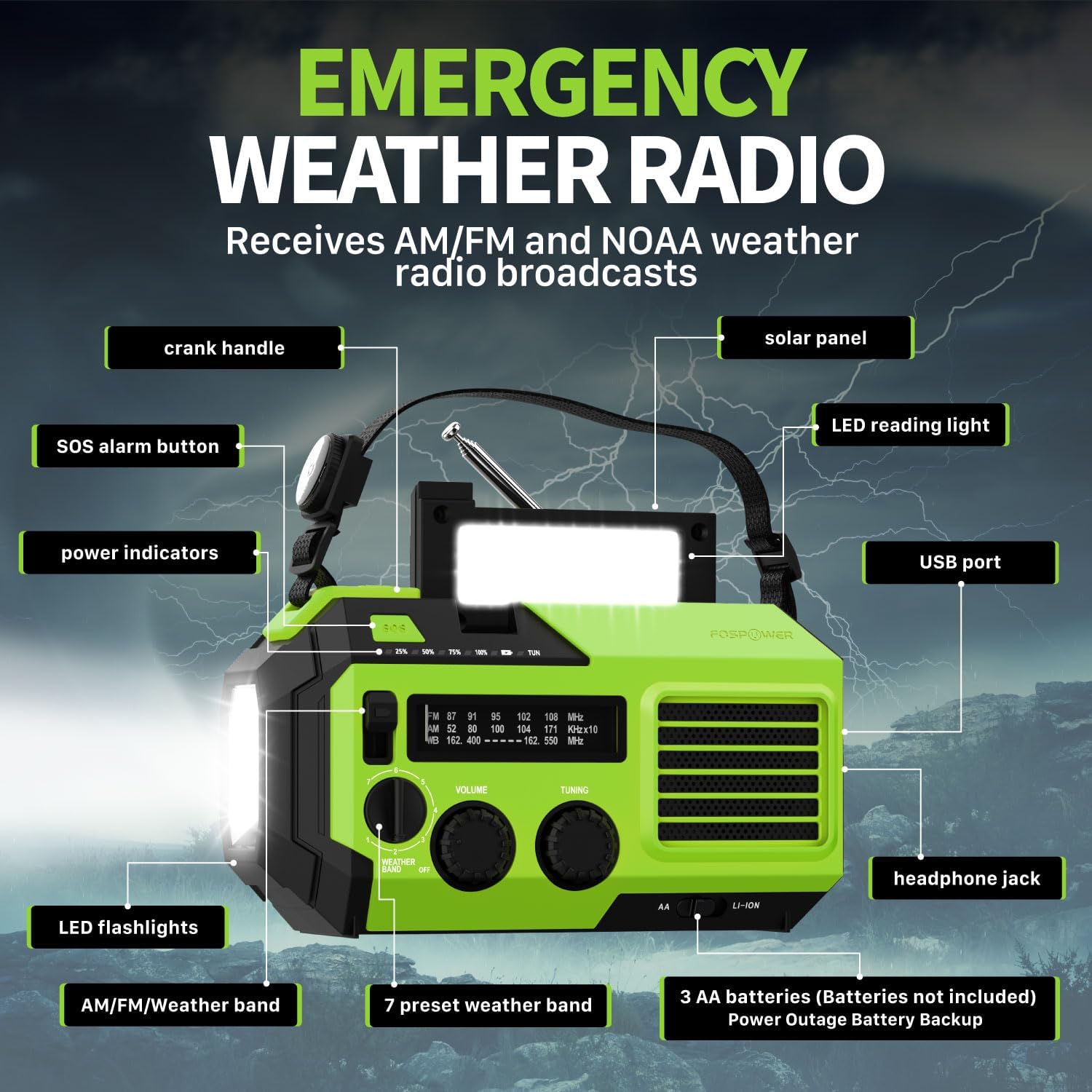
画像2.1:正面 view of the FosPower Emergency Weather Radio with key components labeled, including the crank handle, solar panel, SOS alarm button, power indicators, LED reading light, USB port, LED flashlights, AM/FM/Weather band selector, volume and tuning knobs, and headphone jack.
主な特徴:
- NOAA/AM/FM Radio: Access local weather information and emergency hazard alerts, as well as standard AM/FM broadcasts.
- 19240mWh (5200mAh) Power Bank: Charge USB devices during power outages or in outdoor settings.
- 複数の電源: Recharge via USB-C cable, solar panel, or hand crank. Can also be powered by AA batteries (not included).
- SOSアラーム: 緊急信号として大きなサイレンと点滅ライトを作動させます。
- 統合照明: Features a powerful flashlight and a reading light.
- IPX3防水: 水の飛沫に対する保護を提供します。
3. セットアップ
3.1 初期充電
Before first use, fully charge the internal battery using the provided USB-C cable. Connect the USB-C cable to the radio's USB-C port and the other end to a USB power adapter (not included) or a computer USB port. The power indicators will illuminate to show charging progress.
3.2 AA Battery Installation (Optional)
The radio can also operate on 3 AA batteries (not included) as a backup power source. Open the battery compartment cover on the back of the radio and insert 3 AA batteries, ensuring correct polarity. Close the cover securely.

画像3.1:リア view of the radio highlighting the solar panel, hand-crank, AA battery compartment, and USB charging port, illustrating the multiple power sources.
4. 操作手順
4.1無線操作
- 電源オン/オフ: Rotate the 'VOLUME' knob clockwise to turn the radio on and adjust the volume. Rotate counter-clockwise until it clicks to turn off.
- バンドの選択: Use the 'WEATHER BAND' switch to select between AM, FM, or WB (Weather Band).
- チューニング: Rotate the 'TUNING' knob to scan for radio stations. Extend the telescopic antenna for improved reception, especially for FM and WB.
- NOAA 天気バンド: When WB is selected, the radio will receive NOAA weather alerts. The radio supports 7 preset weather bands.
- ヘッドフォンジャック: For private listening, connect 3.5mm headphones to the headphone jack.
4.2 懐中電灯と読書灯

Image 4.1: The radio demonstrating its high-power flashlight and cool-tone reading lamp 特徴。
- 懐中電灯: Press the flashlight button located on the front of the radio to turn the flashlight on or off.
- 読書灯: Lift the solar panel to reveal the LED reading light. Press the reading light button to turn it on or off.
4.3SOSアラーム
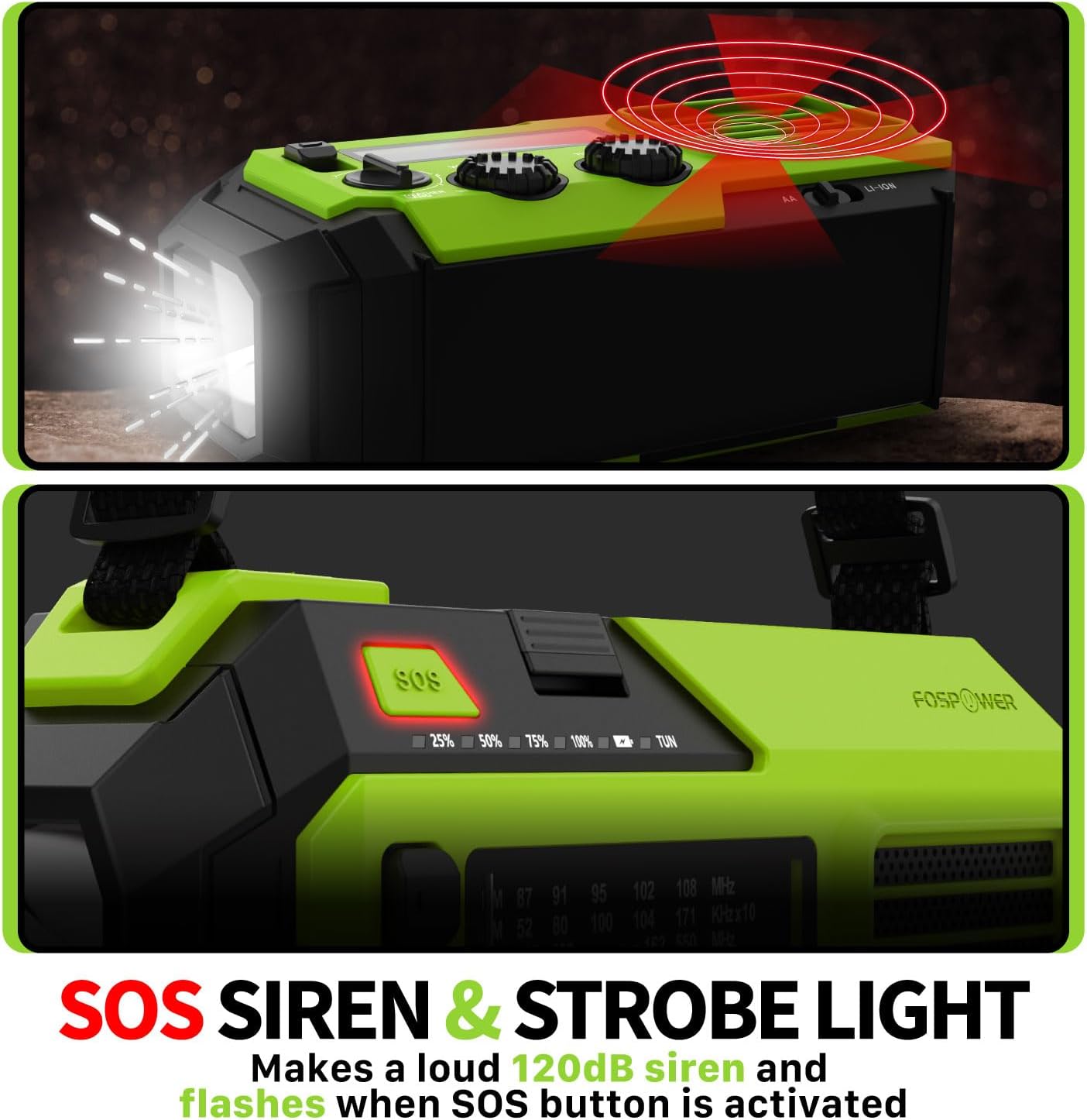
Image 4.2: Close-up of the radio's SOS button and an illustration of the siren and strobe light being activated.
In an emergency, press and hold the 'SOS' button to activate a loud 120dB siren and a flashing strobe light. Press the 'SOS' button again to deactivate.
4.4 外部デバイスの充電(パワーバンク)

Image 4.3: The radio connected via USB to a smartphone, demonstrating its power bank capability for charging small electronics.
Connect your USB-powered device (e.g., smartphone, tablet) to the radio's USB-A output port using your device's charging cable. The radio's internal battery will begin charging your device.
4.5ラジオの充電
- USB-C充電: Connect the provided USB-C cable to the radio's USB-C input port and a USB power source. This is the most efficient charging method.
- ソーラー充電: Place the radio with the solar panel facing direct sunlight. The solar panel charges the internal battery, primarily for maintaining charge or slow charging in emergencies.
- 手回し充電: Rotate the hand crank clockwise or counter-clockwise at a steady pace (approximately 130-150 RPM) for 3-5 minutes to generate power for short-term use or to initiate charging.
5. メンテナンス
- クリーニング: ラジオは柔らかく乾いた布で拭いてください。研磨剤入りの洗剤や溶剤は使用しないでください。
- ストレージ: Store the radio in a cool, dry place away from direct sunlight when not in use for extended periods. For optimal battery health, fully charge the internal battery every 3-6 months.
- バッテリーのケア: 単三電池を使用する場合、ラジオを長期間使用しない場合は、液漏れを防ぐために電池を取り外してください。
6。 トラブルシューティング
| 問題 | 考えられる原因 | 解決 |
|---|---|---|
| ラジオがオンになりません。 | Internal battery is depleted; AA batteries are depleted or incorrectly installed. | Charge the internal battery via USB-C or hand crank. Check and replace AA batteries if used. |
| ラジオの受信状態が悪い。 | アンテナが伸びていない、信号が弱いエリアがある、干渉がある。 | Fully extend the telescopic antenna. Adjust radio position. Try tuning to a stronger station. |
| 外部デバイスが充電されません。 | ラジオの内部バッテリー残量が少ない、ケーブルが間違っている、デバイスに互換性がない。 | Ensure the radio's internal battery is sufficiently charged. Use a functional USB charging cable. Verify device compatibility. |
| ハンドクランクが固い、または電力を生成しません。 | Mechanism obstruction; improper cranking speed. | Ensure no obstructions. Crank at a steady, moderate pace (130-150 RPM). |
7. 仕様
| 特徴 | 詳細 |
|---|---|
| モデル番号 | FOSPWB-2419 |
| 製品寸法 | 6.76 x 3.52 x 2.59インチ |
| アイテム重量 | 1.08ポンド |
| 内蔵バッテリー | 19240mWh (5200mAh) |
| External Battery Support | 単三電池3本(別売) |
| ラジオバンド | AM、FM、NOAA気象バンド(WB) |
| 充電方法 | USB-C, Solar, Hand Crank |
| 特集 | Built-In Flashlight, Reading Light, SOS Alarm, Power Bank |
| 耐水性 | IPX3 |
8. 保証とサポート
FosPower provides a limited lifetime warranty for this product. For warranty claims, technical assistance, or customer service inquiries, please contact FosPower's USA-based customer support team. Refer to the official FosPower web連絡先の詳細については、サイトまたは購入書類をご覧ください。