
amazon basics B0C58TDFPR
Amazon Basics Handheld Gimbal Stabiliser User Manual
Model: B0C58TDFPR
導入
The Amazon Basics Handheld Gimbal Stabiliser is designed to provide smooth and steady footage for your smartphone photography and videography. This manual provides essential information for setting up, operating, maintaining, and troubleshooting your device.

Image: The Amazon Basics Handheld Gimbal Stabiliser with a smartphone attached, ready for use.
パッケージ内容
始める前に、パッケージにすべてのアイテムが揃っていることを確認してください。
- 1N Handheld Gimbal with attached holder
- 1N Charging cable
- 1N ユーザーマニュアル(この文書)
- 1三脚
- 1N Hanging belt
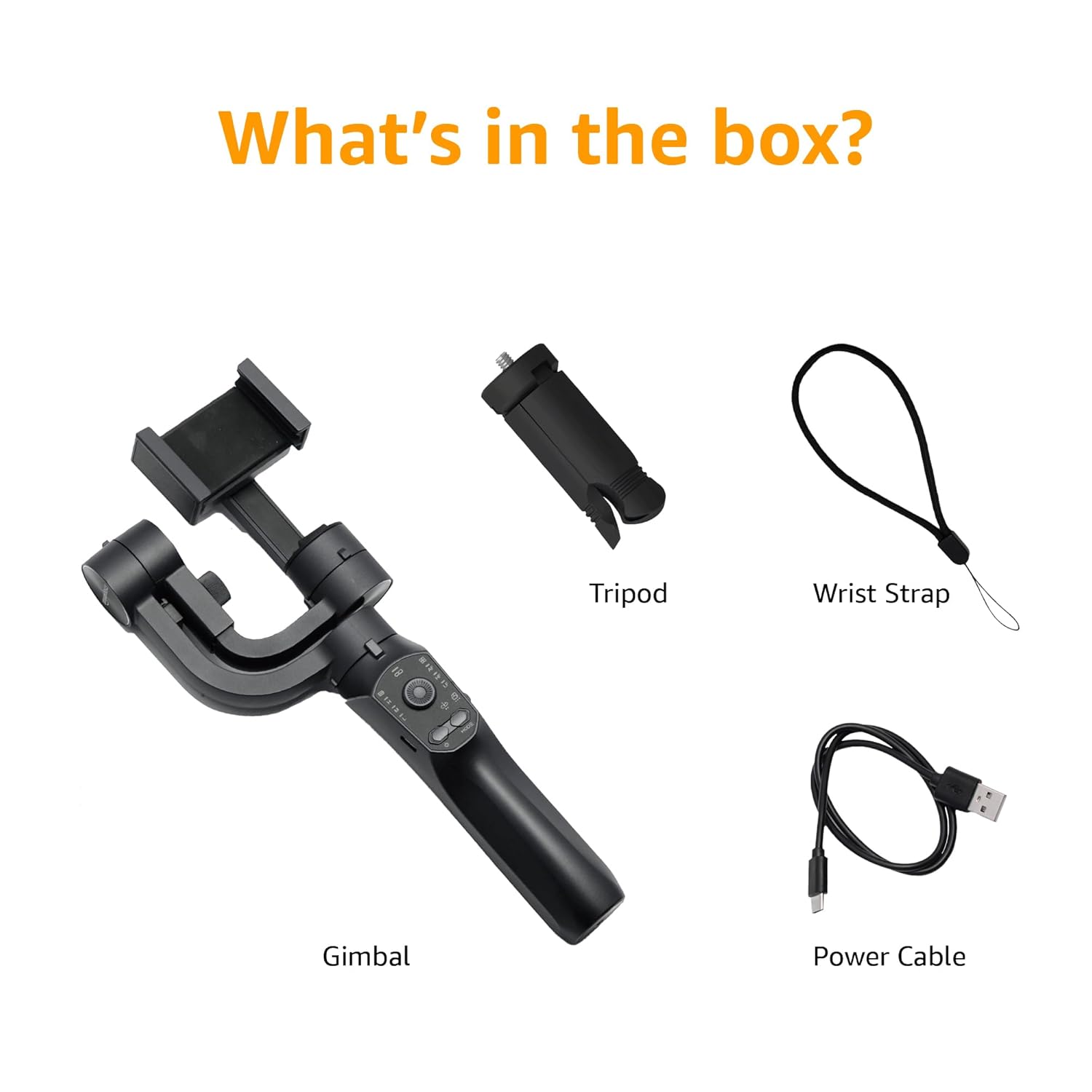
Image: A visual representation of the package contents, including the gimbal, tripod, power cable, and wrist strap.
製品構成
Familiarize yourself with the different parts of your gimbal stabiliser:
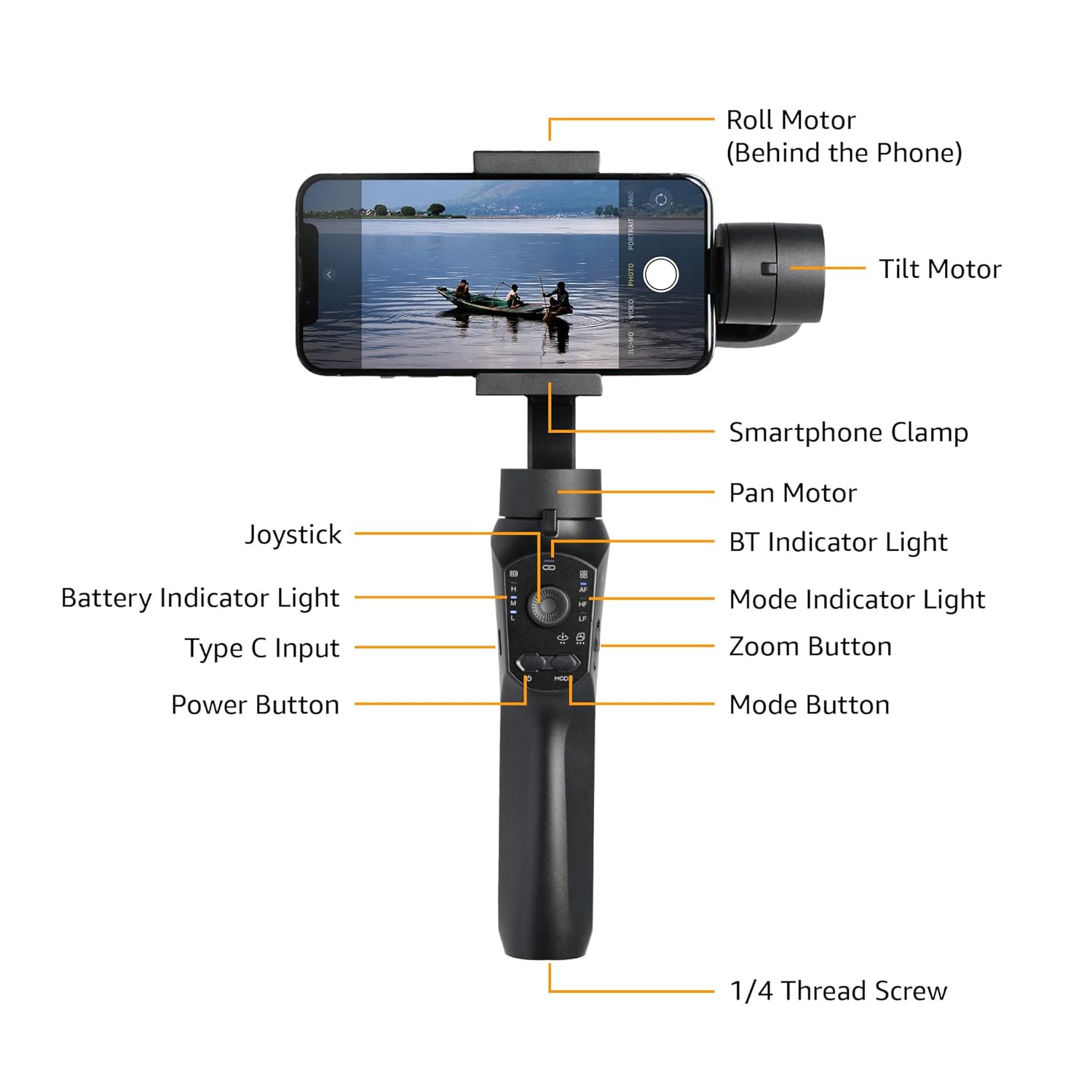
Image: Labeled diagram showing the various components of the gimbal, including the Roll Motor, Tilt Motor, Smartphone Clamp, Pan Motor, BT Indicator Light, Mode Indicator Light, Zoom Button, Mode Button, Power Button, Type C Input, Battery Indicator Light, Joystick, and 1/4 Thread Screw.
- ロールモーター: Controls the roll axis (rotation along the lens axis).
- チルトモーター: Controls the tilt axis (up and down movement).
- スマートフォンClamp: スマートフォンをしっかりと固定します。
- パンモーター: Controls the pan axis (left and right rotation).
- ジョイスティック: ジンバルの動きを手動で制御します。
- BTインジケーターライト: Bluetooth接続ステータスを示します。
- バッテリーインジケーターライト: 現在のバッテリーレベルを表示します。
- タイプC入力: Charging port for the gimbal.
- 電源ボタン: ジンバルのオン/オフを切り替えます。
- モードインジケーターライト: 現在の動作モードを表示します。
- ズームボタン: Controls digital zoom (via app).
- モードボタン: さまざまな動作モードを切り替えます。
- 1/4 Thread Screw: For attaching accessories like the included tripod.
設定
- ジンバルを充電する: Before first use, fully charge the gimbal using the provided Type-C charging cable. The battery indicator light will show charging status.
- Install the Smartphone:
- スマートフォンのclを拡張amp スマートフォンを慎重に中央に置きます。
- Ensure the phone is balanced as centrally as possible within the clamp to reduce motor strain.
- Manual Balancing (Crucial):
Important: Do not switch on this Gimbal without manual balancing. Doing so may lead to motor damage and fast battery draining.
- With the smartphone mounted, adjust the position of the phone within the clamp until it remains level when you release it. This minimizes the work the motors need to do.
- Adjust the horizontal arm if necessary to achieve perfect balance.
- 電源オン: Press and hold the Power Button until the gimbal powers on and stabilizes.
- アプリをダウンロード: Download the "Gimbal Pro" app from your smartphone's app store (available for Android and iOS). This app unlocks advanced features and controls.
- Bluetooth経由で接続: Open the Gimbal Pro app and follow the on-screen instructions to connect your gimbal via Bluetooth. The BT Indicator Light will confirm a successful connection.

Image: An illustration demonstrating the three axes of stabilization: Tilt Axis, Roll Axis, and Pan Axis, which work together to keep footag安定しています。
操作手順
基本操作
- 電源オン/オフ: 電源ボタンを押し続けます。
- ジョイスティックコントロール: ジョイスティックを使用して、ジンバルのパンおよびチルトの動きを手動で制御します。
- モードボタン: Press the Mode Button to cycle through different operating modes (e.g., Pan Follow, Lock Mode, FPV). The Mode Indicator Light will change accordingly.
- ズームボタン: Use the Zoom Button to zoom in or out within the Gimbal Pro app.
- Multifunction Push Key: This key allows you to focus or zoom, providing a more professional photography experience.
Advanced Features (via Gimbal Pro App)
The Gimbal Pro app unlocks a variety of advanced shooting modes and features:
- Facial Tracking: Automatically tracks a subject's face to keep them in frame.
- タイムラプス: 素晴らしいタイムラプスビデオを撮影します。
- スローモーション: Record high-frame-rate videos for slow-motion effects.
- Intelligent Zoom: Provides precise zoom control.
- ヒッチコックモード: Creates a "Dolly Zoom" effect.
- マッドドッグモード: A dynamic, fast-response mode.
- 開始モード: Rotates the camera 360 degrees along the roll axis.
- FPVモード: Follows the gimbal's orientation for an immersive first-person view.
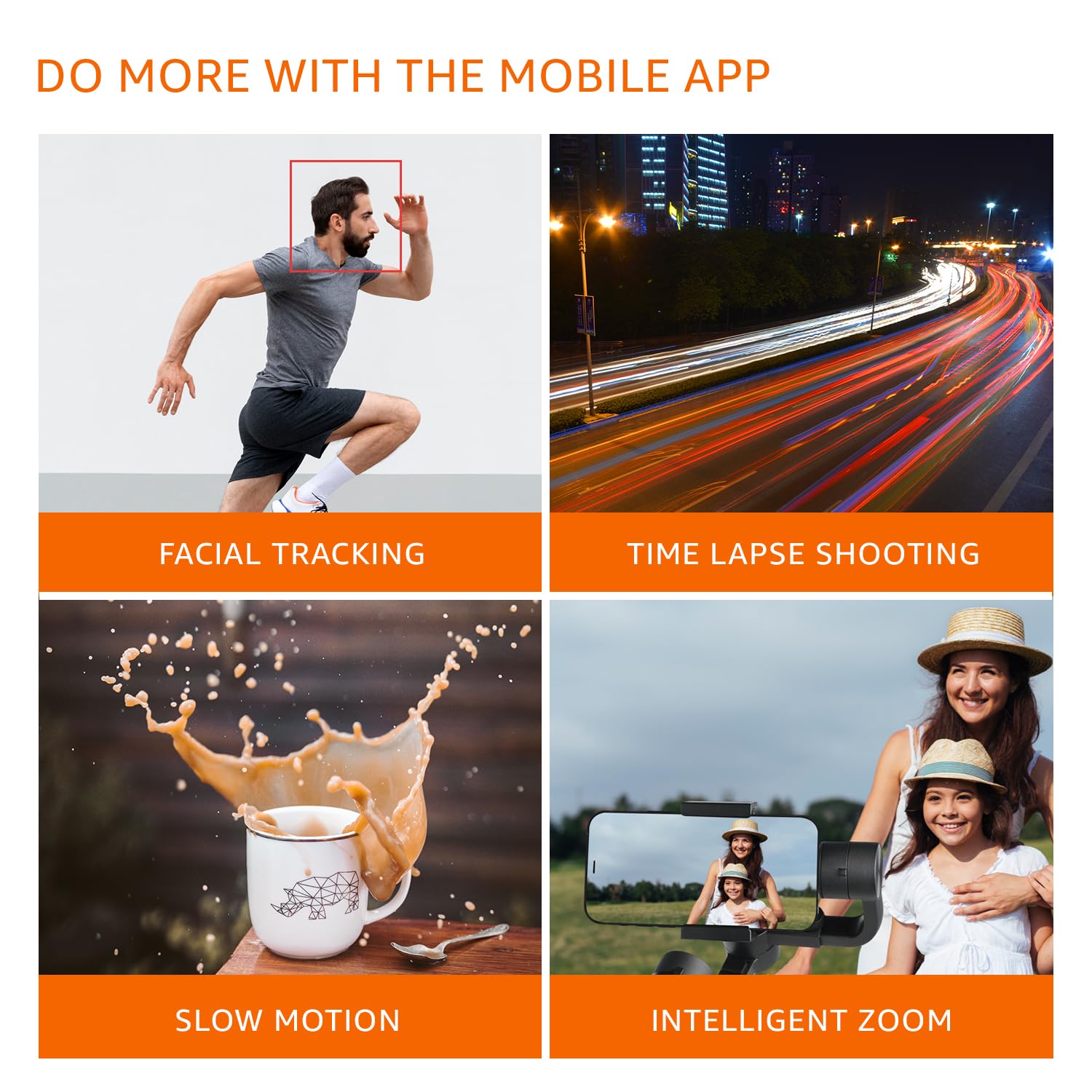
画像: Visual examples of features available through the mobile app, including Facial Tracking, Time Lapse Shooting, Slow Motion, and Intelligent Zoom.

Image: Icons illustrating various shooting modes such as Mad Dog Mode, Hitchcock Mode, Inception Mode, and FPV Mode, available on the gimbal.
Portrait-to-Landscape Rotation
The gimbal supports effortless rotation between portrait and landscape orientations for versatile shooting.

Image: A three-panel image demonstrating the gimbal's ability to effortlessly rotate a smartphone from portrait to landscape orientation.
バッテリーと充電
The gimbal is equipped with a 3600mAh Lithium Ion battery, providing up to 10 hours of operational time.
- 充電: Connect the provided Type-C cable to the gimbal's charging port and a suitable USB power source.
- パワーバンク機能: The gimbal can also function as a power bank to charge your smartphone during extended shoots. Connect your smartphone to the gimbal's Type-C port using a compatible cable.
- バッテリーインジケーター: Monitor the battery level using the Battery Indicator Lights on the control panel.
メンテナンス
- クリーニング: ジンバルの清掃には、柔らかく乾いた布をご使用ください。刺激の強い化学薬品や研磨剤の使用は避けてください。
- ストレージ: ジンバルは直射日光や極端な温度を避け、涼しく乾燥した場所に保管してください。
- バッテリーのケア: For long-term storage, charge the battery to approximately 50-60% to prolong its lifespan. Recharge every 3 months if not in use.
- 過負荷を避ける: Do not mount smartphones heavier than the recommended payload capacity (approx. 180 grams, as per user experience). Overloading can damage the motors.
トラブルシューティング
| 問題 | 考えられる原因 | 解決 |
|---|---|---|
| ジンバルの電源が入りません。 | バッテリー残量が少なくなりました。 | ジンバルを完全に充電します。 |
| Gimbal motors vibrate or do not stabilize properly. | Improper manual balancing. | Ensure the smartphone is perfectly balanced before powering on. Refer to the "Manual Balancing" section under Setup. |
| Gimbal disconnects from phone or app features not working. | Bluetooth connection issue; App malfunction. |
|
| フーtage is still shaky. | Improper balancing; Exceeding gimbal's stabilization limits. |
|
仕様
| 特徴 | 詳細 |
|---|---|
| モデル番号 | B0C58TDFPR |
| 安定 | 3-Axis (Pan, Tilt, Roll) |
| 電池のタイプ | リチウムイオン |
| バッテリー容量 | 3600mAh |
| 運行時間 | 最大10時間 |
| 充電ポート | タイプC |
| 対応デバイス | スマートフォン |
| 製品寸法(長さx幅x高さ) | 10 x 7 x 28.9 cm |
| アイテム重量 | 460グラム |
| 色 | 黒 |
| メーカー | SHENZHEN JX ROBOT TECHNOLOGY CO. LTD |

Image: A diagram illustrating the dimensions of the gimbal in both folded and extended states.
保証とサポート
This Amazon Basics Handheld Gimbal Stabiliser comes with a 1年間の限定保証 購入日より。
For warranty claims, technical support, or any product-related inquiries, please contact Amazon Basics customer service or refer to the official Amazon support channels.
Ask a question about this manual
Ask about setup, troubleshooting, compatibility, parts, safety, or missing instructions. Manuals+ will review the question and use this page’s manual context to help answer it.