
1. はじめに
Thank you for choosing the SPLITSKY NZFS Kids Alarm Clock. This device combines an alarm clock, white noise sleep aid, and an 8-mode RGB night light, designed to assist with sleep and wake-up routines for children and adults. Please read this manual thoroughly to understand its features and ensure proper operation.
安全情報:
- デバイスを水や湿度の高い環境に置かないでください。
- デバイスを自分で分解または修理しようとしないでください。
- Use only the provided USB-C power cable or a certified equivalent.
- デバイス周囲の適切な換気を確保してください。
2. パッケージ内容
パッケージにすべてのアイテムが含まれていることを確認します。
- SPLITSKY NZFS Kids Alarm Clock
- 1.2M (4.7 inch) USB-C Power Cable
- ユーザーマニュアル(このドキュメント)
- 1 x CR2032 Lithium Ion Battery (pre-installed for memory backup)
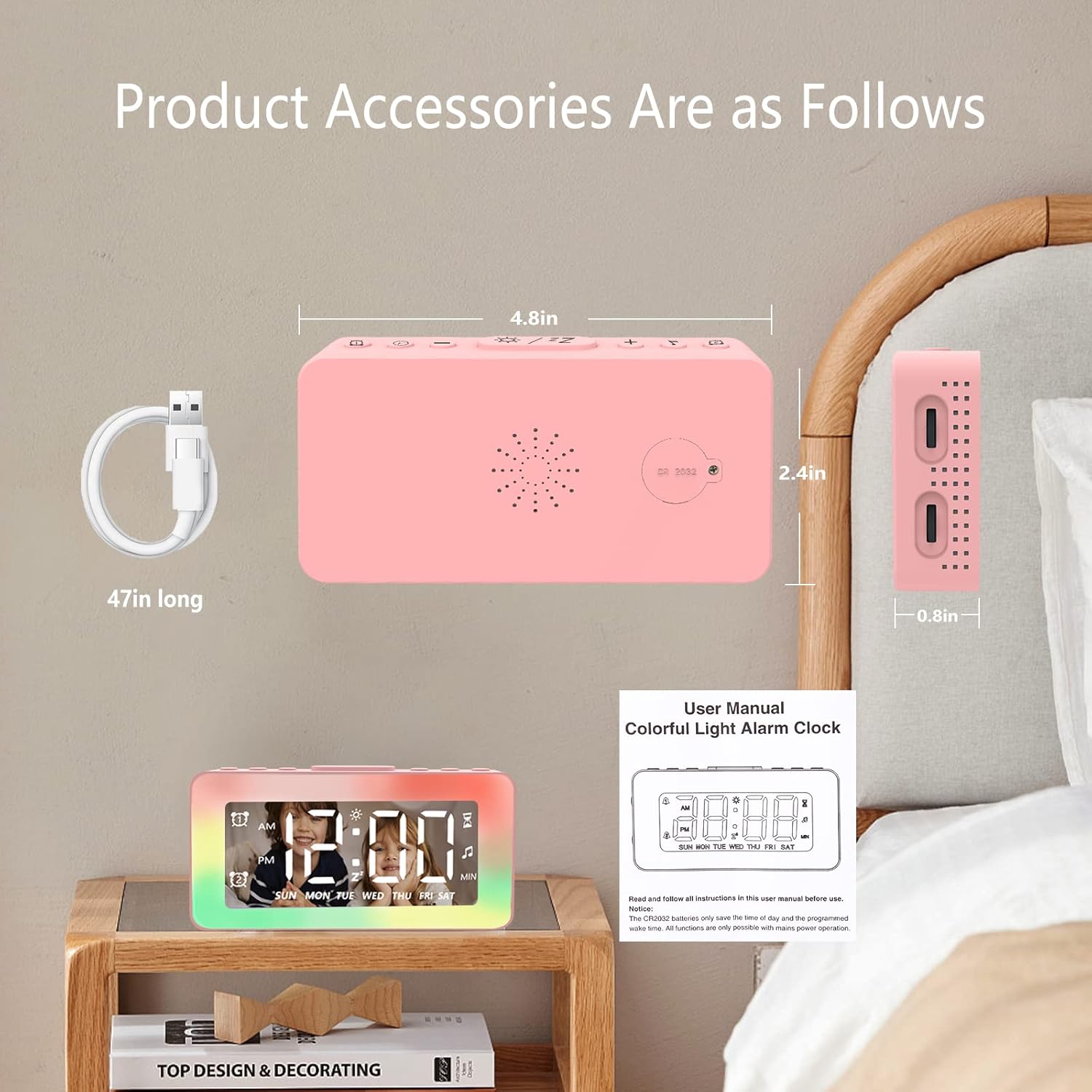
Image: The SPLITSKY NZFS Kids Alarm Clock, a USB-C power cable, and the user manual are included in the package.
3.製品オーバーview
目覚まし時計のボタンとポートについて理解しておきましょう。

画像: 詳細 view of the alarm clock's top buttons and side ports, including Alarm 1, Time Setting, Light Minus/Settings, Snooze/Light Mode Switch, Light Plus/Setup, Music Switch, Alarm 2, Volume Setting, Time Brightness Setting, USB Output Charging Port, and Type-C Input Interface.
- アラーム1ボタン: Set and activate Alarm 1.
- 時間設定ボタン: 現在の時刻を調整します。
- Light Minus / Settings Button: Decrease light brightness or navigate settings.
- Snooze / Light Mode Switch Button: Activate snooze, or cycle through light modes.
- Light Plus / Setup Button: Increase light brightness or confirm settings.
- Music Switch Button: Cycle through white noise sounds.
- アラーム2ボタン: Set and activate Alarm 2.
- Volume Setting Wheel (Side): Adjust alarm and white noise volume.
- Time Brightness Setting Wheel (Side): ディスプレイの明るさを調整します。
- USB Output Charging Port (Side): Charge external devices.
- Type-C Input Interface (Side): Connect power cable to the alarm clock.
4. セットアップ
4.1電源接続
- Connect the provided USB-C power cable to the Type-C Input Interface on the side of the alarm clock.
- USB-C ケーブルのもう一方の端を、互換性のある USB 電源アダプター (別売) または USB ポートに差し込みます。
- ディスプレイが点灯し、時計の電源がオンになっていることを示します。

Image: The SPLITSKY NZFS Kids Alarm Clock is shown powered on and connected via its USB-C port, also demonstrating its capability to charge a smartphone.
4.2 電池の取り付け(メモリバックアップ)
The alarm clock includes a pre-installed CR2032 battery. This battery serves as a memory backup to retain time and alarm settings during a power outage or when the main power is disconnected. It does not power the clock for regular operation.
- If the battery needs replacement, locate the battery compartment on the back of the unit.
- 小さなドライバーを使用してコンパートメントを開きます。
- 正しい極性を確認して、新しい CR2032 電池と交換してください。
- 収納部をしっかりと閉めてください。
5. 操作手順
5.1 Setting the Time (12H/24H Format)
- を押し続けます 時間設定ボタン until the hour digits begin to flash.
- 使用 Light Minus / Settings Button (下)または Light Plus / Setup Button (up) to adjust the hour.
- を押す 時間設定ボタン again to move to minute adjustment. Adjust minutes using the Light Minus/Plus buttons.
- を押す 時間設定ボタン a third time to select 12-hour or 24-hour format. Adjust using the Light Minus/Plus buttons.
- を押す 時間設定ボタン もう一度押して確認し、時間設定モードを終了します。
5.2 Setting Alarms (Dual Alarm, Daily/Weekday/Weekend Mode)
時計は 2 つの独立したアラーム (アラーム 1 とアラーム 2) をサポートします。
- を押し続けます アラーム1ボタン (アラーム1の場合)または アラーム2ボタン (for Alarm 2) until the alarm hour digits flash.
- 使用 Light Minus / Settings Button or Light Plus / Setup Button 時間を調整します。
- Press the respective Alarm Button again to move to minute adjustment. Adjust minutes using the Light Minus/Plus buttons.
- Press the respective Alarm Button again to select the alarm mode:
- デイリーモード: 毎日アラームが鳴ります。
- 平日モード: アラームは月曜日から金曜日まで鳴ります。
- 週末モード: 土曜日と日曜日にアラームが鳴ります。
- Press the respective Alarm Button once more to confirm and exit alarm setting mode.
- アラームを有効/無効にするには、 アラーム1ボタン or アラーム2ボタンディスプレイにアラームアイコンが表示されたり消えたりします。
5.3スヌーズ機能
アラームが鳴ったら、 Snooze / Light Mode Switch Button on top to activate snooze. The alarm will pause for 9 minutes and then sound again. This can be repeated multiple times.
5.4 Night Light (8 Modes RGB, 10-level dimming)
The alarm clock features 6 solid color lights and 2 ambient colorful lights.
- を短く押す Snooze / Light Mode Switch Button to turn on the night light and cycle through the 8 color modes.
- To adjust the brightness (10 levels), use the Light Minus / Settings Button or Light Plus / Setup Button while the night light is active.
- To turn off the night light, continue pressing the Snooze / Light Mode Switch Button ライトが消えるまで。

Image: Multiple SPLITSKY NZFS Kids Alarm Clocks are shown, each displaying a different color from the 8 available RGB night light modes.
5.5 White Noise Sleep Aid (8 Sounds)
The clock offers 8 soothing sounds to aid sleep.
- を短く押す 音楽スイッチボタン to turn on the white noise and cycle through the available sounds.
- To adjust the volume (16 levels), use the Volume Setting Wheel on the side of the clock.
- To turn off the white noise, continue pressing the 音楽スイッチボタン until the sound stops.

Image: The SPLITSKY NZFS Kids Alarm Clock is displayed on a bedside table, with icons illustrating the various white noise options such as rain, cicadas, piano, bonfire, waves, birdsong, and church bells.
5.6 Sleep Timer (10-120 minutes)
The sleep timer allows you to set a duration for the white noise and/or night light to play before automatically turning off.
- While white noise or night light is active, press and hold the 音楽スイッチボタン (for white noise timer) or Snooze / Light Mode Switch Button (for light timer).
- 使用 Light Minus / Settings Button or Light Plus / Setup Button to select the desired timer duration (10, 20, 30, 60, 90, 120 minutes).
- Press the respective button again to confirm the timer setting. The timer icon will appear on the display.
5.7ディスプレイの明るさ調整
LED時間表示の明るさを調整するには、 Time Brightness Setting Wheel on the side of the clock.
5.8USB充電ポート
The USB output charging port on the side of the alarm clock can be used to charge other small electronic devices, such as smartphones. Connect your device's charging cable to this port.
6. メンテナンス
6.1 クリーニング
- クリーニングする前に、デバイスのプラグが抜かれていることを確認してください。
- 柔らかく乾いた布で表面を拭いてください。
- 研磨剤入りの洗剤、溶剤、化学スプレーは使用しないでください。
6.2 ストレージ
When not in use for extended periods, store the alarm clock in a cool, dry place, away from direct sunlight and extreme temperatures.
7。 トラブルシューティング
If you encounter issues with your SPLITSKY NZFS Kids Alarm Clock, refer to the table below for common problems and solutions.
| 問題 | 考えられる原因 | 解決 |
|---|---|---|
| 時計の表示が消えているか暗いです。 | Not connected to power; Time brightness set too low. | Ensure USB-C cable is securely connected to a power source. Adjust the Time Brightness Setting Wheel. |
| アラームは鳴りません。 | アラームが作動しません。アラームの音量が低すぎます。 | Check if the alarm icon is displayed. If not, short press the respective Alarm Button to activate. Adjust the Volume Setting Wheel. |
| Time/settings reset after power disconnection. | CR2032 backup battery is depleted or missing. | 電池ボックス内の CR2032 電池を交換します。 |
| Night light or white noise not working. | Function not activated; Sleep timer active. | を短く押す Snooze / Light Mode Switch Button or 音楽スイッチボタン to activate. Check if a sleep timer is set. |
8. 仕様
| 特徴 | 詳細 |
|---|---|
| ブランド | スプリツキー |
| モデル番号 | NZFS |
| 表示タイプ | デジタルLED |
| 製品寸法 | 幅3.17インチ x 高さ3.17インチ(約幅8.05cm x 高さ8.05cm) |
| アイテム重量 | 8.1オンス(約230グラム) |
| 電源 | Corded Electric (USB-C), Battery Powered (CR2032 for memory) |
| ナイトライトモード | 8 (6 solid colors, 2 ambient colorful) with 10-level dimming |
| ホワイトノイズ音 | 8つの心地よいサウンド |
| アラーム音 | 7 wake-up alarm tones with 16-level volume control |
| アラーム機能 | Dual Alarm, Daily/Weekday/Weekend modes, 9-minute Snooze |
| タイマー機能 | 10-120 minute sleep timer for sounds and lights |
| 接続性 | USB-C Input, USB-A Output (for charging external devices) |
| 材料 | アクリロニトリルブタジエンスチレン |
9. 保証とサポート
9.1 保証情報
Please refer to the warranty information provided at the time of purchase or contact your retailer for details regarding the product warranty. Keep your proof of purchase for any warranty claims.
9.2 カスタマーサポート
For technical assistance, troubleshooting beyond this manual, or general inquiries, please contact the seller through the platform where you purchased the product. Provide your order number and a detailed description of the issue for prompt support.