
bopmen STAR 10
Star10 ワイヤレス Bluetooth カラオケマイク ユーザーマニュアル
Model: STAR 10 | Brand: bopmen
導入
The bopmen Star10 Wireless Bluetooth Karaoke Microphone is a versatile 4-in-1 device designed for singing, acting as a portable handheld microphone, speaker, and featuring an integrated disco light. It offers high-resolution audio quality and extensive compatibility, making it suitable for various entertainment settings including car travel, home parties, and general use for adults and children.

Image: The Star10 Wireless Bluetooth Karaoke Microphone in Rose Gold, showcasing its sleek design and integrated disco ball.
安全情報
- デバイスを極端な温度や湿度にさらさないでください。
- 落としたり、強い衝撃を与えないでください。
- 小さな部品による窒息の危険を防ぐため、小さなお子様の手の届かないところに保管してください。
- Use only the provided USB C-A cable for charging.
- デバイスを分解または変更しようとしないでください。
- 柔らかく乾いた布でデバイスを拭いてください。刺激の強い化学薬品や研磨剤入りの洗剤の使用は避けてください。
パッケージ内容
以下の項目のボックスにチェックを入れてください。
- 1 x Karaoke microphone (Star10)
- 1 x USB C-A charging cable
- ユーザーマニュアル x 1
製品終了view
Familiarize yourself with the main controls and ports of your Star10 microphone.

Image: Detailed diagram illustrating the main control panel and bottom ports of the Star10 microphone, including Microphone Volume, On/Off/Play/Pause, Reverb On/Off, Volume Up/Down, Next/Previous Song, Tone Mode, Disco Light Control, USB Port, 3.5mm Earphone Jack, and TF Card slot.
メインコントロール:
- Microphone Volume / Accompaniment Mode On/Off: Adjusts microphone volume or toggles accompaniment.
- On/Off, Play/Pause: Powers the device on/off and controls music playback.
- Reverb On/Off / Bluetooth & TF Card Mode: Toggles reverb effect and switches between input modes.
- 音量を上げる/下げる: スピーカー全体の音量を調整します。
- 前/次の曲: トラック間を移動します。
- トーンモード: Cycles through different voice effects.
- Disco Light Control / Twins Pairing: Controls the disco light and initiates Twins Mode pairing.
下部ポート:
- インジケーターライト: デバイスのステータス (例: 充電中、接続中) を表示します。
- 3.5 mm Earphone Jack / Re-Set button inside: For private listening or resetting the device.
- USBポート: マイクの充電用。
- TFカードスロット: For playing music directly from a micro TF card (up to 32GB, not included).
設定
マイクの充電:
- Connect the provided USB C-A cable to the USB port on the bottom of the microphone.
- ケーブルのもう一方の端を互換性のある USB 電源アダプター (別売) またはコンピューターの USB ポートに接続します。
- The indicator light will show charging status. A full charge provides up to 10 hours of use (minimum 5 hours).
電源オン/オフ:
- を押し続けます オン/オフ/再生/一時停止 button for a few seconds to power on the microphone. You will hear an audible prompt.
- To power off, press and hold the same button until you hear the power-off prompt.
操作手順
Bluetooth接続:
The Star10 microphone uses Bluetooth 5.2 for seamless connection to your devices.
- Power on the microphone. It will automatically enter Bluetooth pairing mode.
- On your smartphone, tablet, or other Bluetooth-enabled device, open the Bluetooth settings.
- 検索する "STAR 10" in the list of available devices and select it to pair.
- Once connected, you will hear a confirmation prompt. You can now play music from your device through the microphone's speaker and sing along.

Image: The Star10 microphone demonstrating its wide compatibility, connecting wirelessly to smartphones, tablets, and laptops via Bluetooth.
TFカードモード:
Play music directly from a micro TF card.
- Insert a micro TF card (up to 32GB, not included) with your music files into the TF Card slot on the bottom of the microphone.
- The microphone will automatically switch to TF Card mode. If not, press the Reverb On/Off / Bluetooth & TF Card Mode button to cycle modes.
- 使用 前/次の曲 トラックをナビゲートするボタンと 再生/一時停止 再生コントロール用。
Disco Light Control:
Enhance your karaoke experience with the built-in disco light.
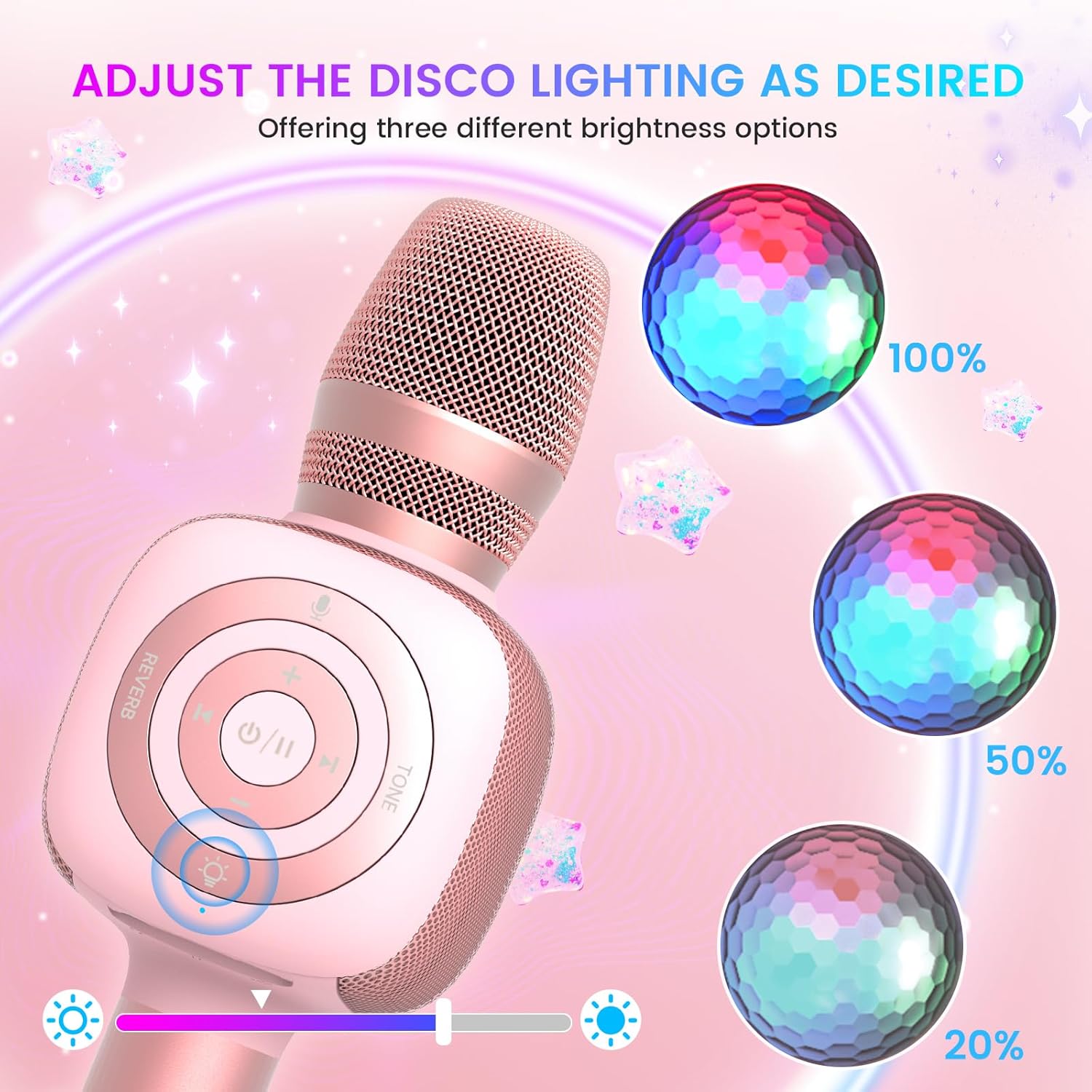
Image: The Star10 microphone's disco light feature, illustrating three adjustable brightness levels (100%, 50%, 20%) to suit different ambiance needs.
- を押す ディスコライトコントロール button (light bulb icon) to cycle through three RGB color modes and brightness levels.
- Press again to turn the disco light off.
Tone Modes (Magic Mode):
Experiment with different voice effects for added fun.

Image: The Star10 microphone's "Magic Mode" feature, depicting icons for Male Voice, Female Voice, Cartoon Voice, and Monster Sound effects.
- を押す トーンモード button to cycle through various voice effects such as Male Voice, Female Voice, Cartoon Voice, and Monster Sound.
- Continue pressing to return to the original tone.
Twins Mode (Duet Mode):
Pair two Star10 microphones for a duet experience.

Image: Two individuals enjoying a duet, each holding a Star10 microphone, illustrating the "Twins Mode" functionality for shared singing experiences.
- Ensure both Star10 microphones are powered on.
- On one microphone, press and hold the ディスコライトコントロール button for 2 seconds until a prompt tone "LINK CONNECTED" is heard. This microphone is now in Twins Mode pairing.
- On your cellphone/device, perform Bluetooth pairing selection and choose either of the two microphones. Both microphones will now be connected and output audio.
- To exit Twins Mode, press and hold the ディスコライトコントロール button on the paired microphone for 2 seconds.
メンテナンス
- クリーニング: Wipe the microphone with a soft, dry cloth. Do not use liquid cleaners or aerosols.
- ストレージ: マイクは直射日光や極端な温度を避け、涼しく乾燥した場所に保管してください。
- バッテリーのケア: For optimal battery life, charge the microphone regularly, even if not in frequent use. Avoid fully discharging the battery for extended periods.
トラブルシューティング
| 問題 | 考えられる原因 | 解決 |
|---|---|---|
| マイクの電源が入りません。 | バッテリー残量が少ない。電源ボタンを十分な時間押していない。 | Charge the microphone fully; Press and hold the power button for 3-5 seconds. |
| Bluetooth経由で接続できません。 | マイクがペアリング モードになっていません。デバイスの Bluetooth がオフになっています。干渉が発生しています。 | Ensure microphone is on and in pairing mode; Enable Bluetooth on your device; Move closer to the microphone; Restart both devices. |
| スピーカーから音が出ません。 | Volume too low; Device volume too low; Incorrect mode. | Increase microphone volume; Increase device volume; Ensure correct mode (Bluetooth/TF Card). |
| 音声効果が機能しません。 | ボタンの押し方が間違っています。 | Press the 'Tone Mode' button repeatedly to cycle through effects. |
| Disco light not working. | Light turned off. | Press the 'Disco Light Control' button to turn on/cycle modes. |
仕様
- モデル: スター10
- ブランド: ボプメン
- マイクのフォームファクター: ハンドヘルド
- 接続技術: ブルートゥース5.2
- 電源: 電池式(リチウムイオン電池2個付属)
- バッテリー寿命: Up to 10 hours (minimum 5 hours)
- 製品寸法: 18.7 x 16.54 x 12.2インチ
- 商品の重量: 1.19 ポンド (540 グラム)
- 信号対雑音比: 52デシベル
- 周波数応答: 10 kHz
- 対応デバイス: Personal Computer, Smartphone, Karaoke Machine
- 特集: Mute Function, Disco Light, Voice Changer, Twins Mode
- 色: ローズゴールド
- 推奨用途: 屋内/屋外
保証とサポート
Your bopmen Star10 Karaoke Microphone comes with a standard manufacturer's warranty. For detailed warranty information, please refer to the warranty card included in your package or visit the official bopmen webサイト。
If you encounter any issues or have questions regarding your product, please do not hesitate to contact our professional customer service team. We are committed to providing support and assistance within 24 hours to ensure your satisfaction.
連絡先: Please refer to the contact details provided in your product packaging or on the official bopmen support page for the most up-to-date information.
Ask a question about this manual
Ask about setup, troubleshooting, compatibility, parts, safety, or missing instructions. Manuals+ will review the question and use this page’s manual context to help answer it.