
1. はじめに
This manual provides comprehensive instructions for the Vrabocry LM091 RGBCCT 4 Zone Touch RF Remote Control. This remote is designed to control RGBCCT LED strips and bulbs, offering intuitive control over color, brightness, and color temperature. Please read this manual thoroughly before use to ensure proper operation and to maximize the product's lifespan.
2.製品オーバーview
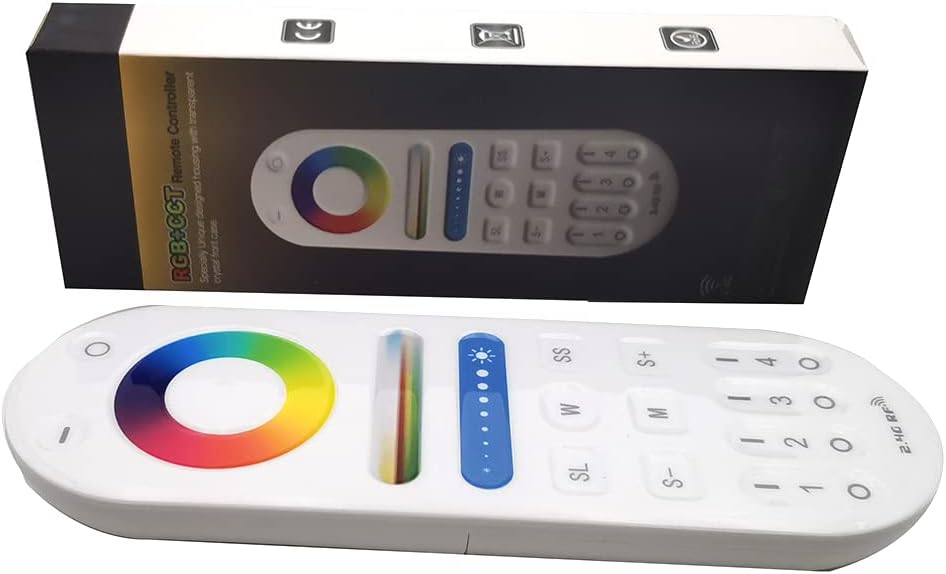
Image 1: The Vrabocry LM091 RGBCCT remote control shown alongside its product packaging.
2.1 主な特徴
- RGBCCT Control: Capable of controlling RGBCCT 6-pin (V+, R, G, B, WW, CW) LED strips and bulbs.
- 4ゾーンコントロール: Manage up to four distinct lighting zones independently or simultaneously.
- Touch Color Ring: Intuitive color selection via a sensitive touch color ring.
- 明るさと色温度の調整: Fine-tune lighting intensity and white light temperature (warm white to cool white).
- 2.4GHz RF Transmission: Reliable wireless control with a range of up to 98 feet (30 meters).
- 互換性: Works with various Mi-Boxer/Mi-Light RGBCCT series controllers such as WL5, LS2, FUT045, FUT039, and others.
- 人間工学に基づいたデザイン: 持ちやすく操作しやすい。
2.2 リモコンのレイアウト

画像2:正面 view of the LM091 remote control, showing the touch color ring, brightness slider, and various control buttons.
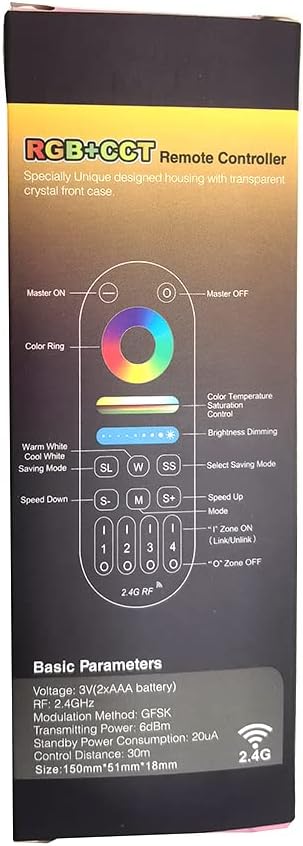
Image 3: A detailed diagram illustrating the functions of each button on the LM091 remote control, as depicted on its packaging.
3. セットアップ
3.1 バッテリーの取り付け
- リモコンの背面にある電池ボックスのカバーを見つけます。
- カバーをスライドさせて開きます。
- 正しい極性 (+ と -) を確認して、単 4 電池 2 本を挿入します。
- 電池ボックスのカバーを取り付けます。

Image 4: The back of the LM091 remote control with the battery compartment open, showing where to insert AAA batteries.
3.2リモコンのペアリング
To control your LED lights, the remote control must be paired with a compatible RGBCCT controller (e.g., Mi-Boxer/Mi-Light series). The pairing process typically involves the following steps:
- Ensure your LED controller is powered off.
- Power on the LED controller. Within 3 seconds of powering on, press the desired zone number button (1, 2, 3, or 4) on the LM091 remote control three times.
- The connected LED lights should flash three times to indicate successful pairing.
- If pairing fails, power off the controller and repeat the process.
ペアリング解除: To unpair, power on the LED controller. Within 3 seconds, press the desired zone number button five times. The lights should flash six times to confirm unpairing.
4. 操作手順
The LM091 remote control allows for precise adjustment of your RGBCCT LED lighting. Refer to Image 3 for button identification.
- マスターのオン/オフ: Press the 'Master ON' button (top right) to turn all paired lights on. Press the 'Master OFF' button (top left) to turn all paired lights off.
- ゾーンの選択: Press buttons '1', '2', '3', or '4' to select a specific lighting zone. Once a zone is selected, all subsequent commands will apply only to that zone. To control all zones simultaneously, press the 'Master ON' button.
- カラーリング: Touch the color ring to select any static color.
- 色温度コントロール: Use the 'W' (Warm White) and 'SS' (Cool White) buttons to adjust the color temperature of the white light. This function requires a CCT (Dual White) 3-wire LED strip (V+, WW, CW) or an RGBCCT strip.
- 明るさの調光: Use the brightness slider to increase or decrease the light intensity. The 'S+' and 'S-' buttons can also be used for fine-tuning brightness.
- Mode Selection (M): Press the 'M' button to cycle through various dynamic lighting modes.
- Speed Adjustment (S+/S-): When a dynamic mode is active, use the 'S+' and 'S-' buttons to increase or decrease the speed of the mode.
- Saving Mode (SL): The 'SL' button may be used to save or recall custom lighting settings, depending on the connected controller's capabilities.
5. メンテナンス
- クリーニング: リモコンは柔らかく乾いた布で拭いてください。研磨剤入りの洗剤や溶剤は使用しないでください。
- バッテリー交換: Replace batteries when the remote's response becomes sluggish or inconsistent. Always use new AAA batteries and dispose of old batteries responsibly.
- ストレージ: リモコンは直射日光や極端な温度を避け、乾燥した場所に保管してください。
6。 トラブルシューティング
| 問題 | 考えられる原因 | 解決 |
|---|---|---|
| リモートが応答しない | Low or dead batteries. Remote is out of range. Not paired correctly. | Replace batteries. Move closer to the LED controller. Re-pair the remote control with the LED controller (refer to Section 3.2). |
| Lights not changing color/brightness | Incorrect zone selected. Controller not compatible with RGBCCT. | Ensure the correct zone is selected or press 'Master ON'. Verify that your LED controller and strip are RGBCCT compatible. |
| Color temperature adjustment not working | LED strip is not CCT or RGBCCT. | This function requires a CCT (Dual White) 3-wire LED strip (V+, WW, CW) or an RGBCCT strip. Ensure your strip supports this feature. |
7. 仕様
- モデル: LM091
- 巻tage: 3V (2 x AAA Batteries)
- 送信周波数: 2.4GHz
- 変調方式: GFSK
- 送信電力: 6dBm
- スタンバイ時の消費電力: 20uA
- 制御距離: 最大98フィート(30メートル)
- 動作温度: -20°C ~ 60°C (-4°F ~ 140°F)
- サポートされるデバイスの最大数: 1 (per remote, but one controller can be controlled by four remotes)
- ボタンの数: 4 (zone buttons) + other control buttons
- コントローラタイプ: Remote control, Touch
8. 保証とサポート
For warranty information and technical support, please refer to the documentation provided with your purchase or contact Vrabocry customer service through the retailer where the product was purchased. Keep your proof of purchase for any warranty claims.