
1. はじめに
The MOBAPAD ChiTu PRO-HD is a versatile wireless controller designed for an enhanced gaming experience across multiple platforms. It features advanced technology such as Hall-effect joysticks, ALPS linear motors, and comprehensive customization options. This manual provides essential information for setting up, operating, maintaining, and troubleshooting your controller.

Figure 1: MOBAPAD ChiTu PRO-HD Wireless Controller connected to a Nintendo Switch.
2. パッケージ内容
パッケージにすべてのアイテムが揃っていることを確認します。
- MOBAPAD ChiTu PRO-HD Wireless Controller
- USB-A to USB-C Cable (1m / 39.37in)
- 取扱説明書
- Additional Cross-style D-Pad for swapping

Figure 2: Included items in the MOBAPAD ChiTu PRO-HD package.
3. セットアップ
3.1 コントローラの充電
Connect the controller to a power source using the provided USB-A to USB-C cable. The controller features a built-in 1000mAh lithium battery, providing approximately 30 hours of usage on a full charge.

Figure 3: USB-C charging port and programmable back paddles.
3.2 Nintendo Switchとのペアリング
- Nintendo Switch で、HOME メニューに移動します。
- 「コントローラー」>「グリップ/順序の変更」を選択します。
- On the MOBAPAD ChiTu PRO-HD controller, press and hold the small pairing button located on the back of the controller (between the M1 and M2 buttons) until the LED indicators begin to flash.
- Once the controller is detected by the Switch, the LED indicators will stabilize, and the controller will be paired.
ビデオ1: オーバーview of the MOBAPAD ChiTu PRO-HD controller's features and pairing process.
3.3 Detachable D-Pad and Joysticks
The controller supports detachable joysticks and a replaceable D-pad. To swap the D-pad, gently pull the existing D-pad off and align the new D-pad with the slots, then press firmly until it clicks into place. This allows for customization based on game genres and player preferences.
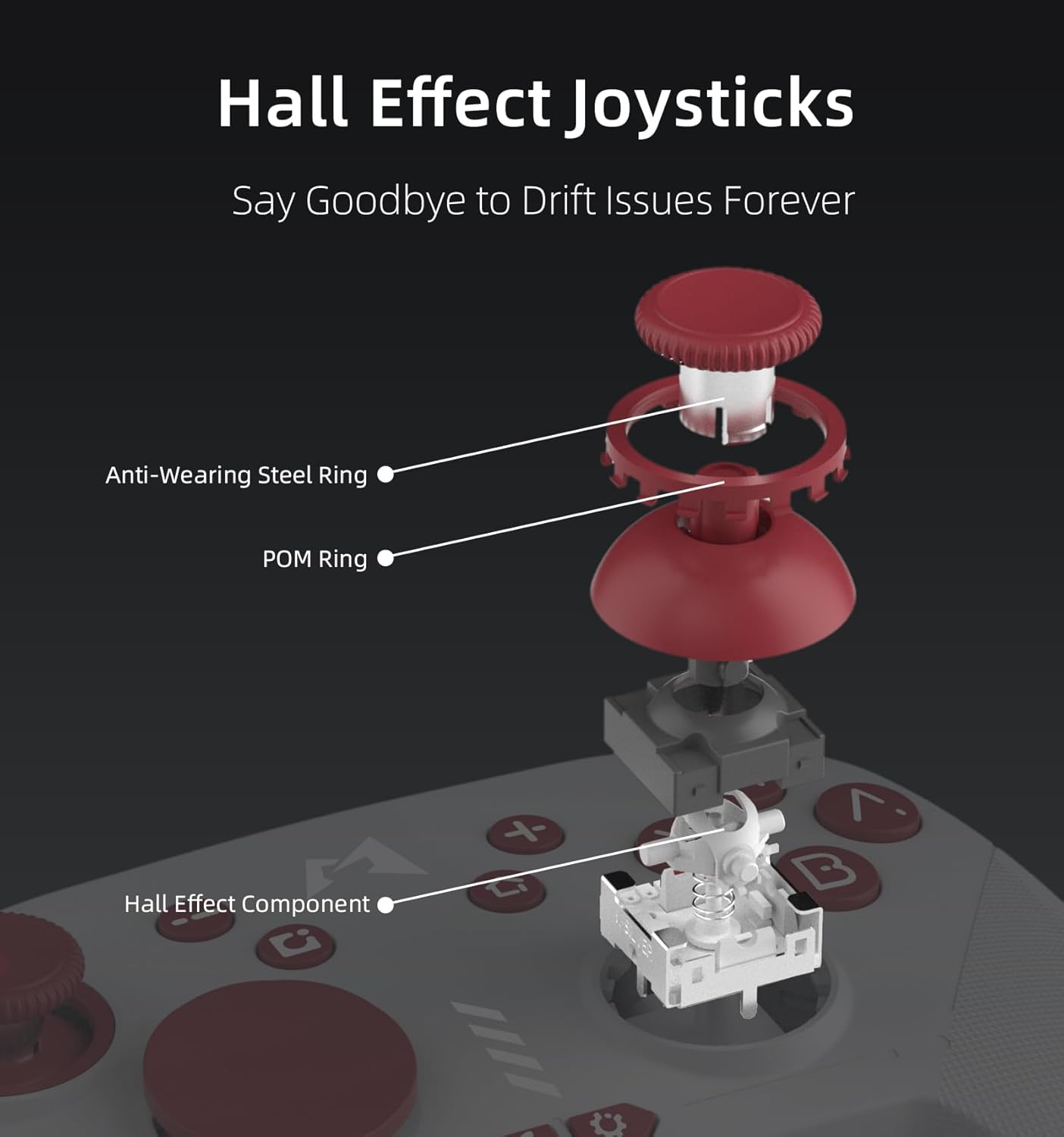
図 4: 分解 view of Hall Effect Joysticks, highlighting components designed to prevent drift.
4. 操作手順
4.1 基本的な制御
- アナログスティック: 正確な動きとカメラ制御を実現します。
- A/B/X/Y ボタン: 標準のアクション ボタン。
- +/- ボタン: ゲーム内メニューのプラスボタンとマイナスボタン。
- スクリーンショットボタン: ゲームプレイ中にスクリーンショットをキャプチャします。
- ホームボタン: HOMEメニューに戻ります。
- ショルダーボタン(L/R、ZL/ZR): ゲーム内のさまざまなアクションに使用します。
4.2 Six-Axis Motion Sensing
The controller supports six-axis motion sensing, allowing for intuitive control in compatible games. This feature is particularly useful for aiming, steering, and solving puzzles that require tilting or motion input.

Figure 5: Demonstrating 6-Axis Gyroscope motion sensing.
4.3 NFC機能
The controller includes NFC functionality, enabling you to scan Amiibo figures for in-game bonuses and content. Simply place your Amiibo on the MOBAPAD logo area on the controller to activate.

Figure 6: Amiibo scanning via NFC on the controller.
5. 主な特徴
- ホール効果ジョイスティック: Equipped with Control Silver's custom JH16 Hall-effect joysticks, ensuring precise input, low power consumption, resistance to interference, and prevention of metal magnetization, effectively eliminating stick drift.
- HDランブル: Features an original ALPS linear motor with 320Hz high-frequency drive and dual-axis space, providing a lifelike and immersive vibration experience.
- メカニカルボタン: The face buttons offer a tactile and responsive feel, similar to mechanical switches, ensuring accurate and satisfying feedback with each press.
- 耐久性: Designed for longevity with 5 million mechanical button presses and 5 million Hall-effect joystick cycles.
- Integrated Mechanical Structure: The joystick's mechanical design uses an integrated structure to resolve issues like metal magnetization and magnetic interference, enhancing electrical performance and consistent quality.
6. カスタマイズ
6.1 ターボ機能
The controller includes an independent Turbo button for rapid-fire actions. To activate, press and hold the Turbo button, then press the desired action button (e.g., A, B, X, Y). The button will now repeatedly register presses as long as it's held down. There are three different turbo intensities, starting at medium. Repeat the process to deactivate.

Figure 7: Independent Turbo Button for rapid-fire actions.
6.2 マクロプログラミング
The controller supports macro programming for complex command sequences. To record a macro:
- Press and hold the 'Settings' button (gear icon) for a few seconds until the controller vibrates and the logo turns purple, indicating it's ready to record.
- Perform the desired button inputs for your macro.
- To save the macro, press either the M1 or M2 back paddle. The recorded sequence will be assigned to that paddle.
6.3 Software-Based Customization
Utilize the dedicated mobile application for advanced customization, including joystick dead zone adjustment, key remapping for macro programming, and RGB lighting control for the logo.

Figure 8: Companion app for advanced customization.
7. メンテナンス
To ensure the longevity and optimal performance of your MOBAPAD ChiTu PRO-HD controller, follow these maintenance guidelines:
- クリーニング: コントローラーは柔らかく乾いた布で拭いてください。頑固な汚れには、軽くamp布を水または中性洗剤で拭いてください。刺激の強い化学薬品や研磨剤は使用しないでください。
- ストレージ: コントローラーは、直射日光や極端な温度を避け、涼しく乾燥した場所に保管してください。
- 取り扱い: コントローラーを落としたり、強い衝撃を与えたりしないでください。内部コンポーネントが損傷する可能性があります。
8。 トラブルシューティング
コントローラーで問題が発生した場合は、次の手順を試してください。
- コントローラーがペアリングされない: Ensure the controller is charged. Press and hold the pairing button on the back of the controller until the LEDs flash, then re-attempt pairing via the Nintendo Switch 'Change Grip/Order' menu.
- 入力遅延または切断: Ensure the controller is within range of the console. Avoid obstructions between the controller and the console. If issues persist, try resetting the controller using the small reset hole on the back.
- スティックドリフト: The Hall-effect joysticks are designed to prevent drift. If you experience any unusual stick behavior, try recalibrating the joysticks via the companion app or the Switch system settings.
- 充電の問題: Verify that the USB-C cable is securely connected to both the controller and the power source. Try using a different USB-C cable or power adapter.
9. 仕様
| 特徴 | 詳細 |
|---|---|
| モデル番号 | プロHD |
| 寸法 | 5.99 x 4.13 x 2.42インチ |
| アイテム重量 | 12.52オンス |
| バッテリー | 1000mAhリチウム電池(付属) |
| バッテリー寿命 | 約30時間 |
| 接続性 | Wireless (Bluetooth), USB-C |
| ジョイスティックタイプ | Hall-Effect (JH16) |
| 振動 | ALPS Linear Motor (HD Rumble) |
| モーションコントロール | 6-Axisジャイロスコープ |
| NFCサポート | Yes (Amiibo) |
| メーカー | Dongguan Heng xun Energy Technology CO., Ltd. |
10. 保証とサポート
For warranty information or technical support, please refer to the documentation included with your purchase or contact MOBAPAD customer service directly. Keep your proof of purchase for any warranty claims.