
ODK B02031601002USAN0818A7YUQ5J
ODK U Shaped Desk User Manual
Model: B02031601002USAN0818A7YUQ5J
1.製品オーバーview
The ODK U Shaped Desk is designed for both gaming and home office environments, offering an immersive workspace with ample storage and integrated features. This desk includes a monitor stand, power outlets with USB ports, and an LED lighting strip to enhance your experience. Its reversible design allows for flexible configuration to suit various room layouts.
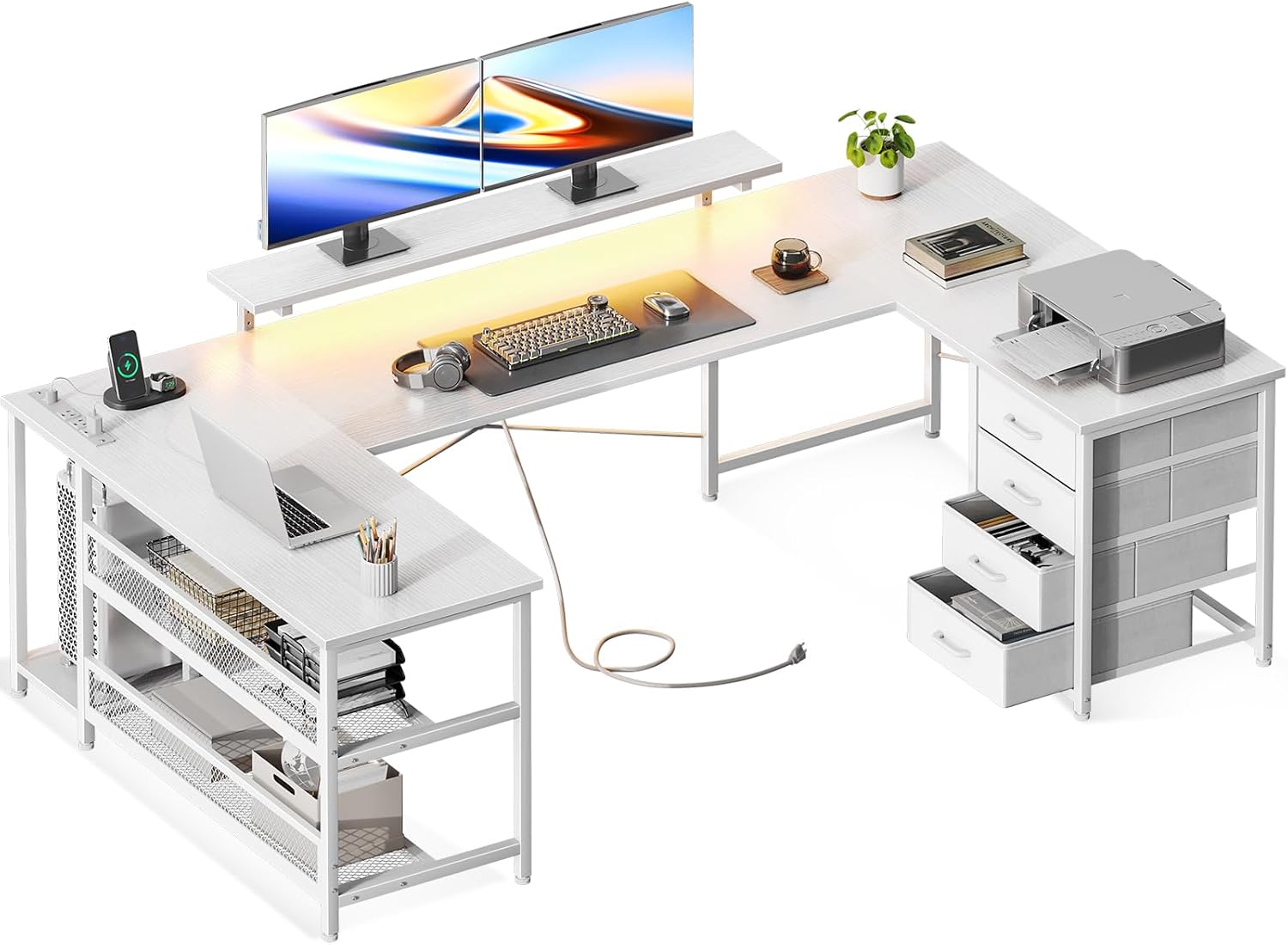
Image 1.1: The ODK U-shaped desk configured for an office environment, showcasing its spacious design, integrated monitor stand, power outlets, and storage drawers.
2. 主な特徴
- U-Shaped Design: Provides an expansive and immersive workspace, ideal for multi-monitor setups and keeping essential items within easy reach.
- Amp収納スペース: Includes a monitor stand, a UPC stand, two open shelves, and four-tier drawers to organize various items and free up desktop space.
- 統合された LED ライト: Features an LED lighting strip with 7 colors and 20 lighting modes, offering customizable ambiance with a memory function to recall the last setting.
- Built-in Power Outlets and USB Charging Ports: Equipped with a recessed power strip containing 3 AC outlets and 2 USB ports, along with a 6.6-foot power cord, for convenient device charging.
- Reversible & Adjustable Design: The drawer unit can be installed on either the left or right side, and the monitor stand is height-adjustable for ergonomic viewing。

Image 2.1: The ODK U-shaped desk set up for gaming, featuring multiple monitors, gaming peripherals, and dynamic blue LED lighting, highlighting its immersive design.

画像2.2: 詳細な view of the desk's storage solutions, including four fabric drawers for classified storage and metal storage shelves for larger items like a computer tower.

Image 2.3: A close-up of the RGB LED strip located under the monitor stand, demonstrating various color options and lighting modes available to personalize the workspace.

画像2.4: 詳細な view of the recessed power strip, showing its 3 AC outlets and 2 USB ports, with a smartphone connected for charging, illustrating its practical utility.

Image 2.5: A diagram illustrating the reversible nature of the desk, showing how the storage and drawer sections can be configured on either the left or right side to fit different room layouts.

Image 2.6: A detailed diagram showing the overall dimensions of the desk and the three adjustable height settings for the monitor stand (3.9", 5.1", 6.3"), promoting ergonomic posture.
3. セットアップと組み立て
Assembly of the ODK U Shaped Desk is required. Due to its weight of approximately 67.35 lbs (30.84 kg), it is highly recommended that two people participate in the assembly process to ensure safety and ease of construction. Follow the included step-by-step instructions carefully.
3.1 Important Assembly Notes:
- 2人での組み立て: Always assemble with at least two individuals to prevent injury and facilitate handling of heavy components.
- 可逆構成: Before beginning assembly, decide whether you want the drawer unit on the left or right side of the U-shape. This choice will affect the initial steps of the assembly.
- 安定性: For enhanced stability, especially with the U-shaped design, consider properly anchoring the desk to a wall if possible.
- 重量制限: Adhere to all specified weight limits for the desktop and shelves to prevent damage or injury.
4. 操作手順
4.1 LED Lighting Strip
- 電源オン/オフ: Locate the control button or remote for the LED strip. Press to turn on or off.
- 色/モードの変更: Use the control interface to cycle through the 7 available colors and 20 lighting modes.
- メモリ機能: The LED strip is designed to remember the last selected lighting mode and color when powered off and on again.
4.2 Built-in Power Outlets and USB Ports
- ACコンセント: Plug in your computer, monitors, or other AC-powered devices into the 3 standard outlets (125V/12A).
- USB ポート: Connect your smartphones, tablets, or other USB-powered devices to the 2 USB ports (5V-2A) for charging.
- 電源コード: Ensure the 6.6-foot power cord is securely plugged into a wall outlet.
4.3 調整可能なモニタースタンド
- The monitor stand can be adjusted to three different heights (3.9", 5.1", 6.3") to achieve an ergonomic viewing level. Refer to the assembly instructions for details on how to adjust the stand's height.
5. メンテナンス
- クリーニング: 柔らかい布で表面を拭いてください。amp 布で拭いてください。仕上げを傷める可能性のある、刺激の強い化学薬品や研磨剤入りの洗剤は使用しないでください。
- ダスティング: Regularly dust the desk surfaces, including the LED strip and power outlets, to prevent accumulation.
- 引き出しのお手入れ: 布製の引き出しは、必要に応じて中性洗剤で部分洗いできます。再び収納する前に、完全に乾いていることを確認してください。
- ハードウェアチェック: すべてのネジと留め具がしっかりと締まっているか定期的に確認してください。安定性を維持するために、必要に応じて締め直してください。
6。 トラブルシューティング
- 机のぐらつき: Ensure all assembly screws are tightened. Verify the desk is on a level surface. Adjust leg levelers if present.
- LED ライトが動作しない: Check if the power cord for the LED strip is securely connected. Ensure the power outlet is functional. Verify the control button/remote battery if applicable.
- 電源コンセント/USBポートが機能しない: Confirm the main power cord for the desk's power strip is fully plugged into a live wall outlet. Check if the wall outlet itself is working. Avoid overloading the power strip.
- Drawers Stick/Don't Slide Smoothly: Ensure the fabric drawers are not overloaded. Check for any obstructions in the drawer slots.
7. 仕様
| 属性 | 詳細 |
|---|---|
| ブランド | ODK |
| モデル番号 | B02031601002USAN0818A7YUQ5J |
| 製品寸法 | 奥行き19.69インチ x 幅65.75インチ x 高さ29.72インチ |
| 色 | オールホワイト |
| スタイル | モダンな |
| ベース素材 | 合金鋼 |
| 上部の材質の種類 | エンジニアリングウッド |
| 特集 | Built-In USB Outlet, LED Strip, Monitor Stand |
| 部屋タイプ | オフィス、ゲーム |
| 取り付けタイプ | フロアマウント |
| 含まれるコンポーネント | Monitor Stand, UPC Stand, Built-in Power Strip with 3-Outlets & 2 USB Ports |
| アイテム重量 | 30.84キログラム(約67.99ポンド) |
| 引き出しの数 | 4 |
| 棚の数 | 2(オープンシェルフ) |
| 必要な組み立て | はい |
| 組み立てに推奨される人数 | 2 |
8. 保証とサポート
For warranty information and customer support, please refer to the documentation included with your purchase or contact ODK customer service directly. Keep your proof of purchase for any warranty claims.
関連文書 - B02031601002USAN0818A7YUQ5J
 |
Inbox Zero L字型デスク ユーザーマニュアルおよび組み立てガイド Inbox Zero L 字型デスクの包括的なユーザー マニュアルと組み立てガイド。詳細な手順、部品リスト、安全上の注意事項、ホーム オフィスのセットアップに関するトラブルシューティングのヒントが記載されています。 |
 |
Wrought Studio L字型デスク ユーザーマニュアル Wrought Studio L 字型デスクのユーザー マニュアル。このリバーシブル コンピューターおよびゲーム デスクの組み立て手順、安全ガイドライン、部品リスト、およびカスタマー サービスの詳細が記載されています。 |
 |
Inbox Zero L字型デスク ユーザーマニュアルおよび組み立てガイド このユーザーマニュアルには、Inbox Zero L字型デスクの基本的な使用方法が記載されています。安全に関する注意事項、詳細な部品リスト、組み立て手順、カスタマーサポート情報などが記載されています。この多用途デスクでワークスペースを最適化しましょう。 |
 |
Assembly Instructions for anof2217 L-Shaped Computer Desk Detailed assembly instructions for the anof2217 L-shaped computer desk. This guide provides step-by-step assembly, parts list, and textual descriptions of diagrams for your industrial computer desk with power outlets and USB-C. |
 |
Wrought Studio Reception Desk Assembly Instructions and User Guide Detailed assembly instructions and user guide for the Wrought Studio L-shaped reception desk, featuring LED lights and integrated power outlets. Includes parts list, hardware guide, and app manual for LED control. |
 |
Latitude Run® L字型エグゼクティブオフィスデスクの組み立て説明書(blcg5286) Latitude Run® blcg5286 L字型エグゼクティブオフィスデスクの詳細な組み立て説明書。部品リスト、ステップバイステップの組み立てガイド、安全に関する警告、使用方法に関する情報が含まれています。 |
Ask a question about this manual
Ask about setup, troubleshooting, compatibility, parts, safety, or missing instructions. Manuals+ will review the question and use this page’s manual context to help answer it.