
1. はじめに
The UNI-T UT60S is a smart, true RMS digital multimeter designed for accurate and reliable electrical measurements. Featuring 9999 counts, this device can measure AC/DC voltage, AC/DC current, resistance, diode, capacitance, temperature, and frequency. Its fully automatic anti-burn intelligent design helps prevent operational errors and device damage, making it suitable for both professional technicians and everyday users.

図1: 前面 view of the UNI-T UT60S Digital Multimeter.
2. 安全情報
Always adhere to safety precautions when using the multimeter. Failure to do so may result in electric shock, injury, or damage to the meter or equipment under test.
- マニュアルを読む: Before use, thoroughly read and understand all instructions and safety warnings in this manual.
- 定格巻tage: 定格容量を超えて塗布しないでくださいtage, as marked on the meter, between terminals or between any terminal and earth ground. The UT60S is capable of withstanding a maximum overvoltage impulse of 1000V.
- 使用前に点検してください: ご使用の前に、メーター、テストリード、付属品に損傷がないか必ず点検してください。損傷がある場合は使用しないでください。
- 適切な端末: Ensure test leads are connected to the correct input terminals for the measurement function selected.
- 回路の電源切断: 常に回路の電源を切り、高電圧のものを全て放電してください。tage capacitors before performing resistance, continuity, diode, or capacitance measurements.
- Live Circuit Work: When working on live circuits, work alone as little as possible, and ensure another person is present to provide assistance if needed.
- 過電流保護: The meter features overcurrent alarms and protection functions. Do not exceed the maximum current ratings for the input terminals.
- 環境条件: Use the meter only as specified in this manual. Do not use the meter in explosive gas, vapor, or dusty environments.
- 個人用保護具: 電気回路を扱うときは、必ず安全メガネや絶縁手袋などの適切な個人用保護具 (PPE) を着用してください。
3 製品の特徴
The UNI-T UT60S Digital Multimeter offers a range of features for versatile and safe electrical testing:
- 9999 カウント表示: Provides high-resolution measurements for precision.
- 真の実効値測定: 非正弦波形の正確な読み取りを保証します。
- Fully Automatic Anti-Burn Design: Intelligent protection against operational errors and potential device damage.
- Wide Measurement Capabilities: AC/DCボリュームを測定tage (up to 1000V), AC/DC current, resistance, diode, capacitance, temperature, and frequency.
- Large LCD Screen with Dual Display: Allows simultaneous display of AC voltage and frequency, enhancing readability.
- Full Button Design: Offers intuitive control and automatic recognition of current input jacks.
- Fast ADC (Analog to Digital Converter): Provides rapid measurement updates (3 times/second).
- Misoperation Protection: Capable of withstanding a maximum overvoltage impulse of 1000V, with overvoltage and overcurrent alarms.
- NCV(非接触Vol。tage) 機能: AC vol を検出tage without physical contact, featuring audible and visual alarms for safety.
- 自動電源節約: Low power consumption (7mA during operation, 5uA in sleep state) and automatic backlight display in dark environments, extending battery life. Automatic shut-down feature.

Figure 2: The UT60S display with 9999 counts for precise readings.
4. 箱の中身
パッケージを開けると、次のアイテムが見つかります。
- UNI-T UT60S デジタルマルチメーター
- Thermocouple (for temperature measurements)
- マルチメーターのテストリード(赤と黒)
- 1.5V AAA Batteries (pre-installed or included separately)

Figure 3: Contents of the UNI-T UT60S package, including the multimeter, test leads, and thermocouple.
5. セットアップ
5.1. バッテリーの取り付け
The UT60S typically uses 1.5V AAA batteries. To install or replace batteries:
- マルチメーターの電源がオフになっており、テストリードが取り外されていることを確認します。
- メーターの背面にある電池ボックスを見つけます。
- ドライバーを使用して電池ボックスのカバーを開きます。
- 正しい極性 (+ と -) に注意して、単 4 電池を挿入します。
- 電池カバーを取り付けて、ネジで固定します。
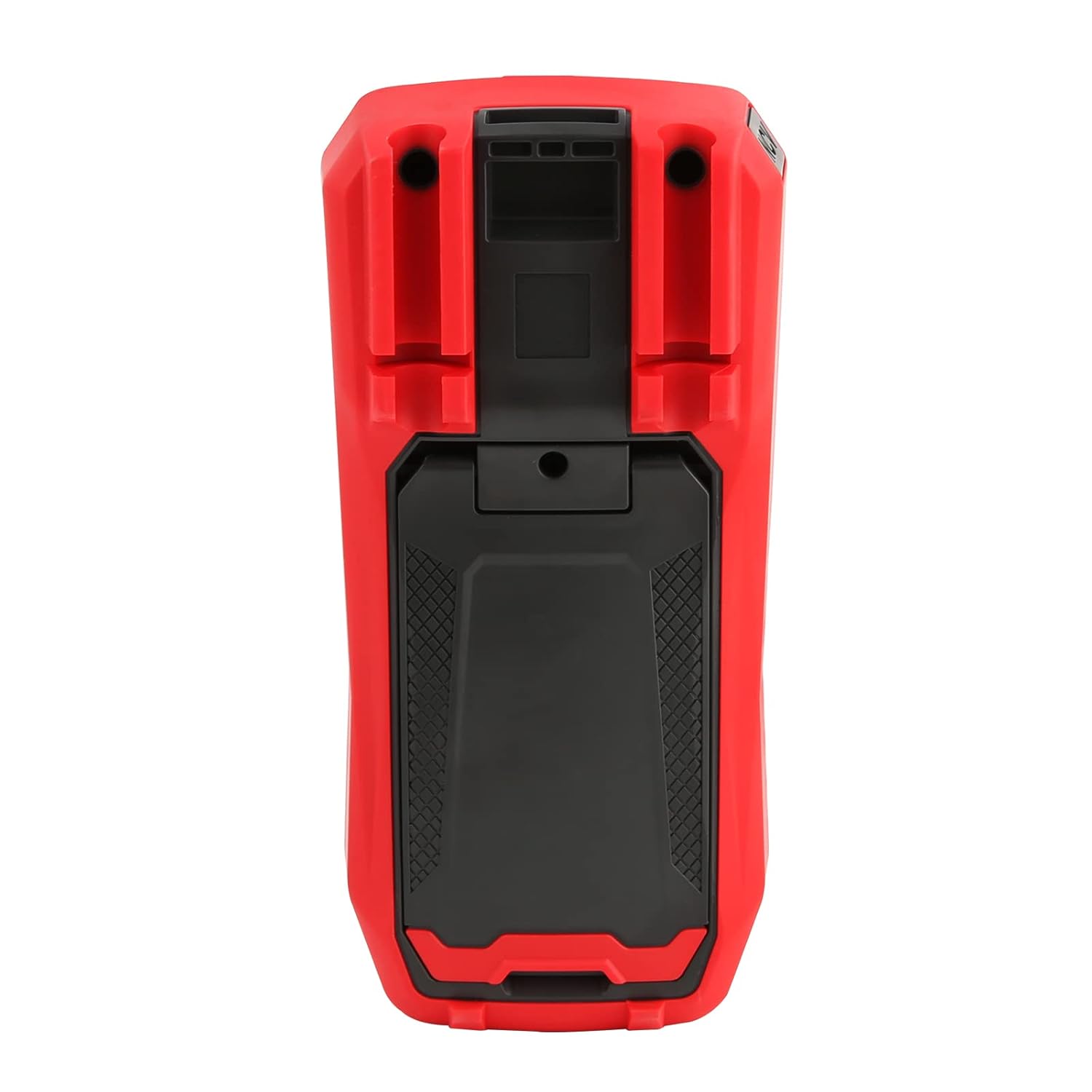
図4:背面 view of the UT60S, indicating the battery compartment location.
5.2. テストリードの接続
Connect the test leads to the appropriate input terminals:
- The black test lead (common) should always be connected to the コム ターミナル。
- 巻の場合tage, resistance, capacitance, frequency, diode, and continuity measurements, connect the red test lead to the VΩHzCAP ターミナル。
- For current measurements (mA/A), connect the red test lead to the mA / A ターミナル。
- マイクロ向けampere current measurements (μA), connect the red test lead to the μA ターミナル。

Figure 5: Input terminals of the UT60S for connecting test leads.
6. 操作手順
The UT60S features a full button design for selecting measurement functions. The meter's intelligent anti-burn design automatically recognizes the input jack and selected function.
6.1. 電源のオン/オフ
を押す 力 button to turn the meter on or off. The meter will automatically shut down after a period of inactivity to save battery life.
6.2. 自動モード
In Auto mode, the meter automatically identifies the measurement type (voltage, resistance, continuity) and selects the appropriate range. This simplifies operation for general troubleshooting.
6.3. AC/DC電圧の測定tage
体積を測定するtage:
- 黒のテストリードをに接続します コム 端子と赤のテストリードを VΩHzCAP ターミナル。
- を押す V~ / Hz button to select AC voltage measurement, or the V= / NCV button for DC voltage. The meter may automatically select the correct mode in Auto range.
- 測定対象の回路またはコンポーネントにテストプローブを接続します。
- 巻を読むtagディスプレイにe値が表示されます。AC電圧の場合tage, the frequency may also be displayed simultaneously.

図6: AC電圧の測定tage and frequency with the UT60S.
6.4. AC/DC電流の測定
電流を測定するには:
- 重要: To measure current, the meter must be connected in series with the circuit. Always turn off power to the circuit before connecting the meter.
- 黒のテストリードをに接続します コム ターミナル。
- For current up to 10A, connect the red test lead to the mA / A terminal. For microampere current, connect to the μA ターミナル。
- を押す ACA / DCA button to select AC or DC current measurement.
- Break the circuit and connect the test leads in series with the load.
- 回路に電力を供給し、ディスプレイ上の電流値を読み取ります。
6.5. Measuring Resistance, Diode, and Continuity
To measure resistance, diode, or continuity:
- Ensure the circuit is de-energized and capacitors are discharged.
- 黒のテストリードをに接続します コム 端子と赤のテストリードを VΩHzCAP ターミナル。
- を押す Ω→+ button to cycle through resistance, diode, and continuity functions.
- テスト プローブをコンポーネント全体に接続します。
- Read the measurement. For continuity, an audible buzzer will sound if continuity is detected.
6.6. 静電容量の測定
静電容量を測定するには:
- テストの前にコンデンサが完全に放電されていることを確認してください。
- 黒のテストリードをに接続します コム 端子と赤のテストリードを VΩHzCAP ターミナル。
- を押す mV~°C°F button to select temperature measurement.
- テストプローブをコンデンサ端子間に接続します。
- ディスプレイの静電容量値を読み取ります。

Figure 7: The UT60S performing a capacitance measurement.
6.7. 温度の測定
温度を測定するには:
- Connect the thermocouple to the appropriate input terminals (usually the VΩHzCAP そして コム terminals, or dedicated temperature inputs if available).
- を押す mV~°C°F button to select temperature measurement.
- 温度を測定する必要があるポイントに熱電対プローブを配置します。
- Read the temperature value on the display in Celsius or Fahrenheit.
6.8. NCV(非接触Vol。tage) 機能
NCV機能によりAC電圧の検出が可能tag導体に直接接触することなく。
- を押す V= / NCV NCV 機能を有効にするボタン。
- Move the top of the meter close to the conductor or outlet.
- The meter will provide an audible alarm and visual indication (flashing light) if AC voltage is detected. The intensity of the alarm and light may vary with voltag強さ。

図8: NCV機能を使用してライブACボリュームを検出するtage.
6.9. データホールド
を押す 所有 ボタンを押すと、ディスプレイの現在の表示が固定されます。もう一度押すと、ホールド機能が解除されます。
6.10. Range Selection
While the meter typically operates in Auto range, you can manually select a range by pressing the RANGE button. This can be useful for specific applications or to speed up measurements in stable conditions. Press and hold the RANGE button to return to Auto range.
6.11. USB Communication (if applicable)
The UT60S series may support USB communication for data logging and analysis on a computer. If your model includes this feature, connect the meter to your computer using the provided USB cable and install the UNI-T software. Refer to the software manual for detailed instructions.
Video 1: Demonstration of features like NCV, LoZ, and USB communication on a UNI-T UT161 series multimeter. The UT60S shares similar functionalities.
7. メンテナンス
7.1. 清掃
メーターのケースを拭くamp 布と中性洗剤を使用してください。研磨剤や溶剤は使用しないでください。使用前にメーターが完全に乾いていることを確認してください。
7.2. バッテリーの交換
ディスプレイに電池残量低下インジケーターが表示されたら、電池を交換してください。電池の取り付け手順については、セクション5.1を参照してください。
7.3.ヒューズの交換
If the current measurement function stops working, the fuse may need replacement. Refer to the full user manual for specific fuse ratings and replacement procedures. Always use fuses with the specified voltageおよび現在の評価。
8。 トラブルシューティング
If you encounter issues with your UNI-T UT60S, try the following basic troubleshooting steps:
- ディスプレイなし/電源オン: 電池の取り付けを確認し、電池が消耗していないことを確認してください。必要に応じて交換してください。
- 間違った読み方: Verify that the test leads are correctly connected to the appropriate terminals for the selected function. Ensure the function dial is set correctly. Check for damaged test leads.
- 電流測定が機能しない: Check the fuse. If blown, replace it with a fuse of the correct rating. Ensure the meter is connected in series with the circuit.
- 「OL」または過負荷表示: This indicates that the measured value is outside the selected range or the maximum capability of the meter. Try selecting a higher range (if in manual range mode) or ensure the component is within the meter's specifications.
- NCV 検出なし: Ensure the NCV function is activated and the meter is brought close enough to the AC voltag電子ソース。
For more complex issues, refer to the detailed troubleshooting section in the complete user manual or contact UNI-T customer support.
9. 仕様
Key specifications for the UNI-T UT60S Digital Multimeter:
| 特徴 | 仕様 |
|---|---|
| 表示数 | 9999 |
| 真のRMS | はい |
| AC / DC Voltage | 最大1000V |
| AC / DC電流 | Up to 10A (mA/A terminals), Up to 1000μA (μA terminal) |
| 抵抗 | 0.1Ω - 40MΩ |
| キャパシタンス | 1nF - 4000μF |
| 温度 | はい(熱電対付き) |
| 頻度 | はい |
| ダイオード試験 | はい |
| 導通テスト | はい |
| NCV(非接触Vol。tage) | はい |
| 電源 | Battery Powered (1.5V AAA batteries) |
| アイテム重量 | 370グラム |
| 安全コンプライアンス | UL 61010-1, IEC 61010-2-030, CAT III 1000V, CAT II 600V |
10. 保証とサポート
UNI-T provides customer support for their products. If you encounter any problems during use, please contact UNI-T customer service directly via email. They offer 7/24 1-to-1 user support to address your concerns promptly.
For specific warranty details, please refer to the warranty card included with your product or visit the official UNI-T webサイト。


