
導入
This manual provides essential instructions for the assembly, operation, maintenance, and troubleshooting of your FLEXISPOT Comhar 55-inch Electric Standing Desk. Please read this manual thoroughly before use to ensure proper function and safety.

The FLEXISPOT Comhar 55-inch Electric Standing Desk, showcasing its spacious desktop, integrated drawer, and control panel.
安全情報
- Do not exceed the desk's maximum weight capacity of 154 lbs (70 kg).
- Exercise caution during assembly and operation. Keep hands and objects clear of moving parts.
- 机が水平な場所に設置されていることを確認してください。
- Keep children and pets away from the desk during operation. Utilize the child lock feature when not in use.
- Do not attempt to modify the desk's structure or electrical components.
設定
The FLEXISPOT Comhar desk features an innovative quick-install design, significantly simplifying the assembly process. A factory-installed crossbeam reduces setup time, allowing for completion in approximately 5 minutes.
組み立て手順:
- すべてのコンポーネントを開梱し、付属の部品リストと照合します。
- Place the desktop upside down on a soft, clean surface to prevent scratches.
- Attach the desk legs to the pre-installed crossbeam and desktop using the provided hardware.
- Connect all necessary cables according to the diagram in the separate quick start guide.
- Carefully flip the desk upright with assistance and position it in your desired location.
操作手順
高さ調整
The desk's electric motor allows for smooth height adjustments. Use the up and down arrow buttons on the control panel to move the desk to your desired height. The height can be adjusted from 28.7 inches to 48 inches.

The desk offers a wide height adjustment range, allowing users to easily switch between sitting and standing positions.
メモリプリセット
The control panel includes four programmable height presets. To save a height:
- 机を希望の高さに調整します。
- Press the 'M' button (or similar memory set button, refer to quick start guide).
- Press one of the numbered preset buttons (1, 2, 3, or 4) until you hear a beep or see the display confirm.
保存した高さを呼び出すには、対応する番号のプリセット ボタンを押すだけです。
チャイルドロック
Activate the child lock feature to prevent accidental height adjustments. Locate the child lock button on the control panel and press it to engage or disengage the lock.
統合された USB 充電ポート
The desk is equipped with integrated USB-A and USB-C ports for convenient charging of mobile devices. Note that these ports may temporarily pause charging while the desk height is being adjusted. Laptop charging is not supported through these ports.

The control panel features a digital display, height adjustment buttons, four programmable memory presets, a child lock, and integrated USB-A and USB-C charging ports.
収納引き出し
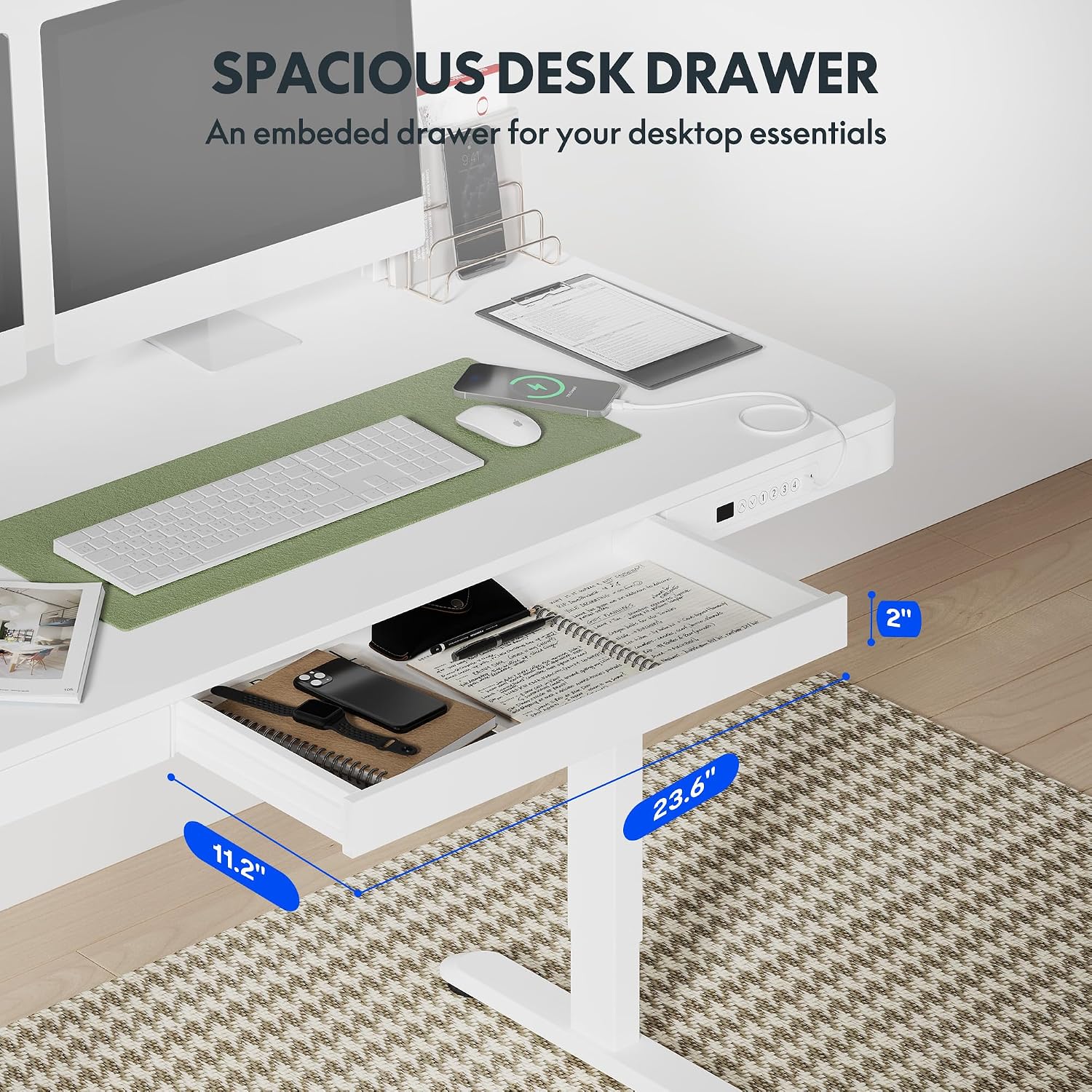
A pull-out drawer is integrated into the desktop, providing discreet storage for small office supplies and personal items. Gently pull the drawer to open and push to close.

The convenient pull-out drawer provides integrated storage for office essentials, keeping your workspace organized.
衝突防止機能
The desk is equipped with an anti-collision system. If the desk encounters an obstacle during height adjustment, it will automatically stop and reverse slightly to prevent damage or injury.
The anti-collision system automatically detects obstacles during height adjustment, stopping and reversing to prevent damage or injury.
メンテナンス
- Regularly wipe the desktop and frame with a soft, damp 布。 研磨剤入りクリーナーは避けてください。
- すべてのネジと接続が確実に固定されているかどうかを定期的に確認してください。
- モーターと電気部品をほこりや湿気から守ってください。
トラブルシューティング
| 問題 | 考えられる原因 | 解決 |
|---|---|---|
| デスクが動かず、コントロールにも反応しません。 | Power cable disconnected; Child lock engaged; Motor overload; Control panel malfunction. | Check power connection. Disengage child lock. Unplug desk for 10 minutes, then plug back in. Reduce weight on desk. If problem persists, contact support. |
| USB ポートが充電されません。 | Desk is adjusting height; Device not compatible; Cable issue. | Wait for desk movement to complete. Ensure device is compatible with USB charging. Try a different USB cable. Note: Laptop charging is not supported. |
| 机が異常な音を立てます。 | 緩んだコンポーネント、障害物。 | Check all screws and ensure they are tightened. Inspect for any obstructions under or around the desk. |
仕様

Detailed dimensions of the desk, illustrating the desktop size and the adjustable height range from 28.9 inches to 46.5 inches.
| 特徴 | 詳細 |
|---|---|
| ブランド | フレキシポット |
| モデル名 | Standing Desk (Comhar) |
| モデル番号 | B0C2Y3645L |
| 色 | 白 |
| 製品寸法(奥行き×幅×高さ) | 23.8インチ x 47.3インチ x 47.6インチ(全体) |
| デスクトップサイズ | 55" x 28" (approximate working surface) |
| 高さ調整範囲 | 28.7インチ~48インチ(テーブルトップの厚さ2.6インチを含む) |
| 最大重量容量 | 154ポンド(70kg) |
| アイテム重量 | 113ポンド(51.3kg) |
| デスクトップ素材 | 木材 |
| ベース素材 | 金属(合金鋼) |
| 特集 | Electric Height Adjustment, Integrated Drawer, USB-A & USB-C Charging Ports, 4 Memory Presets, Child Lock, Anti-Collision System |
| 組み立てが必要 | Yes (Quick Assembly) |
| 含まれるコンポーネント | Built-in USB Port, All Assembly Tools |
保証
This FLEXISPOT Comhar Electric Standing Desk comes with a Limited Warranty. For specific terms and conditions, please refer to the warranty documentation included with your product or visit the official FLEXISPOT webサイト。
サポート
If you encounter any issues or have questions regarding your FLEXISPOT Comhar Electric Standing Desk that are not addressed in this manual, please contact FLEXISPOT customer support. Contact information can typically be found on the manufacturer's webサイトまたは製品パッケージに記載されています。


