
1. はじめに
Thank you for choosing the Aigo AC SE 360 Rainbow 360mm Water Cooler. This all-in-one liquid cooling solution is designed to provide efficient thermal management for your high-performance CPU, featuring a 360mm triple radiator and vibrant ARGB lighting. This manual provides essential information for proper installation, operation, and maintenance to ensure optimal performance and longevity of your product.

Image 1.1: Aigo AC SE 360 Rainbow 360mm Water Cooler assembled view.
2. 安全情報
- インストールまたはメンテナンスを行う前に、必ずコンピューターの電源を切ってください。
- 損傷を防ぐためにコンポーネントを慎重に取り扱ってください。
- 電気的危険を防ぐために適切な接地を確保してください。
- 製品を湿気や極端な温度から遠ざけて保管してください。
- ポンプやラジエーターを開けないでください。保証が無効になり、漏れが発生する可能性があります。
- お子様の手の届かない場所に保管してください。
3. パッケージ内容
以下にリストされているすべてのコンポーネントがパッケージに含まれていることを確認してください。
- 1x Aigo AC SE 360 Water Cooler Unit (Radiator, Pump/CPU Block, Tubing)
- 120mm ARGBファン×3
- Mounting Hardware for Intel Sockets (LGA 115X, 1200, 1700, 2011, 2066)
- Mounting Hardware for AMD Sockets (AM2, AM3, AM4, AM5)
- サーマルペースト
- ファンネジとラジエーターネジ
- ARGB Controller (if included with your specific model)
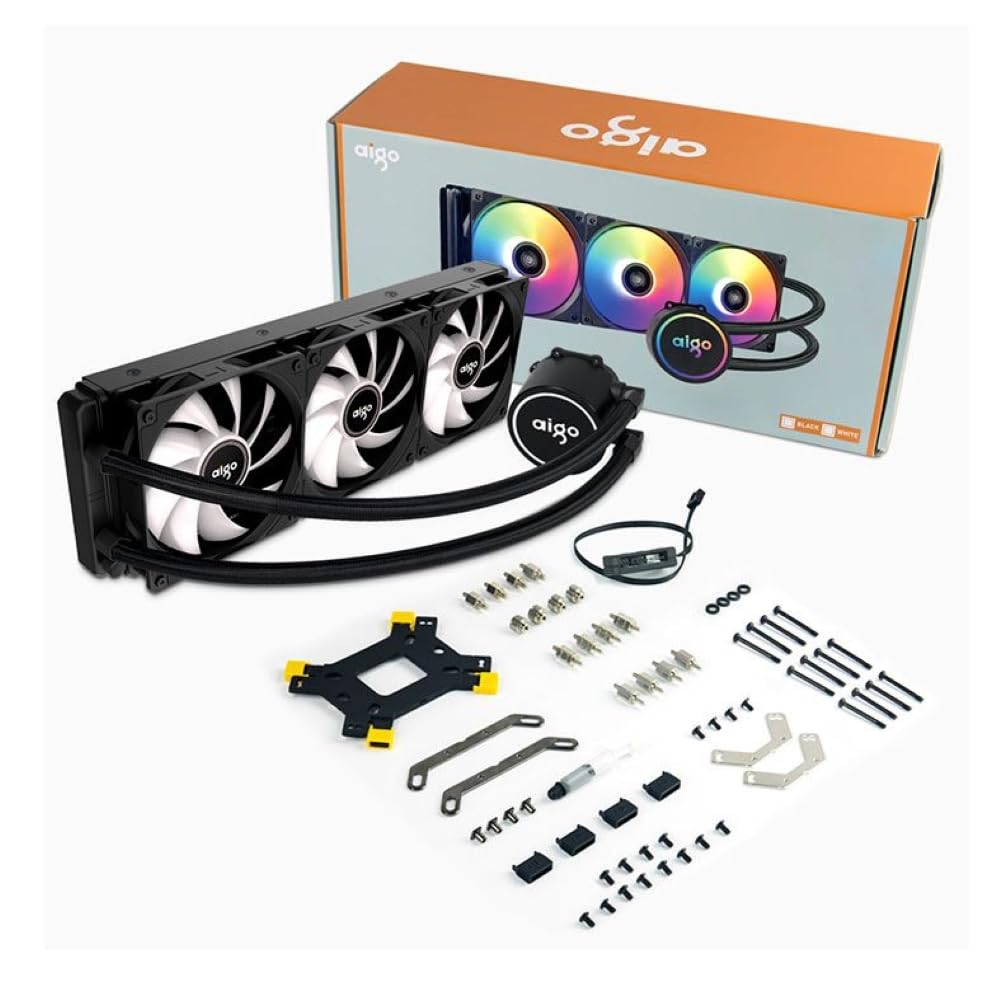
Image 3.1: All components included in the Aigo AC SE 360 package.
4. セットアップとインストール
Follow these steps for proper installation of your Aigo AC SE 360 Water Cooler:
- マザーボードを準備します。 Install the appropriate backplate and standoffs for your CPU socket (Intel: 115X, 1200, 1700, 2011, 2066; AMD: AM2, AM3, AM4, AM5). Refer to your motherboard manual for specific instructions.
- サーマルペーストを塗布します。 Clean the CPU surface. Apply a small amount of thermal paste to the center of the CPU IHS (Integrated Heat Spreader).
- Mount the CPU Block/Pump: Carefully place the CPU block onto the CPU, aligning it with the standoffs. Secure it with the provided screws, tightening them in a diagonal pattern until snug. The magnetic block design allows for easy rotation to align the logo or tubing as desired.
- ラジエーターにファンを取り付ける: Attach the three 120mm ARGB fans to the radiator using the longer screws provided. Ensure the fan airflow direction is correct for your case configuration (typically blowing air through the radiator).
- ラジエーターマウント: Install the radiator assembly into your PC case. The 360mm radiator is compatible with most ATX cases that support this size. Secure it with the appropriate screws.
- Connect Fans (Daisy Chain): The fans feature a daisy chain connection system. Connect the fans to each other in series, then connect the final fan's cable to the motherboard's fan header or an ARGB controller. This simplifies cable management by reducing the number of cables.
- ARGB照明を接続する: Connect the ARGB cables from the fans and pump to a 3-pin, 5V ARGB header on your motherboard or a dedicated ARGB controller. Ensure the voltage is correct (5V) to prevent damage.
- ポンプ電源を接続: Connect the pump's 4-pin power connector to a dedicated AIO_PUMP or CPU_FAN header on your motherboard.
- ケーブル管理 Organize all cables neatly to ensure proper airflow and a clean build.
5. 操作手順
Once installed, the Aigo AC SE 360 Water Cooler operates automatically to maintain optimal CPU temperatures. Here are key operational aspects:
- 自動冷却: The pump and fans will adjust their speed based on CPU temperature, ensuring efficient cooling. The pump operates at 12V with 3200 RPM, and fans operate between 800-1800 RPM.
- ARGB照明コントロール: The Rainbow ARGB lighting can be controlled via your motherboard's ARGB software (if connected to a compatible header) or through an included ARGB controller. This allows for various lighting effects and synchronization with other ARGB components.
- 騒音レベル: The cooler is designed for quiet operation, with a noise level of approximately 30 dB.
6. メンテナンス
Regular maintenance helps ensure the longevity and performance of your water cooler:
- ダストクリーニング: ラジエーターフィンとファンブレードは、空気の流れと冷却性能を低下させる可能性のある埃の蓄積を防ぐため、定期的に清掃してください。圧縮空気または柔らかいブラシを使用してください。
- チューブの検査: チューブにねじれ、漏れ、または損傷の兆候がないか確認します。
- 温度を監視します: Use monitoring software to keep an eye on your CPU temperatures. Significant increases may indicate a need for further inspection or cleaning.
- サーマルペースト: While not frequently required, reapplying thermal paste every few years can help maintain optimal thermal transfer.
7。 トラブルシューティング
If you encounter issues with your Aigo AC SE 360 Water Cooler, refer to the following common problems and solutions:
| 問題 | 考えられる原因 | 解決 |
|---|---|---|
| 高いCPU温度 | Insufficient thermal paste, poor contact, dust buildup, pump failure, fan failure. | Reapply thermal paste, ensure CPU block is securely mounted, clean radiator and fans, check pump/fan connections. |
| ファンが回転しない | Loose fan connection, incorrect fan header, faulty fan. | Check fan cables and connections, ensure connected to appropriate motherboard header, test fans individually if possible. |
| No ARGB Lighting | Loose ARGB connection, incorrect ARGB header (e.g., 12V instead of 5V), faulty ARGB component. | Verify ARGB cables are securely connected to a 3-pin, 5V ARGB header. Check motherboard manual for correct header. |
| 異常な音 | Air bubbles in loop, fan rubbing, pump issue. | Gently tilt the PC case to help dislodge air bubbles. Check for obstructions around fans. If pump noise persists, contact support. |
8. 仕様
| 特徴 | 詳細 |
|---|---|
| モデル | AC SE 360 |
| ラジエーターサイズ | 360 mm (394 x 120 x 27 mm) |
| ファンサイズ | 120ミリメートル |
| ファン速度 | 800-1800 回転 |
| 気流 | 64.05 CFM |
| 静圧 | 1.85mmH₂O |
| 騒音レベル | 30デシベル |
| ポンプ巻tage | 12ボルト |
| ポンプ速度 | 3200 回転 |
| 消費電力 | 3.24ワット |
| ベアリングタイプ | セラミックベアリング |
| TDP Supported | 280ワット |
| 互換性のあるソケット | Intel (LGA 115X, 1200, 1700, 2011, 2066), AMD (AM2, AM3, AM4, AM5) |
| 電源コネクタ | 4ピン |
| ARGB コネクタ | 3ピン、5V |
9. 保証とサポート
The Aigo AC SE 360 Water Cooler comes with a 12ヶ月保証 ご購入日から有効です。この保証は、通常の使用条件下での製造上の欠陥を対象としています。
For technical support, warranty claims, or any questions not covered in this manual, please contact your retailer or the Aigo customer support team. Please have your proof of purchase and product model number (ACSE360) ready when contacting support.