
1. はじめに
The Vrriis WL091 Wireless HDMI Transmitter and Receiver kit provides a seamless solution for streaming 1080P video and audio wirelessly. This device supports dual-mode flexible meetings, allowing for mirroring or extended display modes. It offers stable 5GHz transmission up to 330 feet (line of sight) and is compatible with various operating systems including Windows, Mac, iOS, and Android.
2. パッケージ内容
パッケージにすべてのアイテムが含まれていることを確認してください。
- ワイヤレスHDMIトランスミッター(TX)×1
- ワイヤレス HDMI レシーバー (RX) x 1
- 2 x 5V2A 電源アダプター
- タイプC電源ケーブル2本
- HDMI延長ケーブル1本
- ユーザーマニュアル x 1

Image: Contents of the Vrriis WL091 Wireless HDMI Transmitter and Receiver package, including the transmitter, receiver, power adapters, cables, and user manual.
3. セットアップ手順
Follow these steps to set up your Vrriis WL091 Wireless HDMI system:
- 送信機(TX)に電源を供給します。 Connect the provided 5V2A power adapter and Type-C cable to the Transmitter. The indicator light will turn green upon successful power-on.
- Connect Transmitter to Source Device: Plug the Transmitter into the HDMI port of your laptop, PC, or other source device.
- 受信機(RX)の電源を入れる: Connect the second 5V2A power adapter and Type-C cable to the Receiver.
- Connect Receiver to Display Device: Use an HDMI cable to connect the Receiver to your monitor, projector, or HDTV.
- 自動ペアリング: The Transmitter and Receiver are pre-paired from the factory. Once both are powered and connected, they will automatically establish a connection, and your screen will be mirrored or extended.
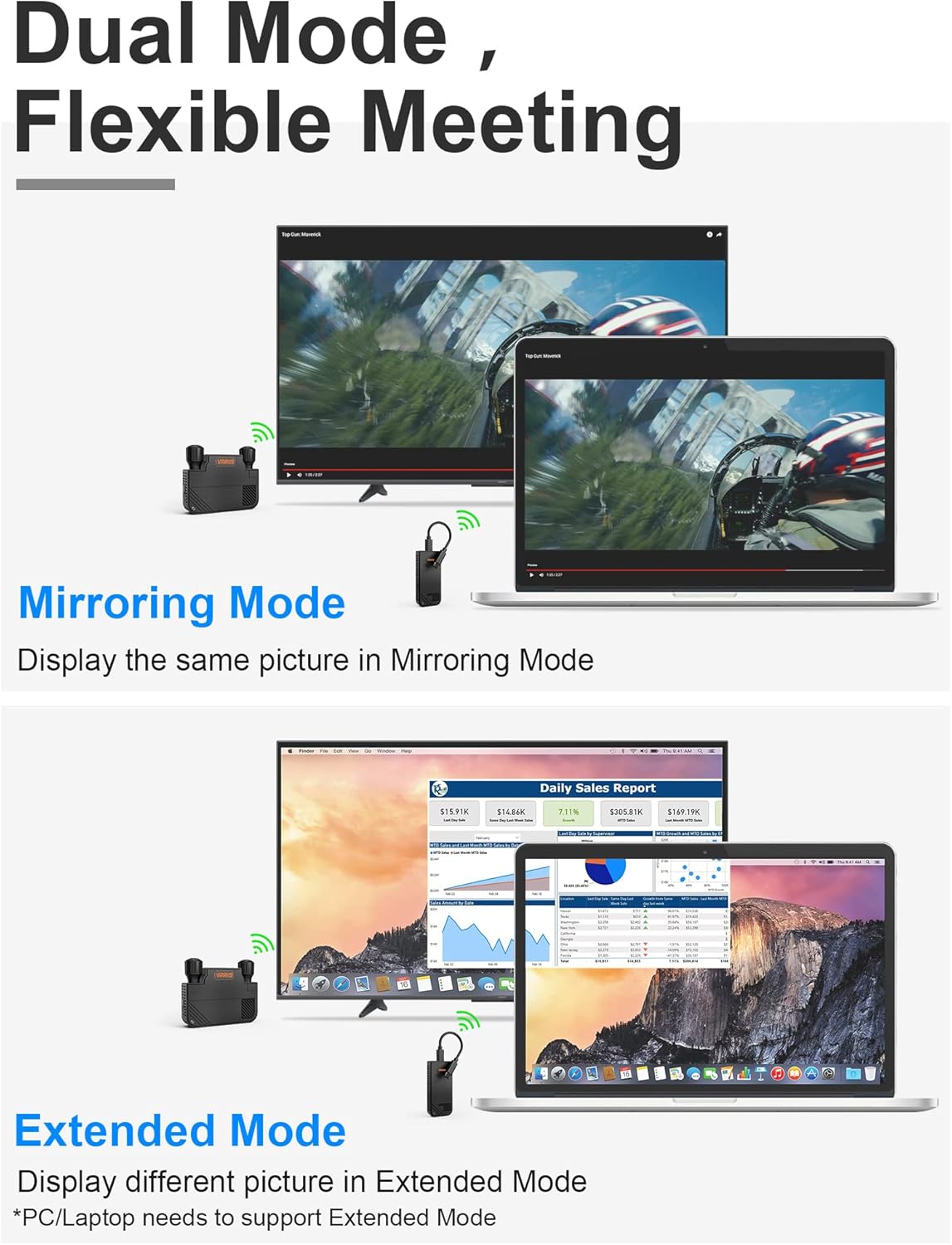
Image: The Vrriis WL091 Transmitter connected to a laptop's USB-C port, illustrating the compact design and plug-and-play functionality.
Video: A demonstration of how to connect the Vrriis WL091 Wireless HDMI Transmitter and Receiver to a laptop and display, showing the power-on sequence and automatic pairing.
4. 操作手順
4.1 Dual Mode Display (Mirroring & Extended)
システムは次の 2 つの表示モードをサポートしています。
- ミラーリングモード: The content displayed on your source device (e.g., laptop) will be duplicated on the large screen.
- 拡張モード: The large screen will act as an extension of your source device's display, allowing you to view different content on each screen. Note: Your PC/Laptop must support Extended Mode for this functionality.

Image: Visual representation of the mirroring mode, where the same content is shown on both screens, and extended mode, where different content is displayed.
4.2 複数の送信機から1つの受信機へ
The Vrriis WL091 system allows for connecting multiple transmitters to a single receiver, supporting up to 8 transmitters. This is ideal for flexible meeting environments where multiple presenters need to share their screens.
- Adding a New Transmitter: Each time a new transmitter is added to the system, it needs to be paired with the receiver.
- ペアリングプロセス:
- Ensure the receiver is powered on and connected to the display.
- On the receiver, press and hold the reset button (often accessible with a thimble or pin) until the display shows "Ready to Pair".
- On the new transmitter, press and hold the pause button.
- The screen will indicate "Pairing..." and then "Pairing OK" upon successful connection.
- Switching Between Transmitters: Once multiple transmitters are paired, you can switch between them with a single button press on the active transmitter.

Image: An office meeting room setup demonstrating multiple laptops wirelessly connected to a central display, highlighting the multi-transmitter capability.
Video: A guide on how to add additional transmitters to the Vrriis WL091 system, including the pairing process and switching between multiple source devices.
4.3 プライバシーモード
To temporarily stop casting your screen to the large display, press the pause button on the Transmitter. This will activate privacy mode, preventing your content from being shown on the shared screen. Press the button again to resume casting.
5. 仕様
| 特徴 | 仕様 |
|---|---|
| 製品寸法 | 3.74 x 1.37 x 0.74インチ |
| アイテム重量 | 4.6オンス |
| 接続技術 | 5GHzワイヤレス |
| 電源 | External Power (via 5V2A Adapter and Type C Cable) |
| 材料 | ポリカーボネート(PC) |
| 最大伝送距離 | 330FT (100M) Line of Sight; 132FT for Windows PC; 60FT through wall |
| 解決サポート | Ultra HD 1080P@60Hz |
| レイテンシー | 0.06年代 |
| 互換性 | Windows, Mac, iOS, Android (Phone/Tablet/Laptop to TV/Monitor/Projector with HDMI Port). Type C transmitter supports Thunderbolt 3/4, USB 3.1 GEN 1/2. |

画像: 詳細 view of the Vrriis WL091 Transmitter and Receiver, showing product dimensions.
6。 トラブルシューティング
- デバイスの温かさ: It is normal for the device to become slightly warm during operation. This does not affect its performance or safety.
- No Display/Connection Issues:
- Ensure both the Transmitter and Receiver are properly powered and their indicator lights are green.
- Verify all HDMI and Type-C cable connections are secure.
- Confirm your display device is set to the correct HDMI input.
- If using Extended Mode, ensure your PC/Laptop supports this feature.
- Re-attempt the pairing process if the connection is not established automatically.
7. 保証とサポート
The Vrriis WL091 Wireless HDMI Transmitter and Receiver comes with a 1年間のメーカー交換保証.
For any questions, concerns, or technical assistance, please contact our customer support. You can typically find a 'Ask a Question' option on the product's purchase page, and we aim to reply within 24 hours.