
インスタント 140-0095-01
インスタントソロ WIFIコネクト シングルサーブコーヒーメーカー 取扱説明書
モデル: 140-0095-01
導入
This manual provides essential instructions for the safe and efficient operation, maintenance, and troubleshooting of your Instant Solo WIFI Connect Single Serve Coffee Maker. Please read all instructions thoroughly before first use and retain this manual for future reference.
重要な安全対策
電気製品を使用するときは、火災、感電、および/または人への傷害のリスクを軽減するために、次のような基本的な安全上の注意事項に常に従う必要があります。
- すべての指示を読んでください。
- 熱い表面に触れないでください。ハンドルまたはノブを使用してください。
- 火災、感電、人への傷害を防ぐため、コード、プラグ、機器を水やその他の液体に浸さないでください。
- いかなる機器も、子供が使用したり、子供の近くで使用したりする場合には、厳重な監視が必要です。
- 使用していないときや清掃する前には、コンセントからプラグを抜いてください。部品の取り付けや取り外し、および機器の清掃を行う前には、機器が冷めるまで待ってください。
- コードやプラグが損傷している機器、または機器が故障したり、何らかの損傷を受けたりした場合は、機器を操作しないでください。
- 機器メーカーが推奨していない付属品を使用すると、火災、感電、または人身事故につながる可能性があります。
- 屋外では使用しないでください。
- コードをテーブルやカウンターの端から垂らしたり、熱い表面に触れたりしないでください。
- 高温のガスバーナーや電気バーナーの上や近く、または加熱されたオーブンの中に置かないでください。
- 必ず最初にプラグを機器に接続し、次にコードを壁のコンセントに差し込んでください。取り外すには、いずれかのスイッチを「オフ」にしてから、プラグを壁のコンセントから抜いてください。
- 本来の用途以外には機器を使用しないでください。
- 抽出中に蓋を外すとやけどする可能性があります。
製品終了view
Familiarize yourself with the components of your Instant Solo WIFI Connect Single Serve Coffee Maker.

Image: The Instant Solo WIFI Connect Coffee Maker, shown brewing coffee into a mug, with a smartphone displaying the Instant Brands Connect app interface.

画像: 詳細な view of the coffee maker's top control panel with touch buttons for power, Wi-Fi, brew sizes (8oz, 10oz, 12oz), and the reusable coffee pod being inserted.
主要コンポーネント:
- コントロールパネル: Touch-sensitive buttons for power, Wi-Fi, and brew size selection.
- 貯水池: Removable 40oz capacity for water.
- 醸造責任者: Area where K-Cup pods or the reusable coffee pod are placed.
- 受け皿: Removable and dishwasher-safe tray to catch drips and accommodate travel mugs.
- Reusable Coffee Pod: Included for brewing with ground coffee.
設定
初期クリーニング:
- コーヒーメーカーから梱包材とステッカーをすべて取り除きます。
- Wash the water reservoir, reusable coffee pod, and drip tray in warm, soapy water. Rinse thoroughly and dry.
- コーヒーメーカーの外側を広告で拭きますamp 布。
初回使用時(クリーニングサイクル):
- 水タンクに真水をMAXラインまで入れます。
- 大きめのマグカップ(少なくとも12オンス)をドリップトレイに置きます。
- Do not insert a K-Cup pod or the reusable coffee pod.
- 電源ボタンを押してコーヒーメーカーの電源を入れます。
- Select the 12oz brew size. The machine will perform a hot water cycle to clean the internal components.
- Discard the hot water. Repeat this process 2-3 times to ensure thorough cleaning.
Water Reservoir Refill:

Image: A hand pouring water into the transparent, removable 40oz water reservoir of the Instant Solo coffee maker, highlighting its slim design and dimensions.
The 40oz removable water reservoir allows for multiple brews before refilling. To refill, simply lift the reservoir from the back of the unit and fill with fresh, cold water. Replace it securely on the coffee maker.
操作手順
ホットコーヒーの淹れ方:
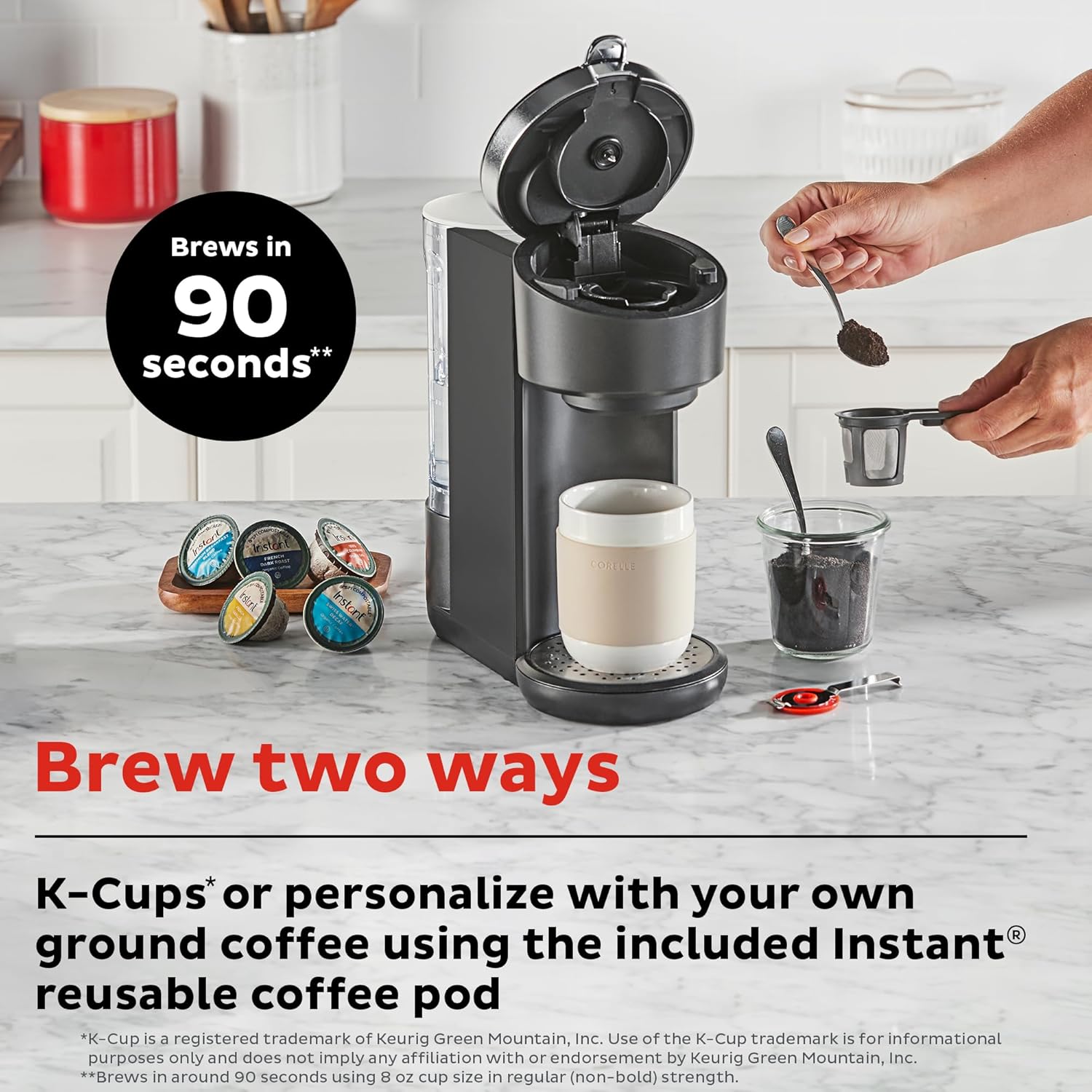
Image: The Instant Solo coffee maker on a countertop, illustrating the two brewing methods: using K-Cup compatible pods or filling the reusable coffee pod with ground coffee.
Using K-Cup Compatible Pods:
- 水タンクが満たされていることを確認してください。
- ブリューヘッドハンドルを持ち上げます。
- Insert a K-Cup compatible pod into the pod holder. Close the handle firmly.
- マグカップをドリップトレイの上に置きます。
- Press the power button. Select your desired brew size (8oz, 10oz, or 12oz).
- The coffee maker will begin the brewing process.
Using Ground Coffee with Reusable Pod:
- 水タンクが満たされていることを確認してください。
- Open the reusable coffee pod and fill it with your preferred ground coffee. Do not overfill.
- Close the reusable pod and insert it into the brew head. Close the handle firmly.
- マグカップをドリップトレイの上に置きます。
- Press the power button. Select your desired brew size (8oz, 10oz, or 12oz).
- The coffee maker will begin the brewing process.
Bold Setting and Pre-Infusion:

Image: A cutaway diagram showing the three stages of the pre-infusion brew process: Infuse (grounds soaked), Pause (grounds saturate), and Brew (remaining water extracted).
The Instant Solo features a pre-infusion brew process that gently soaks the coffee grounds before full brewing. This process enhances flavor and aroma. To activate the Bold setting for a stronger brew, select the 'Bold' option on the control panel or through the Instant Brands Connect app before selecting your brew size.
Brewing Iced Coffee:

Image: A graphic illustrating the customization capabilities of the coffee maker, including brew sizes (8, 10, 12 oz on device; 4, 8 oz via app), the Bold setting for deeper flavor, and the Iced Coffee mode accessible through the app.
To prepare iced coffee, fill your glass with ice cubes. Select the 'Bold' feature and choose an 8, 10, or 12oz brew size. The machine will brew a concentrated coffee over the ice. You may add milk or other ingredients after brewing to complete your iced coffee.
Wi-Fi Connect & App Usage:

Image: The Instant Solo coffee maker on a kitchen counter, with a hand holding a smartphone showing the Instant Brands Connect app, indicating remote control functionality.
The Instant Solo WIFI Connect coffee maker can be controlled remotely using the Instant Brands Connect app. This app allows you to initiate brewing, customize settings, and receive notifications.
- Download the Instant Brands Connect app from your device's app store (available for iOS and Android).
- Follow the in-app instructions to connect your coffee maker to your home Wi-Fi network.
- Once connected, you can use the app to select brew sizes (including additional 4oz and 6oz options), adjust brew strength, activate Iced Coffee mode, and schedule brewing.
- The app also provides notifications regarding brewing status and maintenance reminders.
メンテナンス
クリーニング:
- 外観: 外側を拭くamp柔らかい布で拭いてください。研磨剤入りの洗剤は使用しないでください。
- 貯水池: The 40oz removable water reservoir is dishwasher safe (top rack recommended) or can be hand-washed with warm, soapy water.
- 受け皿: The removable drip tray is dishwasher safe (top rack recommended) or can be hand-washed.
- Reusable Coffee Pod: 使用後は毎回温かい石鹸水で洗ってください。
- 醸造責任者: Periodically wipe the area around the brew head with a damp 布。
スケール除去:
Over time, mineral deposits (scale) can build up in your coffee maker, affecting performance. Descaling should be performed regularly, depending on water hardness and frequency of use.
- 水タンクを空にします。
- Fill the reservoir with a mixture of white vinegar and water (e.g., 1:1 ratio) or a commercial descaling solution according to product instructions.
- ドリップトレイに大きなマグカップを置きます。
- Run several 12oz brew cycles until the reservoir is empty. Do not insert a coffee pod during descaling.
- After descaling, rinse the reservoir thoroughly and fill it with fresh water.
- Run several 12oz brew cycles with fresh water to flush out any remaining descaling solution.
トラブルシューティング
| 問題 | 考えられる原因 | 解決 |
|---|---|---|
| コーヒーが淹れられない | タンクに水がありません。抽出ヘッドが閉じられていません。電源に問題があります。 | Fill reservoir; ensure brew head handle is fully down; check power connection. |
| 弱いコーヒー | Insufficient coffee grounds; incorrect brew size; descaling needed. | Use more grounds or a finer grind; select smaller brew size; activate Bold setting; descale the machine. |
| コーヒーが溢れる | Mug too small; reusable pod overfilled. | Use a larger mug; do not overfill reusable pod. |
| Wi-Fi接続の問題 | Wi-Fi パスワードが間違っている、ルーターが遠すぎる、アプリが更新されていない。 | Verify password; move coffee maker closer to router; update Instant Brands Connect app. |
| Machine flashes lights | Error indicator; descaling reminder. | Refer to app for specific error codes; perform descaling if due. |
仕様
- ブランド: インスタント
- モデル名: Instant Solo WIFI Connect
- モデル番号: 140-0095-01
- 色: 黒
- 製品寸法: 奥行き12.2インチ x 幅5.3インチ x 高さ12.4インチ (奥行き31 cm x 幅13.5 cm x 高さ31.5 cm)
- 商品の重量: 4.6ポンド
- 貯水容量: 40オンス
- 抽出サイズ: 8oz, 10oz, 12oz (additional 4oz, 6oz via app)
- 特集: App-Controlled, Pre-Infusion Brew Process, Bold Setting, Iced Coffee Mode
- 互換性: K-Cup compatible pods, ground coffee with reusable pod
- 動作モード: 完全自動
- ヒューマン インターフェイス入力: タッチスクリーン
- 国際コード: 810028589940
保証とサポート
For warranty information and customer support, please refer to the warranty card included with your product or visit the official Instant Brands website. You can also find additional resources and frequently asked questions on the Instant Brands Connect app.
Ask a question about this manual
Ask about setup, troubleshooting, compatibility, parts, safety, or missing instructions. Manuals+ will review the question and use this page’s manual context to help answer it.