
導入
This manual provides comprehensive instructions for the installation, operation, and maintenance of your Natec Cabassu G2 Midi Tower PC Case. Please read this manual thoroughly before beginning installation to ensure proper setup and optimal performance.
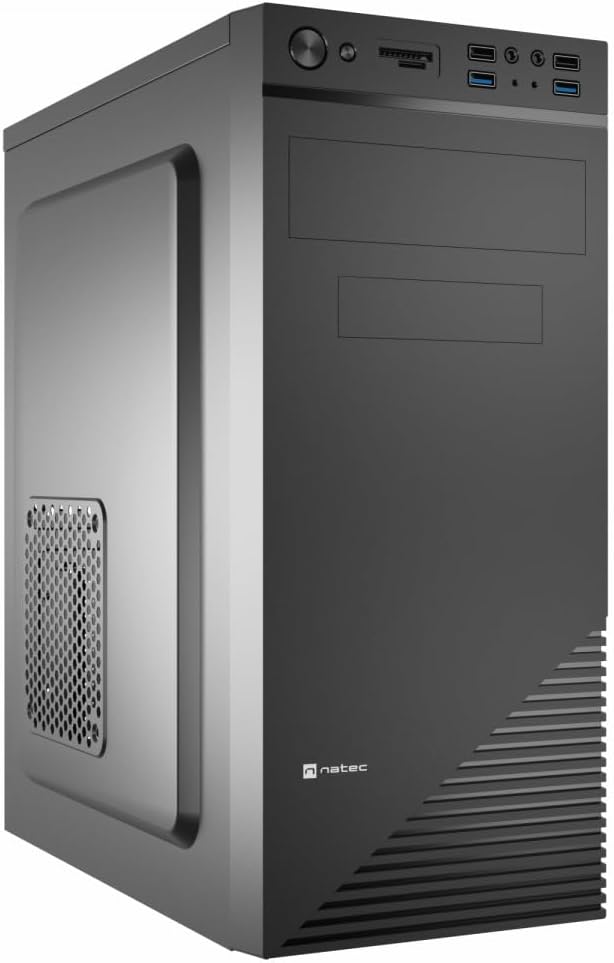
Figure 1: Natec Cabassu G2 Midi Tower PC Case. This image shows the front and left side of the black PC case, highlighting its sleek design and front panel layout.
安全情報
- コンポーネントの取り付けまたは取り外しを行う前に、必ず壁のコンセントから電源を抜いてください。
- 静電気による損傷を防ぐため、コンポーネントを慎重に取り扱ってください。
- Keep the case away from water, moisture, and extreme temperatures.
- 過熱を防ぐために適切な換気を確保してください。
- Do not attempt to open the power supply unit.
パッケージ内容
パッケージにすべてのアイテムが揃っていることを確認します。
- Natec Cabassu G2 Midi Tower PC Case
- アクセサリキット(ネジ、スタンドオフ、ケーブルタイ)
- ユーザーマニュアル(このドキュメント)
セットアップとコンポーネントのインストール
1. ケースの準備
- ケースを平らで安定した面に置きます。
- 背面の蝶ネジを外し、パネルを後方にスライドさせて、サイドパネルを取り外します。

図2: 内部 view of the Natec Cabassu G2 case with the side panel removed, illustrating the internal layout for component installation.
2. マザーボードの取り付け
- I/O シールドをケースの背面開口部に取り付けます。
- Align the motherboard with the pre-installed standoffs. The Cabassu G2 supports Mini ITX, Micro ATX, and ATX motherboards.
- 付属のネジでマザーボードを固定します。
3.電源装置の設置
- The power supply mounts at the bottom of the case.
- Slide the power supply into its designated bay from the rear of the case.
- Secure it with screws from the rear.
4. ストレージドライブのインストール
- 2.5" Drives (SSDs/HDDs): The case features 3 x 2.5" drive bays. Mount drives using the provided screws in the designated locations.
- 3.5" Drives (HDDs): The case also supports 3.5" drives.
5. 拡張カードの取り付け
- Remove the necessary expansion slot covers from the rear of the case (7 expansion slots available).
- グラフィック カードまたはその他の拡張カードをマザーボードの PCIe スロットに挿入します。
- カードをネジで固定します。

図3:背面 view of the Natec Cabassu G2 case, detailing the I/O shield cutout, power supply opening, and seven expansion slots.
6.ケーブル管理
Route cables behind the motherboard tray where possible to improve airflow and aesthetics. Use the included cable ties to secure bundles.
7. フロントパネルケーブルの接続
Connect the front panel cables (USB 2.0, USB 3.0, audio, power switch, reset switch, HDD LED, power LED) to the corresponding headers on your motherboard. Refer to your motherboard manual for exact pin assignments.

Figure 4: Close-up of the Natec Cabassu G2 front panel, showing 2x USB 2.0 ports, 2x USB 3.0 ports, audio jacks, and power/reset buttons.
操作手順
電源のオン/オフ
- 電源オン: フロントパネルにある電源ボタンを押します。
- 電源を切る: Initiate shutdown through your operating system. For a forced shutdown, press and hold the power button for several seconds.
- リセット: Press the reset button on the front panel to restart the system.
Using Front Panel Ports
フロントパネルから以下の機能に簡単にアクセスできます。
- USB 2 ポート x 2.0
- USB 2 ポート x 3.0
- Audio input (microphone) and output (headphone) jacks
Connect compatible devices to these ports as needed.
メンテナンス
クリーニング
- ケースの外側は定期的に柔らかくて乾いた布で拭いてください。amp 布。 研磨剤入りクリーナーは避けてください。
- Use compressed air to remove dust from fan filters and internal components. Ensure the system is powered off and unplugged before cleaning.
ダストフィルター
The case may include removable dust filters. Periodically remove and clean these filters to maintain optimal airflow and cooling performance.
トラブルシューティング
| 問題 | 考えられる原因 | 解決 |
|---|---|---|
| システムの電源が入らない。 | Power cables not connected properly. Faulty power supply. | Check all power connections (motherboard, CPU, GPU, power supply to wall). Ensure power supply switch is ON. |
| フロントパネルの USB ポートが機能しません。 | Front panel USB cables not connected to motherboard. | Verify that the USB 2.0 and USB 3.0 headers are correctly connected to the motherboard. |
| ファンの騒音が大きすぎる。 | Dust accumulation. Loose fan. | Clean dust from fans and filters. Ensure all fans are securely mounted. |
仕様
| 特徴 | 詳細 |
|---|---|
| モデル名 | Cabassu G2 |
| 商品型番 | S5624687 |
| ケースタイプ | ミディタワー |
| 寸法(長さx幅x高さ) | 19.69 x 19.69 x 11.02 インチ (50 x 50 x 28 cm) |
| 重さ | 7.04ポンド(3.19kg) |
| 材料 | アクリロニトリルブタジエンスチレン(ABS)、合金鋼 |
| マザーボードの互換性 | ミニITX、マイクロATX、ATX |
| 2.5インチドライブベイ | 3 |
| 拡張スロット | 7 |
| フロントI / Oポート | USB 2.0 x 2、USB 3.0 x 2、オーディオ入力/出力 |
| ファンサポート | 120mm (rear, pre-installed if applicable) |
| 冷却方法 | 空気 |
| 電源の取り付け | ボトムマウント |
保証情報
Natec products are covered by a manufacturer's warranty. Specific warranty terms and conditions may vary by region and retailer. Please refer to the warranty card included with your product or visit the official Natec website for detailed information regarding warranty coverage and claims.
サポート
For technical assistance, troubleshooting, or further inquiries, please visit the official Natec support web公式サイトをご覧いただくか、カスタマーサービス部門にお問い合わせください。連絡先は通常、製品のパッケージまたは公式ブランドロゴに記載されています。 webサイト。
Webサイト: www.natec-zone.com (元amp(リンクは変更される場合があります)