
レッドドラゴンM990
Redragon M990 MMO Gaming Mouse Instruction Manual
モデル: M990 | ブランド: Redragon
導入
Thank you for choosing the Redragon M990 MMO Gaming Mouse. This high-precision wired RGB gaming mouse is designed for optimal performance with 23 programmable buttons, 16 side macro keys, and an aluminum base. This manual provides essential information for setting up, operating, and maintaining your device.
主な特徴
- High-End Optical Sensor: Equipped with a professional optical sensor (PAW3389) for precise tracking.
- 調整可能なDPI: 5 redefinable DPI levels (default: 1000/2000/4000/8000/16000), software adjustable from 100-32000 DPI.
- 23 つのプログラム可能なボタン: Includes 16 side macro keys and a dedicated fire button for extensive customization.
- ダイナミックRGBバックライト: 5 distinct backlit modes with 16.8 million RGB LED color options. LED backlight can be disabled. 5 memory profiles, each with a dedicated light color for quick identification.
- ウェイトチューニングシステム: Includes an 8-piece weight tuning set (2.4g x8) for personalized balance and feel.
- 耐久性のある構造: Features an aluminum base for enhanced stability and smooth movement.
- 人間工学に基づいたデザイン: 長時間のゲームセッションでも快適にプレイできるよう作られています。
- 幅広い互換性: Compatible with Windows XP/VISTA/7/8/10/11 for programmable functions and Mac OS for normal use.
セットアップガイド
1. マウスの接続
The Redragon M990 is a wired mouse. Simply plug the USB connector into an available USB port on your computer. The mouse will be recognized automatically by most operating systems for basic functionality.
2. Software Installation for Customization
To unlock the full potential of your M990 mouse, including DPI customization, button programming, macro settings, and RGB lighting effects, you need to install the official Redragon software.
- 公式Redragonをご覧ください webサイト。
- 「ダウンロード」または「サポート」セクションに移動します。
- Locate the software for the Redragon M990 model.
- Download and run the installer, following the on-screen instructions.
- Once installed, launch the software to begin customizing your mouse.
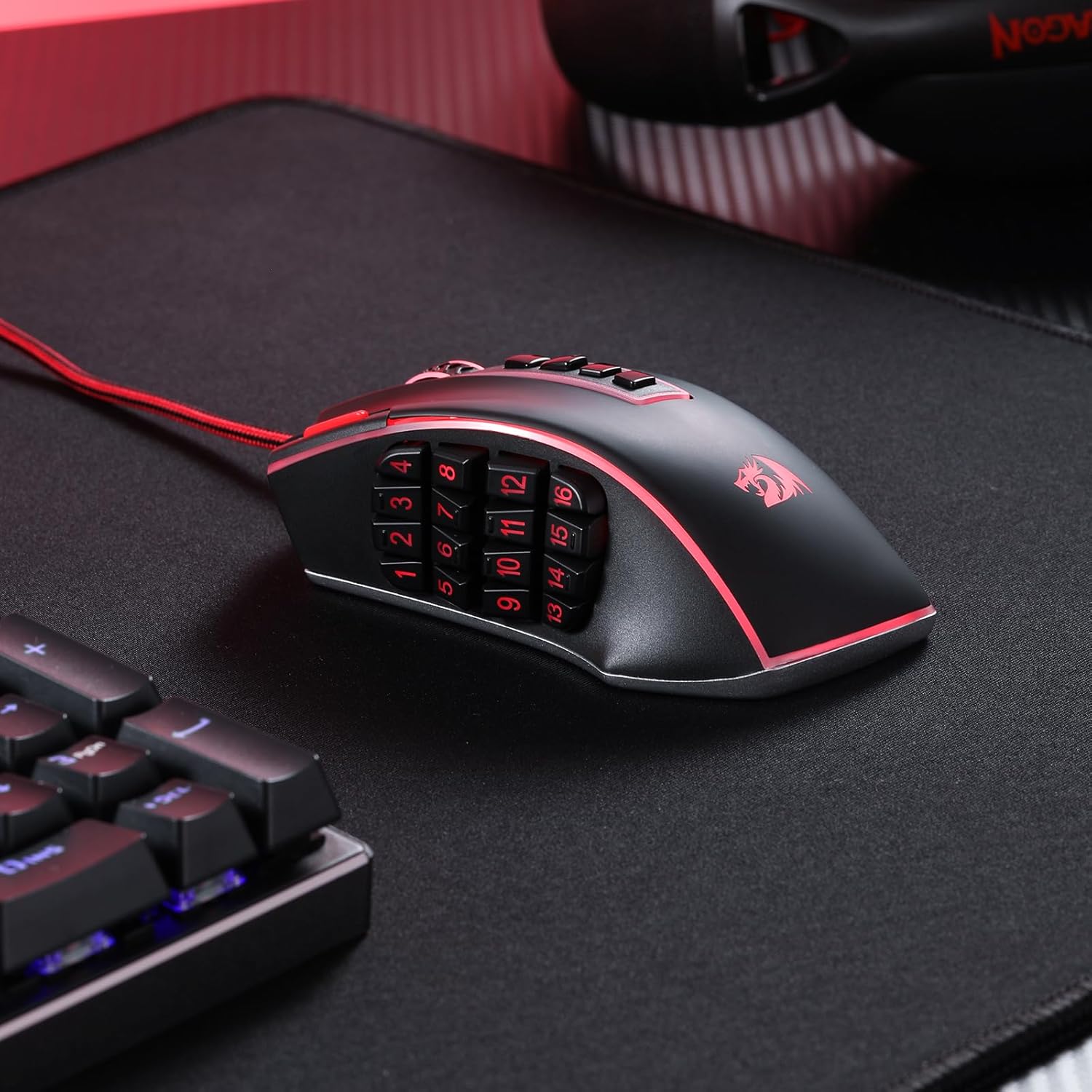
Image: Redragon M990 software interface for customization.
3. Weight Tuning Adjustment
The M990 mouse includes an 8-piece (2.4g each) weight tuning set, allowing you to adjust the mouse's weight and balance to your preference.
- マウスの下側にある重り入れ部分を見つけます。
- コンパートメントを開けます。
- Add or remove weights as desired to achieve your preferred feel.
- 収納部をしっかりと閉めてください。

Image: Underside of the Redragon M990 mouse showing the weight tuning compartment and included weights.
操作手順
1. DPI調整
The M990 features dedicated buttons for on-the-fly DPI adjustment. There are 5 redefinable DPI levels, with defaults set at 1000, 2000, 4000, 8000, and 16000 DPI. You can further customize these levels and set a range from 100 to 32000 DPI using the Redragon software.

Image: Graphic illustrating the customizable DPI levels of the Redragon M990 mouse.
2. Programmable Buttons and Macro Keys
The mouse boasts 23 programmable buttons, including 16 side macro keys. These buttons can be assigned various functions, macros, or keybinds through the Redragon software to suit your gaming or work needs.
- Side Macro Keys: The 16 buttons on the side are ideal for complex commands in MMO games or for quick access to software functions.
- Dedicated Fire Button: A specific button designed for rapid firing actions in games.
- ソフトウェアのカスタマイズ: Use the Redragon software to record macros, assign single key presses, or complex sequences to any of the programmable buttons.

画像: クローズアップ view of the Redragon M990 mouse highlighting the 16 side programmable buttons.
3. RGBバックライト制御
The M990 features dynamic RGB backlighting with 5 distinct modes and 16.8 million color options. You can customize the lighting effects, brightness, and even disable the LEDs via the software. The mouse supports 5 memory profiles, each identifiable by a dedicated light color.

Image: The Redragon M990 mouse displaying its dynamic RGB backlighting.
メンテナンス
Proper maintenance ensures the longevity and optimal performance of your Redragon M990 mouse.
- クリーニング: Regularly clean the mouse surface and sensor with a soft, dry cloth. Avoid using harsh chemicals or abrasive materials.
- ケーブルのお手入れ: 損傷を防ぐため、USB ケーブルを急激に曲げたり、過度に引っ張ったりしないでください。
- ストレージ: 使用していないときは、マウスを極端な温度を避け、清潔で乾燥した環境に保管してください。
トラブルシューティング
If you encounter issues with your Redragon M990 mouse, refer to the following common solutions:
- マウスが反応しない:
- USB ケーブルが動作している USB ポートにしっかりと差し込まれていることを確認します。
- ポートまたはシステムの問題を排除するために、マウスを別の USB ポートまたは別のコンピューターに接続してみてください。
- Software Issues (Settings Not Saving/Forgetting Bindings):
- Ensure the Redragon software is up-to-date. Check the official web最新バージョンのサイト。
- ソフトウェアを管理者として実行します。
- 問題が解決しない場合は、ソフトウェアを再インストールしてください。
- Ensure no other mouse customization software is running simultaneously, as this can cause conflicts.
- Squeaking or Mushy Buttons:
- This can sometimes occur with new mice. Continued use may alleviate the issue.
- Ensure no debris is lodged around the buttons. Gently clean around the buttons with compressed air.
- If the issue significantly impacts functionality, contact Redragon support.
- Cursor Movement Issues (Lag/Jitter):
- マウスの裏側にある光学センサーを清掃します。
- マウスを適切な表面(マウスパッドなど)で使用してください。反射率の高い表面や凹凸のある表面は避けてください。
- Adjust DPI settings in the software or using the on-mouse buttons.
仕様
| モデル番号 | M990 |
| 接続技術 | USB有線 |
| 動き検出技術 | 光学 |
| DPI範囲 | 100-32000 (Software Adjustable) |
| プログラム可能なボタン | 23個(サイドマクロキー16個を含む) |
| RGBバックライト | 5つのモード、16.8万色 |
| 重量調整システム | 2.4gのウェイト8個付属 |
| 製品寸法 | 4.81 x 3.62 x 0.04インチ |
| アイテム重量 | 7.1オンス |
| 互換性 | Windows XP/VISTA/7/8/10/11 (programmable), Mac OS (normal use) |
保証とサポート
For warranty information, technical support, or further assistance with your Redragon M990 MMO Gaming Mouse, please visit the official Redragon web公式サイトをご覧いただくか、カスタマーサービスに直接お問い合わせください。保証請求のために購入時のレシートを保管してください。
No official instructional videos from the seller were available in the provided data. Please refer to the written instructions and the Redragon support web詳細なガイダンスについては、サイトを参照してください。
Ask a question about this manual
Ask about setup, troubleshooting, compatibility, parts, safety, or missing instructions. Manuals+ will review the question and use this page’s manual context to help answer it.