
トキスコ TO1
Tkisko TO1 プロジェクター ユーザーマニュアル
モデル: TO1 | ブランド: Tkisko
1.製品オーバーview
The Tkisko TO1 Projector is designed to deliver a high-quality visual experience with native 1080P resolution and 4K support. It features electric focus, 4D/4P keystone correction, and versatile connectivity options including Wi-Fi and Bluetooth.
箱の中身
- Tkisko TO1 プロジェクター
- リモートコントロール
- バックパックを背負う
- 電源コード
- AVケーブル
- HDMIケーブル
- ユーザーマニュアル
ビデオの説明: 簡単な説明view of the Tkisko TO1 projector, showcasing its compact size and ease of use in a home setting, projecting onto a ceiling.
ビデオの説明: An unboxing video demonstrating the contents of the Tkisko TO1 projector package, including the projector, remote, and various cables.
2.セットアップガイド
2.1 初期配置とパワー
Place the projector on a stable, flat surface or mount it securely. Ensure adequate ventilation around the device. Connect the power cord to the projector and then to a power outlet.
2.2 フォーカスとキーストーン補正
The Tkisko TO1 features electric focus and 4D/4P keystone correction for optimal image clarity and shape. Use the remote control to adjust these settings.
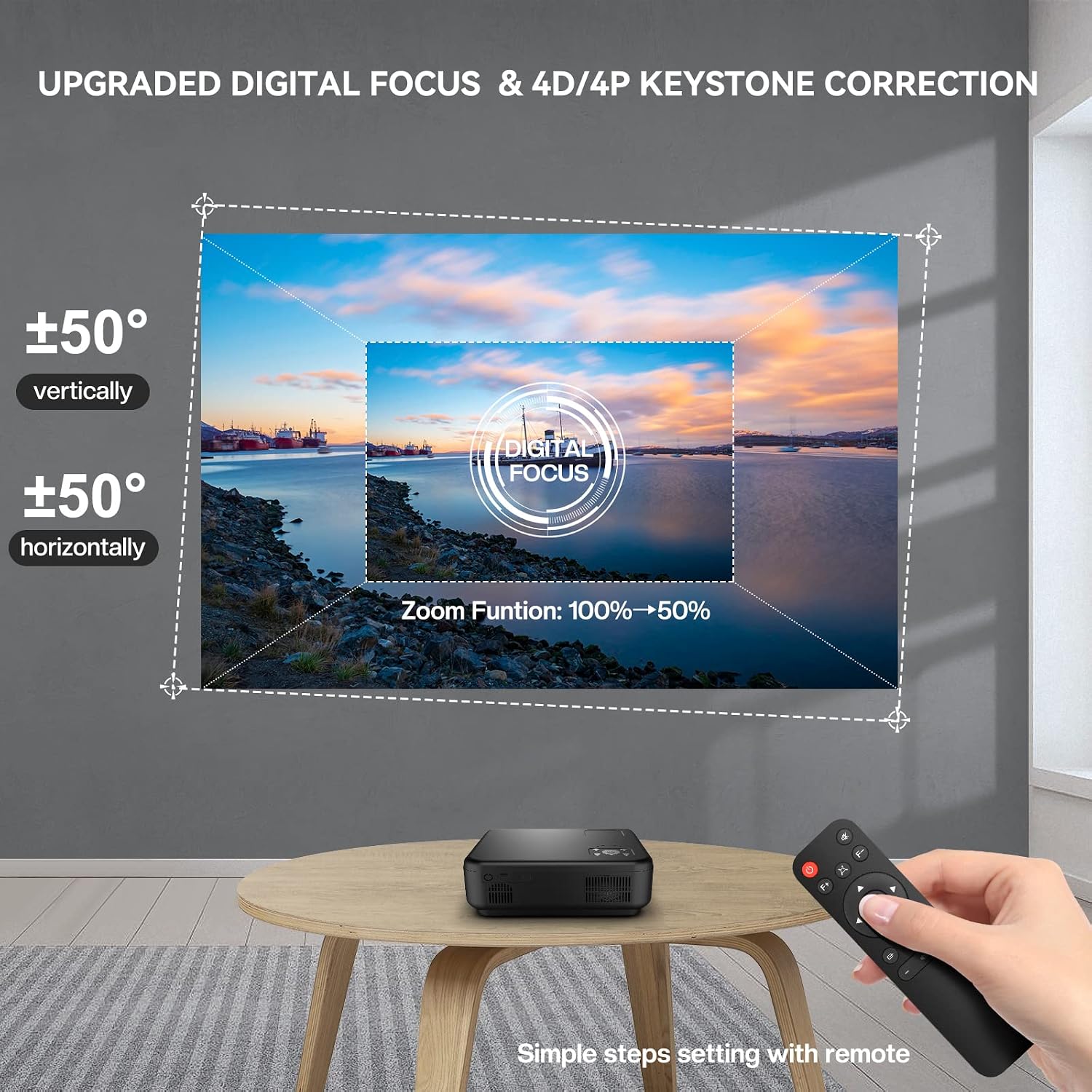
画像の説明: A Tkisko TO1 projector projecting an image onto a wall, with a remote control in hand demonstrating the digital focus and 4D/4P keystone correction features. The projected image shows vertical and horizontal adjustment capabilities and a 50% zoom function.
ビデオの説明: A demonstration of the Tkisko TO1 projector's menu navigation and projection settings, including adjusting the projection mode and keystone correction.
2.3 接続性
プロジェクターには複数の入力オプションがあります。
- HDMI: HDMI ケーブルを使用して、ノートパソコン、ゲーム機、TV スティックなどのデバイスを接続します。
- USB: メディアを再生するには USB ドライブを接続します。
- AV: 古いデバイスには AV ケーブルを使用してください。
- 3.5mmオーディオジャック: 外部スピーカーまたはヘッドフォンを接続します。

画像の説明: The Tkisko TO1 projector displayed with various connectivity options such as AV, AUX, USB, and HDMI, alongside compatible devices like a smartphone, tablet, gaming controller, and headphones.
3. 操作手順
3.1 電源オン/オフ
プロジェクターまたはリモコンの電源ボタンを押して、デバイスの電源をオンまたはオフにします。
3.2 ワイヤレス接続(Wi-Fi)
The projector supports 5G+2.4G Wi-Fi for smooth streaming. Navigate to the Wi-Fi settings in the projector's menu, select your network, and enter the password.

画像の説明: A Tkisko TO1 projector projecting a large image onto a wall, demonstrating 5G wireless screening from a smartphone. Icons indicate compatibility with iPhone, Android phones, MacBook, and Windows laptops.
3.3Bluetoothオーディオ
Connect external Bluetooth speakers or headphones for enhanced audio. The projector features 5.1 bidirectional Bluetooth. Go to Bluetooth settings, enable Bluetooth, and pair with your desired device.

画像の説明: The Tkisko TO1 projector connected via Bluetooth 5.1 to an external speaker, illustrating its bidirectional Bluetooth capability. It also shows the projector being used as a standalone Bluetooth speaker, with a smartphone connected.
3.4 画像サイズの調整(ズーム)
The projector supports a 50% zoom function, allowing you to reduce the image size from 100% to 50% without moving the projector. This can be adjusted via the remote control.

画像の説明: A visual representation of the Tkisko TO1 projector's adjustable screen size, showing projections of 50, 100, and 300 inches against a scenic backdrop, emphasizing optimal view距離。
ビデオの説明: A quick demonstration of the Tkisko TO1 projector's initial setup, showing the projected image and basic functionality.
4. メンテナンス
Proper maintenance ensures the longevity and optimal performance of your Tkisko TO1 Projector.
4.1 レンズケア
- Use a soft, lint-free cloth to gently wipe the projector lens.
- 頑固な汚れには、光学表面専用に設計されたレンズ洗浄液を使用してください。
- Avoid abrasive materials or harsh chemicals that can scratch the lens.
4.2 防塵
The Tkisko TO1 features a fully sealed optical engine designed to protect the lens from dust and scratches, contributing to a longer lifespan. However, regular cleaning of the exterior and ensuring the projector is stored in a clean environment is recommended.
4.3一般的なクリーニング
- プロジェクターの外側を柔らかく乾いた布で拭いてください。
- Do not use liquid cleaners or aerosols directly on the projector.
- Ensure ventilation ports are clear of obstructions to prevent overheating.
5。 トラブルシューティング
If you encounter issues with your Tkisko TO1 Projector, refer to the following common problems and solutions:
5.1 No Image or Blurry Projection
- フォーカスを確認: Use the electric focus function via the remote control to sharpen the image.
- キーストーンを調整: If the image is trapezoidal, use the 4D/4P keystone correction to square it.
- 入力ソース: 正しい入力ソース (HDMI、USB、AV) が選択されていることを確認します。
- ケーブル接続: すべてのケーブルがしっかりと接続されていることを確認します。
5.2 音が出ない
- 音量レベル: プロジェクターと接続されたデバイスの両方の音量を上げます。
- オーディオ出力: Check if external speakers or headphones are properly connected via Bluetooth or the 3.5mm audio jack.
- ソースオーディオ: Ensure the audio is enabled on the source device.
5.3 リモートコントロールの問題
- 電池: リモコンの電池を交換してください。
- 視線: リモコンとプロジェクターの IR 受信機の間に障害物がないことを確認してください。
- 距離: Operate the remote within the recommended range.
5.4 ワイヤレス接続の問題
- Wi-Fi信号: Ensure the projector is within range of your Wi-Fi router and the signal is strong.
- ネットワーク パスワード: Wi-Fi パスワードを再確認してください。
- デバイスの互換性: Confirm your device supports the projector's wireless screening protocols (e.g., AirPlay, Miracast).
6. 仕様
| 特徴 | 仕様 |
|---|---|
| ブランド | ツキスコ |
| モデル名 | TO1 |
| ネイティブ解像度 | 1920×1080 |
| ディスプレイ解像度最大 | 1920 x 1080 (4K対応) |
| 輝度 | 700 ANSI (20000 Lux) |
| コントラスト比 | 20000:1 |
| 接続技術 | HDMI, USB, AV, 3.5mm Audio Jack, Wi-Fi (5G+2.4G), Bluetooth 5.1 |
| 表示タイプ | 情報漏洩防止 |
| フォームファクター | ポータブル |
| 取り付けタイプ | 卓上マウント |
| 推奨用途 | 屋内 |
| 光源の動作寿命 | 30000時間 |
| 最小画像サイズ | 40インチ |
| 最大画像サイズ | 300インチ |
| 商品の寸法(長さ x 幅 x 高さ) | 長さ10.24インチ x 幅8.27インチ x 高さ4.02インチ |
| アイテム重量 | 5グラム |
7. 保証とサポート
The Tkisko TO1 Projector comes with a 3年間保証. For any technical assistance or product-related inquiries, please contact Tkisko customer support. Our team is ready to help you within 24 hours.
連絡先:
- メールアドレス: support_us@tkisko.com
- Webサイト: Tkisko Official Store
Ask a question about this manual
Ask about setup, troubleshooting, compatibility, parts, safety, or missing instructions. Manuals+ will review the question and use this page’s manual context to help answer it.