
1. はじめに
Thank you for choosing the Osee LCM215-HDR+ 21.5 Inch Full HD Field Production Monitor. This monitor is designed for professional video production, offering a 1500-nit ultra-high brightness panel, excellent backlight uniformity, and comprehensive input/output options. This manual provides essential information for the safe and efficient use of your monitor, including setup, operation, maintenance, and troubleshooting.
2. 安全情報
- 電源: Use only the specified power adapter. Ensure the power source matches the monitor's requirements.
- 換気: 通気口を塞がないでください。過熱を防ぐため、モニターの周囲に十分な空気の流れを確保してください。
- 水と湿気: Keep the monitor away from water, rain, and high humidity. Do not operate with wet hands.
- クリーニング: 清掃する前に電源を切ってください。柔らかく乾いた布を使用してください。液体洗剤やエアゾールは使用しないでください。
- 取り扱い: モニターは丁寧に取り扱ってください。落としたり、強い衝撃を与えたりしないでください。
- 修理: モニターをご自身で修理しようとしないでください。すべての修理は資格のある専門家にご依頼ください。
3. パッケージ内容
パッケージにすべてのアイテムが含まれていることを確認します。
- Osee LCM215-HDR+ 21.5 Inch Full HD Ultra-High Brightness Field Production Monitor
- Vマウントバッテリープレート
- サンフード
- C-Stand Adapter
- Custom Foam Mold
- デスクトップスタンドフィート
- 電源ケーブル
- ユーザーマニュアル
- Osee 1-Year Limited Warranty Card
4.製品オーバーview
The Osee LCM215-HDR+ is an upgraded version of the LCM215-HDR monitor, featuring a new 1500-nit ultra-high brightness panel with excellent backlight uniformity. This super 1500-nit screen is approximately 3-4 times brighter than other field monitors, allowing outdoor shooting in direct sunlight without image washout. It does not require a sun hood during use. The LCM215-HDR+ monitor supports various connectors, including 2Ch 3G/HD/SD-SDI input, 1Ch video input, 1 HDMI input, and 1Ch 3G/HD/SD-SDI output. It supports most audio and video formats. The monitor's compatibility makes it suitable for various application scenarios, whether placed on a table, mounted on a rod using a C-stand adapter, or transmitting signals and images wirelessly. It offers superior software functions, including built-in SDR/HDR 3DLUTs. The LCM215-HDR+ provides 30 SDR 3DLUTs to convert log modes to REC 709 for major camera brands like FUJIFILM, GoPro, JVC, Panasonic, RED, and Sony. Additionally, it offers 14 HDR 3DLUTs to further convert log modes.
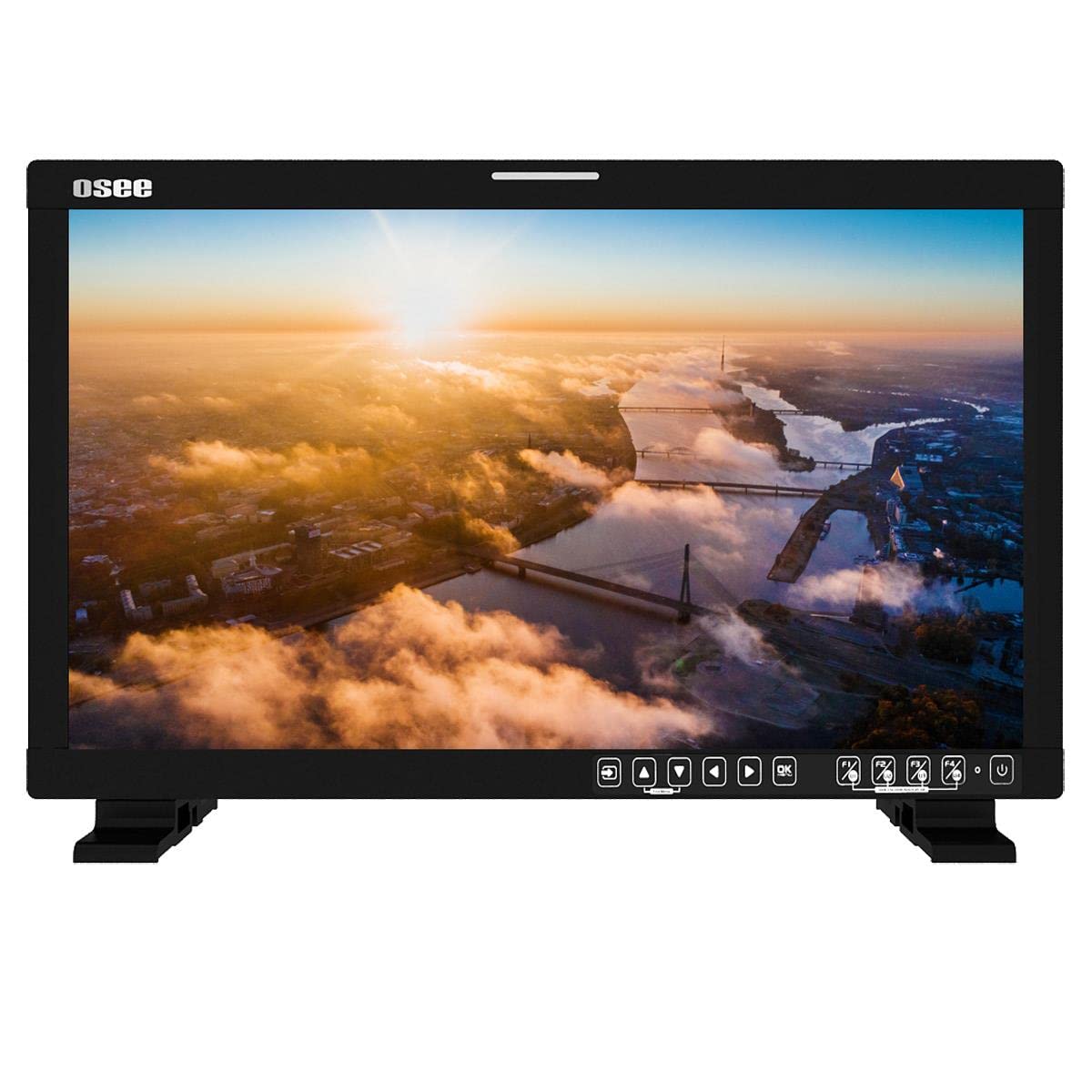
図4.1: 前面 view of the Osee LCM215-HDR+ monitor, displaying a vibrant landscape scene.
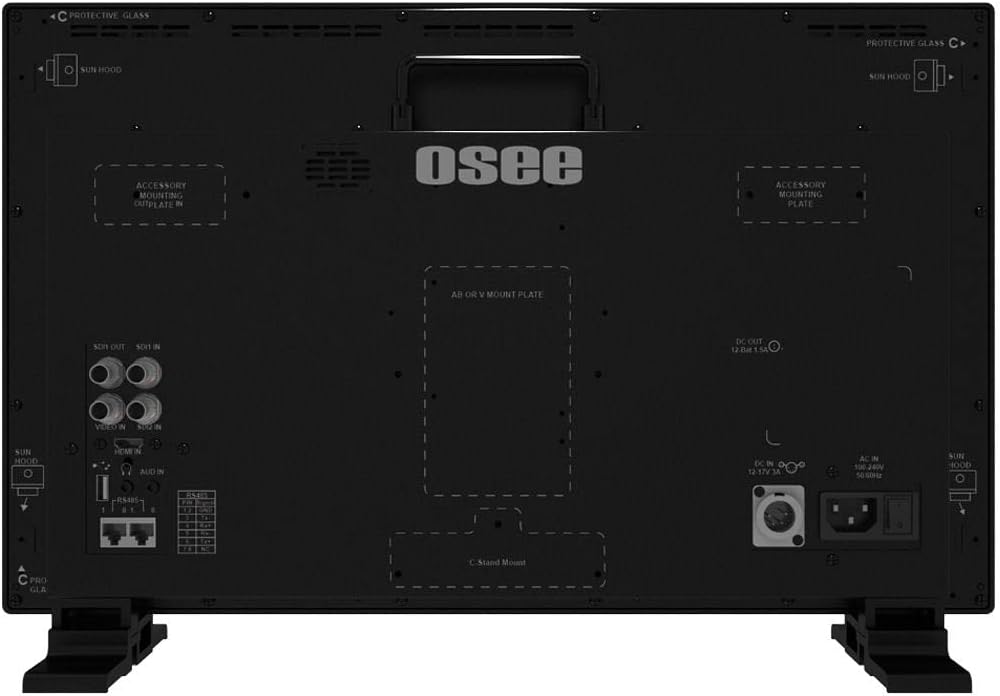
図4.2:側面 view of the Osee LCM215-HDR+ monitor, showing its slim profile and robust build.

図4.3:背面 view of the Osee LCM215-HDR+ monitor, highlighting various input/output ports including SDI, HDMI, and power connections.

Figure 4.4: Osee LCM215-HDR+ monitor displayed with its included accessories: sun hood, C-stand adapter, and V-mount battery plate.

Figure 4.5: Two Osee LCM215-HDR+ monitors in a field production setting, displaying video content from cameras.
5. セットアップ
5.1 モニターの取り付け
- デスクトップでの使用: Attach the provided desktop stand feet to the bottom of the monitor. Ensure they are securely fastened.
- C-Stand Mounting: Use the included C-stand adapter to mount the monitor onto a C-stand or other compatible rod. Secure the adapter firmly to the monitor and the stand.
- Accessory Mounting Plates: The monitor features accessory mounting plates on the rear for additional equipment.
5.2電源接続
- Connect the power cable to the AC input port on the rear of the monitor.
- 電源ケーブルのもう一方の端を適切な電源コンセント (100 ~ 240V AC) に差し込みます。
- Alternatively, attach a V-mount battery to the V-mount battery plate for portable operation.
5.3入力接続
The LCM215-HDR+ supports multiple input types:
- SDI: Connect your 3G/HD/SD-SDI sources to the SDI IN ports. The monitor has 2 SDI inputs.
- HDMI: Connect your HDMI source to the HDMI IN port.
- ビデオ: Connect analog video sources to the Video IN port.
The monitor also features 1Ch 3G/HD/SD-SDI output for looping through signals to other devices.
6.運用
6.1 電源のオン/オフ
Press the power button located on the front panel to turn the monitor on or off. The power indicator light will illuminate when the monitor is on.
6.2メニューナビゲーション
Use the control buttons on the front panel to navigate the on-screen display (OSD) menu. Typically, there are buttons for menu access, navigation (up/down/left/right), and selection (enter).
6.3入力の選択
Access the input menu via the OSD to select the desired input source (SDI 1, SDI 2, HDMI, Video).
6.4 Brightness and Picture Settings
Adjust brightness, contrast, saturation, and other picture parameters through the OSD menu. The LCM215-HDR+ offers a super bright 1500-nit display, ideal for outdoor viewing。
6.5 LUT Functions
The monitor includes built-in 3DLUTs for color management:
- SDR 3DLUTs: Access 30 SDR 3DLUTs to convert log modes from major camera brands (FUJIFILM, GoPro, JVC, Panasonic, RED, Sony) to REC 709.
- HDR 3DLUTs: Utilize 14 HDR 3DLUTs for advanced log mode conversions.
These functions are accessible through the OSD menu, allowing you to apply them to your input signal for accurate monitoring.
6.6オーディオ出力
The monitor features a built-in speaker for audio monitoring. Adjust the volume through the OSD menu.
7. メンテナンス
7.1 クリーニング
- 画面: 柔らかく糸くずの出ない布で画面を優しく拭いてください。頑固な汚れには、軽くamp布に水または画面専用の洗浄液を含ませます(画面に直接スプレーしないでください)。
- 体: モニターのcを拭くasin柔らかく乾いた布で拭いてください。研磨剤入りの洗剤や溶剤は使用しないでください。
7.2 ストレージ
When not in use for extended periods, store the monitor in a cool, dry place, away from direct sunlight and extreme temperatures. Use the custom foam mold and original packaging for protection during transport or storage.
7.3 Battery Care (V-Mount)
If using a V-mount battery, follow the battery manufacturer's guidelines for charging, discharging, and storage to maximize battery life and performance.
8。 トラブルシューティング
- 電源なし:
- 電源ケーブルがモニターと電源コンセントの両方にしっかりと接続されているかどうかを確認してください。
- If using a V-mount battery, ensure it is charged and properly attached.
- 電源コンセントが機能していることを確認します。
- 信号なし:
- Ensure the input source (camera, video switcher) is powered on and outputting a signal.
- Check that the video cables (SDI, HDMI, Video) are securely connected to both the source and the monitor.
- モニターの OSD メニューで正しい入力ソースが選択されていることを確認します。
- Confirm the signal format from your source is supported by the monitor (refer to Specifications).
- Image Problems (Distorted, Flickering, Incorrect Colors):
- ビデオケーブルに損傷や接続不良がないか確認してください。可能であれば、別のケーブルで試してみてください。
- Reset the monitor's picture settings to default via the OSD menu.
- Ensure the correct LUT is applied, or disable LUTs to check the raw signal.
- If the issue persists, try connecting a different video source to isolate the problem.
- 音声なし:
- Check the audio settings in the OSD menu and ensure the volume is not muted or set too low.
- Verify that the input source is sending an audio signal.
If you encounter issues not covered here, please contact Osee customer support.
9. 仕様
| 特徴 | 仕様 |
|---|---|
| ブランド | オシー |
| モデル番号 | LCM215-HDR+ |
| 画面サイズ | 21.5インチ |
| 解決 | FHD 1080p (Native: 1920 x 1080) |
| 表示タイプ | LED液晶 |
| Screen Surface Finish | 光沢のある |
| View角度 | 170度 |
| 特徴 | Built-in Speaker, High Dynamic Range |
| 入力インターフェース | 2x 3G/HD/SD-SDI, 1x Video, 1x HDMI |
| 出力インターフェース | 1x 3G/HD/SD-SDI |
| 電源入力 | AC 100-240V, V-Mount Battery |
| 色 | 黒 |
| 製品の使用 | デスクトップ |
| 取り付けタイプ | デスクマウント |
| 欧州連合 | 650971522317 |
| ASIN | B0BZKSSN5D |
10. 保証とサポート
The Osee LCM215-HDR+ monitor comes with a 1-year limited warranty. Please refer to the warranty card included in your package for detailed terms and conditions. For technical support, service, or further inquiries, please visit the official Osee webご購入の際は、サイトをご覧いただくか、お近くの販売店にお問い合わせください。保証請求の際は、購入証明としてレシートを保管してください。