
Flashpoint R2 XPro II
Flashpoint R2 XPro II 2.4GHz TTLワイヤレスフラッシュトリガー(ソニーカメラ用)ユーザーマニュアル
Model: R2 XPro II
1. はじめに
This manual provides comprehensive instructions for the safe and effective use of the Flashpoint R2 XPro II 2.4GHz TTL Wireless Flash Trigger for Sony Cameras. This device is designed to provide reliable wireless control over compatible flash units, offering advanced features such as TTL, Manual, and Multi-flash modes, High-Speed Sync (HSS), and a robust 2.4GHz radio system.
適切な機能の確保と損傷の防止のため、デバイスを操作する前にこのマニュアルをよくお読みください。
2. 安全上の注意
- 本製品を分解したり改造したりしないでください。許可されていない改造は故障や感電の原因となる可能性があります。
- デバイスを乾燥した状態に保ってください。雨、湿気、高湿度にさらさないでください。
- Avoid strong impacts or vibrations. Dropping the device may cause internal damage.
- お子様の手の届かない場所に保管してください。
- 指定された電池のみを使用してください。不適切な種類の電池を使用すると、液漏れや爆発の原因となる可能性があります。
- Do not operate in environments with flammable gases or liquids.
- Turn off the device when not in use or during cleaning.
3. 製品コンポーネントとコントロール
The Flashpoint R2 XPro II features an intuitive layout for easy operation. Familiarize yourself with the various parts and controls:
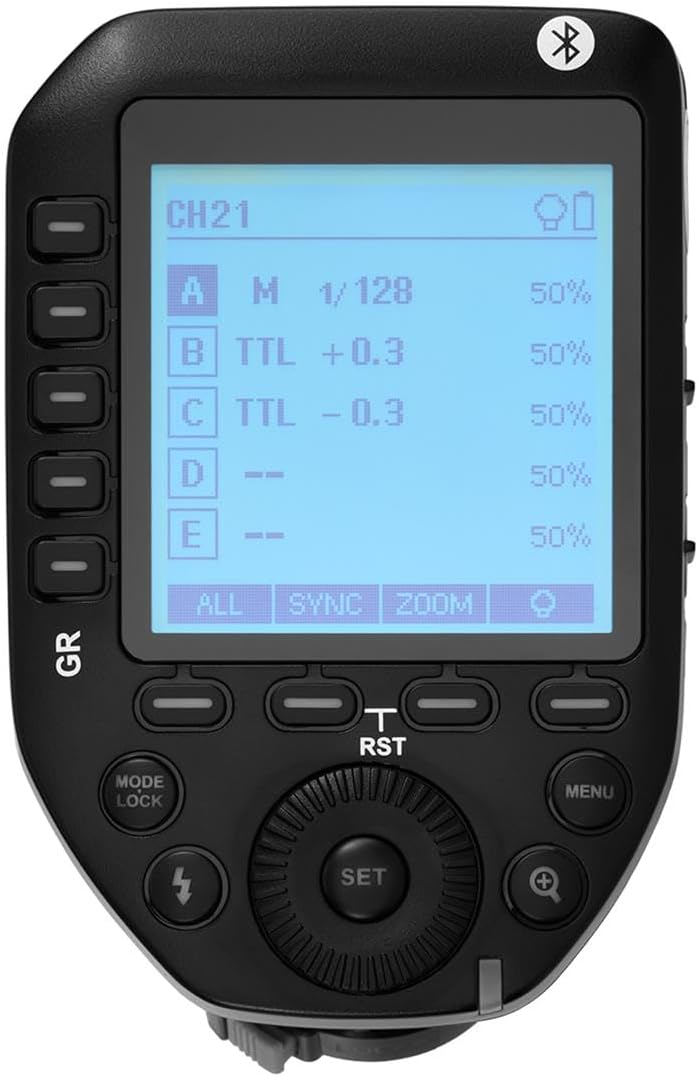
図3.1:上 view of the Flashpoint R2 XPro II, highlighting the large dot matrix LCD display and various control buttons including Group (GR), Mode/Lock, Set, Menu, and Zoom.

図3.2: 角度付き view of the Flashpoint R2 XPro II, illustrating the hot shoe mount for camera attachment and the power ON/OFF switch located on the side.
主なコントロール:
- LCDディスプレイ: Large dot matrix display with adjustable backlight for clear visibility of settings.
- Group (GR) Buttons: Control individual flash groups (A, B, C, D, E).
- Mode/Lock Button: Switches between flash modes (TTL, Manual, Multi) and locks settings.
- 設定ボタン: 選択を確定し、サブメニューに入ります。
- メニューボタン: システム設定と詳細オプションにアクセスします。
- ズームボタン: Adjusts flash zoom settings for specific groups.
- ダイヤル: メニューを移動し、値を調整します。
- 電源スイッチ: ユニットの電源をオン/オフします。
- ホットシューマウント: Connects the trigger securely to your camera's hot shoe.
4. セットアップとインストール
4.1 バッテリーの取り付け
The R2 XPro II uses two AA batteries (not included). Ensure correct polarity when inserting.

Figure 4.1: The battery compartment of the Flashpoint R2 XPro II, with the cover removed, illustrating the correct orientation for inserting AA batteries.
- 本体下部の電池ケースカバーを見つけます。
- カバーをスライドさせて開きます。
- Insert two AA batteries, matching the positive (+) and negative (-) indicators inside the compartment.
- 電池カバーをしっかりと閉じてください。
4.2 カメラへの取り付け
Attach the trigger to your Sony camera's hot shoe for seamless integration.

図4.2:下 view of the Flashpoint R2 XPro II, displaying the hot shoe mount and the instant flip locking mechanism designed for secure camera connection.
- Ensure the trigger is turned OFF.
- Slide the hot shoe mount of the R2 XPro II into your camera's hot shoe.
- Secure the trigger by engaging the locking mechanism (typically a lever or dial) on the hot shoe mount.
- Turn on the trigger and your camera.
5. 操作手順
The R2 XPro II offers various modes and settings for precise flash control.
5.1 電源のオン/オフ
Use the ON/OFF switch located on the side of the unit to power the trigger.
5.2 Basic Screen Navigation
The large LCD display shows current settings for channels, groups, and flash modes. Use the dial to navigate and adjust values, and the SET button to confirm.
5.3 Flash Modes (TTL / M / Multi)
を押す モード/ロック 利用可能なフラッシュ モードを切り替えるボタン:
- TTL(レンズを通して): Automatic exposure control. The trigger communicates with the camera to determine optimal flash output.
- M(マニュアル): Allows manual adjustment of flash power output (e.g., 1/1 to 1/128).
- マルチ(ストロボスコープ): クリエイティブな効果を生み出すために、連続した高速フラッシュを発射します。
The R2 XPro II also features TCM (TTL Converted to Manual) fusion, which allows you to capture an exposure in TTL mode and then convert that exposure value to a manual setting for consistent repeat shots.
5.4 チャンネルとグループの管理
The trigger supports 32 channels and multiple groups (A, B, C, D, E) for managing complex lighting setups.
- 使用 GR (Group) buttons to select and adjust individual flash groups.
- Access the menu to change the wireless channel to avoid interference.
5.5 ハイスピードシンクロ(HSS)
The R2 XPro II supports High-Speed Sync up to 1/8000s, enabling you to use flash with fast shutter speeds, ideal for overpowering ambient light or freezing fast motion.
5.6 Smartphone APP Control (Bluetooth)
The built-in Bluetooth allows for smartphone app control of flash functions. Download the compatible Flashpoint R2 app to manage settings remotely.

Figure 5.1: Illustration of the R2 Wireless System, demonstrating the Flashpoint R2 XPro II's ability to work with a complete family of Flashpoint speedlights, monolights, and strobe lights, and transmit atop any Sony DSLR, MSLR, or M Series body.
6. メンテナンスとケア
- クリーニング: Use a soft, dry cloth to clean the exterior of the unit. Do not use solvents or abrasive cleaners.
- ストレージ: 長期間使用しない場合は、液漏れを防ぐため電池を取り外してください。直射日光や極端な温度を避け、涼しく乾燥した場所に保管してください。
- ファームウェアの更新: 定期的にメーカーの website for available firmware updates to ensure optimal performance and compatibility. The unit is Mac and PC firmware updatable.
7。 トラブルシューティング
If you encounter issues with your Flashpoint R2 XPro II, refer to the following common problems and solutions:
| 問題 | 考えられる原因 | 解決 |
|---|---|---|
| デバイスの電源が入りません。 | 電池が切れているか、正しく挿入されていません。 | 電池を交換するか、正しい極性を確認してください。 |
| Flash unit does not fire. | Incorrect channel/group settings; flash unit not compatible; trigger not securely mounted. | Verify channel and group settings on both trigger and flash; ensure flash is compatible with R2 system; re-mount trigger securely. |
| Inconsistent flash firing. | Interference from other wireless devices; low battery. | Change to a different wireless channel; replace batteries. |
| TTL exposure is inaccurate. | Environmental factors; flash unit limitations. | Adjust flash exposure compensation on the trigger or camera; consider switching to Manual mode. |
8. 仕様
| 特徴 | 詳細 |
|---|---|
| モデル | R2 XPro II |
| ワイヤレスシステム | Flashpoint R2 / Godox X - 2.4GHz Radio System |
| 互換性 | Sony Cameras (TTL support) |
| 伝送距離 | 300~400フィート(約90~120メートル) |
| チャンネル | 32 |
| グループ | 5 (A、B、C、D、E) |
| フラッシュモード | TTL、マニュアル、マルチ |
| ハイスピードシンクロ(HSS) | 1/8000秒まで |
| 画面 | Large Dot Matrix LCD with Adjustable Backlight |
| 接続性 | Built-in Bluetooth for Smartphone APP Control |
| ファームウェアアップデート | Mac and PC Updatable via USB-C port |
| 電源 | 単三電池2本 |
| 製品寸法 | 5.15 x 4 x 2.8インチ |
| アイテム重量 | 8.8オンス |
9. 保証情報
Flashpoint products are designed and manufactured to the highest quality standards. For specific warranty terms and conditions, please refer to the warranty card included with your product or visit the official Flashpoint webサイトでご確認ください。保証請求の際は購入証明として領収書を保管してください。
10. カスタマーサポート
For technical assistance, troubleshooting, or service inquiries, please contact Flashpoint customer support. You can find contact information on the official Flashpoint webサイトまたは小売店を通じてご購入いただけます。
オンラインリソース: Flashpoint Official Store on Amazon