
1. はじめに
This manual provides essential information for the proper installation, operation, and maintenance of the Novastar A5S Plus LED Display Receiving Card. Please read this manual thoroughly before using the product to ensure optimal performance and longevity. The Novastar A5S Plus is an advanced receiving card designed to enhance the display effects of LED screens.
2.製品オーバーview および機能
The Novastar A5S Plus Receiving Card offers significant improvements in display quality and control capabilities for LED screens. Key features include:
- カラーマネジメント: Supports standard color gamuts (Rec.709 / DCI-P3 / Rec.2020) and custom color profiles for precise color reproduction.
- 18bit+ Grayscale Enhancement: Improves LED display grayscale by up to 4 times, preventing grayscale loss at low brightness levels and ensuring smoother image transitions.
- Pixel-Level Brightness and Chroma Calibration: Integrates with NovaStar's calibration system to adjust brightness and chroma for each pixel, achieving high consistency across the display.
- 暗い線や明るい線のクイック調整: Corrects brightness discrepancies at module or cabinet seams for a uniform visual experience.
- マルチバッチ調整: Allows brightness adjustment of cabinets or modules to minimize display variations caused by different production batches.
- 低遅延: Reduces video source latency to 1 frame for PWM driver ICs. Custom firmware may be required for DCLK continuous PWM driver ICs.
- 3D機能: Compatible with controllers that support 3D output.
- RGBの個別ガンマ調整: Works with NovaLCT to allow separate adjustment of red, green, and blue gamma, improving image uniformity at low grayscale and correcting white balance offset.
- 90°画像回転: Supports image rotation in multiples of 90° (0°/90°/180°/270°).
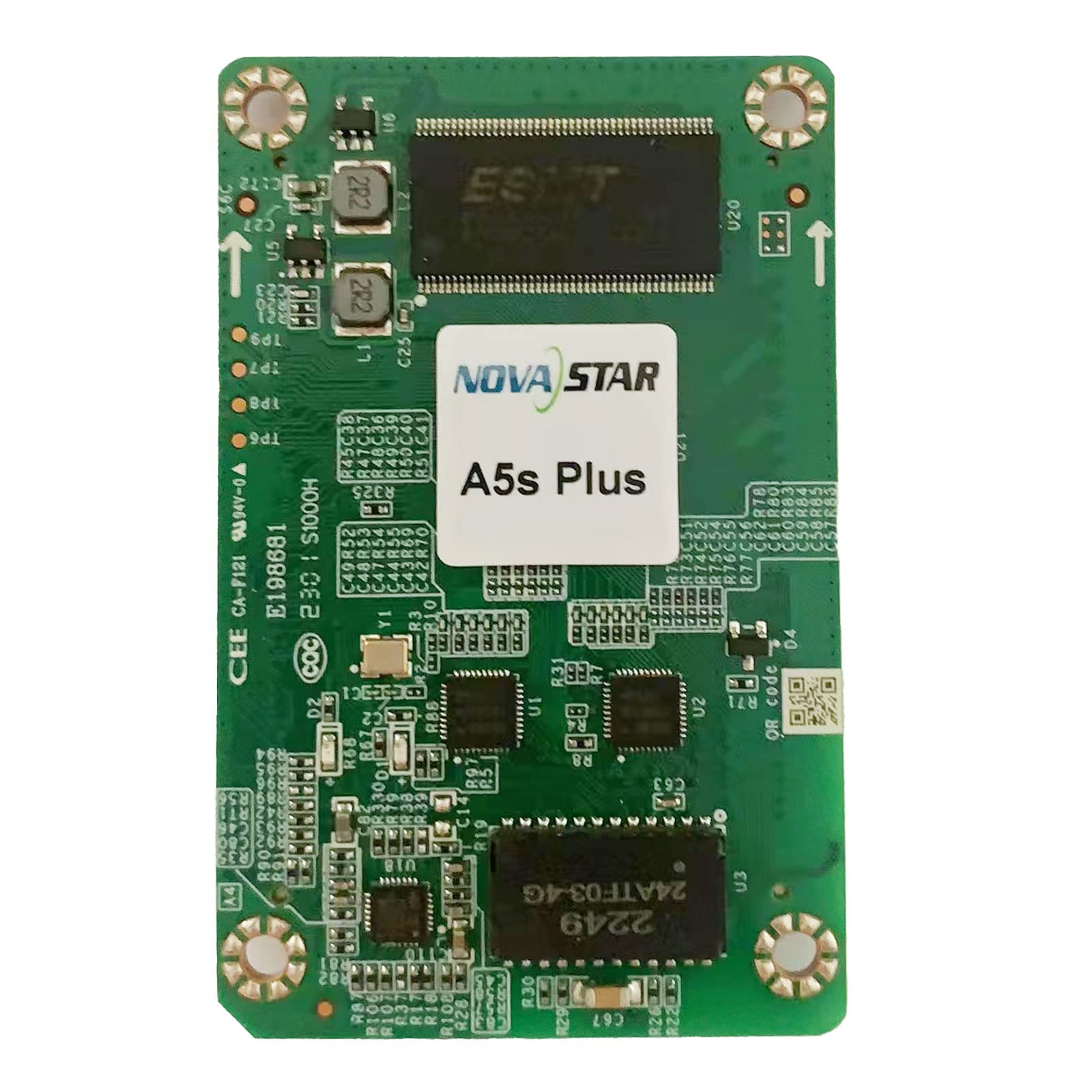
オーバーヘッド view of the Novastar A5S Plus LED Display Receiving Card, showcasing its green circuit board with various electronic components, connectors, and integrated circuits. Two prominent multi-pin connectors are visible on the left and right edges, designed for connecting to LED modules. Key components include resistors, capacitors, and a large integrated circuit labeled '2249 24ATF-03-4G' at the bottom.
3. パッケージ内容
パッケージを開封したら、すべてのアイテムが揃っていて損傷がないことを確認してください。
- Novastar A5S Plus Receiving Card
- 高密度コネクタ
- Assembly network transformer
- ユーザーマニュアル(このドキュメント)
4. セットアップ手順
Follow these general steps for installing the Novastar A5S Plus Receiving Card into your LED display system:
- 電源を切る: Ensure all power to the LED display and control system is disconnected before installation.
- スロットの位置: Identify the designated receiving card slot within your LED display module or cabinet.
- カードを挿入: Carefully insert the Novastar A5S Plus card into the slot, ensuring it is seated firmly and correctly. Avoid applying excessive force.
- データケーブルを接続します。 Connect the data cables from the LED modules to the multi-pin connectors on the receiving card (e.g., JH1, JH2).
- ネットワーク ケーブルを接続します。 Connect the network cables from the sending card or control system to the appropriate network ports on the receiving card.
- 電源オン: Once all connections are secure, restore power to the LED display and control system.
- ソフトウェア構成: Use Novastar's control software (e.g., NovaLCT) to configure the receiving card parameters, including screen resolution, module type, and display settings. Refer to the software's user guide for detailed configuration steps.
5. 操作手順
The Novastar A5S Plus operates in conjunction with a Novastar sending card and control software. Basic operation involves:
- System Power-Up: Power on the sending card, then the LED display modules.
- ソフトウェア制御: Launch the Novastar control software (e.g., NovaLCT) on your computer.
- ディスプレイ構成: Load the saved configuration file for your LED screen. If necessary, perform initial setup or adjustments.
- コンテンツの再生: Use the software to send video or image content to the LED display.
- 機能の利用: Access advanced features like color management, pixel-level calibration, and image rotation through the control software interface to optimize display quality.
- システムのシャットダウン: Power off the LED display modules first, then the sending card.
6. メンテナンス
Proper maintenance ensures the longevity and reliable performance of your Novastar A5S Plus Receiving Card:
- 定期清掃: Keep the card and its connectors free from dust and debris. Use a soft, dry brush or compressed air for cleaning. Ensure power is off before cleaning.
- 環境制御: Operate the card within recommended temperature and humidity ranges to prevent damage.
- ファームウェアの更新: Novastarの公式ウェブサイトを定期的にチェックしてください website for firmware updates. Apply updates as recommended to benefit from new features and bug fixes.
- 安全な接続: Regularly inspect all cable connections to ensure they are secure and free from wear or damage.
- 適切な取り扱い: When handling the card, always use anti-static precautions to prevent electrostatic discharge (ESD) damage.
7。 トラブルシューティング
If you encounter issues with your Novastar A5S Plus Receiving Card, consider the following:
- 表示なし/一部表示:
- Check power supply to the LED modules and receiving card.
- Verify all data and network cables are securely connected.
- Ensure the receiving card configuration in the control software matches the physical display setup.
- Test with a known working receiving card if available.
- ちらつき/不安定なディスプレイ:
- ケーブル接続が緩んでいないか確認してください。
- Ensure the network cable quality is sufficient and within recommended lengths.
- Verify refresh rate settings in the control software.
- Incorrect Colors/Image Distortion:
- Perform color calibration using NovaStar's calibration system.
- Check gamma and color management settings in the control software.
- Ensure the correct module type is selected in the software configuration.
- Card Not Detected by Software:
- Verify network connectivity between the sending card and the receiving card.
- Ensure the control software is up-to-date.
- Check the status indicators (LEDs) on the receiving card for error codes.
For persistent issues, contact Novastar technical support.
8. 仕様
| 特徴 | 仕様 |
|---|---|
| モデル名 | A5S Plus |
| 積載容量 | 512×384ピクセル |
| Parallel RGB Data Groups | 32 |
| Serial Data Groups | 64 |
| グラフィックスコプロセッサ | [Integrated] |
| ビデオ出力インターフェース | HDMI, DVI (via sending card) |
| 対応デバイス | Desktop (as part of LED display system) |
| ディスプレイ解像度最大 | 320 x 256 (per card, typical) |
| グラフィックカードインターフェース | PCI-Express x16 (for sending card connection) |
| 内蔵メディア | High-density connector, Assembly network transformer |
| メーカー | ノヴァスター |
9. 保証とサポート
Novastar products typically come with a limited warranty. Please refer to the warranty card included with your product or visit the official Novastar website for detailed warranty terms and conditions. For technical assistance, troubleshooting, or product inquiries, please contact Novastar customer support through their official channels.