
1. はじめに
This manual provides detailed instructions for the installation, operation, and maintenance of the PeakDo Wireless HDMI Transmitter and Receiver P3 S. This device is designed to wirelessly transmit uncompressed 1080P Full HD video and digital audio with zero latency, making it ideal for various applications including gaming, home entertainment, and professional presentations. The P3 S model features a USB-C port on the receiver for compatibility with AR smart glasses and portable monitors, in addition to standard HDMI output.

Figure 1: PeakDo Wireless HDMI Transmitter (left) and Receiver (right).
2.製品オーバーview
2.1 主な特徴
- Wireless AR Smart Glasses Setup: Features a Type-C port on the Receiver for direct connection to AR smart glasses (e.g., XREAL Air, Rokid Max/Air, RayNeo, VITURE One) and portable monitors, enabling cable-free AR experiences.
- Uncompressed FHD Video & Digital Audio: Transmits 1080P Full HD video and digital audio without compression, ensuring high-quality output.
- Zero Latency Transmission: Provides 0 latency for real-time applications such as live sports, synchronized gaming, and interactive meetings.
- プラグアンドプレイ操作: Requires no Wi-Fi connection or app installation for setup.
- 幅広い互換性: Transmitter (TX) connects to PC, Laptop, Xbox, PlayStation, Nintendo Switch, TV Box. Receiver (RX) connects to TVs, monitors, projectors via HDMI, and AR smart glasses/portable monitors via USB-C.
- 伝送範囲: Effective wireless transmission up to 100 feet (approximately 30 meters).
2.2 パッケージ内容
パッケージにすべてのアイテムが揃っていることを確認してください:
- PeakDo ワイヤレス HDMI トランスミッター (TX)
- PeakDo ワイヤレス HDMI レシーバー (RX)
- USB電源ケーブル
- ユーザーマニュアル(このドキュメント)
3. セットアップ手順
3.1 送信機(TX)の接続
- Connect the HDMI end of the Transmitter (TX) to the HDMI output port of your source device (e.g., PC, laptop, game console, TV box).
- Connect the USB power cable to the TX unit and plug the other end into a USB power source (e.g., a USB port on your source device, a USB wall adapter). Ensure the TX receives at least 5V 2A power supply.

Figure 2: Compatible input (TX) and output (RX) devices.
3.2 受信機(RX)の接続
- 重要: First, connect the USB power cable to the RX unit and plug the other end into a USB power source (e.g., a USB wall adapter). Ensure the RX receives at least 5V 2A power supply. The RX unit requires sufficient power to function correctly.
- For HDMI displays (TV, Monitor, Projector): Connect an HDMI cable from the HDMI output port of the Receiver (RX) to the HDMI input port of your display device.
- For AR Smart Glasses or Portable Monitors: Connect a USB-C cable from the Type-C port on the Receiver (RX) to the USB-C input port of your AR smart glasses or portable monitor.
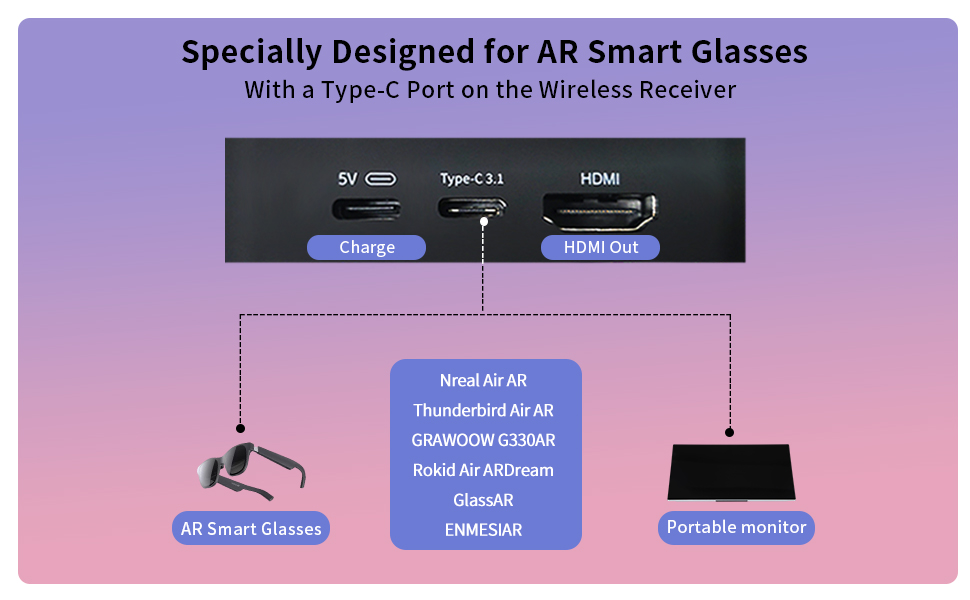
Figure 3: Receiver ports (5V power, Type-C 3.1, HDMI) and AR glasses compatibility.
注記: For certain AR glasses like Nreal, you may need to upgrade their firmware for optimal compatibility. Refer to your AR glasses manufacturer's instructions for firmware updates.
4. 操作手順
4.1 電源オンとペアリング
Once both the Transmitter (TX) and Receiver (RX) units are connected to their respective power sources and devices, they will automatically power on and attempt to pair. The system is designed for plug-and-play operation, requiring no manual pairing steps or software installation.

Figure 4: Plug and Play setup in a meeting environment.
4.2使用シナリオ
- ゲーム: Experience zero-latency gaming on a large screen or through AR glasses.
- ホームエンターテイメント: Stream movies, TV shows, or other media from your PC or TV box to any display.
- Presentations/Meetings: Share content wirelessly from your laptop to a projector or large monitor in a conference room.
- AR Experiences: Connect directly to compatible AR smart glasses for immersive gaming or productivity.
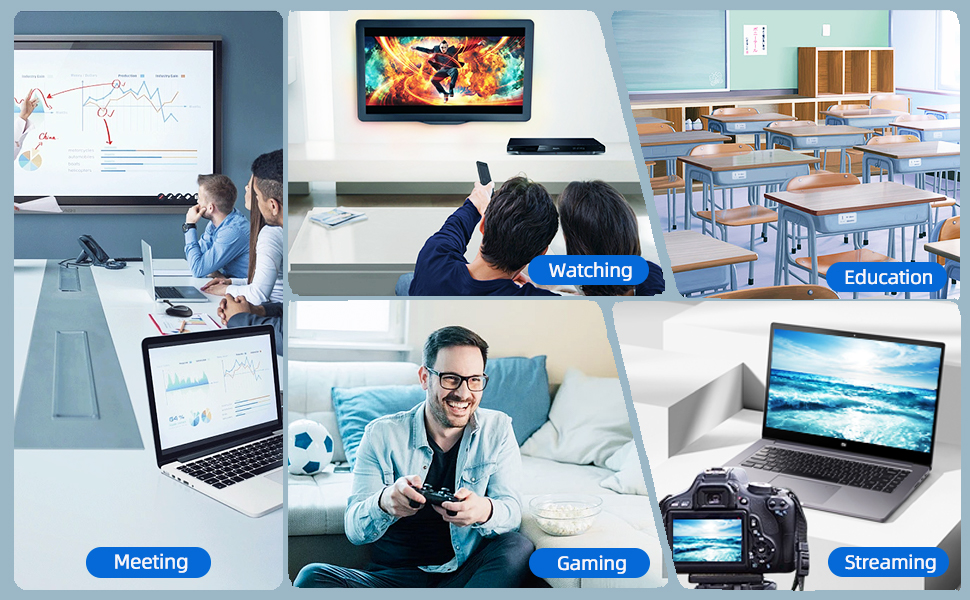
Figure 5: Diverse applications of the PeakDo Wireless HDMI system.

図6:例ample of a wireless AR gaming setup.
5. メンテナンス
The PeakDo Wireless HDMI Transmitter and Receiver P3 S requires minimal maintenance.
- クリーニング: 本体の外装を清掃する際は、柔らかく乾いた布をご使用ください。液体洗剤やエアゾールは使用しないでください。
- ストレージ: 長期間使用しない場合は、直射日光や極端な温度を避け、涼しく乾燥した場所にデバイスを保管してください。
- 電源: Always ensure both TX and RX units receive adequate power (5V 2A) from a stable power source.
6。 トラブルシューティング
6.1 信号なし/黒い画面
- 電力を確認します: Ensure both the Transmitter (TX) and Receiver (RX) units are properly powered. The RX unit specifically requires sufficient power (5V 2A) and should be powered first before connecting the HDMI/USB-C cable to the display.
- ケーブル接続: Verify that all HDMI and USB-C cables are securely connected to their respective ports on the devices and displays.
- ソースデバイス出力: Confirm that your source device (PC, game console) is outputting video correctly. Try connecting the source device directly to the display with a cable to rule out issues with the source.
- ディスプレイ入力: Ensure your display (TV, monitor, projector, AR glasses) is set to the correct input source (e.g., HDMI 1, USB-C).
- デバイスを再起動します。 Disconnect power from both TX and RX units, then reconnect. Also, restart your source device and display.
6.2 Intermittent Signal / Flickering
- 距離と障害物: Reduce the distance between the TX and RX units. Ensure there are no significant physical obstructions (walls, large furniture) between them that could interfere with the wireless signal.
- 干渉: Keep the units away from other wireless devices (e.g., Wi-Fi routers, cordless phones, microwave ovens) that operate on similar frequencies.
- 電源: Ensure stable and sufficient power supply to both units. Fluctuations in power can affect signal stability.
6.3 音声なし
- ソースオーディオ設定: ソース デバイスのオーディオ出力設定をチェックして、オーディオが HDMI 経由で送信されていることを確認します。
- Display Audio: Verify that the audio on your display device (TV, monitor, AR glasses) is not muted and the volume is turned up.
- ケーブルの完全性: Ensure the HDMI or USB-C cable connecting the RX to the display is not damaged.
6.4 AR Glasses Compatibility Issues
- ファームウェアアップデート: As mentioned in the setup, some AR glasses (e.g., Nreal) may require a firmware update to work correctly with external video sources. Consult your AR glasses manufacturer's support.
- Power to RX: Ensure the RX unit is adequately powered, especially when connecting to power-hungry AR glasses.
- USB-C ケーブル: Use a high-quality USB-C cable that supports video transmission.
7. 仕様
| 特徴 | 説明 |
|---|---|
| モデル番号 | P3S |
| ビデオエンコーディング | YUV422 or RGB444 (uncompressed 1080P) |
| 解決サポート | 最大1080PフルHD |
| レイテンシー | 0 レイテンシ |
| 接続技術 | Wireless (Millimeter Wave) |
| 伝送距離 | 最大100フィート(約30メートル) |
| Compatible Transmitter Devices | PC, Laptop, Xbox, PS4, PS5, Switch, PS3, TV Box, etc. |
| 互換性のある受信デバイス | TV, Monitor, Projector (via HDMI); AR Smart Glasses, Portable Monitor (via USB-C) |
| 合計HDMIポート | 1 (on Receiver) |
| コネクタタイプ | HDMI, Micro USB (for power), USB-C (on Receiver) |
| オーディオ出力モード | Mono (Digital Audio) |
| サラウンドサウンドチャンネル構成 | 2.0 |
| 電源 | 5V 2A (for both TX and RX units) |
| アイテム重量 | 1.08ポンド(約0.49kg) |
| パッケージ寸法 | 6.73 x 5.83 x 2.48インチ(約17.1 x 14.8 x 6.3 cm) |
8. 保証とサポート
For warranty information and technical support, please refer to the official PeakDo web公式サイトをご覧いただくか、カスタマーサービスに直接お問い合わせください。保証請求のために購入時のレシートを保管してください。
- メーカー: ピークドゥ
- 発売日: 16年2023月XNUMX日
- カスタマーリviews: 3.3 out of 5 stars (based on 6 ratings at time of data extraction)