
導入
The JOYROOM JR-CL16 is a versatile car accessory designed to enhance your in-car audio and charging experience. This device functions as a Bluetooth FM transmitter, allowing you to stream music and make hands-free calls through your car's stereo system. It also features dual fast-charging ports, including USB-C PD and USB-A QC3.0, to quickly charge your mobile devices. The smart LED display provides essential information such as car battery voltage and FM frequency. This manual provides detailed instructions for setup, operation, and maintenance to ensure optimal performance.
安全情報
本製品をご使用になる前に、すべての安全に関する指示をよくお読みになり、理解してください。指示に従わない場合、怪我をしたり、機器が損傷したりする可能性があります。
- バッテリーの安全性: Keep the device away from excessive heat and humidity. Do not short-circuit the device. Dispose of batteries (if applicable, though this device is car-powered) according to local regulations.
- 干渉: This device may interfere with other wireless devices. Follow the instructions in this manual to minimize potential interference.
- 安全運転: Do not operate the device in a manner that distracts you from driving. Only use hands-free functions when it is safe and permitted by local traffic laws.
- 電源: Ensure the device is connected to a compatible 12V-24V car cigarette lighter socket.
パッケージ内容
パッケージにすべてのアイテムが揃っていることを確認します。
- 1 × JOYROOM JR-CL16 48W Wireless FM Transmitter Car Charger
製品終了view
Familiarize yourself with the components of your JR-CL16 FM Transmitter.

画像: フロント view of the JOYROOM JR-CL16 FM Transmitter, showing the LED display, multi-function knob, call button, USB-C PD port, USB-A QC3.0 port, and a standard USB port for U-disk playback.
The device features a smart LED display, a multi-function knob for volume and frequency adjustment, a dedicated call button, and multiple charging ports for convenience.
セットアップ手順
- 車のソケットに挿入します: Plug the JR-CL16 FM Transmitter into your car's cigarette lighter socket. The device will power on automatically, and the LED display will light up.
- FM周波数をチューニングする:
- Find an empty FM frequency on your car radio (a frequency with no active broadcast).
- Adjust the FM frequency on the JR-CL16 to match your car radio's frequency. To do this, press and hold the multi-function knob until the FM frequency on the display flashes. Rotate the knob left or right to change the frequency. Press the knob again to confirm.
- Bluetoothのペアリング:
- モバイル デバイスで Bluetooth を有効にし、利用可能なデバイスを検索します。
- Select "JR-CL16" from the list to pair. Once paired, the device will confirm the connection.

画像: Diagram illustrating the Bluetooth 5.0 connection process, highlighting faster and more stable pairing with automatic connection.
操作手順
音楽再生に
JR-CL16 は、3 つの音楽再生モードをサポートしています。
- Bluetooth ストリーミング: After successful Bluetooth pairing, open your music player on your mobile device. Audio will be transmitted wirelessly to your car stereo via the selected FM frequency.
- USB Flash Drive (U-Disk) Playback: MP3/WMA/WAV/FLACが保存されたUSBフラッシュドライブ(最大64GB)を挿入します。 files into the dedicated USB port (not the charging ports). The device will automatically detect and play music from the U-disk.
- AUX Cable Playback: Connect your audio device to the JR-CL16 using a 3.5mm AUX cable. The device will switch to AUX mode for audio transmission.

画像: Visual representation of the three music playback options: USB flash drive, AUX cable, and Bluetooth 5.0, showing the respective connection points on the device.
音楽の制御:
- 音量調整: 多機能ノブを回して音量を調整します。
- 再生/一時停止: マルチファンクションノブを短く押します。
- 次のトラック: Rotate the multi-function knob clockwise and hold.
- 前のトラック: Rotate the multi-function knob counter-clockwise and hold.
- 低音ブースト: Press the "B" button (Bass) to activate or deactivate enhanced bass.

画像: The JR-CL16 FM Transmitter with an emphasis on its Deep BASS and Hi-Fi Stereo sound capabilities, indicating CD-level audio quality.
ハンズフリー通話
The built-in microphone with CVC noise cancellation ensures clear and safe hands-free calls.
- 通話に応答: Short press the call button (green phone icon).
- 通話を拒否: 通話ボタンを長押しします。
- 電話を切る: Short press the call button during a call.
- 最後の番号にリダイヤル: Double press the call button.

画像: A driver using the JR-CL16 for a hands-free call, demonstrating the clear and stable calling feature with CVC Noise Cancellation. The image also shows controls for volume, answering, rejecting, and hanging up calls.
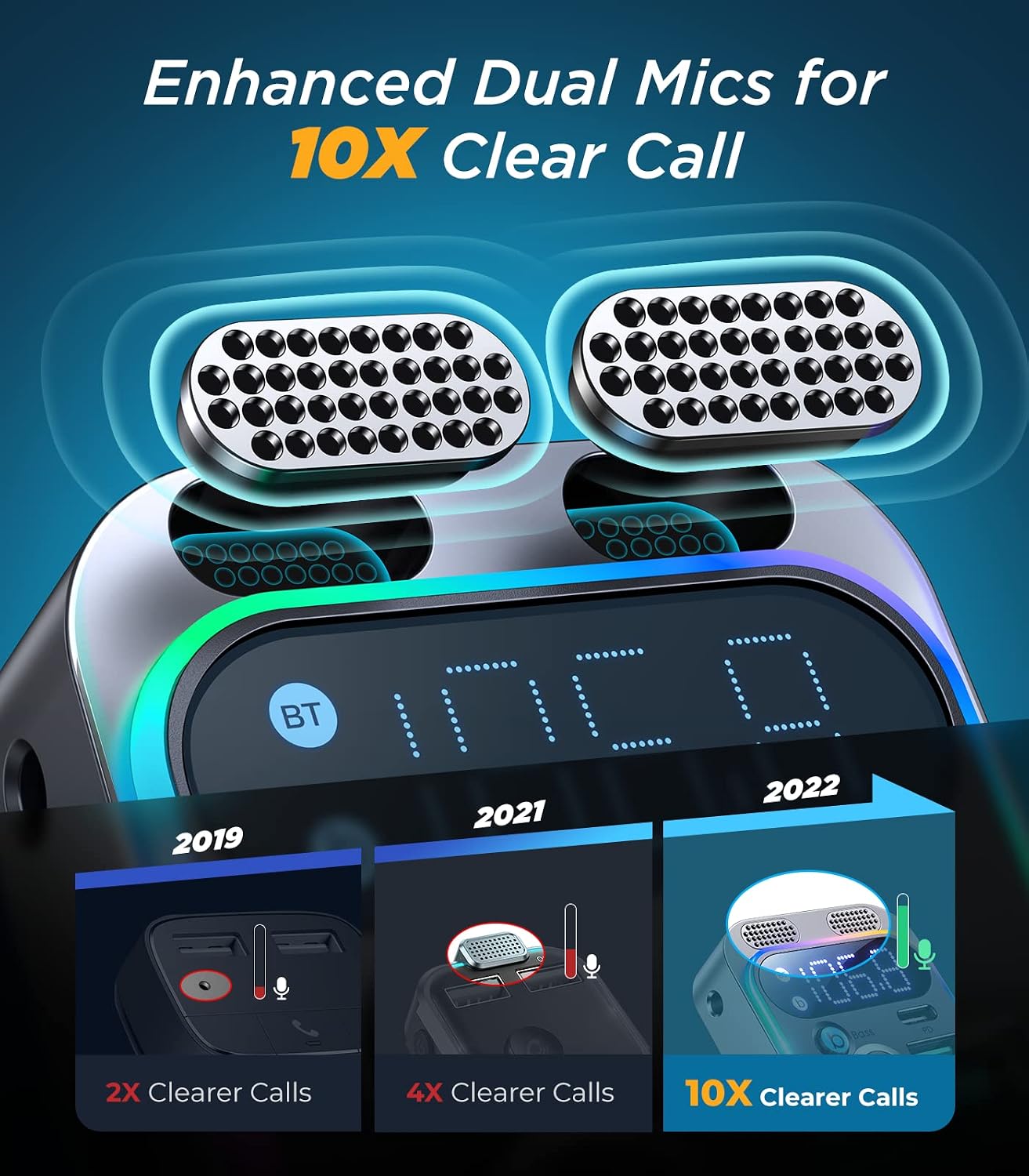
画像: 詳細な view of the JR-CL16's enhanced dual microphones, designed to provide 10 times clearer call quality compared to previous versions.
充電デバイス
The JR-CL16 is equipped with two fast-charging ports:
- USB-C PD 30W ポート: 高速充電に対応した USB-C デバイス用。
- USB-A QC3.0 18W Port: 高速充電に対応したUSB-Aデバイス用。
You can charge two devices simultaneously with a total output of 48W.

画像: The JR-CL16 connected to a car's power outlet, simultaneously charging an iPhone 13 Pro via PD30W and a Samsung S22 via QC18W, demonstrating its 48W super fast charging capability.
音声アシスタント
Activate your phone's voice assistant (Siri or Google Assistant) directly through the JR-CL16 by long-pressing the call button when not on a call.
メンテナンス
- 本体は乾いた柔らかい布で拭いて清潔に保ってください。
- デバイスを極端な温度、直射日光、湿気にさらさないでください。
- 自分でデバイスを分解したり修理したりしないでください。 サポートが必要な場合は、カスタマー サポートにお問い合わせください。
トラブルシューティング
| 問題 | 考えられる原因 | 解決 |
|---|---|---|
| 電源なし/LEDディスプレイオフ | Loose connection; car socket issue; blown fuse in car. | Ensure the device is firmly plugged in. Check if the car's cigarette lighter socket is working. Consult a car technician if necessary. |
| 音質が悪い/雑音がある | FM frequency interference; volume too low; Bluetooth not properly connected. | Change to a different, clear FM frequency on both the device and car radio. Increase volume on both the device and car stereo. Re-pair Bluetooth. |
| Bluetoothでペアリングできない | 電話で Bluetooth が有効になっていません。デバイスがペアリング モードになっていません。ペアリングされたデバイスが多すぎます。 | Ensure Bluetooth is on and visible on your phone. Restart the JR-CL16. Forget previous Bluetooth connections on your phone and try again. |
| 急速充電が機能しない | Cable not compatible; device not supporting fast charging; incorrect port used. | Use a high-quality, fast-charging compatible cable. Ensure your device supports PD or QC3.0. Use the correct USB-C PD or USB-A QC3.0 port. |
仕様
| 特徴 | 詳細 |
|---|---|
| ブランド | ジョイルーム |
| モデル名 | JR-CL16 |
| 接続技術 | USB、ブルートゥース |
| ワイヤレス標準 | ブルートゥース5.0 |
| 電源 | Car Cigarette Lighter (12V-24V) |
| 材料 | プラスチック、アクリル |
| 製品寸法(長さ x 幅 x 高さ) | 10 x 5 x 1.3 cm |
| 色 | Black (Note: Product title mentions Silver, but specifications indicate Black) |
| 対応デバイス | Car Stereo System, Mobile Phones |
| 特集 | USB-C PD Port, Hands-Free Calling, Voice Assistant Support, LED Display, Bass Boost |
| メディアタイプのサポート | USB Flash Drive (MP3, WMA, WAV, FLAC), Bluetooth Audio, AUX Input |
| 充電出力 | USB-C PD 30W, USB-A QC3.0 18W (Total 48W) |
| オーディオ出力タイプ | FMラジオ、Bluetooth |
| オーディオ入力 | 3.5mm補助 |
| 制御方法 | タッチ(多機能ノブ) |
| サポートされているアプリケーション | Spotify, YouTube, MP3, AAC, etc. |
| GTIN (UPC/EAN) | 06941237199652 |
保証とサポート
保証: The product description indicates "No Warranty". Please refer to your point of purchase for specific return or exchange policies.
カスタマーサポート: For any questions, issues, or technical assistance, please contact the retailer or JOYROOM customer service through their official website or contact channels. Keep your purchase receipt for any warranty claims or support inquiries.


