
導入
Thank you for choosing the Baseus Super Energy Pro 1600A Car Jump Starter. This device is designed to provide a reliable and powerful solution for starting vehicles with dead batteries, and also functions as a portable power bank. Please read this manual thoroughly before use to ensure safe and proper operation. Keep this manual for future reference.
安全情報
- Always read the vehicle's owner's manual before attempting to jump start it.
- 凍結したバッテリーをジャンプスタートしようとしないでください。
- デバイスを操作するときは適切な換気を確保してください。
- デバイスを子供やペットの手の届かない場所に保管してください。
- デバイスを雨や極端な温度にさらさないでください。
- ジャンパーの短絡を避けるamps. Do not connect the red and black clamp一緒に。
- If the device or cables are damaged, do not use them. Contact support.
- 常にclを接続するamps to the correct battery terminals (red to positive, black to negative).
- 車両が始動したらすぐにジャンプスターターを取り外してください。
パッケージ内容
パッケージにすべてのアイテムが含まれていることを確認します。
- Baseus Super Energy Pro カージャンプスターターユニット
- Cl付きスマートジャンパーケーブルamps
- USB-C充電ケーブル
- ユーザーマニュアル(このドキュメント)
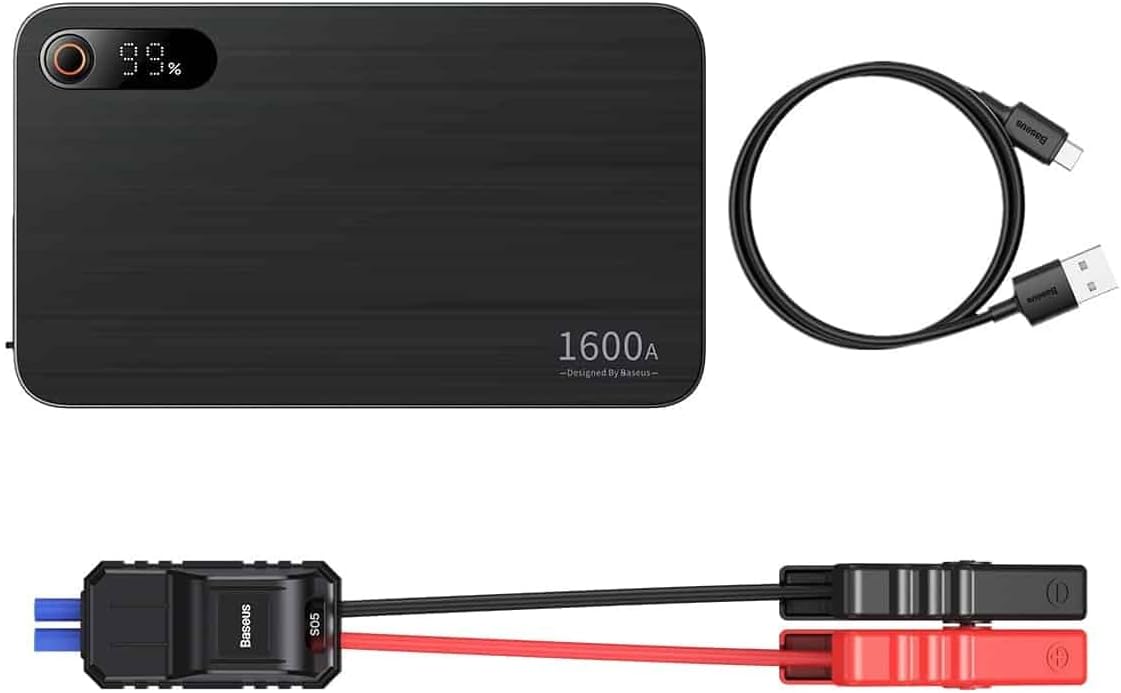
Image: Contents of the Baseus Super Energy Pro Car Jump Starter package, showing the main unit, smart jumper cables, and a USB-C charging cable.
製品終了view
Familiarize yourself with the components of your Baseus Super Energy Pro Car Jump Starter:
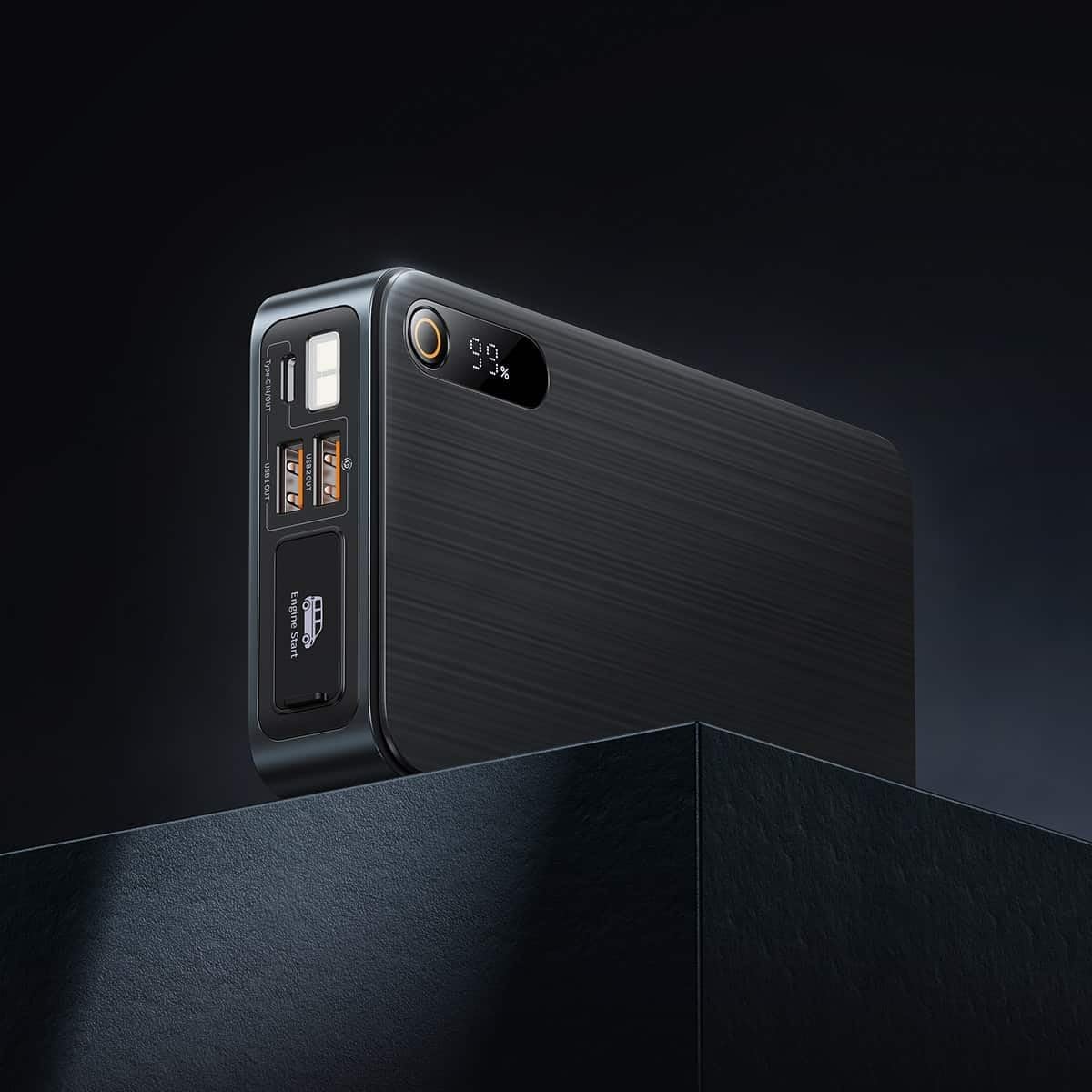
Image: Close-up of the jump starter's side panel, highlighting the various ports and the digital display.
- デジタルディスプレイ: バッテリー残量を表示しますtage.
- 電源ボタン: Activates the device and turns on the LED light.
- USB-A出力ポート: For charging external devices like smartphones or tablets.
- Type-C 入力/出力ポート: Used for charging the jump starter itself or charging other devices.
- Engine Start Port: スマートジャンパーケーブルを接続するための専用ポート。
- LED懐中電灯: 暗い環境でも照明を提供します。

Image: The Baseus Super Energy Pro Car Jump Starter unit, displaying its digital battery indicator.
デバイスの充電
Before first use, fully charge the Baseus Super Energy Pro Car Jump Starter. It is recommended to keep the device charged above 50% for optimal performance and longevity.
- Connect the provided USB-C charging cable to the Type-C port on the jump starter.
- Connect the other end of the USB-C cable to a suitable USB power adapter (not included).
- The digital display will show the charging progress. The device is fully charged when the display shows 100%.
Setup for Jump Starting
Ensure your vehicle is in Park (P) or Neutral (N) and the parking brake is engaged. Turn off all vehicle accessories (headlights, radio, air conditioning).
- Ensure the jump starter has sufficient charge (at least 50%).
- Connect the blue end of the smart jumper cables into the Engine Start port on the jump starter. Ensure it is firmly seated.
操作手順(ジャンプスタート)
車両をジャンプスタートするには、次の手順に注意深く従ってください。
- RedClを接続するamp: 赤い(+)clを取り付けますamp of the jumper cables to the positive (+) terminal of your vehicle's dead battery.
- ブラックClを接続するamp: 黒(-)clを取り付けますamp of the jumper cables to the negative (-) terminal of your vehicle's dead battery.
- チェックインジケーター: Observe the indicator light on the smart jumper cable. A solid green light indicates a correct connection and that the device is ready to start. If it's red or flashing, check connections or refer to troubleshooting.
- 開始車両: インジケーターが緑色になったら、車両のエンジンを始動します。
- ジャンパーケーブルを取り外す: As soon as the engine starts, immediately remove the blue plug of the jumper cables from the jump starter.
- Cl を切断しますamps: 次に、黒色の(-)clを外しますamp 車のバッテリーから、赤い(+)clが続きますamp.
Allow your vehicle's engine to run for at least 20-30 minutes to recharge its battery.
メンテナンス
- ストレージ: ジャンプスターターは直射日光や湿気を避け、涼しく乾燥した場所に保管してください。
- 充電: バッテリー寿命を最適に保つには、使用していない場合でも 3 ~ 6 か月ごとにデバイスを充電してください。
- クリーニング: 柔らかく乾いた布でデバイスを拭いてください。刺激の強い化学薬品や研磨剤は使用しないでください。
- バッテリーの廃棄: Do not dispose of the device in household waste. Follow local regulations for proper disposal of lithium-ion batteries.
トラブルシューティング
| 問題 | 考えられる原因 | 解決 |
|---|---|---|
| 車両が始動しない | ジャンプスターターのバッテリー残量が少なくなっています。 ケーブル接続が正しくありません。 車両のバッテリーがひどく損傷しています。 | ジャンプスターターを充電します。 clを確認してくださいamp connections to battery terminals. プロの整備士に相談してください。 |
| ジャンプスターターが充電されない | 充電ケーブルまたはアダプターに障害があります。 Type-C port damaged. | 別の USB-C ケーブルと電源アダプターを試してください。 カスタマーサポートにお問い合わせください。 |
| Smart cable indicator is red/flashing | 逆極性接続。 短絡が検出されました。 過電流/過電圧tage. | 切断して再接続するamps correctly (red to +, black to -). clを確認してくださいamp互いに接触していません。 Disconnect and try again after a few minutes. If problem persists, contact support. |
仕様
| 特徴 | 詳細 |
|---|---|
| ブランド | ベースス |
| モデル番号 | CGNL070001 |
| ピーク電流 | 1600A |
| バッテリー構成 | リチウムイオン |
| 車両サービスタイプ | 車 |
| 製品寸法(長さ x 幅 x 高さ) | 10 x 5 x 1.27 cm |
| アイテム重量 | 920グラム |
| 入力/出力 | USB-A Output, Type-C Input/Output |
保証とサポート
For warranty information or technical support, please refer to the warranty card included with your product or contact the retailer where you purchased the device. You may also visit the official Baseus web詳しいサポートと連絡先については、こちらのサイトをご覧ください。