
1. はじめに
ご購入ありがとうございますasing the LFF LDR113-EU Kitchen Radio. This manual provides essential information for the safe and efficient operation of your device. Please read it thoroughly before use and retain it for future reference.
The LFF LDR113-EU is a versatile kitchen radio featuring DAB+, FM, and Bluetooth connectivity. It includes dual alarms, a sleep timer, and 60 station presets, designed for both tabletop use and under-cabinet mounting.
2. 安全情報
- 電源: 付属の電源アダプターのみを使用してください。tage はお住まいの地域の電源に適合します。
- 水と湿気: Do not expose the device to water, rain, or excessive moisture. Avoid placing liquids near the radio.
- 換気: 装置の周囲に十分な換気を確保してください。通気口を塞がないでください。
- 熱: デバイスをラジエーター、暖房送風口、ストーブ、その他の熱を発生する器具などの熱源から遠ざけてください。
- クリーニング: 清掃する前に電源を切ってください。柔らかく乾いた布を使用してください。液体クリーナーやエアゾールクリーナーは使用しないでください。
- サービス: この製品を自分で修理しようとしないでください。 すべてのサービスを資格のあるサービス担当者に依頼してください。
- 配置: Place the radio on a stable, level surface or mount it securely according to the instructions.
3. パッケージ内容
パッケージにすべてのアイテムが揃っていることを確認してください:
- LFF LDR113-EU Kitchen Radio
- 電源アダプター
- Mounting Kit (screws, spacers, mounting template)
- ユーザーマニュアル(このドキュメント)
4.製品オーバーview
ラジオのコンポーネントとコントロールについて理解しておいてください。

図4.1: フロント view of the LFF LDR113-EU Kitchen Radio, showing the LCD display on the left, control buttons in the center, and a large rotary knob on the right. The buttons include power, mode, menu, info, preset, timer/sleep, and navigation arrows. The rotary knob is for volume and selection.

図4.2: Diagram illustrating the key features of the LFF Kitchen Radio, including DAB/DAB+ radio, FM radio, two alarms, sleep timer, Bluetooth connectivity, and 60 station presets.
4.1. コントロールとディスプレイ
- LCDカラーディスプレイ: 現在のモード、ステーション情報、時間、設定を表示します。
- 電源ボタン: ラジオのオン/オフを切り替えます。
- モードボタン: DAB+、FM、Bluetooth モードを切り替えます。
- メニュー/情報ボタン: Accesses menu options or displays station information.
- プリセットボタン(1~5): 保存したステーションにすばやくアクセスできます。
- Timer/Sleep Button: スリープタイマーやアラーム機能を設定します。
- ナビゲーション ボタン (上/下/左/右): Navigates through menus and station lists.
- Rotary Knob (Volume/Enter): Adjusts volume, scrolls through options, and confirms selections.
5. セットアップ
5.1. 電源接続
- 電源アダプターをラジオの背面にある DC IN ポートに接続します。
- 電源アダプタを壁のコンセントに差し込みます。
- ラジオの電源がオンになるか、スタンバイ モードになります。
5.2. Initial Scan (DAB+ and FM)
Upon first power-on, the radio will typically perform an automatic scan for DAB+ and FM stations. If not, follow these steps:
- を押す モード DAB+またはFMモードを選択するボタン。
- For DAB+, the radio will usually initiate a full scan automatically. If not, navigate to the 'Full Scan' option in the DAB+ menu and press the rotary knob to confirm.
- For FM, navigate to the 'Auto Scan' option in the FM menu and press the rotary knob to confirm.
- The radio will search for available stations and store them.

図5.1: The LFF Kitchen Radio's LCD color screen displaying the main menu with icons for Digital Radio (DAB+), FM Radio, and Bluetooth, indicating available modes.
6. 操作手順
6.1. 電源のオン/オフ
を押す 力 button to turn the radio on or off (standby mode).
6.2.モードの選択
を押す モード ボタンを繰り返し押すと、DAB+、FM、Bluetooth モードが切り替わります。
6.3. DAB+ラジオの操作
- In DAB+ mode, use the 上/下 navigation buttons or the rotary knob to browse available stations.
- 回転ノブを押して放送局を選択します。
- プレス メニュー/情報 に view station information (e.g., program type, signal strength).
6.4. FMラジオの操作
- FMモードでは、 上/下 navigation buttons to tune to stations manually.
- を押し続けます 上/下 自動で放送局を探すためのボタン。
- プレス メニュー/情報 に view 駅情報。
6.5. Bluetooth接続
Connect your smartphone or other Bluetooth-enabled device to the radio.
- を押す モード ボタンを押してBluetoothモードを選択します。ディスプレイに「Bluetoothペアリング」と表示されます。
- モバイル デバイスで Bluetooth を有効にし、利用可能なデバイスを検索します。
- Select 'LFF LDR113-EU' from the list of devices.
- Once connected, the radio display will show 'Bluetooth Connected'. You can now play audio from your device through the radio.
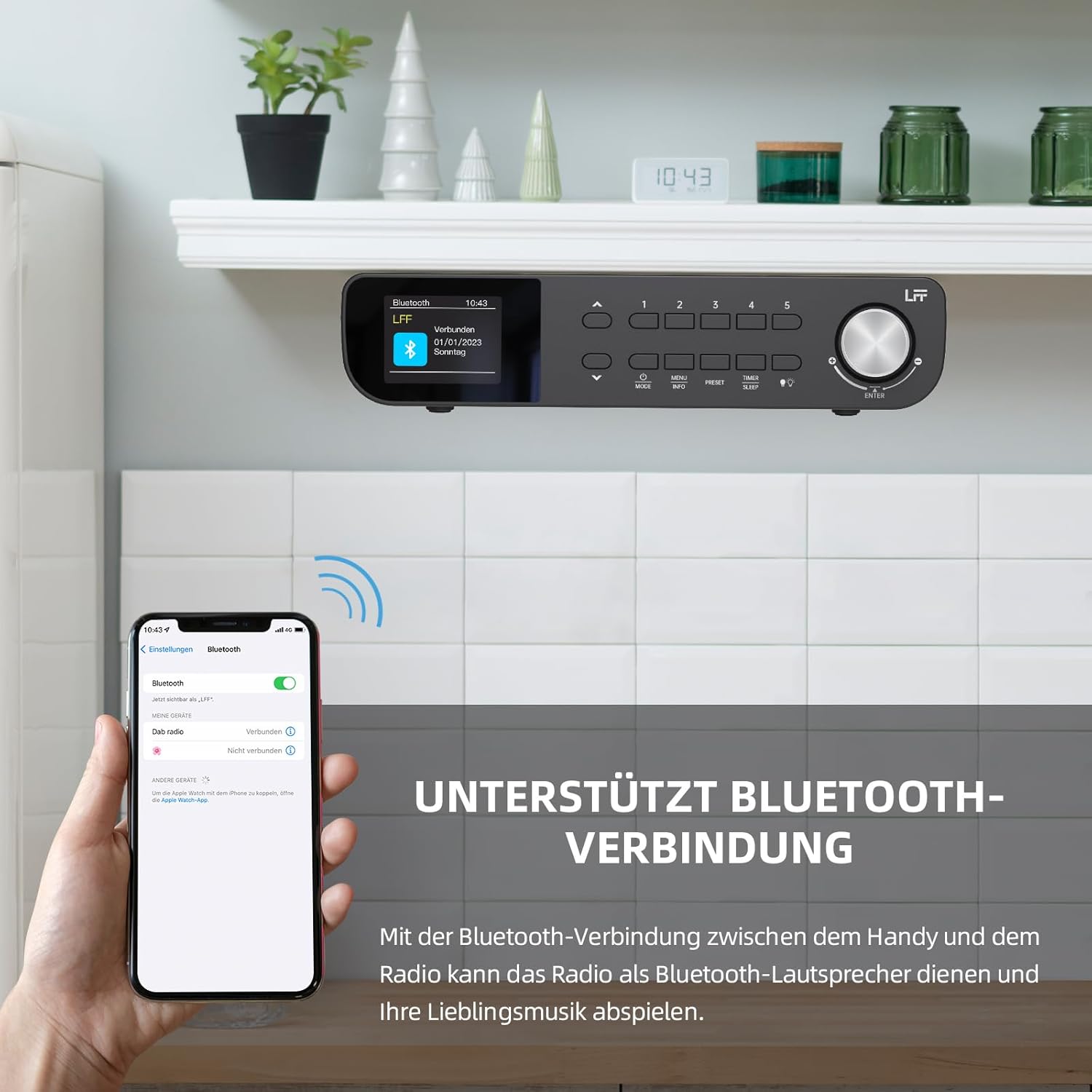
図6.1: The LFF Kitchen Radio displaying a successful Bluetooth connection, with a smartphone screen showing the radio as a connected device.

図6.2: 閉じる view of the radio's display indicating 'LFF' and 'Connected' under the Bluetooth menu, confirming a successful pairing.
6.6.アラームの設定
The radio features two independent alarms.
- を押す タイマー/スリープ button repeatedly until 'Alarm 1' or 'Alarm 2' appears.
- Use the navigation buttons and rotary knob to set the alarm time, source (DAB+, FM, or Buzzer), and frequency (daily, weekdays, weekends, once).
- Confirm settings by pressing the rotary knob.

図6.3: Close-up of the radio's display showing the current time and options to activate or deactivate Alarm 1 and Alarm 2.
6.7。 目覚まし時計
スリープタイマーを使用すると、設定された時間が経過するとラジオが自動的にオフになります。
- を押す タイマー/スリープ button repeatedly until 'Sleep Timer' appears.
- Use the navigation buttons or rotary knob to select the desired sleep duration (e.g., 15, 30, 60 minutes).
- 回転ノブを押して確定します。

図6.4: Close-up of the radio's display showing the 'Sleep Timer' setting, with an option to set the duration, for example, to 30 minutes.
6.8.プリセット
Save up to 60 favorite stations for quick access.
- プリセットを保存するには: 希望の放送局に合わせます。 プリセット(1~5) buttons until 'Preset Saved' appears. For additional presets, use the 'Preset Store' option in the menu.
- プリセットを呼び出すには: いずれかのボタンを短く押すと、 プリセット(1~5) buttons. For other presets, navigate to 'Preset Recall' in the menu.
6.9.LEDライト
The radio includes an integrated LED light, useful for illuminating the area below if mounted under a cabinet.
- を押す ライト button (if available, or navigate through menu) to turn the LED light on or off.

図6.5: The LFF Kitchen Radio mounted under a kitchen cabinet, with its integrated LED light providing illumination to the countertop below.
6.10.ディスプレイの明るさ
Adjust the display backlight brightness to suit your environment.
- Access the 'Display' or 'Settings' menu.
- Select 'Brightness' and choose from High, Medium, or Low settings.

図6.6: A visual comparison of the LFF Kitchen Radio's display at three different backlight brightness levels: High, Medium, and Low, demonstrating the adjustable visibility.
7. 取り付け手順
The LFF LDR113-EU Kitchen Radio offers flexible placement options: tabletop or under-cabinet mounting.
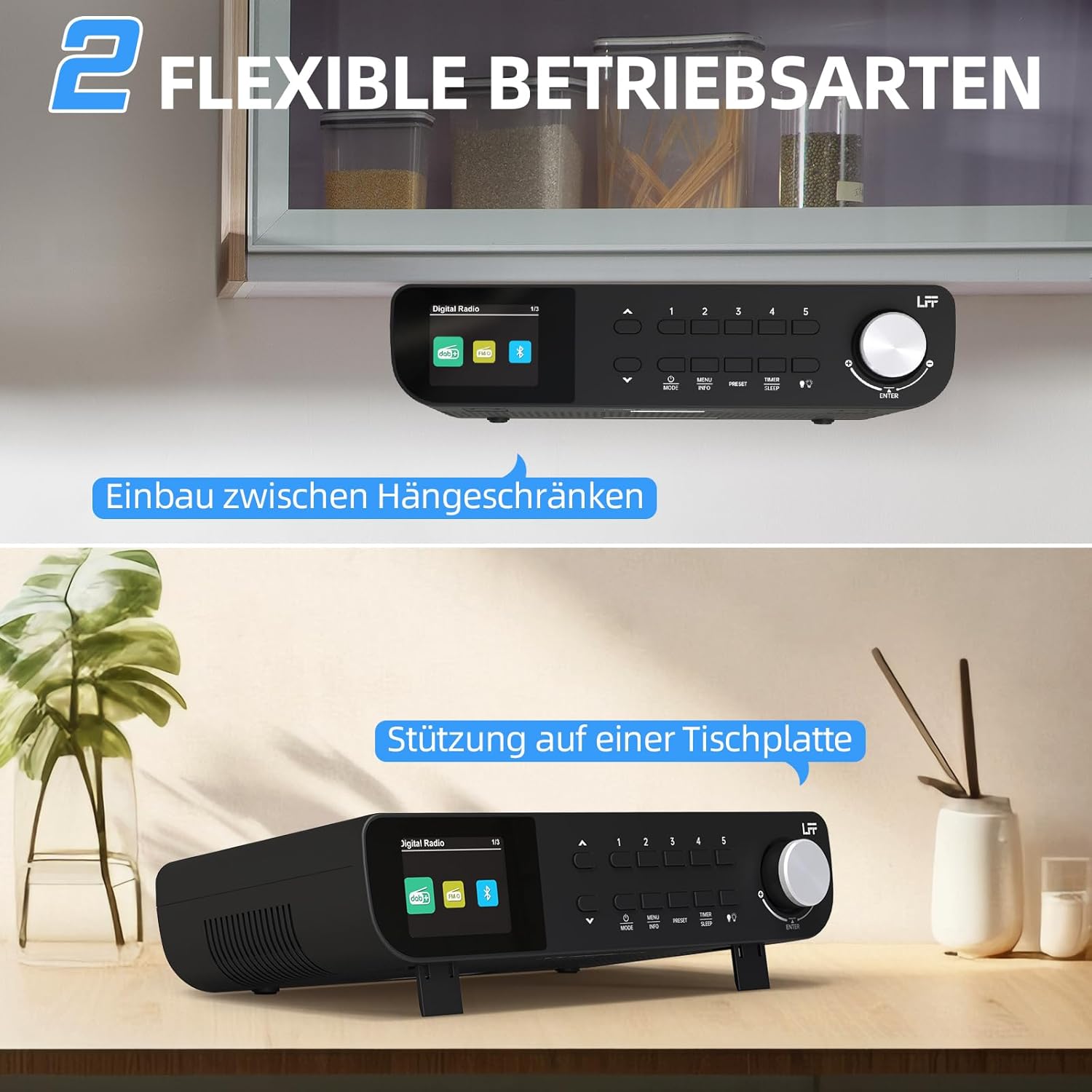
図7.1: The LFF Kitchen Radio displayed in two common installation scenarios: mounted underneath a kitchen cabinet and placed freestanding on a tabletop.
7.1. Tabletop Placement
Simply place the radio on a stable, flat surface. Ensure it is not near the edge to prevent accidental falls.
7.2. Under-Cabinet Mounting
For under-cabinet installation, use the provided mounting kit.
- 場所を準備する: Choose a suitable location under a kitchen cabinet, ensuring there is enough space and access to a power outlet.
- ドリル穴をマークする: Use the provided mounting template to mark the drill holes on the underside of the cabinet.
- パイロット穴をドリルで開ける: 印を付けた位置に下穴を開けます。
- Attach Mounting Plate (if applicable): Some models may include a separate mounting plate. Attach this to the cabinet using the screws.
- 無線を確保する: Align the radio with the mounting holes or plate and secure it using the provided screws. Ensure it is firmly attached.
- 接続電源: 電源アダプタを差し込みます。

図7.2: Detailed diagram showing the steps for under-cabinet mounting, including measuring distances (e.g., 58mm) and securing the radio with screws.
8. メンテナンス
- クリーニング: To clean the radio, disconnect it from the power supply. Use a soft, dry, lint-free cloth. Do not use abrasive cleaners, waxes, or solvents.
- アンテナ: Ensure the antenna is extended for optimal reception in DAB+ and FM modes. Handle it gently to avoid damage.
- ストレージ: ラジオを長期間保管する場合は、電源を外して涼しく乾燥した場所に保管してください。
9。 トラブルシューティング
| 問題 | 考えられる原因 | 解決 |
|---|---|---|
| 電源なし | 電源アダプターが接続されていないか、コンセントに障害があります。 | 電源の接続を確認してください。別のコンセントを試してください。 |
| DAB+/FMの受信状態が悪い | アンテナが伸びていない、信号が弱い、または干渉がある。 | Fully extend the antenna. Reposition the radio. Perform a full scan. |
| Bluetoothが接続されない | 無線がペアリングモードになっていないか、デバイスが遠すぎるか、すでに別のデバイスに接続されています。 | Ensure radio is in Bluetooth mode. Move device closer. Disconnect from other devices. |
| 音が出ない | Volume too low, mute activated, or incorrect mode. | Increase volume. Check if mute is active. Ensure correct mode (DAB+, FM, Bluetooth). |
| ディスプレイが機能しない | Brightness too low or device malfunction. | Adjust display brightness. If problem persists, contact support. |
10. 仕様

図10.1: Diagram showing the dimensions of the LFF Kitchen Radio: 250mm length, 146mm width, and 55mm height.
| 特徴 | 詳細 |
|---|---|
| ブランド | LFF |
| モデル番号 | LDR113-EU |
| 色 | 黒 |
| 接続性 | ブルートゥース |
| チューニング技術 | DABプラス、FM |
| 電源 | 電気ケーブル |
| 頻度 | 108 MHz(FM最大) |
| 寸法(長さ×幅×高さ) | 250mm x 146mm x 55mm |
| プリセット | 60 |
| 画面 | LCDカラースクリーン |
| 特集 | Dual Alarms, Sleep Timer, Under-cabinet mounting option, LED Light |
11. 保証とサポート
This product comes with a standard manufacturer's warranty. Please refer to the warranty card included in your package for specific terms and conditions. For technical support, troubleshooting assistance, or warranty claims, please contact your retailer or the LFF customer service department.