
1.製品オーバーview
The SecuFirst REP240 Wi-Fi Repeater is a versatile device designed to extend the range of your existing wireless network, eliminate Wi-Fi dead zones, and provide stable internet access throughout your home or office. It supports a maximum speed of 300 Mbps and operates on the 2.4 GHz frequency band.
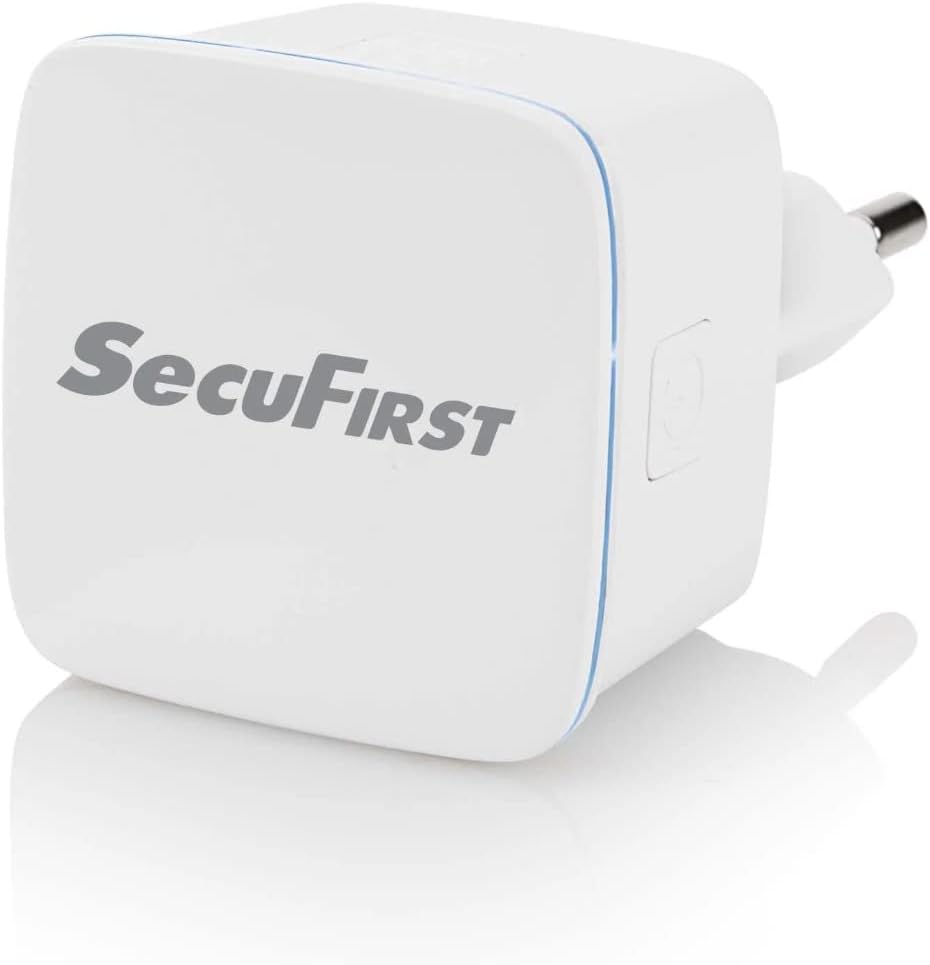
図1.1: 前面 view of the SecuFirst REP240 Wi-Fi Repeater, showing its compact design.

Figure 1.2: Various angles of the REP240, highlighting its plug and side features.
The REP240 features a compact wall-plug design that avoids obstructing adjacent outlets. It includes a WPS button for quick setup and an Ethernet port for wired connections or Access Point mode.

Figure 1.3: Diagram illustrating the signal and power indicator, WPS/Reset button, ON/OFF button, and RJ45 connection port on the device.

Figure 1.4: Dimensions of the SecuFirst REP240, showing its width (W: 41mm), height (H: 41mm), and depth (D: 27mm).
2. 主な特徴
- Wi-Fi Signal Booster: Extends the range of your existing wireless network.
- 高速: 最大 300 Mbps のデータ転送速度をサポートします。
- 2.4 GHz Compatibility: Works with all devices using the 2.4 GHz network, including smartphones, laptops, tablets, IP cameras, and printers.
- コンパクトなデザイン: Wall-plug design that does not obstruct adjacent power outlets.
- WPS ボタン: Enables quick and easy connection to your router.
- 複数の動作モード: Functions as a Repeater, Access Point (AP), or Client.
- イーサネットポート: Provides a wired connection option for devices or for AP mode setup.
- 屋内範囲: Effective range of up to 50 meters indoors.
3. セットアップとインストール
The SecuFirst REP240 offers two primary methods for setup: using the WPS button for quick connection or via an online wizard for manual configuration.
3.1. WPS(Wi-Fi Protected Setup)方式
- Plug the REP240 into a power outlet near your existing Wi-Fi router.
- Wait for the power indicator light on the REP240 to become stable.
- Press the WPS button on your Wi-Fi router.
- Within 2 minutes, press the WPS button on the SecuFirst REP240.
- The indicator light on the REP240 will flash and then turn solid, indicating a successful connection.
- Once connected, you can unplug the REP240 and move it to a location between your router and the area with weak Wi-Fi signal. Ensure the signal indicator on the REP240 shows a good signal strength.
3.2. Online Wizard Method (for routers without WPS or manual setup)
- Plug the REP240 into a power outlet.
- On your computer or mobile device, connect to the Wi-Fi network broadcast by the REP240 (e.g., "SecuFirst_Repeater"). No password is required initially.
- 開く web ブラウザを開き、デフォルトのIPアドレス(通常は
192.168.10.1or check the quick start guide for the exact address). - Follow the on-screen instructions of the setup wizard. You will be prompted to select your existing Wi-Fi network and enter its password.
- Choose your desired operating mode (Repeater, AP, or Client).
- Complete the setup. The REP240 will restart, and its indicator light will confirm the connection.
4。 動作モード
The SecuFirst REP240 supports three distinct operating modes to cater to various network needs:
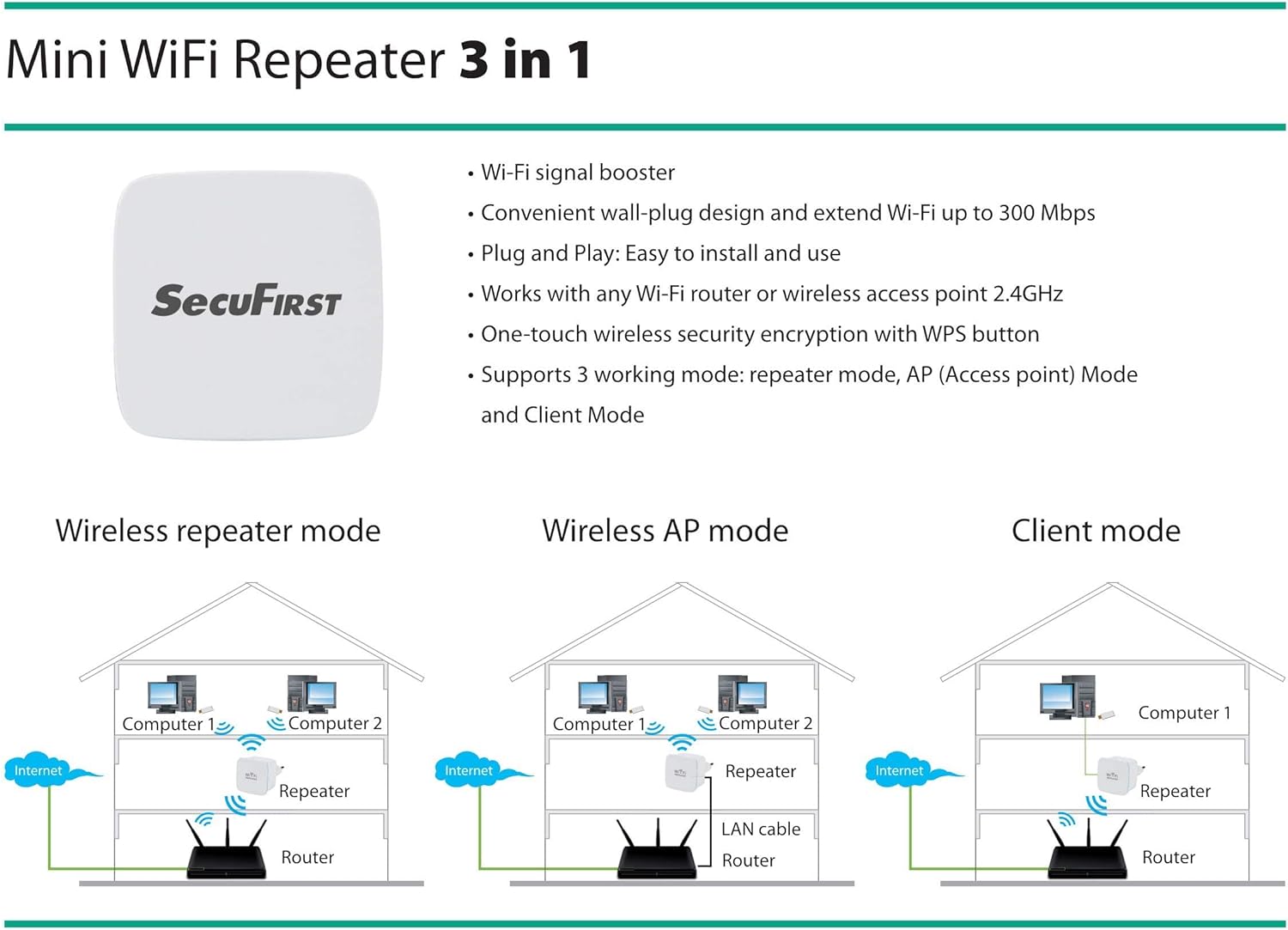
Figure 4.1: Visual representation of the three operating modes: Wireless Repeater mode, Wireless AP mode, and Client mode.
4.1. リピーターモード(デフォルト)
In Repeater Mode, the REP240 extends the coverage of your existing Wi-Fi network. It receives the wireless signal from your main router and re-broadcasts it, effectively eliminating dead zones and improving signal strength in areas with poor reception. This mode is ideal for expanding your Wi-Fi coverage without running new cables.
4.2. アクセスポイント(AP)モード
In AP Mode, the REP240 transforms a wired internet connection into a wireless hotspot. You connect the REP240 to your router or modem via an Ethernet cable, and it then creates a new Wi-Fi network. This mode is useful in situations where you have an Ethernet port available but need to provide wireless access, such as in a hotel room or a part of your home with a wired connection but no Wi-Fi.
4.3. クライアントモード
Client Mode allows you to connect a wired-only device (e.g., a desktop computer, smart TV, or gaming console) to your wireless network. In this mode, the REP240 connects wirelessly to your main Wi-Fi network and provides an Ethernet port for your wired device. This is beneficial for devices that lack Wi-Fi capabilities but need internet access.
5. メンテナンス
To ensure optimal performance and longevity of your SecuFirst REP240 Wi-Fi Repeater, follow these simple maintenance guidelines:
- 清潔に保ちます: 定期的に柔らかく乾いた布でデバイスを拭き、ほこりを取り除いてください。液体クリーナーやエアゾールの使用は避けてください。
- 換気: デバイスが換気の良い場所に設置され、通気孔が塞がれていないことを確認してください。
- 環境条件: デバイスを極端な温度、高湿度、または直射日光にさらさないでください。
- 電源サイクル: If you experience minor performance issues, try unplugging the device from the power outlet for 10-15 seconds and then plugging it back in. This can often resolve temporary glitches.
- ファームウェアの更新: Periodically check the SecuFirst official web利用可能なファームウェアアップデートについては、サイトをご覧ください。ファームウェアを最新の状態に保つことで、パフォーマンスとセキュリティが向上します。
6。 トラブルシューティング
If you encounter issues with your SecuFirst REP240, refer to the following common troubleshooting steps:
| 問題 | 考えられる原因 | 解決 |
|---|---|---|
| 電源が入らない/デバイスが起動しない | Power outlet issue, device not properly plugged in. | デバイスが機能している電源コンセントにしっかりと差し込まれていることを確認してください。別のコンセントを試してください。 |
| リピーターのWi-Fiに接続できない | Incorrect Wi-Fi name/password, repeater not configured. | Ensure you are selecting the correct network name. If newly set up, follow the online wizard instructions. |
| Weak or no internet signal after setup | Repeater placed too far from the main router, interference. | Relocate the repeater closer to your main router. Ensure there are no major obstructions (thick walls, large metal objects) between the repeater and the router. Check the signal indicator on the repeater. |
| WPS接続に失敗しました | WPS button not pressed within time limit, router WPS issue. | Ensure both WPS buttons are pressed within 2 minutes. If it continues to fail, use the online wizard method for setup. |
| インターネット速度が遅い | Network congestion, interference, repeater placement. | Try moving the repeater to a different location. Reduce the number of devices connected to the repeater. Check for sources of interference (e.g., microwaves, cordless phones). |
| Forgot repeater's login password | パスワードを忘れました。 | Perform a factory reset by pressing and holding the WPS/Reset button for 5-10 seconds until the lights flash. This will revert the device to its default settings, and you can reconfigure it. |
7. 技術仕様
| ブランド | SecuFirst |
| モデル番号 | REP240 |
| ワイヤレス標準 | 802.11bgn |
| データ転送速度 | 300 Mbps |
| 周波数帯域 | 2.4GHz帯 |
| 屋内範囲 | 最大50メートル |
| 特集 | Compact design, Access Point function, WPS button |
| 対応デバイス | Devices supporting 2.4 GHz network |
| 含まれるコンポーネント | 1 Quick Start Guide, 1 SecuFirst REP240 3-in-1 WiFi Repeater |
| アイテム重量 | 22グラム |
8. 保証とサポート
All SecuFirst products, including the REP240 Wi-Fi Repeater, come with a standard 2年間のメーカー保証 購入日から。この保証は通常の使用における材料および製造上の欠陥をカバーします。
For technical support, troubleshooting assistance, or warranty claims, please refer to the contact information provided in your product's packaging or visit the official SecuFirst website. Ensure you have your product model number (REP240) and proof of purchase ready when contacting support.