
1. はじめに
The Cooler Master Synk X is an ergonomic real-time tactile immersion chair designed to enhance your entertainment experience. It converts sound waves into vibrations, providing tactile feedback for games, movies, and music. This manual provides essential information for the safe and efficient use of your Synk X chair.

Figure 1.1: Cooler Master Synk X Immersive Chair
2. 安全情報
Please read all safety instructions carefully before using the Synk X chair. Failure to follow these instructions may result in injury or damage to the product.
- 重量制限: This product has a maximum weight recommendation of 275 pounds (125 kg). Exceeding this limit could result in damage to the chair or pose a risk of injury.
- 電源: 充電には付属の電源アダプターのみを使用してください。
- 配置: Ensure the chair is placed on a stable, level surface. Avoid placing it near heat sources or in direct sunlight.
- クリーニング: Refer to the maintenance section for proper cleaning procedures. Do not use abrasive cleaners or immerse electrical components in water.
- 子供たち: Keep children and pets away from the chair during operation and assembly.
- 変更点: Do not attempt to modify or disassemble the chair. Unauthorized modifications may void the warranty and pose safety risks.
3. パッケージ内容
以下にリストされているすべてのアイテムがパッケージに含まれていることを確認してください。
- Synk X Chair (Seat and Backrest)
- チェアベース
- ガスリフトシリンダー
- 5つのキャスターホイール
- 腰枕
- アームレスト (2)
- 電源アダプター
- Bluetooth Transceiver (optional accessory)
- Auxiliary Cables
- ハードウェアキット(ネジ、ワッシャー、六角レンチ)
- ユーザーマニュアル
ビデオ3.1: 開封と終了view 含まれるコンポーネント。
4. セットアップ
Follow these steps to assemble your Cooler Master Synk X chair:
- キャスターホイールをベースに取り付けます。 Insert each of the five caster wheels into the openings at the ends of the chair base until they click securely into place.
- ガスリフトを挿入: Place the gas lift cylinder into the central hole of the chair base.
- アームレストを取り付ける: Secure the armrests to the underside of the seat using the provided screws from the hardware kit. Ensure they are firmly attached.
- シートをガスリフトに接続します。 Carefully align the central mechanism on the underside of the seat with the top of the gas lift cylinder and press down firmly until the seat is securely seated.
- バックレストを取り付ける: Connect the backrest to the seat assembly using the remaining screws. Ensure all connections are tight.
- ケーブルを接続する: Locate the internal cables for the haptic system and RGB lighting. Connect them according to the diagrams in the included user manual.
- 腰枕を取り付ける: Position the lumbar pillow on the backrest for ergonomic support.
Video 4.1: Visual guide for chair assembly.

Figure 4.1: Fully assembled Cooler Master Synk X chair.
5. 操作手順
The Synk X chair features an intuitive control panel for managing its functions.
5.1コントロールパネルオーバーview

図5.1:詳細 view コントロールパネルの。
- DC 19V入力: Power input for charging the chair's internal battery. A full charge takes approximately 6 hours and provides 4 hours of battery life.
- バッテリーステータスインジケーター: LEDs display the current battery charge level.
- AUX入力: 3.5mm auxiliary input for wired audio sources.
- ペアリングボタン: Initiates Bluetooth pairing mode for wireless audio connections.
- 選択ボタン: Cycles through different audio input modes (AUX, Bluetooth, 5.8G).
- ヘッドフォンジャック: 3.5mm output for connecting wired headphones.
- ボリュームノブ: Adjust master volume and headphone volume.
- Vibration Level Knob: Controls the intensity of the tactile feedback.
- ARGB Button: さまざまな RGB 照明モードと色を切り替えます。
- 電源ボタン: 椅子の電源をオンまたはオフにします。
Video 5.1: Demonstration of the control panel functions.
5.2 Tactile Immersion
The Synk X converts audio signals into real-time vibrations, providing a dynamic tactile experience. Adjust the 'Vibration Level' knob to customize the intensity.
Video 5.2: Demonstration of the chair's vibration mode with a bowl of water.
5.3 RGB照明
The chair features customizable RGB lighting on the backrest. Press the 'ARGB' button on the control panel to cycle through various lighting effects and colors.

Figure 5.2: RGB lighting on the Synk X chair.
Video 5.3: Demonstration of RGB lighting modes.
5.4 人間工学的調整
The Synk X chair offers multiple adjustments for personalized comfort:
- シートの高さ: Use the lever located under the seat to adjust the chair's height.
- リクライニング角度: The backrest can recline up to 135 degrees. Use the recline lever to find your preferred angle.
- Retractable Leg Rest: Pull out the leg rest from under the seat for extended comfort.
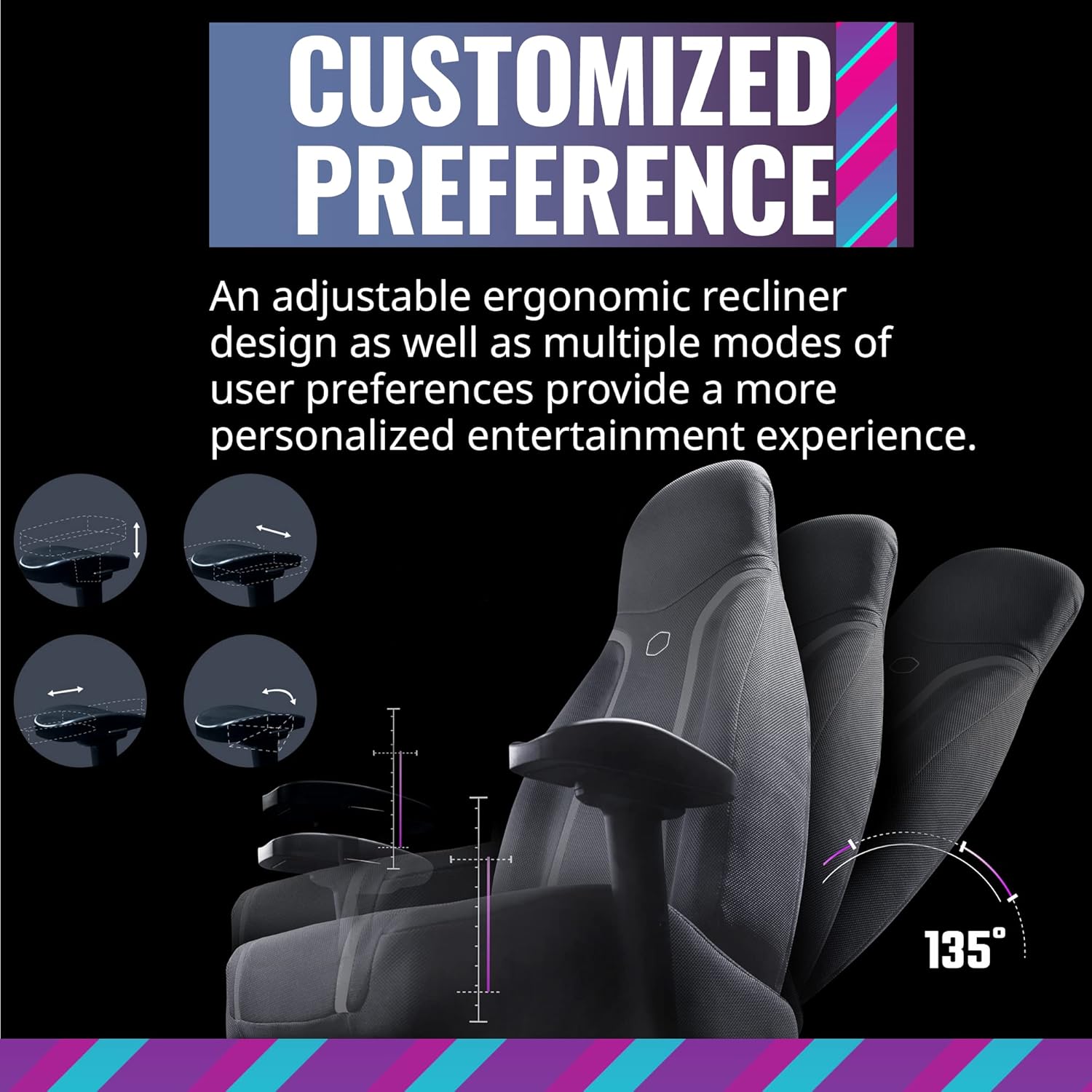
Figure 5.3: Ergonomic adjustments including recline and leg rest.
6. メンテナンス
Proper care will extend the life of your Synk X chair:
- クリーニング: 広告できれいに拭き取るamp 布。 刺激の強い化学薬品や研磨剤を使用しないでください。
- こぼれ: こぼした場合は、すぐに清潔で乾いた布で拭き取ってください。
- 椅子を動かす: 椅子を移動する際は、ベースや床を傷つけないように、引きずるのではなく持ち上げてください。
- ストレージ: 椅子は直射日光や極端な温度を避け、涼しく乾燥した場所に保管してください。
7。 トラブルシューティング
If you encounter issues with your Synk X chair, refer to the following common problems and solutions:
| 問題 | 考えられる原因 | 解決 |
|---|---|---|
| No power/Chair not turning on | Battery is depleted; Power adapter not connected; Power button not pressed. | Connect the power adapter and charge the chair. Ensure the power button is pressed firmly. |
| No tactile feedback/vibration | Vibration level set too low; Audio source not connected or playing; Cables are loose. | Increase the vibration level using the knob. Verify the audio source is connected and playing. Check all internal cable connections. |
| Bluetoothペアリングの問題 | Chair not in pairing mode; Device too far; Interference. | Press the pairing button on the control panel. Ensure your device is within range. Reduce interference from other wireless devices. |
| RGB照明が機能しない | Lighting off; Cable connection loose. | Press the ARGB button to cycle through modes. Check the RGB cable connection. |
| 椅子が不安定だったりぐらついたりしているように感じる | ネジが緩んでいる。床が平らでない。 | すべての組み立てネジを確認し、締め付けてください。椅子が平らで均一な場所にあることを確認してください。 |
8. 仕様
- ブランド: クーラーマスター
- モデル名: シンクエックス
- 商品モデル番号: IXC-SX1-I-US1
- 色: 月の灰色
- 材料: ポリカーボネート
- 商品の重量: 80.8ポンド(36.74kg)
- 製品寸法 (長さ×幅×高さ): 22 x 26.25 x 37インチ
- 最大重量推奨: 275ポンド(125kg)
- バックスタイル: オープンバック
- 特集: Ergonomic, Rolling, Tactile Immersion
- 推奨用途: ゲーム
- リクライニングポジション数: More than one (up to 135 degrees)
- 接続性: Bluetooth, AUX, 5.8G (with optional transceiver)
- バッテリー寿命: Approximately 4 hours on a full charge
- 充電時間: 約6時間
9.保証とサポート
For warranty information and customer support, please refer to the official Cooler Master webご購入の際は、ウェブサイトをご覧いただくか、カスタマーサービスまでお問い合わせください。保証請求の際は、購入証明としてレシートを保管してください。
オンラインサポート: Visit the Cooler Master support page for FAQs, drivers, and contact options.
連絡先: Refer to the Cooler Master web地域の連絡先の詳細については、サイトをご覧ください。