
導入
This manual provides essential information for the safe and efficient use of your ONN 42-Inch Full HD LED Smart TV, Model 100018254. Please read these instructions thoroughly before operating your television and retain them for future reference.
箱の中身
セットアップを続行する前に、すべてのコンポーネントが揃っていることを確認してください。
- ONN 42-Inch Full HD LED Smart TV
- リモートコントロール
- テレビ台(2台)
- テレビスタンド用ネジ
- 電源コード
- クイックスタートガイド(このマニュアルには含まれていません)

画像: 正面 view of the ONN 42-inch Smart TV displaying the Roku TV home screen with various streaming app icons like Netflix, Disney+, Apple TV, Hulu, Peacock, and Roku Channel. The TV is black with slim bezels and two stand feet.
設定
1. テレビスタンドの取り付け
- 損傷を防ぐため、テレビ画面を下にして、柔らかく清潔な表面に慎重に置いてください。
- 各スタンド部分をテレビの下部にある対応するネジ穴に合わせます。
- 各スタンド部品を付属のネジで固定します。しっかりと締められていることを確認してください。

Image: A diagram illustrating the dimensions of the ONN 42-inch TV, showing its width as 43 inches and height as 37 inches when placed on its stand.
2. 壁掛け(オプション)
This TV is compatible with VESA standard wall mounts. Refer to your wall mount's instructions for proper installation. Ensure the wall mount can support the weight of the television.

画像: 背面 view of the ONN 42-inch TV, highlighting the VESA mounting screw holes in a square pattern and various input ports on the side and bottom right.
3.デバイスの接続
ケーブル ボックス、ゲーム コンソール、Blu-ray プレーヤーなどの外部デバイスをテレビの入力ポートに接続します。
- HDMI: For high-definition audio and video. Use an HDMI cable to connect devices like set-top boxes, game consoles, or streaming sticks.
- USB: USBストレージデバイスを接続してメディアを再生します files.
- Wi-Fi: For internet connectivity to access smart TV features and streaming services.
4. 初回電源投入とセットアップウィザード
- 電源コードをテレビに差し込み、次に壁のコンセントに差し込みます。
- リモコンまたはテレビ本体の電源ボタンを押します。
- Follow the on-screen instructions to complete the initial setup, including language selection, network connection (Wi-Fi), channel scanning, and linking to your Roku account (if applicable).
テレビの操作
1. リモートコントロールview
The remote control allows you to navigate the TV's interface and control various functions.
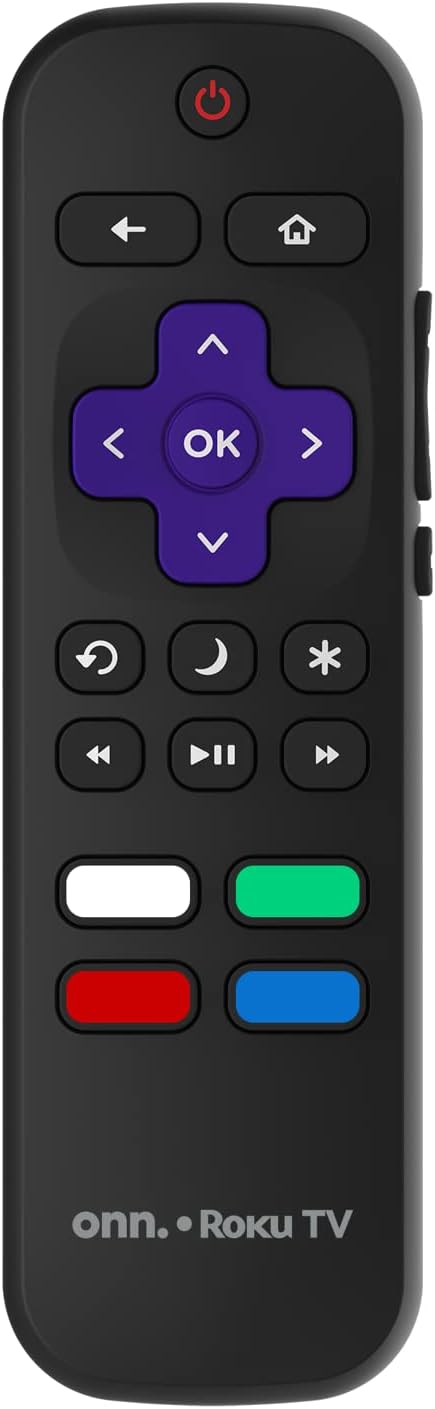
Image: The ONN Roku TV remote control, featuring a power button, directional pad, OK button, home button, back button, volume controls, and dedicated buttons for popular streaming services.
- 電源ボタン: テレビの電源をオンまたはオフにします。
- Directional Pad (D-Pad) & OK: メニューを移動し、選択を確定します。
- ホームボタン: Roku TV のホーム画面に戻ります。
- 戻るボタン: 前の画面またはメニューに戻ります。
- 音量を上げる/下げる: オーディオの音量を調整します。
- 消音ボタン: 音声をミュートまたはミュート解除します。
- チャンネルアップ/ダウン: チャンネルを変更します(アンテナ/ケーブル入力用)。
- 専用アプリボタン: Quick access to popular streaming services like Netflix, Hulu, etc.
2. スマートテレビの機能
Your ONN Smart TV provides access to a wide range of streaming content and smart functionalities.
- ストリーミングサービス: Access pre-installed apps like Netflix, YouTube, and many more through the Roku Channel Store.
- 音声コントロール: Compatible with Alexa and Google Assistant for hands-free control (requires a separate compatible voice assistant device).
- 自動ソフトウェア更新: The TV will automatically update its software when connected to the internet, ensuring you have the latest features and security.
3. 入力選択
To switch between connected devices (e.g., cable box, game console), use the 入力 button on your remote or select the desired input from the Roku TV home screen.
4. 画像とサウンドの設定
テレビの設定メニューにアクセスして、画像とサウンドの設定をカスタマイズします。 設定 > テレビ画像設定 or 設定>オーディオ to adjust options like brightness, contrast, color, sound mode, and equalizer settings.
メンテナンス
1. 画面のクリーニング
- 掃除をする前に必ずテレビの電源をオフにし、プラグを抜いてください。
- 柔らかく、糸くずの出ない布を少し使用してください。amp水または専用のスクリーンクリーナーで拭き取ってください。
- クリーナーを画面に直接スプレーしないでください。まず布にクリーナーを塗布してください。
- 研磨剤入りのクリーナー、アルコール、ベンゼン、シンナーは画面を損傷する恐れがあるので使用しないでください。
2. ソフトウェアの更新
Ensure your TV is connected to the internet to receive automatic software updates. These updates improve performance, add features, and enhance security. You can manually check for updates in the 設定 > システム > システムアップデート メニュー。
トラブルシューティング
テレビで問題が発生した場合は、次の一般的な解決策を参照してください。
電源なし
- 電源コードがテレビと壁のコンセントの両方にしっかりと差し込まれているかどうかを確認してください。
- 別のデバイスを接続して、壁のコンセントが機能していることを確認します。
- リモコンだけでなく、テレビ本体の電源ボタンを押してみてください。
画像なし/画像が歪む
- 正しい入力ソースが選択されていることを確認します(例:HDMI 1、HDMI 2)。
- テレビと外部デバイス間のすべてのケーブル接続を確認してください。
- Try a different HDMI cable if possible.
- テレビメニューで画像設定(明るさ、コントラスト)を調整します。
音が出ない / 音が小さい
- Check if the TV is muted or if the volume is turned down.
- Ensure external audio devices (soundbars, receivers) are properly connected and powered on.
- テレビメニューでオーディオ設定を確認してください。
ネットワーク接続の問題
- Verify your Wi-Fi router is powered on and functioning.
- ルーターとモデムを再起動します。
- へ移動 設定 > ネットワーク > 接続を確認 on your TV to diagnose the issue.
- 正しい Wi-Fi パスワードを入力していることを確認してください。
仕様
| 特徴 | 詳細 |
|---|---|
| モデル番号 | 100018254 |
| 画面サイズ | 42インチ |
| ディスプレイ技術 | 導かれた |
| 解決 | 1080p(フルHD) |
| リフレッシュレート | 60Hz |
| 接続性 | USB、Wi-Fi |
| サポートされているインターネットサービス | Netflix, YouTube (and others via Roku platform) |
| 制御方法 | Voice (via Alexa & Google Assistant compatible devices), Remote Control |
| 取り付けタイプ | 壁掛けマウント(VESA対応) |
| 色 | 黒 |
| 欧州連合 | 671227025567 |

Image: Energy Guide label for Television Model 100018254, indicating an estimated yearly energy cost of $11 based on 12 cents per kWh and 5 hours use per day.
保証とサポート
For warranty information and technical support, please refer to the documentation included with your purchase or visit the official ONN support webサイト。 保証請求に備えて購入時のレシートを保管しておいてください。