1.製品オーバーview
The Shiftpower FT-SP18+ is an advanced electronic module designed to enhance your vehicle's throttle response. It effectively eliminates the electronic throttle delay, providing a more direct and immediate acceleration experience. This device offers various driving modes to suit different preferences and driving conditions, along with an anti-theft feature and an Eco Mode for improved fuel efficiency.

Image 1.1: Shiftpower FT-SP18+ device, packaging, and the accompanying smartphone application interface.
2. 含まれるコンポーネント
Before beginning installation, please verify that all the following items are present in your Shiftpower FT-SP18+ package:
- 01 x Shiftpower Interface Module
- 01 x Toggle Button
- 01 x Installation Harness
- 6インチケーブルタイ02本
- ユーザーマニュアル(このドキュメント)
3. インストールとセットアップ
The Shiftpower FT-SP18+ is designed for a simple plug-and-play installation, requiring no complex programming. It is compatible with cars equipped with an electronic throttle.
3.1. インストール手順
- Locate your vehicle's electronic accelerator pedal.
- Disconnect the original connector from the accelerator pedal.
- Connect the Shiftpower interface module's male connector to the vehicle's original female connector.
- Connect the Shiftpower interface module's female connector to the accelerator pedal's male connector.
- Connect the toggle button to the designated port on the Shiftpower interface module.
- Secure all cables and the module using the provided cable ties, ensuring they do not interfere with pedal operation or other vehicle components.
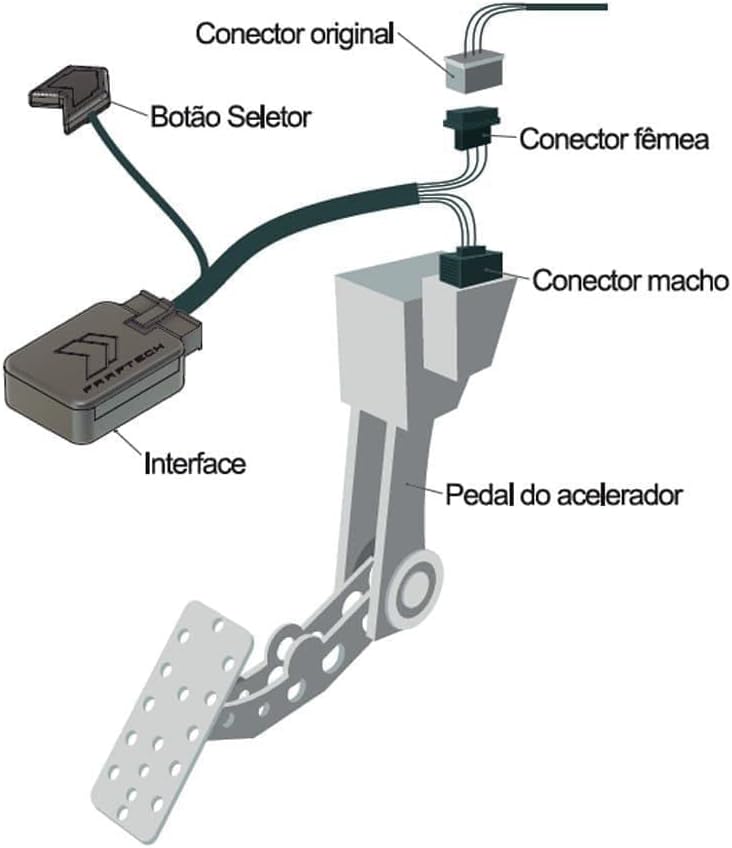
Image 3.1: Installation diagram illustrating the connection of the Shiftpower interface, toggle button, and harness to the vehicle's accelerator pedal.
3.2. Initial Setup (App Connection)
For maximum customization and control, connect your Shiftpower device to the dedicated smartphone application, available for both iOS and Android. Ensure Bluetooth is enabled on your device.

Image 3.2: Instructions to connect the Shiftpower device with the smartphone application, available on iOS and Android platforms.
4. Operating the Shiftpower FT-SP18+
The Shiftpower FT-SP18+ offers multiple driving modes and features accessible via the physical toggle button or the smartphone application.
4.1. 運転モード
The device provides several pre-defined driving modes, each offering a distinct throttle response profile:
- 動的: A balanced mode for improved daily driving.
- スポーツ: Enhanced throttle response for a more engaging drive.
- SUPER SPORT: Aggressive throttle mapping for spirited driving.
- 人種: Maximum throttle sensitivity for track or performance-oriented use.
- エコモード: Reduces acceleration response for fuel economy.
- MANOBRIST MODE (Valet Mode): Limits acceleration for safe use by others.
- LOCK MODE (Anti-Theft): Blocks the accelerator pedal, preventing unauthorized use of the vehicle.

Image 4.1: Smartphone application displaying various driving modes (Dynamic, Sport, Super Sport, Race) and their respective gain percentages。

画像4.2: 別の view of the smartphone application interface, highlighting Race, Sport, Manobrista (Valet), and Eco modes.
4.2. アプリの機能とカスタマイズ
The Shiftpower app allows for comprehensive control and customization:
- Full customization with over 300 performance maps.
- Option to disable Valet & Presence Lock modes (when Bluetooth is connected and app is active).
- Automatic or manual adjustment of button lighting for day and night modes.
- Limits setting for valet mode.

Image 4.3: The Shiftpower app interface demonstrating a 75% gain setting, with options for Dynamic, Sport, Super Sport, Race, Lock, Valet, Off, and Eco modes.
5. エコモード操作
The exclusive Eco Mode feature of the Shiftpower FT-SP18+ allows for a reduction in acceleration response by up to 20%, contributing to fuel savings. This mode is ideal for city driving or when prioritizing fuel efficiency.

Image 5.1: Visual representation highlighting the new Eco Mode feature of Shiftpower.

Image 5.2: Illustrates the fuel-saving benefit of Shiftpower's Eco Mode.

Image 5.3: The Shiftpower app interface displaying the Eco mode setting, indicating a 10% gain reduction for fuel efficiency.
6. 仕様
| 特徴 | 詳細 |
|---|---|
| メーカー | Faaftech |
| 製品寸法 | 6 x 10 x 15 cm |
| 商品型番 | FT-SP18+ |
| メーカー部品番号 | 7892460881489 |
| アイテム重量 | 350グラム |
| 接続性 | Bluetooth内蔵 |
| アプリの互換性 | iOSとAndroid |
| インストール | プラグアンドプレイ |
| 互換性 | Cars with electronic throttle only |
| 起源 | 100% National Product (Brazil) |
7. メンテナンス
The Shiftpower FT-SP18+ is designed for durability and requires minimal maintenance. Ensure that all connections remain secure and free from moisture or debris. Periodically check the wiring for any signs of wear or damage. Keep the device clean by wiping it with a dry, soft cloth.
8。 トラブルシューティング
If you encounter any issues with your Shiftpower FT-SP18+, please refer to the following common troubleshooting steps:
- 応答なし: Ensure the device is correctly installed and all connectors are firmly seated. Check your vehicle's battery for sufficient charge.
- アプリの接続の問題: Verify that Bluetooth is enabled on your smartphone and the Shiftpower app has the necessary permissions. Try restarting both the app and your phone.
- 予期しない動作: If the device is not performing as expected, try resetting it by disconnecting and reconnecting the power harness. Ensure your app is updated to the latest version.
- エラーコード: If your vehicle displays any error codes after installation, immediately disconnect the Shiftpower module and consult a qualified mechanic.
これらの手順を実行しても問題が解決しない場合は、カスタマー サポートにお問い合わせください。
9. 保証とサポート
For information regarding the product warranty, please refer to the warranty card included with your purchase or visit the official Faaftech website. For technical support, troubleshooting assistance beyond this manual, or any other inquiries, please contact Faaftech customer service through their official channels.