
1. はじめに
Thank you for choosing the FLEXISPOT EF1 Basic Plus Electric Height-Adjustable Desk. This manual provides essential information for the safe and efficient assembly, operation, and maintenance of your new desk. Please read these instructions thoroughly before use and retain them for future reference.
安全上の警告
- Always follow the assembly instructions carefully to prevent accidents and ensure proper function.
- Do not exceed the maximum load capacity of 70 kg (154 lbs) on the desktop. Overloading can compromise stability and cause damage.
- To prevent tipping, especially when the desk is at its maximum height (121 cm), ensure the desk is anchored correctly to a stable wall.
- Keep children and pets away from the desk during operation to avoid injury from moving parts.
- 高さ調整中は、机の進路に障害物がないことを確認してください。
- 机の上に座ったり立ったりしないでください。
- 清掃やメンテナンスを行う前に電源を切ってください。
2. セットアップと組み立て
The FLEXISPOT EF1 Basic Plus desk requires assembly. Please ensure all components are present before beginning. Refer to the included assembly guide for detailed step-by-step instructions.
開梱と部品チェック
Carefully unpack all parts and lay them out on a soft, clean surface to prevent scratches. Verify that all components listed in the packing list are present.
組み立て終了view
- リフティングコラムをデスクの脚に取り付けます。
- クロスバーをリフティングコラムに接続します。
- 組み立てたフレームにデスクトップを固定します。
- Install the control panel and cable management tray (if included).
- Connect all motor and control cables according to the wiring diagram.
- 電源コードを接地されたコンセントに差し込みます。

図1: The FLEXISPOT EF1 Basic Plus Electric Height-Adjustable Desk with a black tabletop and white frame, set up in a home office environment.

図2: This image illustrates the smooth, single-piece desktop construction of the FlexiSpot desk, contrasting it with typical multi-piece desktops that may have uneven surfaces.

図3: An illustrative diagram detailing various desktop size and color options, along with key specifications for the desk frame, including adjustable height range, static and dynamic load capacities, and lifting noise levels.
3. 操作手順
コントロールパネルオーバーview

図4: 詳細な view of the desk's Smart Control Panel, highlighting the LED display, the up and down adjustment buttons, and four numbered buttons for memory presets.
The desk is equipped with an advanced all-in-one keypad for easy height adjustment and memory functions.
- LEDディスプレイ: 現在のデスクの高さをセンチメートル単位で表示します。
- 上/下ボタン (⌃ / ⌄): 押し続けると、デスクの高さを手動で上下に調整できます。希望の高さでボタンを離すと停止します。
- メモリプリセット(1、2、3、4): Four programmable buttons to save and recall your preferred sitting and standing heights.
メモリプリセットの設定
- 上/下ボタンを使用して、デスクを希望の高さに調整します。
- Press the "M" or "SET" button (if available, otherwise proceed to step 3) to activate memory mode.
- Press one of the numbered preset buttons (1, 2, 3, or 4) within 3 seconds. The LED display will show "S-1", "S-2", etc., indicating the height has been saved to that preset.
メモリプリセットの呼び出し
希望する番号のプリセットボタン(1、2、3、または4)を押すだけで、デスクは自動的に保存された高さまで移動します。
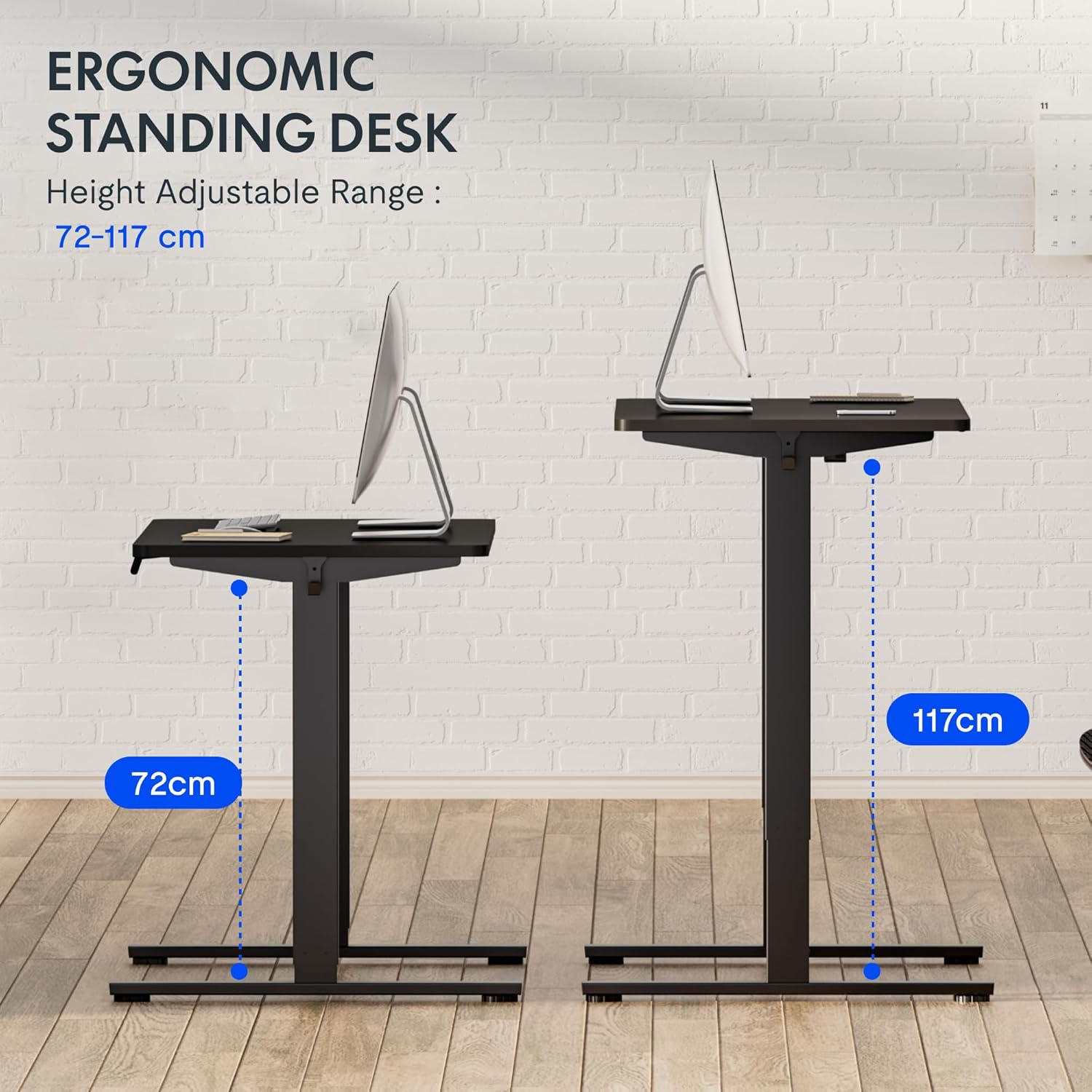
図5: This image demonstrates the height adjustment capabilities of the desk, showing a range from 72 cm (sitting height) to 117 cm (standing height). Note that the full adjustable range for this model is 71 cm to 121 cm.
4. メンテナンス
Regular maintenance ensures the longevity and optimal performance of your FLEXISPOT desk.
- クリーニング: デスクトップとフレームを柔らかくて乾いた布で拭きます。amp 布で拭いてください。仕上げを傷める可能性のある研磨剤入りの洗剤や刺激の強い化学薬品は使用しないでください。
- ケーブル管理 定期的にケーブルを点検し、整理して、もつれを防ぎ、スムーズな操作を確保してください。
- 検査: すべてのネジとボルトがしっかりと締まっているか定期的に点検してください。必要に応じて締め直してください。
- 潤滑: The lifting columns are generally maintenance-free. Do not attempt to lubricate internal components unless specifically instructed by customer support.
5。 トラブルシューティング
デスクで問題が発生した場合は、次の一般的な問題と解決策を参照してください。
| 問題 | 考えられる原因 | 解決 |
|---|---|---|
| 机は動きません。 |
|
|
| 机の動きが不均一であったり、異常な音がしたりします。 |
|
|
| LEDにエラーコードが表示されます。 |
|
|
リセット手順
If the desk is not functioning correctly, a reset may resolve the issue.
- Press and hold the "Down" button until the desk reaches its lowest position and slightly retracts, then releases.
- If this does not initiate a reset, unplug the desk from the power outlet for at least 10 seconds, then plug it back in.
- Repeat step 1. The desk should now be reset.
6. 仕様
| ブランド | フレキシポット |
| モデル番号 | HU-XI-201 |
| Desktop Dimensions (L x W x Thickness) | 120 x 80 x 2.5 cm |
| Adjustable Height Range (without tabletop) | 71cm~121cm |
| 最大揚重速度 | 2.5 cm/秒 |
| 最大積載量 | 70 kg (154 ポンド) |
| 持ち上げ時の騒音レベル | <50dB |
| デスクトップ素材 | Engineered Wood (MDF) with High-Pressure Laminate |
| フレーム素材 | 粉体塗装鋼 |
| 色 | Black tabletop + White frame |
| 特徴 | Electric height adjustment, 4 memory presets |
7. 保証とサポート
保証情報
FLEXISPOT stands behind the quality of its products. Your EF1 Basic Plus desk comes with the following warranty:
- 3年間保証: Covers controllers and motors.
- 5年間保証: Covers the desk frame.
Please retain your proof of purchase for warranty claims. The warranty covers manufacturing defects under normal use. It does not cover damage caused by misuse, accidents, unauthorized modifications, or failure to follow the instructions in this manual.

図6: An image outlining the warranty coverage for FlexiSpot desks, specifically mentioning a 3-year warranty for controllers and motors, and a 5-year warranty for the desk frame.
カスタマーサポート
For technical assistance, warranty claims, or any questions regarding your FLEXISPOT EF1 Basic Plus desk, please contact FLEXISPOT customer support.
Webサイト: www.flexispot.com (または地域の同等のもの)
メールアドレス: Refer to your purchase documentation or the official FlexiSpot web連絡先メールアドレスのサイト。
電話: Refer to your purchase documentation or the official FlexiSpot web連絡先電話番号のサイト。