
リンディ 38365
Lindy 38365 Extender, SDVoE HDMI 4K60 and USB Transmitter User Manual
モデル: 38365
1. はじめに
The Lindy 38365 Extender is an advanced SDVoE (Software Defined Video over Ethernet) device designed for transmitting high-quality 4K@60Hz 4:4:4 HDMI video and USB signals over a 10G network. This device supports uncompressed resolution with HDR10 and no latency, making it ideal for professional AV installations. It can operate in either Encoder (Transmitter) or Decoder (Receiver) mode, offering flexibility for various system configurations.
2. 安全情報
- デバイスを操作する前に、すべての指示をよくお読みください。
- デバイスを湿気、極端な温度、直射日光にさらさないでください。
- Use only the provided power supply and mounting hardware.
- ご自身でデバイスを開けたり修理したりしないでください。すべての修理は資格のある専門家にご依頼ください。
- 過熱を防ぐために適切な換気を確保してください。
3. パッケージ内容
- Lindy 38365 Extender Unit
- 電源
- 取り付け金具
- ユーザーマニュアル(このドキュメント)
4.製品オーバーview
The Lindy 38365 Extender is a versatile unit capable of functioning as both an SDVoE HDMI 4K60 and USB Transmitter (Encoder) or Receiver (Decoder). It features multiple ports for video, audio, USB, and network connectivity.
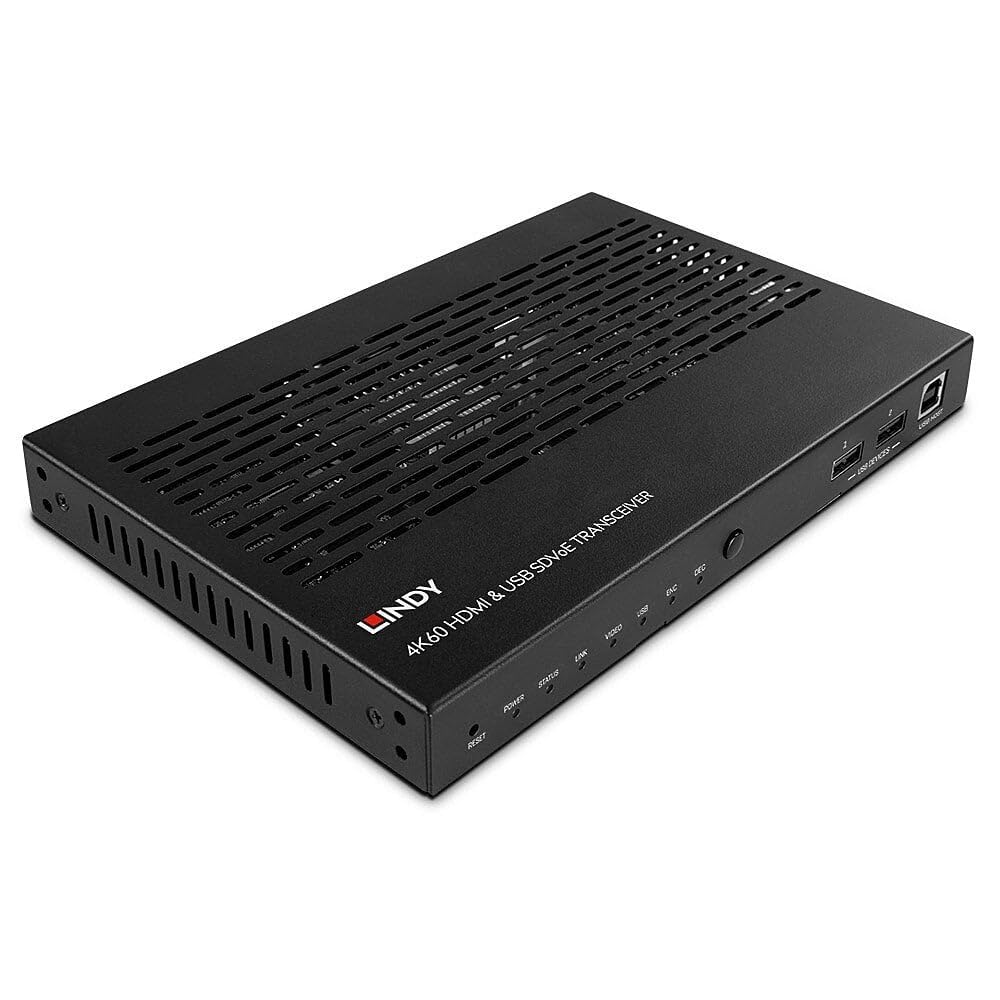
Figure 4.1: Lindy 38365 Extender - Overall View. This image displays the top and side panels of the black extender unit, highlighting its ventilation grilles and various input/output ports.
4.1フロントパネル

Figure 4.2: Front Panel. The front panel includes LED indicators for Power, Status, Link, Video, USB, Encoder (ENC), and Decoder (DEC) modes. It also features a Reset button, a Mode button, two USB device ports, and one USB Host port.
- リセットボタン: デバイスをリセットします。
- LEDインジケーター: Power, Status, Link, Video, USB, ENC (Encoder), DEC (Decoder).
- モードボタン: Toggles between Encoder and Decoder modes.
- USB DEVICES (1, 2): USB ports for connecting peripheral devices.
- USB ホスト: USB port for connecting to a host computer.
4.2 背面パネル

Figure 4.3: Rear Panel. This view shows the DC 12V power input, RS-232 terminal block, IR In/Out jacks, HDMI In/Out ports, 10G (PoE) SFP+ port, 1G LAN port, and Audio In/Out jacks.
- DC 12V: 電源入力コネクタ。
- RS-232 (TX, RX): シリアル制御ポート。
- IR IN / IR OUT: Infrared signal input and output for remote control.
- HDMI入力: HDMI入力ポート。
- HDMI出力: HDMI出力ポート。
- 10G (PoE) SFP+: 10 Gigabit Ethernet port with SFP+ cage, supporting Power over Ethernet.
- 1G LAN: 1 ギガビット イーサネット ポート。
- オーディオ入力 / オーディオ出力: Analog audio input and output jacks.

Figure 4.4: Rear Panel Close-up. A detailed view of the power, control, and HDMI ports on the rear panel, showing the DC 12V input, RS-232 terminal, IR In/Out, and HDMI In/Out connectors.
5. セットアップ
Follow these steps to set up your Lindy 38365 Extender:
- Determine Mode: Decide whether the unit will function as an Encoder (Transmitter) or a Decoder (Receiver). Use the MODE button on the front panel to switch between modes. The corresponding LED (ENC or DEC) will illuminate.
- 電源接続: Connect the provided 12V DC power supply to the DC 12V port on the rear panel. Alternatively, if using a PoE-enabled 10G network switch, the unit can be powered via the 10G (PoE) SFP+ port.
- ネットワーク接続: Connect the 10G (PoE) SFP+ port to your 10 Gigabit Ethernet network switch using an appropriate SFP+ module and fiber or copper cable. The 1G LAN port can be used for additional network connectivity or control.
- HDMI Connection (Encoder Mode):
- Connect your HDMI source (e.g., Blu-ray player, PC) to the HDMI IN ポート。
- If local monitoring is required, connect an HDMI display to the HDMI出力 ポート。
- HDMI Connection (Decoder Mode):
- Connect your HDMI display (e.g., TV, projector) to the HDMI出力 ポート。
- USB接続:
- In Encoder mode, connect a host computer to the USBホスト ポート。
- Connect USB peripheral devices (e.g., keyboard, mouse) to the USBデバイス ports (1, 2).
- オーディオ接続: If using external analog audio, connect your audio source to 音声入力 and your audio receiver/speakers to オーディオ出力.
- RS-232 & IR Control: Connect RS-232 control devices to the terminal block and IR emitters/receivers to the IR IN/OUT jacks as needed for system integration.
6. 操作手順
Once all connections are made and the unit is powered on, the Lindy 38365 Extender will automatically detect the connection type and begin operation based on its configured mode (Encoder or Decoder).
- モード切り替え: を押す モード button on the front panel to toggle between Encoder (ENC) and Decoder (DEC) functionality. The active mode is indicated by the illuminated LED.
- LEDインジケーター: Monitor the front panel LEDs to confirm power, network link, video signal presence, and USB activity.
- SDVoE Features: The device supports advanced SDVoE features such as Multicast, Video Wall, and Multiview configurations. These advanced functionalities typically require a compatible SDVoE controller and software for configuration and management. Refer to your SDVoE system documentation for detailed setup of these features.
- USB 拡張子: USB devices connected to the "USB DEVICES" ports on the Decoder unit will be extended to the host connected to the "USB HOST" port on the Encoder unit.
7. メンテナンス
- クリーニング: 柔らかく乾いた布でデバイスを拭いてください。液体クリーナーやエアゾールクリーナーは使用しないでください。
- 換気: 過熱を防ぐため、通気口がふさがれていないことを確認してください。
- ファームウェアの更新: Periodically check the Lindy web最適なパフォーマンスと互換性を確保するために、利用可能なファームウェア アップデートをサイトから確認してください。
8。 トラブルシューティング
- ビデオ出力なし:
- すべての HDMI ケーブルがしっかりと接続されていることを確認します。
- Ensure the unit is in the correct mode (Encoder/Decoder).
- Check the network connection and ensure the 10G link is active.
- Confirm the source and display are powered on and functioning correctly.
- USB機能なし:
- Ensure USB cables are properly connected to the USB HOST and USB DEVICES ports.
- Verify the unit is in the correct mode for USB extension.
- ネットワーク接続の問題:
- Check the 10G (PoE) SFP+ port and 1G LAN port connections.
- Confirm your network switch supports 10G and PoE (if used).
- ネットワーク ケーブルの整合性を確認します。
- デバイスの電源が入っていない:
- Ensure the 12V DC power supply is correctly connected and plugged into a working outlet.
- If using PoE, confirm the 10G network switch is providing power.
9. 仕様
| 特徴 | 詳細 |
|---|---|
| ブランド | リンディ |
| モデル番号 | 38365 |
| 接続技術 | イーサネット |
| サポートされている解像度 | Up to 4K@60Hz 4:4:4 with HDR10 (uncompressed) |
| レイテンシー | 遅延なし |
| 動作モード | エンコーダまたはデコーダ |
| ネットワークポート | 1x 10G (PoE) SFP+, 1x 1G LAN |
| HDMIポート | 1x HDMI In, 1x HDMI Out |
| USBポート | 1x USB Host, 2x USB Devices |
| オーディオ出力モード | ステレオ、サラウンド(5.1) |
| 制御方法 | Push Button (Mode), RS-232, IR, Remote |
| 電源入力 | DC 12V, PoE (Power over Ethernet) |
| ワットtage | 5ワット |
| アイテム重量 | 1.29キログラム |
| 色 | 黒 |
10. 保証
The Lindy 38365 Extender comes with a 3年間保証 from the date of purchase. Please retain your proof of purchase for warranty claims. This warranty covers manufacturing defects and faults under normal use conditions.
11. サポート
For technical support, troubleshooting assistance, or further information regarding your Lindy 38365 Extender, please visit the official Lindy website or contact your local Lindy customer service representative. Ensure you have your product model number and purchase details available when seeking support.
Ask a question about this manual
Ask about setup, troubleshooting, compatibility, parts, safety, or missing instructions. Manuals+ will review the question and use this page’s manual context to help answer it.