
導入
This manual provides instructions for the Beyution RC877S replacement infrared remote control. This remote is designed to be a direct replacement for various Onkyo Audio Soundbar and Home Theater Systems, including models LS-T10, LS-B50, LSB50, LST10, 24140877, RC-877S, and RC877. It operates using infrared technology and typically requires no programming or setup for compatible devices.
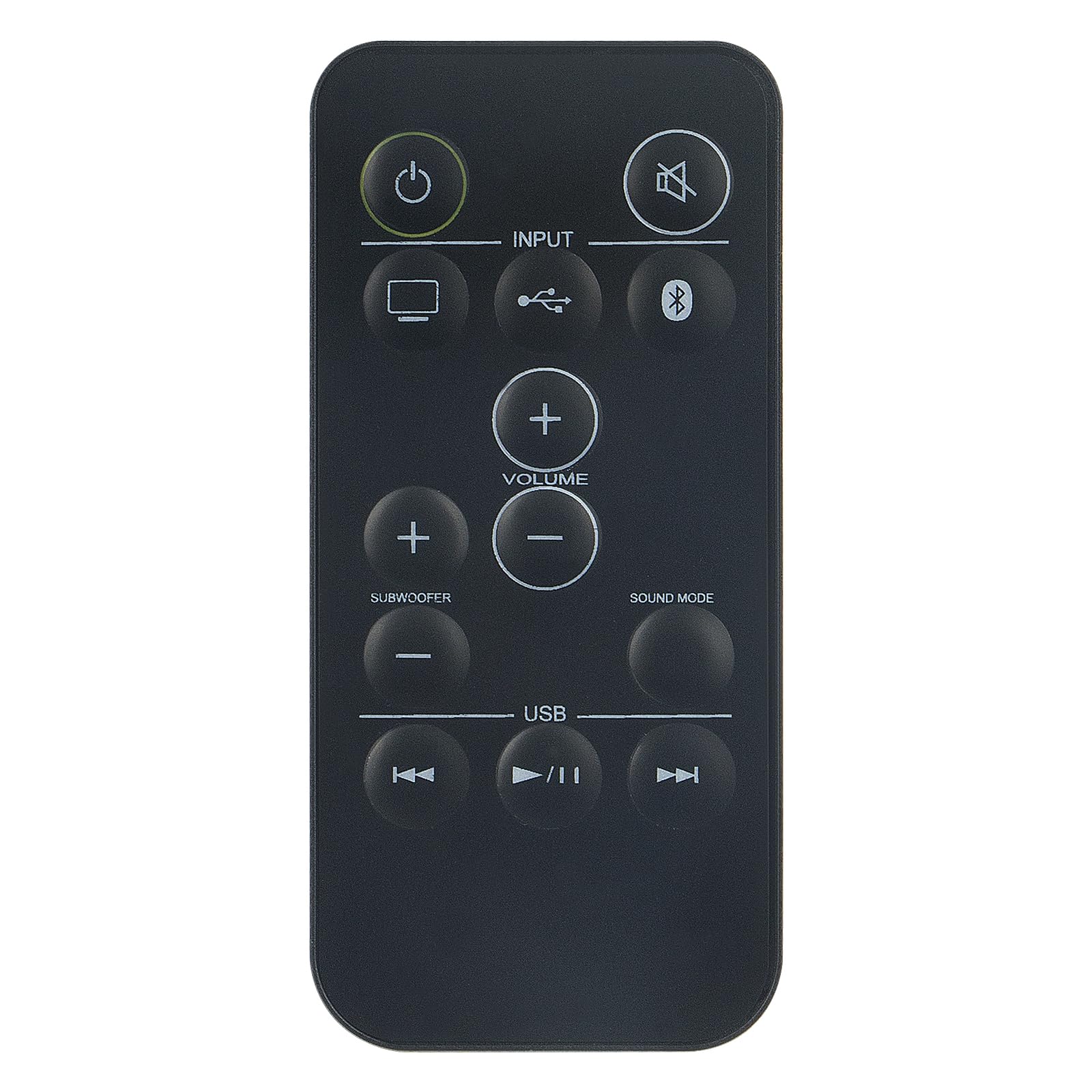
画像: 正面 view of the Beyution RC877S remote control, showing all buttons clearly labeled.
設定
バッテリーの取り付け
The RC877S remote control requires two AAA batteries for operation. Follow these steps to install the batteries:
- リモコンの背面にある電池ボックスのカバーを見つけます。
- カバーを下方にスライドさせるか、ラッチ(ある場合)を押してコンパートメントを開きます。
- 単 4 電池 2 本を挿入し、プラス (+) とマイナス (-) の端子がコンパートメント内のマークと正しく揃っていることを確認します。
- 電池ボックスのカバーを、カチッと音がするまで元の位置に戻してしっかりと閉めます。
注記: This remote control is designed to work immediately with compatible devices without any additional programming. If the remote does not respond, ensure batteries are installed correctly and have sufficient charge.

画像: 斜め view of the Beyution RC877S remote control, highlighting its ergonomic design.
操作手順
Point the remote control directly at your Onkyo audio soundbar or home theater system. The maximum effective operating distance is approximately 10 meters (33 feet).
ボタンの機能:
- パワー(⏻): デバイスの電源をオンまたはオフにします。
- ミュート(🔇): オーディオ出力をミュートまたはミュート解除します。
- 入力: Cycles through available input sources (e.g., TV, USB, Bluetooth).
- ボリューム(+/-): Increases or decreases the main volume level.
- Subwoofer (+/-): サブウーファーの音量レベルを調整します。
- サウンドモード: Changes the audio sound mode or preset.
- USB: USB入力ソースを選択します。
- 前のトラック (⏮): Skips to the beginning of the current track or the previous track during media playback.
- Play/Pause (⏸/⏸): メディアの再生を再生または一時停止します。
- 次のトラック (⏭): Skips to the next track during media playback.

Image: A person comfortably using the remote control to operate a home theater system, demonstrating typical usage.
メンテナンス
リモコンの寿命を延ばし、最適なパフォーマンスを確保するには、次のメンテナンス ガイドラインに従ってください。
- クリーニング: リモコンは柔らかく乾いた布で拭いてください。頑固な汚れには、軽くamp布に水または中性洗剤を含ませ、すぐに乾拭きしてください。研磨剤入りの洗剤や溶剤の使用は避けてください。
- バッテリー交換: リモコンの反応が鈍くなったり、機能しなくなった場合は、電池を交換してください。必ず2本とも、同じ種類の新しい電池(単4電池)に交換してください。
- ストレージ: リモコンは、直射日光、極端な温度、高湿度を避け、涼しく乾燥した場所に保管してください。長期間使用しない場合は、液漏れを防ぐため、電池を取り外してください。
- ドロップを避ける: リモコンを落とすと内部コンポーネントが損傷する可能性があるため、物理的な衝撃からリモコンを保護してください。
トラブルシューティング
If you experience issues with your RC877S remote control, refer to the following common solutions:
- リモコンが応答しない:
- Check if the batteries are installed correctly with the correct polarity (+/-).
- 古い電池を新しい単4電池と交換してください。
- Ensure there is a clear line of sight between the remote control and the device's infrared receiver. Obstructions can block the signal.
- Make sure you are within the effective operating range (approximately 10 meters).
- 特定のボタンが機能しない:
- リモコン、特にボタンの周りを清掃して、操作を妨げる可能性のある汚れやゴミを取り除きます。
- If only certain buttons are unresponsive, the remote might be damaged.
- Device not compatible:
- Verify that your Onkyo audio system model is listed as compatible (LS-T10, LS-B50, LSB50, LST10, 24140877, RC-877S, RC877).
- This remote is an infrared replacement and does not require programming. If your original remote used a different technology (e.g., RF), this replacement may not be suitable.
これらの手順を実行しても問題が解決しない場合は、保証とサポートのセクションを参照してさらにサポートを受けてください。
仕様
| ブランド | ベイユーション |
| モデル名 | RC877S |
| モデル番号 | WY-RC877S-US |
| 接続技術 | 赤外線 |
| 最大範囲 | 10メートル(33フィート) |
| 必要な電池の数 | 2 |
| 電池のタイプ | AAAアルカリ |
| 材料 | ABSプラスチック |
| 色 | 黒 |
| 商品の寸法 (長さ x 幅 x 高さ) | 5インチ x 1インチ x 0.5インチ |
保証とサポート
保証情報
This Beyution RC877S remote control comes with a 1年間保証 ご購入日から1年間有効です。この保証は製造上の欠陥を保証し、通常の使用状況において製品が想定通りに機能することを保証します。保証請求の際は、購入証明書を保管してください。
カスタマーサポート
For any questions, concerns, or issues regarding your remote control, including damage or malfunction, please contact our customer service team. We are committed to providing a satisfactory solution within 24 hours.
接触: Please refer to the seller's contact information on your purchase platform for direct assistance.