
1. はじめに
ご購入ありがとうございますasing the Klipsch Reference Premiere RP-1400SW 14-inch High Excursion Subwoofer. This subwoofer is designed to deliver powerful and accurate low-frequency sound, enhancing your home theater or music listening experience. This manual provides essential information for proper setup, operation, and care of your new subwoofer.

Figure 1.1: Klipsch Reference Premiere RP-1400SW Subwoofer (Grille Removed)
2. 重要な安全情報
Please read all safety instructions before operating this product. Keep these instructions for future reference.
- 電源: Connect the subwoofer only to a power supply of the type described in the operating instructions or as marked on the appliance.
- 換気: 適切な換気を確保してください。通気口を塞がないでください。メーカーの指示に従って設置してください。
- 熱: ラジエーター、暖房レジスター、ストーブ、その他の機器(以下を含む)などの熱源の近くに設置しないでください。 amp熱を発生する装置。
- 水と湿気: この装置を水や湿気の近くで使用しないでください。
- クリーニング: 乾いた布でのみ清掃してください。
- サービス: すべての修理は資格のあるサービス担当者に依頼してください。電源コードやプラグが破損している、液体がこぼれた、装置内に物が落ちた、装置が雨や湿気にさらされた、正常に動作しない、装置を落としたなど、装置が何らかの損傷を受けた場合は修理が必要です。
- ヘビーオブジェクト: This subwoofer is heavy (85 lbs). Exercise caution when moving to prevent injury.
3. 箱の中身
すべてのコンポーネントが存在することを確認します。
- Klipsch Reference Premiere RP-1400SW Subwoofer
- 電源コード
- 取扱説明書(本書)
4. セットアップ
4.1サブウーファーの配置
The Klipsch RP-1400SW features a front-firing driver and Aerofoil front slot port, allowing for flexible placement within your room. Experiment with different locations to find the optimal bass response for your listening environment. Generally, corner placement can enhance bass output, while placement along a wall can provide a more balanced sound. The shock-absorbing rubber feet help isolate the subwoofer from the floor.

Figure 4.1: Front-Firing Driver and Aerofoil Front Slot Port

Figure 4.2: Subwoofer Design Features (Rounded Corners, Shock-Absorbing Feet)
4.2 接続
Your RP-1400SW subwoofer offers both wired and wireless connectivity options.

Figure 4.3: Subwoofer Rear Panel Connections and Controls
- Wired Connection (RCA/LFE):
Connect an RCA cable from the LFE output of your AV receiver to the LFE input on the subwoofer's rear panel. If your receiver does not have an LFE output, use a standard RCA stereo cable to connect the receiver's pre-out (subwoofer output) to both the left and right RCA inputs on the subwoofer.
- Wireless Connection (Optional WA-2 Kit):
For wireless operation, you can connect your subwoofer with a Klipsch WA-2 Wireless Subwoofer Kit (sold separately). This allows for flexible placement without the need for long RCA cables. Refer to the WA-2 kit's instructions for pairing and setup.

Figure 4.4: Wireless Connectivity with Optional WA-2 Kit
- 電源接続:
Once audio connections are made, plug the supplied power cord into the subwoofer's power inlet and then into a suitable wall outlet.
5. サブウーファーの操作
5.1コントロールオーバーview
The rear panel of your subwoofer features several controls to fine-tune its performance:

Figure 5.1: Easy-to-Use Controls on Rear Panel
- ゲイン(ボリューム): サブウーファーの出力レベルを調整します。最初は低い設定から始め、徐々に上げていくことで、低音がメインスピーカーとシームレスに調和するようになります。
- LOW-PASS (Crossover): This control sets the upper frequency limit for the subwoofer. If using an AV receiver with LFE output, set this to LFE (or bypass if available on your receiver). If connecting via stereo RCA, adjust this to blend with your main speakers' low-frequency cutoff.
- 位相(0°/180°): メインスピーカーに対するサブウーファー出力の位相を調整します。両方の設定を試して、最もインパクトがあり、一貫性のある低音が得られる設定を見つけてください。
- POWER (ON/AUTO/OFF):
- に: サブウーファーは常時オンのままです。
- 自動: Subwoofer automatically turns on when an audio signal is detected and enters a low-power standby mode after a period of inactivity.
- OFF: サブウーファーの電源がオフになっています。
The 1/2-watt standby mode in AUTO setting ensures exceptional efficiency and reduces energy costs.
5.2 初回電源投入と調整
- すべての接続が安全であることを確認します。
- Set the GAIN control to its minimum position.
- Set the LOW-PASS control to LFE if using an AV receiver, or to a suitable frequency (e.g., 80Hz) if connecting via stereo RCA.
- PHASEスイッチを0°に設定します。
- POWERスイッチをAUTOに設定します。
- Play some audio with significant bass content. Gradually increase the GAIN control until the subwoofer output blends with your main speakers.
- Experiment with the PHASE switch (0° vs. 180°) to determine which setting provides the most impactful and seamless bass response in your listening position.
For optimal performance, consider using your AV receiver's automatic room correction system (if available) after initial setup.
5.3 Product Video: Reference Premiere Subwoofers
Video 5.1: An official Klipsch video showcasing the features and design of the Reference Premiere Subwoofers, including the RP-1400SW. This video highlights advanced acoustics, balanced performance, front-firing Cerametallic woofers, high-efficiency Class D amplifier, front-firing slot port, detailed design, and easy-to-use controls.
6. メンテナンス
To ensure the longevity and optimal performance of your Klipsch RP-1400SW subwoofer, follow these simple maintenance guidelines:
- クリーニング: Dust the cabinet regularly with a dry, soft cloth. Avoid using abrasive cleaners, solvents, or strong detergents, as these can damage the ebony vinyl finish.
- 配置: Avoid placing the subwoofer in direct sunlight or near heat sources, which can cause discoloration or damage to the cabinet.
- 換気: 後部 amplifier panel has adequate airflow. Do not block the heat sink.
- グリル: The durable woven cloth grille can be gently cleaned with a soft brush or vacuum cleaner attachment to remove dust.
7。 トラブルシューティング
If you experience issues with your subwoofer, consult the following table for common problems and solutions:
| 問題 | 考えられる原因 | 解決 |
|---|---|---|
| サブウーファーから音が出ない |
|
|
| 低音が弱い、または歪んでいる |
|
|
| サブウーファーがハム音やブザー音を発する |
|
|
これらの解決策を試しても問題が解決しない場合は、Klipsch カスタマー サポートにお問い合わせください。
8. 仕様
Key technical specifications for the Klipsch Reference Premiere RP-1400SW Subwoofer:
| 特徴 | 詳細 |
|---|---|
| モデル番号 | RP-1400SW |
| ブランド | クリプシュ |
| スピーカータイプ | サブウーファー |
| ウーファー直径 | 14インチ |
| オーディオドライバータイプ | Dynamic Driver (Cerametallic) |
| スピーカー最大出力 | 600ワット |
| RMSパワー | 500ワット |
| 周波数応答 | 20Hz - 1kHz (approximate, based on A+ content) |
| 接続技術 | Wired RCA, LFE, and WA-2 Wireless Port |
| オーディオ出力モード | ステレオ、サラウンドサウンド |
| 取り付けタイプ | 床立ち |
| エンクロージャ材質 | 木材 |
| 色 | 黒檀 |
| 電源 | コード式電気 |
| 商品の寸法(奥行き x 幅 x 高さ) | 奥行き25.67インチ x 幅20インチ x 高さ21.34インチ |
| アイテム重量 | 85 ポンド |
| 欧州連合 | 743878047424 |
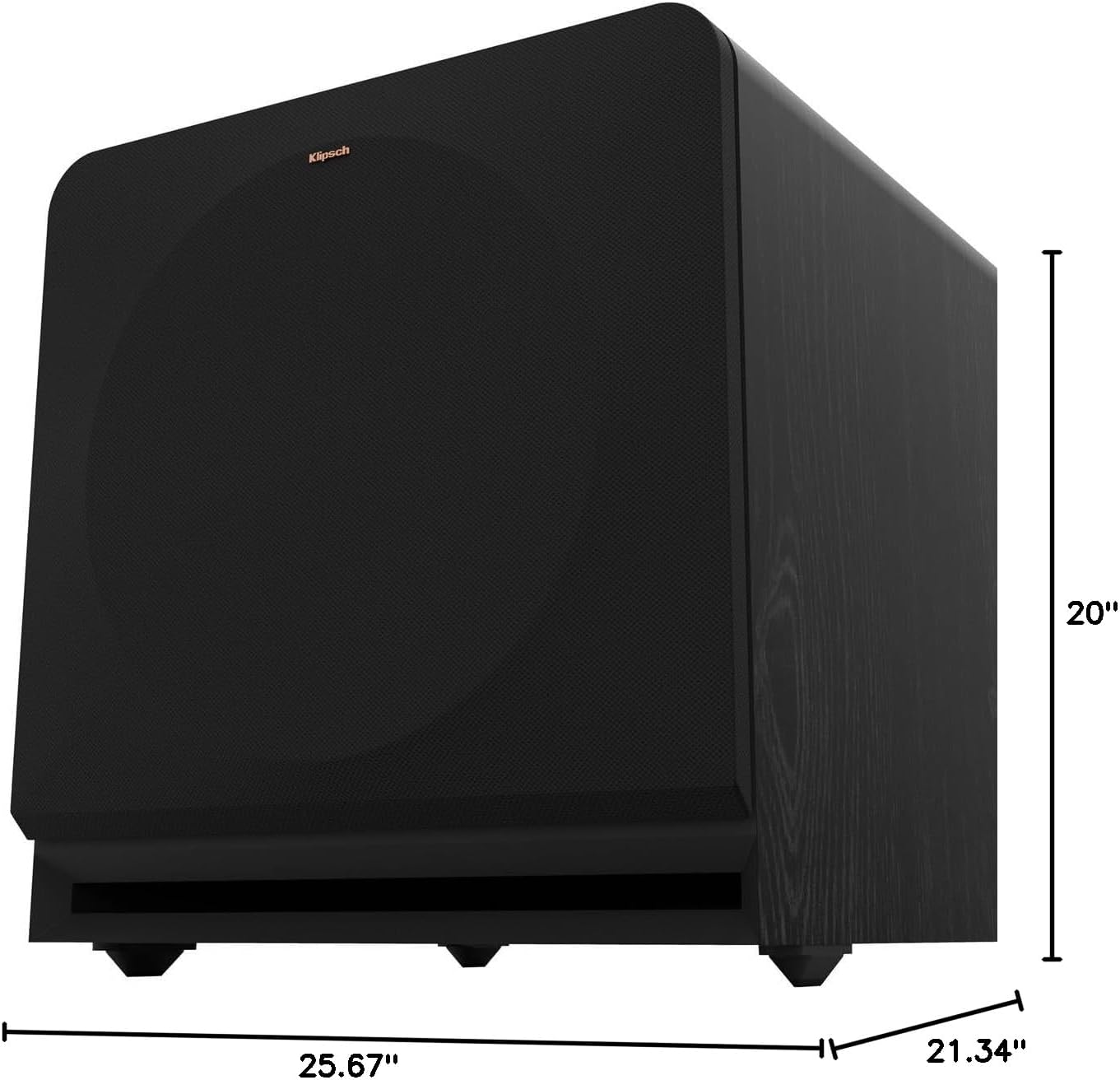
Figure 8.1: Subwoofer Dimensions
9.保証とサポート
9.1 保証情報
The Klipsch Reference Premiere RP-1400SW Subwoofer comes with a limited warranty:
- エレクトロニクス: 2年間
- Woofer, Cabinet, and Non-Electrical Mechanics: 5年
Please retain your proof of purchase for warranty claims. For full warranty terms and conditions, refer to the official Klipsch webサイトをご覧いただくか、カスタマー サポートにお問い合わせください。
9.2 カスタマーサポート
For further assistance, technical support, or warranty inquiries, please visit the official Klipsch website or contact their customer service department. Contact details can typically be found on the Klipsch webサイトの「サポート」または「お問い合わせ」セクションをご覧ください。