
1. はじめに
Thank you for choosing the XTRONS TIX125L 10.1-inch Android 12 Car Stereo. This advanced multimedia system features an Octa-core processor, 8GB RAM, 128GB ROM, built-in GPS, Wi-Fi, 4G connectivity, Apple CarPlay, Android Auto, and a Digital Sound Processor (DSP). Its rotatable QLED display offers a versatile and intuitive user experience. This manual provides essential information for installation, operation, maintenance, and troubleshooting to ensure optimal performance and user satisfaction.
2. 安全情報
- 専門家による取り付けを推奨: 自動車の電気系統は複雑なため、ユニットや車両の損傷を防ぐために専門家による設置を強くお勧めします。
- 電源: ユニットがマイナスアース付きの12V DC電源に接続されていることを確認してください。電圧が正しくありませんtag損傷を引き起こす可能性があります。
- 配線: Follow all wiring diagrams carefully. Improper wiring can lead to malfunctions, electrical shorts, or fire.
- 安全運転: 運転の妨げになるような操作はしないでください。常に道路の安全を最優先にしてください。
- 温度: ユニットを極端な温度や直射日光に長時間さらさないでください。
- 水分: ユニットを乾燥した状態に保ってください。湿気にさらされると損傷する可能性があります。
- 換気: 過熱を防ぐために、ユニットの周囲に十分な換気を確保してください。
3. パッケージ内容
パッケージの内容を以下のリストと照らし合わせてご確認ください。
- XTRONS TIX125L Main Head Unit
- 電源配線ハーネス
- RCA Output/Input Cables
- GPSアンテナ
- USBケーブル(2本)
- 4G LTEアンテナ
- Mounting Brackets (x2 pairs)
- ネジ
- 外部マイク
- ユーザーマニュアル(このドキュメント)

図3.1:同梱の付属品と本体。
4. セットアップとインストール
This section provides general guidelines for installing your XTRONS TIX125L car stereo. For specific vehicle models, additional adapters or professional assistance may be required.
4.1 インストール前の手順
- バッテリーを外します: 作業を始める前に、電気的なショートを防ぐために、車両のバッテリーのマイナス端子を外してください。
- 古いユニットを削除します: 既存のカーステレオをダッシュボードから慎重に取り外します。
- 配線の検査: Identify the vehicle's wiring harness. You may need a vehicle-specific adapter harness (not included) to connect to the XTRONS unit.
4.2配線接続
- パワーハーネス: Connect the provided power wiring harness to the unit and then to your vehicle's wiring. Ensure all connections (power, ground, ACC, illumination) are correct.
- GPSアンテナ: GPSアンテナを接続し、障害物のない場所に設置します。 view 空(例:ダッシュボード上またはフロントガラスの下)
- 4G LTEアンテナ: Connect the 4G LTE antenna for cellular data connectivity.
- Wi-Fiアンテナ: The unit has a built-in Wi-Fi module. Ensure no obstructions block its signal.
- USB ケーブル: Route the USB cables to an accessible location (e.g., glove compartment) for connecting USB drives or smartphones.
- 外部マイク: Connect the external microphone for improved call quality during Bluetooth hands-free operation. Position it near the driver.
- RCAケーブル: 外部用のRCAケーブルを接続する amp必要に応じて、スピーカー、サブウーファー、または補助ビデオ入力/出力を追加できます。
- オプションの接続: Connect optional accessories such as a rear-view camera, DVR camera, DAB+ box, or TPMS kit according to their respective manuals.
4.3 ユニットの取り付け
- Secure the Main Unit: Use the provided mounting brackets and screws to secure the main unit into the dashboard opening.
- 表示を調整: The 10.1-inch display is rotatable and adjustable. Position it for optimal viewing angle and accessibility.
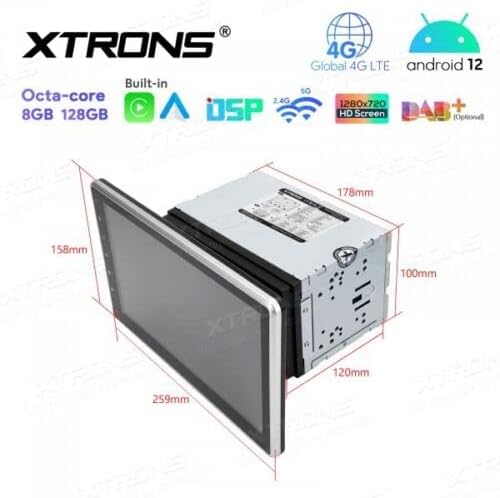
Figure 4.1: Unit dimensions for installation planning.
4.4 インストール後
- バッテリーを再接続します: 車のバッテリーのマイナス端子を再接続します。
- 初回電源オン: Turn on the vehicle ignition and power on the stereo.
- テスト機能: Verify all functions, including audio, radio, GPS, Bluetooth, and touchscreen responsiveness.
5. 操作手順
This section details the operation of the XTRONS TIX125L car stereo's various features.
5.1 基本操作
- 電源オン/オフ: 電源ボタン(通常は前面パネルにあります)を長押しすると、本体の電源のオン/オフを切り替えることができます。短く押すと、通常、音声がミュート/ミュート解除されます。
- タッチスクリーンインターフェイス: Navigate the Android 12 interface by tapping, swiping, and pinching on the capacitive touchscreen.
- 音量コントロール: 物理ボタンまたは画面上のコントロールを使用して音量を調整します。
- ホーム画面: The main screen provides access to frequently used applications and widgets.

Figure 5.1: Main user interface with navigation and media playback.
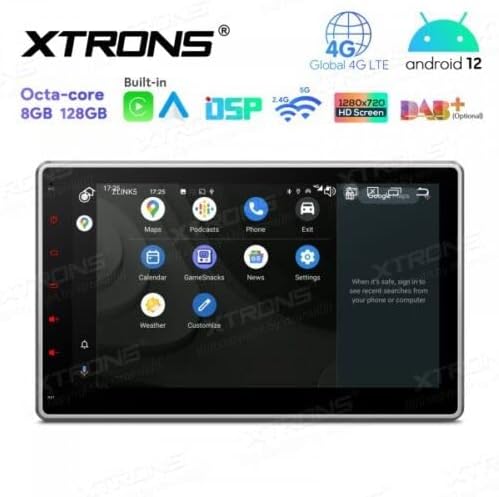
Figure 5.2: Android app drawer with various applications.
5.2GPSナビゲーション
The unit comes with a built-in GPS module. You can use pre-installed navigation apps or download others from the Google Play Store.
- GPSアンテナ: GPSアンテナが正しく接続され、クリアな view 正確な位置特定のために空の位置を測定します。
- マップの更新: Keep your navigation maps updated for the best routing experience.
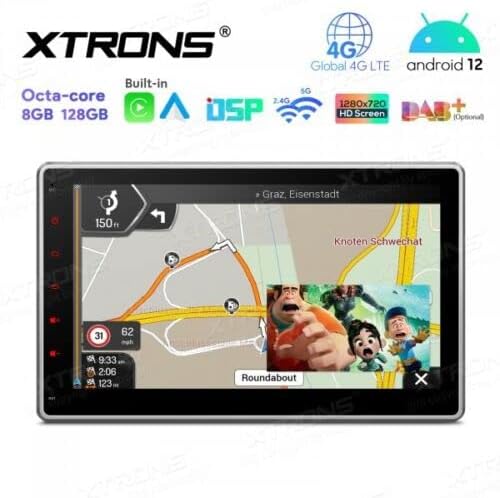
Figure 5.3: Navigation interface with split-screen functionality.
5.3 ブルートゥース 5.0
ハンズフリー通話やオーディオストリーミングを行うには、Bluetooth 経由でスマートフォンを接続します。
- ペアリング: Go to Bluetooth settings on the unit and your phone. 検索する available devices and select the XTRONS unit to pair.
- ハンズフリー通話: 本体の画面から直接通話の発信と受信ができます。外部マイクを使用すれば、クリアな音声伝送が可能です。
- オーディオストリーミング: 携帯電話の音楽をカーステレオのスピーカーから再生します。
5.4 Wi-Fiと4G接続
Access the internet and online services using Wi-Fi or a 4G SIM card.
- Wi-Fi: Connect to a Wi-Fi hotspot (e.g., from your phone or home network) via the Wi-Fi settings.
- 4GLTE: Insert a compatible 4G SIM card into the designated slot (if available) and connect the 4G antenna for mobile data access.
5.5 アップルカープレイ / アンドロイドオート
Integrate your smartphone for a safer and smarter driving experience.
- 繋がり: Connect your iPhone or Android phone via USB or wirelessly (if supported by your phone and the unit's software).
- 特徴: Access navigation, music, messages, and other compatible apps directly on the stereo display.

Figure 5.4: Apple CarPlay / Android Auto interface.
5.6 デジタルサウンドプロセッサ(DSP)
Customize your audio experience with the built-in DSP.
- イコライザー: 周波数帯域を調整して、好みに応じてサウンド出力を微調整します。
- サウンドエフェクト: さまざまなサウンドプリセットとエフェクトを探索します。
5.7 スクリーンミラーリング
スマートフォンの画面をカーステレオに直接表示します。
- 繋がり: Follow the instructions within the Screen Mirroring app on the unit to connect your phone (usually via Wi-Fi or USB).
5.8 USB/SD再生
メディアを再生する fileUSB ドライブまたは SD カードから。
- USB ポート: Connect USB flash drives (up to 128GB) to the provided USB ports.
- SDカードスロット: Insert an SD card (up to 64GB) into the designated slot.
- メディアプレーヤー: Use the built-in media player app to browse and play audio or video files.
5.9 Radio (FM/AM, DAB+)
お気に入りのラジオ局を聴きましょう。
- FM / AM: Use the radio app to scan for stations, save presets, and switch between FM and AM bands.
- DAB+(デジタルオーディオ放送): This feature requires an optional DAB+ receiver box (not included). Once connected, you can enjoy higher quality digital radio broadcasts.
5.10ステアリングホイールコントロール
Control the stereo using your vehicle's steering wheel buttons.
- 構成: This feature typically requires a vehicle-specific CAN-Bus adapter (not included) and configuration within the unit's settings.
5.11 Rear Camera and DVR Input
Enhance driving safety with optional camera systems.
- リアカメラ: Connect an optional rear-view camera. The display will automatically switch to the camera view 車が後進ギアに入っているとき。
- DVRカメラ: Connect an optional DVR (Digital Video Recorder) camera to record your driving.
5.12 TPMSサポート
Monitor your tire pressure with an optional TPMS (Tire Pressure Monitoring System) kit.
- 繋がり: This feature requires an optional TPMS kit (not included). Once connected, tire pressure data will be displayed on the unit.
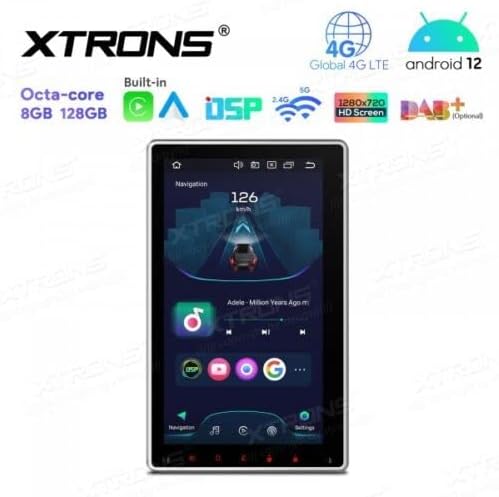
Figure 5.5: Vertical screen orientation for navigation.
6. メンテナンス
適切なメンテナンスを行うことで、カーステレオの寿命が長くなり、最適なパフォーマンスが確保されます。
- 画面の掃除: 柔らかく糸くずの出ない布でタッチスクリーンを優しく拭いてください。頑固な汚れには、軽くamp布を水またはスクリーンに安全なクリーナーで拭いてください。刺激の強い化学薬品は避けてください。
- 一般的な清掃: Keep the unit and surrounding area free from dust and debris.
- ソフトウェアアップデート: 定期的にXTRONS公式ウェブサイトをチェックしてください website for available software or firmware updates to improve performance and add new features. Follow update instructions carefully.
7。 トラブルシューティング
If you encounter issues with your XTRONS TIX125L, refer to the following common problems and solutions.
| 問題 | 考えられる原因 | 解決 |
|---|---|---|
| ユニットの電源が入りません。 | 電源接続なし、ヒューズ切れ、配線間違い。 | Check power wiring, vehicle fuse box, and the unit's fuse. Ensure battery is connected. |
| 音が出ません。 | Volume muted, incorrect audio source, speaker wiring issues. | Check volume level, ensure correct audio source is selected. Verify speaker connections. |
| Poor GPS signal or no signal. | GPS antenna not connected, antenna obstructed, faulty antenna. | Ensure GPS antenna is securely connected and mounted in a clear location. Replace antenna if necessary. |
| Bluetooth接続の問題。 | デバイスがペアリング モードになっていない、干渉がある、ペアリング プロセスが正しくない。 | 両方のデバイスがペアリングモードになっていることを確認してください。以前のペアリングを削除して、もう一度お試しください。デバイスに近づいてください。 |
| タッチスクリーンが反応しない。 | Software glitch, screen dirty, hardware issue. | Restart the unit. Clean the screen. If problem persists, contact support. |
| Apps crash or freeze. | Insufficient memory, software bug, incompatible app. | Close background apps. Clear app cache. Update software if available. Uninstall and reinstall problematic apps. |
これらの解決策を試しても問題が解決しない場合は、XTRONS カスタマー サポートに問い合わせて、さらにサポートを受けてください。
8. 仕様
Below are the technical specifications for the XTRONS TIX125L car stereo:
- ブランド: エクストロン
- モデル: TIX125L
- 画面サイズ: 10.1インチ
- 表示タイプ: QLED, Capacitive Touchscreen, LED
- オペレーティング·システム: アンドロイド12
- プロセッサ: オクタコア
- ラム: 8GB
- ロム: 128GB (Expandable via USB/SD)
- 接続性: Bluetooth 5.0, USB, Wi-Fi, 4G LTE (SIM card reader included)
- ナビゲーション: Built-in GPS (Supports various map types)
- 特別な機能: Apple CarPlay, Android Auto, Digital Sound Processor (DSP), Screen Mirroring, Rotatable Display, Equalizer
- サポートされているストレージ: USB(最大128GB)、SD(最大64GB)
- 制御方法: タッチスクリーン
- 取り付けタイプ: In-dash
- 適合車種: オートバイ(Note: Product description states 'Motocicletta', but typically these units are for cars. Please verify compatibility with your specific vehicle.)
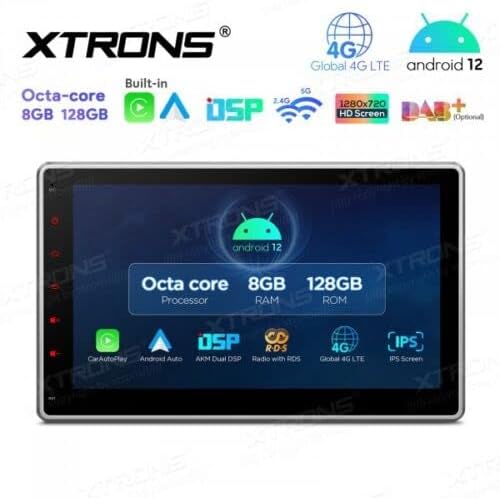
図8.1: 主な特徴と仕様view.
9. 保証とサポート
For warranty information, please refer to the warranty card included with your product or visit the official XTRONS website. If you require technical assistance, have questions about installation, or need troubleshooting beyond what is covered in this manual, please contact XTRONS customer support. Have your product model number (TIX125L) and purchase details ready when contacting support.
XTRONS公式 Webサイト: www.xtrons.com (Please verify the exact support contact details on their web地点。)