
1. はじめに
This manual provides comprehensive instructions for the installation, operation, and maintenance of the YEEHUNG 12.3" Android 13 Car Multimedia System. This system is specifically designed for Mercedes-Benz 2012-2015 ML GL Class W166 X166 vehicles equipped with the NTG4.5 OEM host system. Please read this manual thoroughly before installation and use to ensure proper functionality and to avoid potential issues.

Figure 1.1: YEEHUNG 12.3" Android 13 Car Multimedia Screen
2.製品オーバーview
The YEEHUNG 12.3" Android 13 Car Multimedia System offers an enhanced in-car entertainment and navigation experience. It features a blue anti-glare HD screen with a resolution of 1920x720, powered by an 11 nm Qualcomm Snapdragon 662 8-core high-speed processor, 8GB RAM, and 128GB internal memory. The system supports wired and wireless CarPlay, Android Auto, and wireless mirror link functions.
主な特徴:
- 画面: 12.3-inch Blue Anti-Glare HD Screen (1920x720 resolution), multi-point capacitive touch, IPS panel, 178° ultra-wide view角度。
- プロセッサ: Qualcomm Snapdragon 662 8-core (4x A73 2.0GHz + 4x A53 1.8GHz).
- メモリ: 8GB RAM (LPDDR4X) + 128GB Storage (eMMC 5.1).
- オペレーティング·システム: Android 13。
- 接続性: Built-in Wi-Fi, USB ports, Bluetooth 5.0.
- 統合: Supports wired and wireless CarPlay, Android Auto, and wireless Mirror Link.
- Original Car System Retention: Retains original car knob and steering wheel controls, original radio, ampリファイアー、リア view camera, and reverse trajectory.
- 追加機能: Supports split screen, Google Play, online voice control, and multiple languages.

Figure 2.1: Anti-Glare Screen Features

Figure 2.2: Snapdragon 662 Processor Details
3. 互換性
This multimedia system is compatible with the following Mercedes-Benz models and OEM host systems:
- 車両モデル: Mercedes-Benz ML300, ML320, ML350, ML400, ML500, ML550 (2012-2015)
- 車両モデル: Mercedes-Benz GL350, GL400, GL500, GL550 (2012-2015)
- Chassis Numbers: W166, X166
- OEM Host System: NT4.5 について
重要: If your car's model year is not within the indicated range, please verify compatibility by providing a photo of your OEM host system to the seller. Ensure your vehicle has the NTG4.5 system. You can identify your NTG version by referring to the user interface and host panel of your original car.
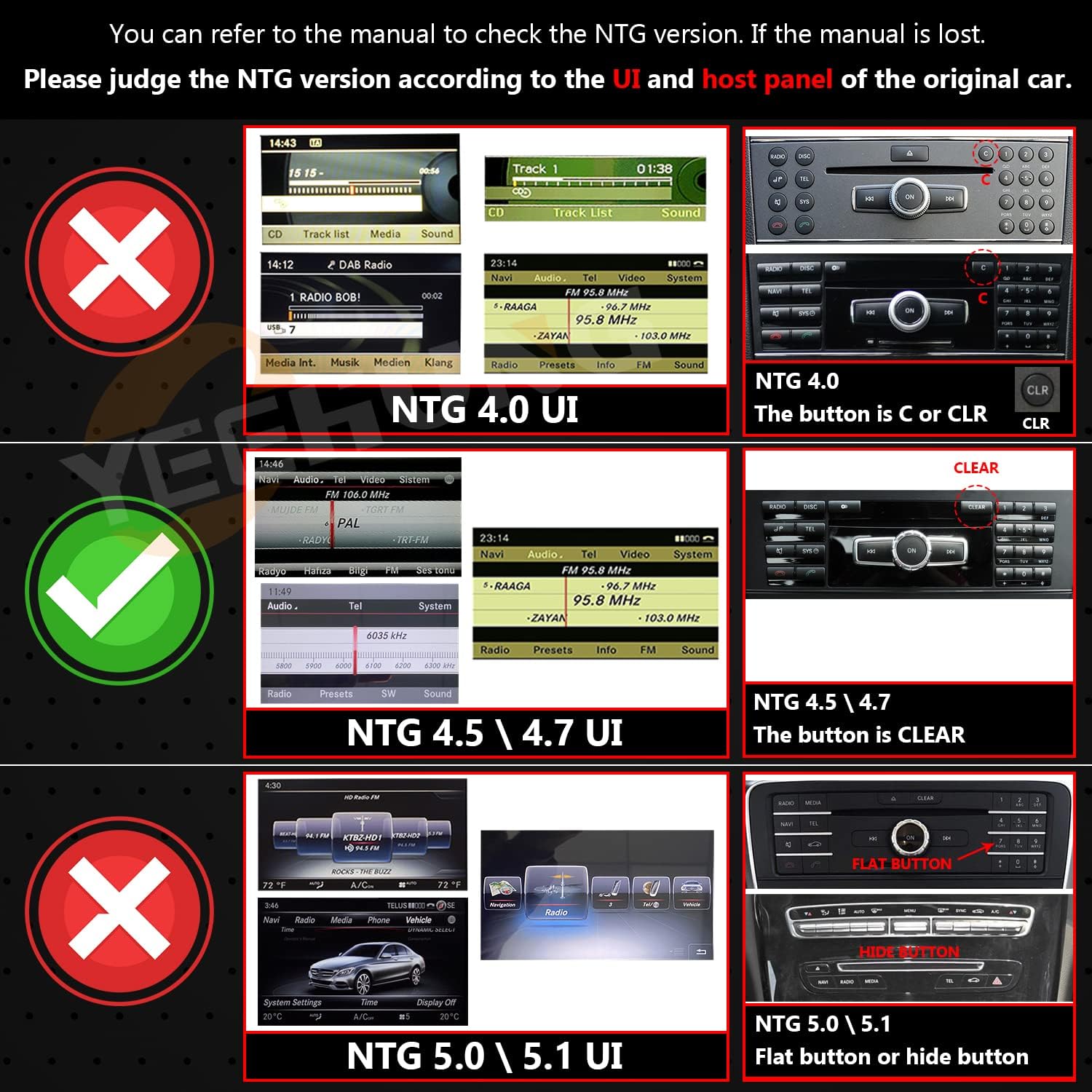
Figure 3.1: NTG Version Identification Guide
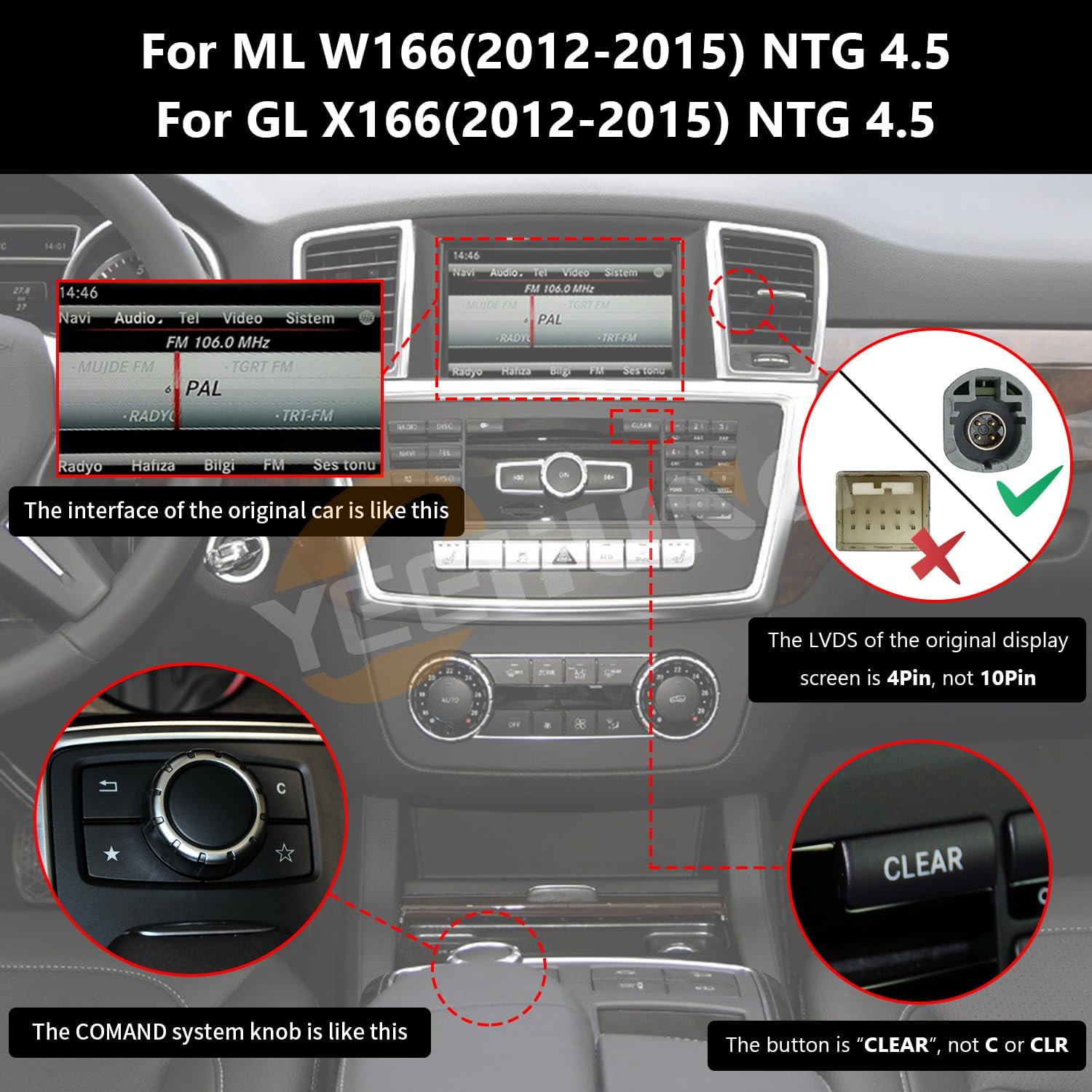
Figure 3.2: NTG 4.5 System Visual Confirmation
4. 箱の中身
開梱したら、以下のコンポーネントがすべて揃っていることを確認してください。
- 1 x 12.3" Multimedia Panel
- ベース x 1
- ISO配線ハーネス×1
- 1 x RCAケーブル
- 1 x Speaker (Optional)
- 1Gアンテナ×4
- GPSアンテナ x 1
- マイク x 1
- 1 x AMI Decoder
- 1 xインストールマニュアル
- ユーザーマニュアル x 1
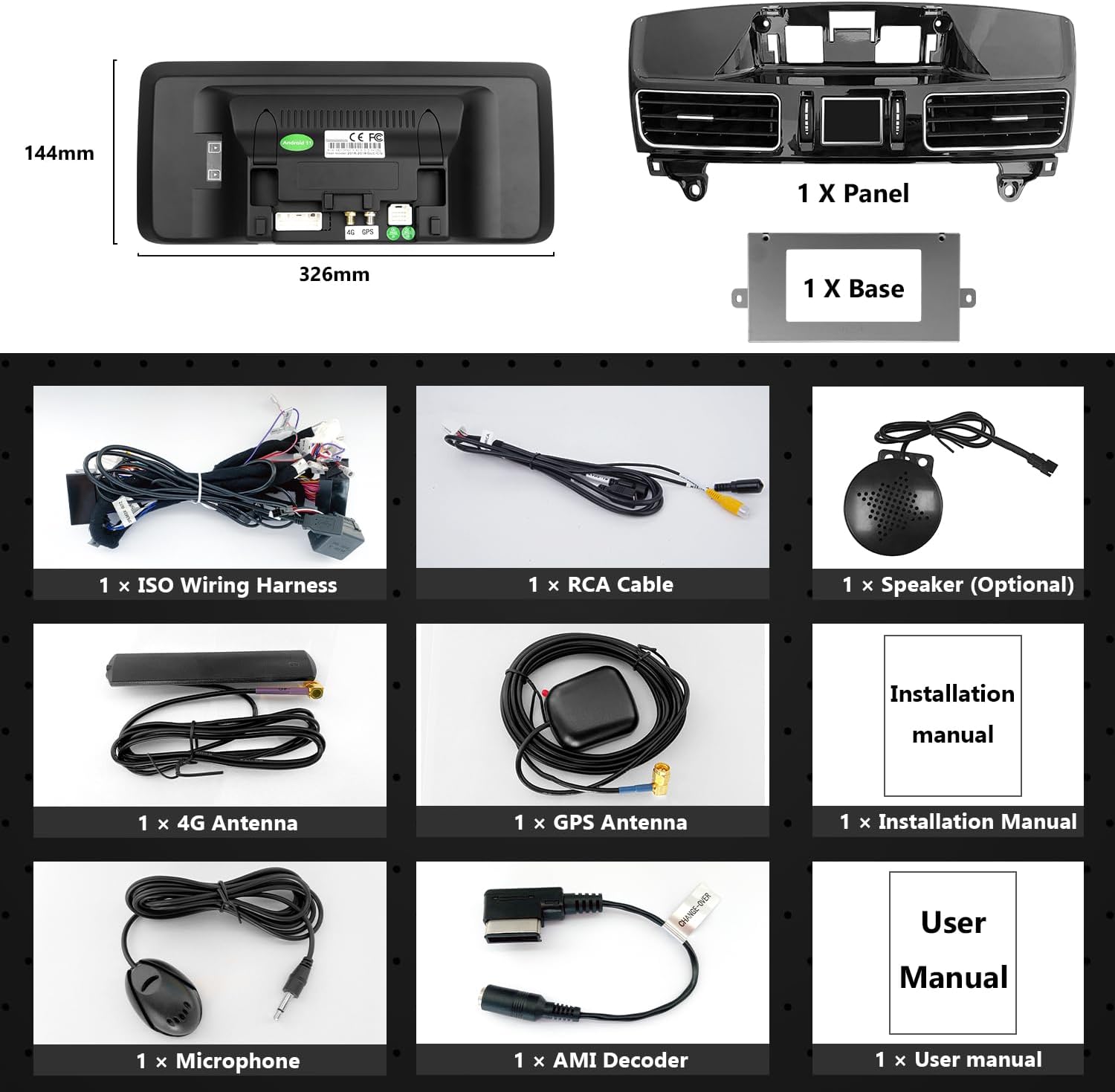
図4.1: パッケージ内容
5.インストールガイド
Professional installation is recommended. Ensure the vehicle's power is disconnected before beginning installation. This system is designed for 'no injury installation', meaning no need to damage original vehicle wires.
5.1 Precautionary Note on AUX Audio
If your NTG4.5 system does not have an AUX menu, you must activate the AUX menu for the Android system's sound to function. You will need to connect the audio output from the new system to your car's AUX input. This can be done via an AMI cable or by using the Audio out on the ISO cable to interface with the car's AUX jack, depending on your car's interface type.

Figure 5.1: Audio Out to AMI Connection

Figure 5.2: Audio Out to AUX IN Connection
5.2配線と接続
Carefully connect all wiring harnesses as per the provided installation manual. Ensure all connections are secure. The system is designed to integrate with your existing vehicle wiring without modification.

Figure 5.3: Wiring Connection Example
5.3 AUX Activation and Automatic Switching (NTG 4.5/4.7)
For NTG4.5 and NTG4.7 systems with original car AUX function, follow these steps to set up automatic AUX switching:
- On the original car interface, navigate to the AUDIO menu. Set the position of the AUDIO icon to '2'.
- Within the AUDIO menu, locate the AUX icon and set its position to '8'.
- Access the Factory Settings of the Android device.
- Under 'AUX Switching Modes', select 'Automatic' or 'Other' as appropriate for your vehicle.
- Ensure 'AUX Activate' is checked in the settings.
- Verify the 'CAN Protocol' is set to 'BC_Protocol_type_4.5'.
- Confirm 'Car Display' settings are appropriate for NTG4.0/NTG4.5 (e.g., 800x480 or 400x240 depending on original screen resolution).

Figure 5.4: Automatic AUX Switching Setup

Figure 5.5: AUX Activate Setting

Figure 5.6: CAN Protocol Setting

Figure 5.7: Car Display Setting
5.4 インストール後のチェック
After completing the cable and device installation, re-route all original cables to their proper positions. Before restoring covers and panels, turn on the Android device and thoroughly test all functions to ensure they are operating normally.
6. 操作手順
The YEEHUNG multimedia system integrates seamlessly with your vehicle's existing controls while offering advanced Android functionality.
6.1 基本的なナビゲーションとインターフェース
The 12.3-inch touchscreen allows for intuitive navigation through the Android interface. Swipe, tap, and use multi-touch gestures to control applications and settings. The system also supports online voice control functions when connected to a network.

図6.1: CarPlayインターフェース

図6.2: Android Autoインターフェース

図6.3: ビデオ再生
6.2 CarPlayとAndroid Auto
The system supports both wired and wireless CarPlay and Android Auto. Connect your smartphone to access navigation, music, messages, and other compatible apps directly on the car's display. The wireless mirror link function also allows mirroring your phone's screen.

Figure 6.4: CarPlay and Android Auto Functionality
6.3 Retained OEM Functions
The YEEHUNG system is designed to retain all original car functions. You can continue to use your original car knob (COMAND knob), steering wheel controls, original car radio, amplifier, and factory rear view camera with reverse trajectory. The system supports dual system switching (NTG 4.5) allowing access to both the original car system and the Android system.
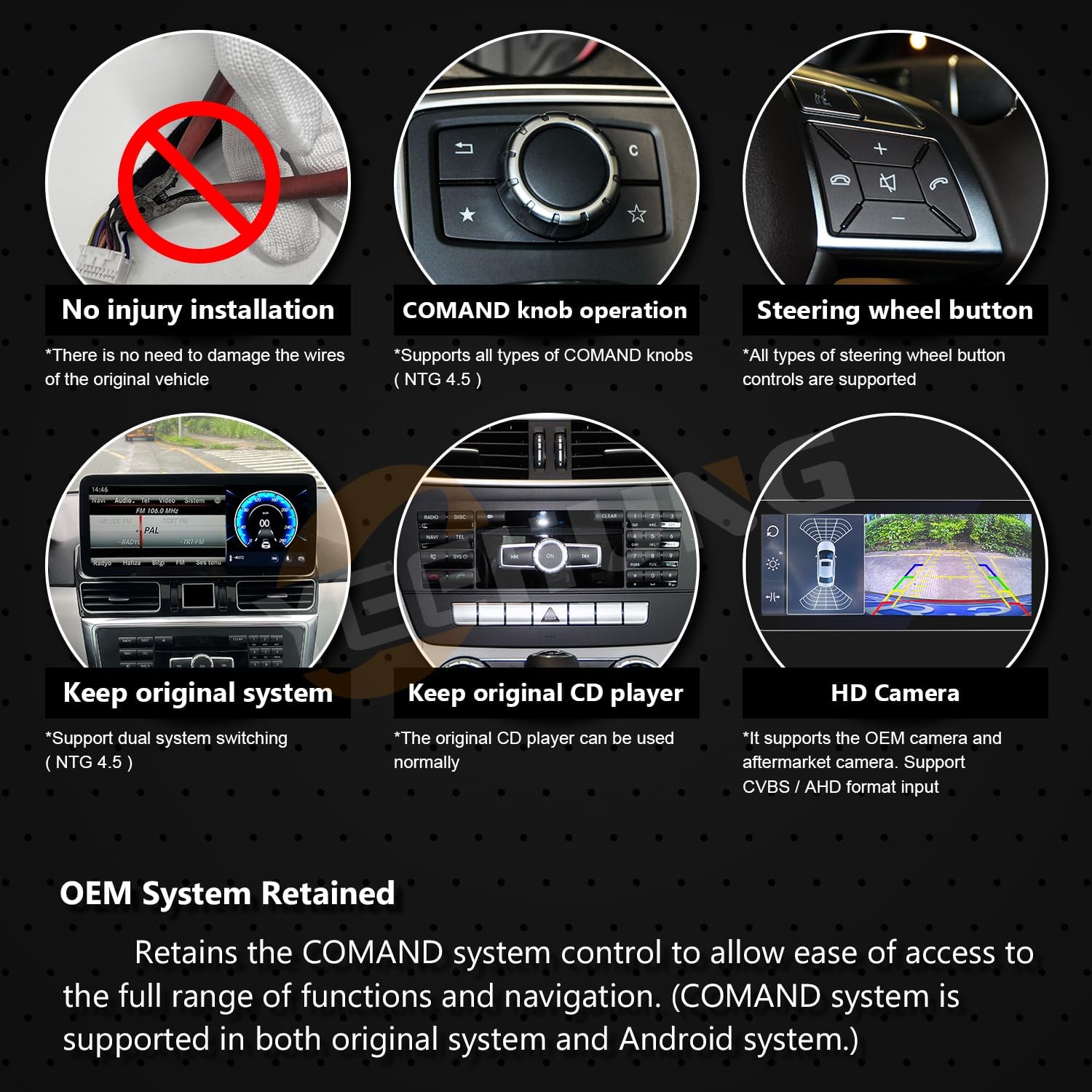
Figure 6.5: Retained OEM System Features
7. 仕様
| 特徴 | 仕様 |
|---|---|
| アイテム重量 | 7.28ポンド |
| 製品寸法 | 12.83 x 11.02 x 7.48インチ |
| 商品型番 | YH-7115 |
| 表示サイズ | 12.3インチ |
| ディスプレイ解像度 | 1920x720 |
| メモリーカードスロット | SD |
| 音声コマンド | タッチスクリーン |
| ブランド | イェフン |
| 車両サービスタイプ | 車 |
| 特集 | Bluetooth、タッチスクリーン |
| 接続技術 | Bluetooth、USB、Wi-Fi、ワイヤレス |
| マップタイプ | 北米 |
| オーディオ出力モード | ステレオ |
| 取り付けタイプ | ダッシュボードマウント |
8。 トラブルシューティング
8.1 Androidシステムから音が出ない
症状: The Android system is powered on and displays correctly, but there is no audio output.
解決: This typically indicates that the AUX menu in your original NTG4.5 system is not activated or the audio output from the Android unit is not correctly connected to the car's AUX input. Refer to Section 5.1 and 5.3 for detailed instructions on activating AUX and setting up the audio connection.
8.2 System Not Responding / Freezing
解決: Try restarting the device by turning off the car's ignition and waiting for a few minutes before restarting. If the issue persists, check all power connections. A factory reset might be necessary as a last resort (consult the separate installation manual for factory reset procedures).
8.3 接続の問題(Bluetooth/Wi-Fi)
解決: Ensure the antennas (4G and GPS) are correctly installed and secured. Check the system settings for Bluetooth and Wi-Fi to ensure they are enabled. If connecting to a phone, ensure the phone's Bluetooth/Wi-Fi is also on and discoverable.
9. メンテナンス
The YEEHUNG 12.3" Android 13 Car Multimedia System requires minimal maintenance. Follow these guidelines to ensure longevity and optimal performance:
- クリーニング: 画面を拭くときは、柔らかく糸くずの出ない布を使用してください。頑固な汚れには、軽く拭いてください。amp布を水またはスクリーンに安全なクリーナーで拭いてください。刺激の強い化学薬品や研磨剤は使用しないでください。
- ソフトウェアアップデート: Periodically check for software updates through the system's settings menu to ensure you have the latest features and security patches.
- 環境条件: Avoid exposing the device to extreme temperatures or direct sunlight for prolonged periods, as this can affect performance and lifespan.
- ケーブルの完全性: すべてのケーブルがしっかりと接続されており、挟まれたり損傷したりしていないことを確認してください。
10. 保証とサポート
10.1 保証情報
- 1ヶ月以内: Free returns according to Amazon rules. Contact Amazon Buyer Services for return procedures.
- 12ヶ月以内: Free warranty service for non-human damage. The customer is responsible for shipping costs within the U.S. for product return and repair.
- 1年後: Repair service is available. In addition to U.S. postage, customers will be responsible for the cost of replacement parts and labor.
10.2 カスタマーサポート
If you encounter any problems or have questions regarding your YEEHUNG multimedia system, please contact our customer support team. Clearly describe your issue to facilitate a quick resolution. We aim to reply within 24 hours.
For general inquiries or to verify compatibility, you may also refer to the YEEHUNG Store on Amazon.