
1. はじめに
ご購入ありがとうございますasing the 2Boom Gaming Mouse GMS150K LED. This wired luminous gaming mouse is designed for an immersive gaming experience, featuring a durable build and vibrant LED lighting. It is compatible with various gaming platforms, including PC, PS4, and Xbox One.
Please read this manual carefully before using the product to ensure proper setup, operation, and maintenance. Keep this manual for future reference.
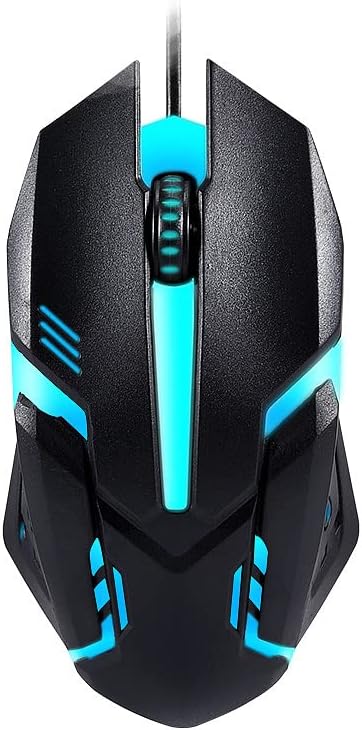
Image 1.1: The 2Boom GMS150K Gaming Mouse, showcasing its ergonomic design and blue LED illumination.
2. 特徴
- Wired Luminous Design: Features dynamic LED RGB color backlighting for an enhanced gaming aesthetic.
- 高い耐久性: Built with a 1,000,000 stroke life for long-lasting performance.
- Optimized DPI: Fixed at 1000 DPI for precise cursor control.
- 幅広い互換性: Fully compatible with PC, PlayStation 4 (PS4), and Xbox One.
- 標準接続: Equipped with a 1.2m USB cable for reliable connection.

画像2.1: 複数 views of the GMS150K mouse, highlighting its various LED color options.
3. パッケージ内容
開梱後、パッケージの内容をご確認ください。不足品や破損品がございましたら、すぐに販売店までご連絡ください。
- 1 x 2Boom Gaming Mouse GMS150K LED
4. セットアップ
4.1PCへの接続
- コンピューターで使用可能なUSBポートを見つけます。
- Plug the USB connector of the 2Boom GMS150K mouse into the USB port.
- Your operating system (Windows XP, Windows 7, Linux, etc.) should automatically detect and install the necessary drivers. This may take a few moments.
- Once installed, the mouse LED lights will illuminate, and the mouse will be ready for use.
4.2 Connecting to PS4 / PS4 PRO / XBOX ONE
- Ensure your gaming console (PS4, PS4 PRO, or Xbox One) is powered on.
- コンソールで使用可能な USB ポートを見つけます。
- Plug the USB connector of the 2Boom GMS150K mouse into the USB port.
- The console should recognize the mouse as an input device. Refer to your console's settings for specific mouse configuration options within games or the system menu.

Image 4.1: Proper grip and ergonomic design of the GMS150K mouse.
5. 操作手順
5.1 マウスの基本機能
- 左クリック: Primary action, selection, or firing in games.
- 右クリック: Secondary action, context menus, or aiming in games.
- スクロールホイール: 文書をスクロールしたり、 web pages. In games, it can be used for weapon switching or zooming. The scroll wheel also functions as a clickable button.
5.2つのLED照明
The 2Boom GMS150K mouse features automatic RGB LED lighting that cycles through various colors. The lighting is an aesthetic feature and does not require manual configuration.
6. メンテナンス
- クリーニング: マウスの表面は、柔らかく乾いた布で拭いてください。頑固な汚れには、軽くamp布を水で拭いてください。刺激の強い化学薬品や研磨剤入りの洗剤の使用は避けてください。
- ケーブルのお手入れ: Do not bend or twist the cable excessively. Avoid placing heavy objects on the cable to prevent damage.
- ストレージ: マウスを使用しないときは、直射日光や極端な温度を避け、涼しく乾燥した場所に保管してください。
7。 トラブルシューティング
| 問題 | 考えられる原因 | 解決 |
|---|---|---|
| マウスが反応しない / カーソルが動かない | USB 接続が緩んでいる、USB ポートに障害がある、ドライバーに問題がある。 |
|
| LEDライトが動作しない | Mouse not powered; Internal fault. |
|
| マウスの動きが不安定または飛び跳ねる | センサーが汚れている。表面が平らでない。 |
|
8. 仕様
| 特徴 | 詳細 |
|---|---|
| モデル | GMS150K |
| ブランド | Generic (2Boom) |
| 解像度 | 1000 |
| ストロークライフ | 1,000,000ストローク |
| ケーブル長さ | 1.2メートル |
| 接続性 | 有線USB |
| LED照明 | RGB Color Backlight (Luminous) |
| 対応デバイス | Personal Computer, PS4, PS4 PRO, XBOX ONE |
| オペレーティングシステム | Linux、Windows 7、Windows XP(およびそれ以降のWindowsバージョン) |
| ボタンの数 | 3(左、右、スクロールホイールクリック) |
| 手の向き | 右 |
9. 保証とサポート
保証情報およびカスタマーサポートについては、ご購入時に付属の説明書をご参照いただくか、販売店にお問い合わせください。保証請求の際に必要となるため、購入証明書は保管してください。
If you encounter any issues not covered in this manual, please reach out to the manufacturer's or seller's customer service for assistance.