
Cecotec Conga 11090 スピンレボリューション ホーム&ウォッシュ
Cecotec Conga 11090 Spin Revolution Home&Wash ロボット掃除機 ユーザーマニュアル
モデル: 08105
1. はじめに
Thank you for choosing the Cecotec Conga 11090 Spin Revolution Home&Wash Robot Vacuum Cleaner. This advanced robot is designed to provide comprehensive cleaning for your home, combining powerful vacuuming with effective mopping capabilities and an automatic self-emptying and mop-washing station. Please read this manual carefully before using the product to ensure proper operation, maintenance, and safety.
2. 重要な安全上の注意事項
火災、感電、または怪我のリスクを軽減するために、電気製品を使用するときは常に基本的な安全上の注意事項に従ってください。
- 機器を使用する前にすべての説明書をお読みください。
- お子様にロボットを操作させないでください。ロボットが作動中は、お子様やペットから目を離さないでください。
- パワーボリュームを確認してくださいtageはvolに一致するtageは評価ラベルに示されています。
- ロボットを濡れた表面や水が溜まっている場所で使用しないでください。
- 髪の毛、ゆったりとした衣服、指、および体のすべての部分を開口部や可動部分から遠ざけてください。
- ロボットで大きな物体、鋭利な物体、液体を拾わないでください。
- メンテナンスや清掃を行う前に、ロボットの電源をオフにし、充電ステーションのプラグを抜いてください。
- メーカーが推奨するアタッチメントおよびアクセサリのみを使用してください。
- Store the robot and charging station indoors in a cool, dry place.
- Do not operate the robot if it has been dropped, damaged, left outdoors, or dropped into water.
3. パッケージ内容
パッケージにすべてのコンポーネントが含まれていることを確認します。
- ロボット掃除機1台
- 1 xサイドブラシ
- 2 x Rotating Mops
- 1 x Self-emptying Base with 2 Tanks (1 x Clean Water Tank, 1 x Dirty Water Tank)
- ダストバッグ1個
- 電源ケーブル x 1
- 1 x Self-cleaning Brush
- 多機能ブラシ1本
- 取扱説明書 x 1

4.製品オーバーview
The Conga 11090 Spin Revolution Home&Wash is an intelligent cleaning solution featuring advanced navigation and comprehensive cleaning capabilities.
4.1ロボット掃除機
- スマートナビゲーション: Equipped with iTech Laser Eye technology for precise mapping and obstacle avoidance.
- 強力な吸引力: Delivers up to 5000 Pa suction power for effective dirt and debris removal.
- Spin Revolution Mopping: Features two rotating mops for deep scrubbing and floor cleaning.
- 長いバッテリー寿命: Provides up to 140 minutes of cleaning autonomy.


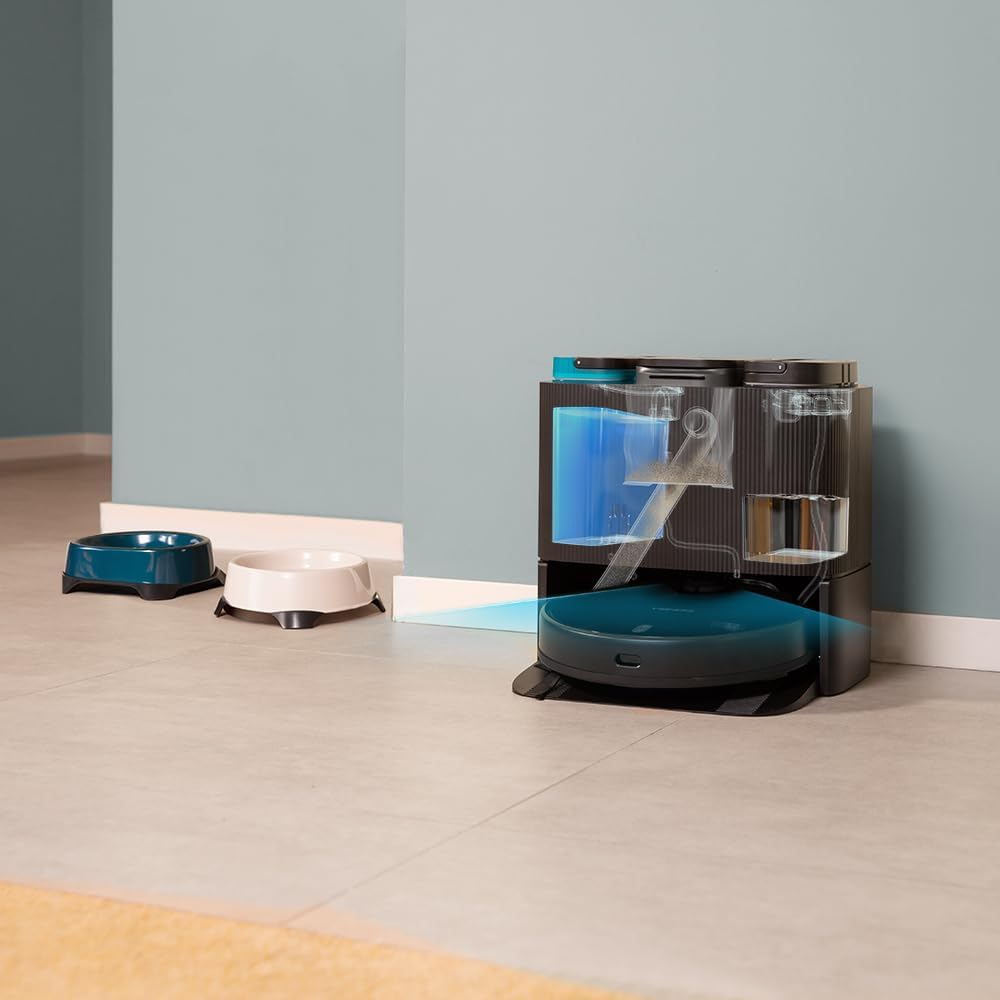
4.2 Self-Emptying and Mop-Washing Station
- 自動集塵: The robot automatically empties its dustbin into a 2L dust bag in the station.
- 自動モップ洗浄: The station cleans the robot's mopping pads with clean water from its 2.8L tank and collects dirty water in a 2.4L tank.
- 便利なデザイン: Reduces manual intervention for a truly hands-free cleaning experience.


5. セットアップ
5.1開梱と配置
- パッケージからすべてのコンポーネントを慎重に取り出します。
- Choose a suitable location for the self-emptying station. Ensure there is at least 1.5 meters of clear space in front of the station and 0.5 meters on either side.
- Plug the power cable into the station and connect it to a power outlet.
5.2 初期充電
Place the robot onto the charging contacts of the self-emptying station. Ensure the robot is properly aligned. The robot will begin charging automatically. For first use, it is recommended to fully charge the robot before operation.
5.3 アプリのインストールと接続
Download the "CECOTEC" app from your smartphone's app store (iOS or Android). Follow the in-app instructions to connect your robot to your home Wi-Fi network (2.4 GHz) and Bluetooth. The app provides enhanced control and mapping features.

6. ロボットの操作
6.1 クリーニングサイクルの開始
- ロボットボタン経由: ロボットの電源ボタンを押して、一般的な掃除サイクルを開始します。
- アプリ経由: Open the CECOTEC app. You can select various cleaning modes such as "Clean All", "Spot Clean", "Zone Clean", or schedule cleanings.

6.2 マッピングとナビゲーション
The robot uses its iTech Laser Eye to create a detailed map of your home during its first cleaning cycle. This map can be viewed and customized in the app. You can set virtual walls, restricted zones, and specific cleaning areas.

6.3 Automatic Self-Maintenance
During and after cleaning cycles, the robot will automatically return to its station to empty its dustbin and wash its mopping pads. The frequency of these actions can be configured in the app.
7. メンテナンス
定期的なメンテナンスにより、ロボット掃除機のパフォーマンスが最適化され、寿命が延びます。
7.1 ロボットの清掃
- メインブラシ: Remove the main brush and clean it regularly using the provided self-cleaning brush to remove tangled hair and debris.
- サイドブラシ: Check and clean the side brush for any tangled hair or debris. Replace if worn.
- モップパッド: Although the station washes them, it is recommended to manually remove and rinse the mopping pads periodically.
- センサー: Wipe all sensors (cliff sensors, laser sensor) with a clean, dry cloth to ensure proper navigation.

7.2 Maintaining the Self-Emptying Station
- ダストバッグ: Replace the dust bag in the station when it is full. The app will notify you.
- 水タンク: Regularly empty the dirty water tank and refill the clean water tank. Clean both tanks to prevent mold or odor buildup.
- Washing Tray: Clean the washing tray where the mops are cleaned to remove any residue.

8。 トラブルシューティング
ロボットに問題が発生した場合は、次の一般的な問題と解決策を参照してください。
| 問題 | 考えられる原因 | 解決 |
|---|---|---|
| ロボットが起動しません。 | Low battery; power cable not connected. | Place robot on charging station; ensure power cable is securely connected. |
| ロボットは充電ステーションを見つけることができません。 | Station is blocked; robot is too far. | Ensure clear space around station; manually place robot closer to station. |
| 洗浄性能が悪い。 | Brushes tangled; dustbin full; mops dirty. | Clean main/side brushes; empty dustbin/replace bag; clean mopping pads. |
| ロボットが頻繁に動けなくなります。 | Obstacles; dark surfaces; dirty sensors. | Clear obstacles; use virtual walls in app; clean sensors. |
| アプリの接続の問題。 | Incorrect Wi-Fi password; 5GHz network; Bluetooth off. | Verify Wi-Fi password; ensure 2.4GHz network; enable Bluetooth; restart robot and router. |
9. 仕様
| 特徴 | 詳細 |
|---|---|
| ブランド | セコテック |
| モデル名 | コンガ 11090 スピンレボリューション ホーム&ウォッシュ |
| モデル番号 | 08105 |
| 色 | 黒 |
| 製品寸法(ロボット) | 34.3 x 34.5 x 10.8 cm |
| 製品重量 | 11.25キロ |
| 巻tage | 120ボルト |
| 騒音レベル | 75デシベル |
| 動作時間 | 最大2時間20分(140分) |
| ダストバッグ容量(ステーション) | 2リットル |
| Clean Water Tank Capacity (Station) | 2.8リットル |
| Dirty Water Tank Capacity (Station) | 2.4リットル |
| 特集 | Wireless, Automatic Shut-off, iTech Laser Eye Navigation |
| 対応デバイス | Smartphones (via CECOTEC App) |
10. 保証とサポート
Cecotec products are manufactured to high-quality standards. For warranty information, please refer to the warranty card included in your product packaging or visit the official Cecotec website. For technical support, troubleshooting assistance, or spare parts, please contact Cecotec customer service or the retailer from whom you purchased the product.
オンラインサポート: 訪問する AmazonのCecotecブランドストア 追加の製品情報およびサポート リソースについては、こちらをご覧ください。
Ask a question about this manual
Ask about setup, troubleshooting, compatibility, parts, safety, or missing instructions. Manuals+ will review the question and use this page’s manual context to help answer it.