
1. はじめに
This manual provides essential information for the safe and efficient operation, maintenance, and troubleshooting of your Cecotec Conga 2299 Ultra Home X-Treme T Robot Vacuum Cleaner. Please read it thoroughly before using the product and retain it for future reference.
2. 安全に関する注意事項
Always follow basic safety precautions when using electrical appliances to reduce the risk of fire, electric shock, and personal injury. This robot vacuum cleaner is designed for indoor household use only.
- 電源のボリュームを確認してくださいtage は充電ベースの定格ラベルと一致します。
- ロボットを湿気の多い環境や水の近くで操作しないでください。
- 髪の毛、ゆったりとした衣服、指、および体のすべての部分を開口部や可動部分から遠ざけてください。
- 大きな物体や鋭利な物体、液体、燃えている物質や煙の出ている物質を拾わないでください。
- 子供たちを監視し、機器で遊ばないようにしてください。
- Only use manufacturer-recommended attachments and accessories.
- If the power cord or plug is damaged, do not use the appliance. Contact customer support.
3. パッケージ内容
パッケージにすべてのコンポーネントが含まれていることを確認します。
- Cecotec Conga 2299 Ultra Home X-Treme T Robot Vacuum Cleaner
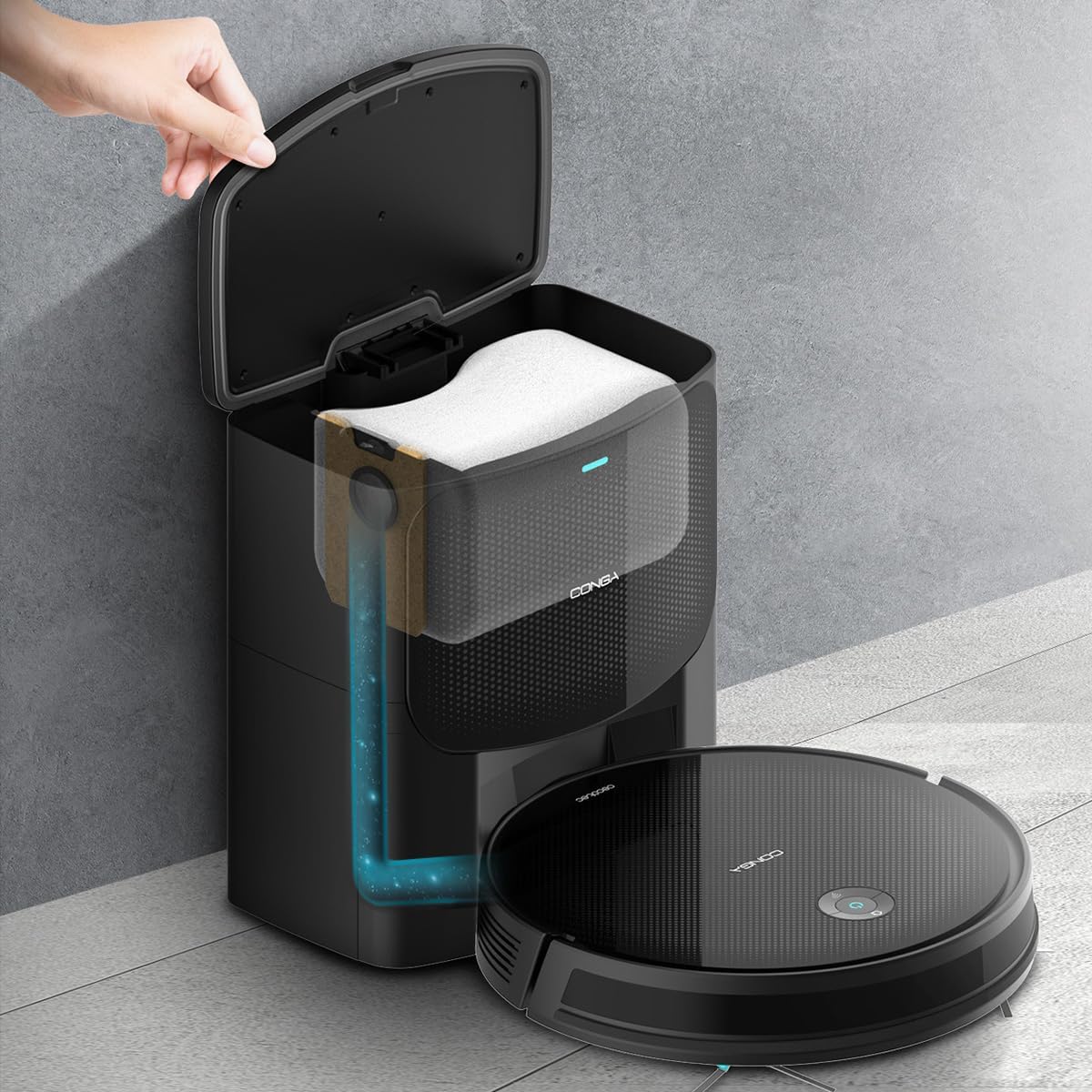
- Auto-emptying Base
- 3L Hygienic Dust Bag (pre-installed or spare)
- Mixed Tank (for water and dust)
- 多機能ブラシ(毛とゴムシリコン)
- サイドブラシ2個
- 2モップ
- 高効率フィルター
- Self-cleaning Brush
- 取扱説明書

4.製品オーバーview および機能
The Cecotec Conga 2299 Ultra Home X-Treme T is a versatile robot vacuum cleaner designed for comprehensive floor cleaning. It integrates multiple cleaning functions and smart navigation for efficient operation.
主な特徴:
- 4-in-1クリーニングシステム: 掃き掃除、掃除機かけ、モップ掛け、こすり洗いを同時に行います。
- Automatic Emptying Base: The robot automatically empties its dustbin into a 3-liter hygienic bag in the base, reducing manual intervention for weeks. Features BagDetect technology to alert if a bag is missing.
- 高い吸引力: Delivers 2100 Pa suction power with an automatic Turbo mode for effective carpet cleaning.
- 拡張された自律性: Up to 160 minutes of continuous cleaning. Total Surface technology ensures the robot returns to its base to recharge and resumes cleaning from where it left off.
- iTech SmartGyro 4.0 Navigation: Provides ordered and efficient cleaning paths using gyroscopic, proximity, anti-shock, and anti-fall sensors.
- APPコントロール: Manage cleaning modes, schedule tasks, adjust suction and mopping levels, and review cleaning history via a smartphone application.
- 多機能ブラシ: Equipped with a combination of bristles and rubber silicone for effective cleaning on various surfaces.
- Adjustable Mopping: Offers 3 levels of water flow to tackle different types of dirt.
- デュアルサイドブラシ: Enhances sweeping and suction coverage for thorough cleaning.


5. セットアップ
5.1開梱と配置
- パッケージからすべてのコンポーネントを慎重に取り出します。
- Choose a suitable location for the auto-emptying base. Ensure it is against a wall, on a hard, level surface, with at least 1 meter of clear space in front and 0.5 meters on either side. Avoid direct sunlight or areas with strong Wi-Fi interference.
- Plug the auto-emptying base into a power outlet. Ensure the power cord is neatly arranged to prevent the robot from tangling.
5.2 初期充電
Place the robot vacuum cleaner onto the charging contacts of the auto-emptying base. Ensure the robot is correctly aligned. The indicator light on the robot will show charging status. For first use, fully charge the robot (approximately 4-5 hours).
5.3 Installing Side Brushes and Mop
- Attach the two side brushes by pressing them into their designated slots on the underside of the robot until they click into place.
- If using the mopping function, fill the mixed tank with water (and a small amount of neutral cleaning solution if desired, following manufacturer guidelines). Attach a clean mop cloth to the mixed tank and slide the tank into the robot until it locks.

5.4 アプリ接続
- Download the official Cecotec Conga app from your smartphone's app store.
- Follow the in-app instructions to register an account and add your Conga 2299 Ultra Home X-Treme T robot. This typically involves connecting the robot to your home Wi-Fi network.
6.運用
6.1 クリーニングサイクルの開始
- 手動スタート: ロボットの電源ボタンを 1 回押すと、自動掃除サイクルが開始されます。
- アプリの起動: Open the Conga app, select your robot, and choose a cleaning mode (Auto, Random, Wash, Spiral, Edges, Manual) to begin.

6.2 モップ機能
Ensure the mixed tank is filled with water and the mop cloth is attached before activating the mopping function. You can adjust the water flow level via the app for different floor types and cleaning needs.
6.3 充電ベースへの復帰
- The robot will automatically return to its auto-emptying base when its battery is low or when a cleaning cycle is complete.
- You can also send the robot back to the base manually via the app or by pressing the home button on the robot.

7. メンテナンス
定期的なメンテナンスにより、ロボット掃除機のパフォーマンスが最適化され、寿命が延びます。
7.1 Auto-Emptying Base Dust Bag
The 3L hygienic dust bag in the auto-emptying base should be replaced when full. The app or an indicator on the base will notify you. The BagDetect technology ensures the system recognizes if a bag is present.


7.2 Cleaning the Mixed Tank and Filter
- After each mopping cycle, empty any remaining water from the mixed tank.
- Rinse the mixed tank and mop cloth with clean water. Allow them to air dry completely before reassembling.
- Tap out the high-efficiency filter to remove dust. Replace the filter every 3-6 months, depending on usage.
7.3 ブラシとセンサーのクリーニング
- Regularly remove hair and debris from the multifunction brush and side brushes using the provided self-cleaning tool.
- Wipe the charging contacts on both the robot and the base with a dry cloth.
- Clean the anti-drop sensors and proximity sensors on the robot's underside and front bumper with a soft, dry cloth.
8。 トラブルシューティング
If you encounter issues with your robot vacuum cleaner, refer to the following common solutions:
| 問題 | 考えられる原因 | 解決 |
|---|---|---|
| ロボットがオンにならない、または充電されません。 | Battery depleted, charging contacts dirty, power adapter not connected. | Ensure the robot is correctly docked. Clean charging contacts. Check power connection to the base. |
| 吸引力の低下。 | Dust bag full, filter clogged, brushes tangled. | Replace the dust bag. Clean or replace the HEPA filter. Clean the main and side brushes. |
| ロボットが頻繁に動けなくなります。 | Obstacles, tangled cables, dirty sensors. | Clear obstacles from the cleaning path. Tidy up cables. Clean anti-fall and proximity sensors. |
| Cleaning map in app is frozen or incorrect. | Software glitch, temporary sensor error. | Perform a reset on the robot. The reset button is typically located on the side of the robot. Refer to the physical manual for exact location. |
| Robot does not return to base. | Base is obstructed, robot is too far, low battery. | Ensure the base has clear space around it. Manually place the robot near the base. |
これらの解決策を試しても問題が解決しない場合は、Cecotec カスタマー サポートにお問い合わせください。
9. 仕様
| 特徴 | 仕様 |
|---|---|
| ブランド | セコテック |
| モデル名 | Conga 2299 Ultra Home X-Treme T |
| モデル番号 | 08607 |
| 色 | 黒 |
| 製品寸法(ロボット) | 32.3L×32.5W×7.5Hcm |
| アイテム重量 | 6.5キロ |
| 吸引力 | 2100パ |
| 電池のタイプ | リチウムイオン |
| 自律性 | 最大160分(2時間40分) |
| ダストバッグ容量(ベース) | 3リットル |
| フィルタータイプ | ヘパ |
| コントローラータイプ | アプリコントロール |
| 特集 | Turbo Mode, Automatic Emptying Base, Mopping Function |
| 表面の推奨事項 | カーペット、ハードフロア |
| スペアパーツの入手可能性 | 10年 |
10. 保証とサポート
Your Cecotec Conga 2299 Ultra Home X-Treme T Robot Vacuum Cleaner comes with a standard manufacturer's warranty. Please refer to the warranty card included in your package for specific terms and conditions, including warranty period and coverage details.
技術サポート、スペアパーツ、保証請求については、Cecotecの公式カスタマーサービスまでお問い合わせください。 website or the contact information provided in your product documentation. Ensure you have your model number (08607) and proof of purchase available when contacting support.