
1.製品オーバーview
The KETOTEK KT3100 is a versatile digital thermostat designed for precise temperature control in various applications. It features both heating and cooling functions, along with advanced timing modes, making it suitable for household use, heating/cooling equipment, incubators, greenhouses, and terrariums.
主な特徴:
- 温度制御範囲: -40°C から 120°C。
- 電源入力: 100〜250V、50/60Hz。
- 最大荷重: 16A、3680W。
- タイミング機能: F01 Cycle Timer, F02 Countdown ON, F03 Countdown OFF, F04 Countdown ON/OFF (0-99 hours, 59 minutes).
- 温度校正: -9.9°C to 9.9°C adjustment.
- メモリ機能: 電源が切れても設定を保持します。
- リセット機能: Allows restoration of factory settings.
- センサー: NTC10K/B3950 temperature probe with a 3-meter cable.

Image 1.1: The KT3100 thermostat displaying its main features including heating/cooling, timing, calibration, memory, and reset functions.
2. 安全情報
Please read all safety instructions before operating the device. Failure to follow these instructions may result in electric shock, fire, or personal injury.
- 電源のボリュームを確認してくださいtage matches the device's specifications (100-250V).
- 最大負荷容量16A/3680Wを超えないでください。
- Keep the device and sensor away from water or excessive moisture.
- 本装置を分解または改造しないでください。修理は必ず資格のある専門家にご依頼ください。
- デバイス周囲の適切な換気を確保してください。
- 清掃の前、または長期間使用しない場合は、デバイスのプラグを電源コンセントから抜いてください。
3.製品コンポーネント
The KETOTEK KT3100 package includes the following items:
- 1 x KETOTEK KT3100 Digital Thermostat
- 1 x 3-meter NTC10K/B3950 Temperature Sensor
- ユーザーマニュアル (本書) x 1

Image 3.1: The KETOTEK KT3100 Digital Thermostat with its included 3-meter temperature sensor.
4. Device Layout and Display
Familiarize yourself with the thermostat's buttons and display indicators for effective operation.

画像4.1:正面 view of the KT3100 thermostat with labeled components.
- モードボタン: Used to switch between temperature control and timing modes, and to confirm settings.
- SETボタン: Used to enter setting mode for parameters.
- 上ボタン: 値を増やすか、上に移動します。
- 下ボタン: 値を減らすか、下に移動します。
- リセットボタン: Small button for factory reset (requires a pin).
- 測定温度: Displays the current temperature detected by the sensor.
- Start Temperature (ON): The temperature at which the connected device turns ON.
- Stop Temperature (OFF): The temperature at which the connected device turns OFF.
- 加熱/冷却インジケーター: Icon indicating active heating or cooling mode.
- 出力作業指標: Light indicating when the output socket is active.

画像4.2: 詳細 view of the digital display showing temperature readings and set points.
5. 技術仕様
| 仕様 | 価値 |
|---|---|
| ブランド | ケトテック |
| モデル番号 | KT3100 |
| 入力ボリュームtage | 100-250V |
| 頻度 | 50/60Hz |
| 最大電流 | 16A |
| 最大パワー | 3680W |
| 温度制御範囲 | -40℃~120℃ |
| 温度センサー | NTC10K/B3950, 3m cable |
| 表示タイプ | 液晶 |
| 制御方法 | タッチボタン |
| 特集 | Timing Function, Temperature Calibration, Memory, Reset |

Image 5.1: Physical dimensions of the KT3100 thermostat and its temperature sensor.
6. セットアップ
- 開梱: Carefully remove the KT3100 thermostat and its temperature sensor from the packaging.
- センサーを接続: Plug the 3-meter temperature sensor into the designated port on the side of the thermostat.
- 位置センサー: Place the sensor in the area where you wish to measure and control the temperature. Ensure it is not directly exposed to heat sources or drafts that could affect readings.
- プラグインサーモスタット: Insert the KT3100 thermostat into a standard 230V wall outlet. The LCD display will illuminate, showing the current measured temperature.
- アプライアンスを接続: Plug the appliance you wish to control (e.g., heater, fan, refrigerator) into the socket on the front of the KT3100 thermostat.
7. 操作手順
7.1. 温度制御モード
This mode allows you to set a desired temperature range for heating or cooling.
- 電源オン: Plug in the thermostat. The display will show the current measured temperature.
- 開始温度を設定する(オン): Press the 'MODE' button once. The 'Start Temperature' (ON) value will flash. Use the 'UP' and 'DOWN' buttons to adjust the desired temperature at which your appliance should turn ON.
- 停止温度設定(オフ): Press the 'MODE' button again. The 'Stop Temperature' (OFF) value will flash. Use the 'UP' and 'DOWN' buttons to adjust the desired temperature at which your appliance should turn OFF.
- 設定を確認: Press the 'MODE' button a third time to exit the setting mode and save your changes. The thermostat will now operate according to your set temperatures.
- Heating/Cooling Selection: The thermostat automatically detects whether to operate in heating or cooling mode based on the relationship between the Start and Stop temperatures. If Start Temp < Stop Temp, it's heating mode. If Start Temp > Stop Temp, it's cooling mode.
7.2. Timing Functions (F01-F04)
The KT3100 offers four timing modes for advanced control. To access these modes, press and hold the 'SET' button for approximately 3 seconds until 'F01' appears.
- F01: サイクルタイマーモード
This mode allows the device to cycle ON and OFF for set durations. Press 'SET' to enter F01 settings. Use 'UP'/'DOWN' to set ON hours/minutes, then 'SET' to move to OFF hours/minutes, then 'SET' to confirm. Press 'MODE' to exit.

Image 7.1: Display showing F01 Cycle Timer settings.
- F02: カウントダウンONモード
The device will remain OFF for a set countdown period, then turn ON and stay ON. Press 'UP'/'DOWN' to select F02, then 'SET' to enter settings. Set countdown hours/minutes. Press 'SET' to confirm. Press 'MODE' to exit.

Image 7.2: Display showing F02 Countdown ON settings.
- F03: カウントダウンOFFモード
The device will remain ON for a set countdown period, then turn OFF and stay OFF. Press 'UP'/'DOWN' to select F03, then 'SET' to enter settings. Set countdown hours/minutes. Press 'SET' to confirm. Press 'MODE' to exit.
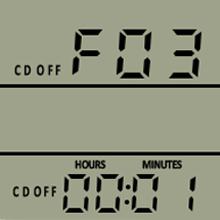
Image 7.3: Display showing F03 Countdown OFF settings.
- F04: Countdown ON/OFF Mode
The device will turn ON for a set period, then OFF for another set period, and then repeat. Press 'UP'/'DOWN' to select F04, then 'SET' to enter settings. Set ON hours/minutes, then 'SET' to move to OFF hours/minutes, then 'SET' to confirm. Press 'MODE' to exit.

Image 7.4: Display showing F04 Countdown ON/OFF settings.
7.3.温度校正
If you notice a discrepancy between the thermostat's reading and a known accurate thermometer, you can calibrate the sensor. Press and hold 'SET' for 3 seconds, then use 'UP'/'DOWN' to navigate to the calibration setting (usually indicated by 'CAL' or a similar symbol). Adjust the value between -9.9°C and 9.9°C to match the reference thermometer. Press 'SET' to confirm, then 'MODE' to exit.
7.4.メモリ機能
The KT3100 automatically saves your settings. In case of a power outage, the device will retain its last programmed settings once power is restored.
7.5. リセット機能
To restore the thermostat to its factory default settings, locate the small reset button (usually a pinhole) on the device. Use a thin object (like a paperclip) to press and hold the reset button for a few seconds until the display indicates a reset has occurred.
8. アプリケーション
The KETOTEK KT3100 Digital Thermostat is suitable for a wide range of temperature control applications:
- Home Heating/Cooling: Control electric heaters, fans, or portable air conditioners.
- 冷凍: Maintain specific temperatures for refrigerators or freezers.
- インキュベーター: Ensure stable temperatures for hatching eggs.
- 温室: Regulate temperature for optimal plant growth.
- 爬虫類テラリウム: Create a stable environment for reptiles and ampハイビアン。
- 養殖業: Control water temperature in aquariums or fish tanks.

図8.1: 例amples of common applications for the KT3100 thermostat.
9. メンテナンス
Proper maintenance ensures the longevity and accuracy of your KT3100 thermostat.
- クリーニング: 柔らかく乾いた布で拭いてください。研磨剤入りの洗剤を使用したり、水に浸したりしないでください。
- センサーのケア: Keep the temperature sensor clean and free from debris. Avoid bending or damaging the sensor cable.
- ストレージ: When not in use, store the thermostat in a cool, dry place away from direct sunlight and extreme temperatures.
10。 トラブルシューティング
KT3100 サーモスタットで問題が発生した場合は、次の一般的な問題と解決策を参照してください。
| 問題 | 考えられる原因 | 解決 |
|---|---|---|
| 表示が空白 | 電源なし、デバイスの故障 | Check power outlet; Ensure thermostat is properly plugged in; Try a different outlet. If still blank, contact support. |
| 不正確な温度測定値 | Sensor dirty or damaged; Calibration needed; Sensor placed incorrectly | Clean sensor; Perform temperature calibration (Section 7.3); Reposition sensor away from direct heat/cold sources. |
| 家電製品の電源がオン/オフにならない | Incorrect temperature settings; Timing mode active; Appliance not plugged in or faulty | Verify Start/Stop temperature settings (Section 7.1); Check if a timing mode (F01-F04) is active (Section 7.2); Ensure appliance is functional and correctly plugged into the thermostat. |
| ボタンが反応しない | 一時的なソフトウェアの不具合 | Unplug and replug the thermostat; Perform a factory reset (Section 7.5). |
11. 保証とサポート
KETOTEK products are manufactured to high-quality standards. This product comes with a standard manufacturer's warranty against defects in materials and workmanship. For warranty claims, technical support, or service inquiries, please refer to the contact information provided with your purchase or visit the official KETOTEK webサイトでご確認ください。保証の有効性を確認するため、購入証明書を保管してください。