
1. はじめに
The YIZEELFAR Wake Up Light Sunrise Alarm Clock is a multi-functional device designed to enhance your sleep and wake-up experience. It combines a sunrise simulation alarm, sound machine, Bluetooth speaker, and night light, all controllable via a dedicated mobile application or touch buttons. This manual provides detailed instructions for setup, operation, maintenance, and troubleshooting to ensure optimal use of your device.
2. セットアップ
2.1 開梱と電源接続
Carefully remove all components from the packaging. Ensure all parts are present: the Wake Up Light unit and its power adapter. Connect the provided power adapter to the DC input port on the back of the device and plug it into a standard electrical outlet.

画像: 背面 view of the YIZEELFAR Wake Up Light, highlighting the power input and USB port.
2.2 アプリのダウンロードとBluetooth接続
For full functionality and advanced control, download the "E-life Explorer" application. The app is available on the Apple App Store. Please note that some users have reported the app primarily supports iOS devices.
To connect the device via Bluetooth:
- Open the E-life APP on your cellphone.
- Click the Bluetooth icon on the top left corner.
- Choose to connect APP Bluetooth "E-life BLE".
- Turn to the Bluetooth Settings Page of your cellphone.
- Choose and tap Bluetooth "E-life" to pair.
- The device will prompt "connected" once successfully paired. The blue indicator light on the device will be steady on.
Video: Instructions on how to connect the E-life app with Bluetooth.
Video: E-Life Alarm Clock Tutorial Video, demonstrating app connection and features.
3. 操作手順
3.1 時間表示
The device displays time in a 24-hour format. To adjust the brightness of the time display:
- Click the setting icon in the app.
- Choose L0 to close the time and indicator light.
- Choose L3 for the brightest display.
画像: 正面 view of the YIZEELFAR Wake Up Light, showing the digital time display.
3.2 ライトモードと明るさ
The device offers 5 light modes and rich custom colors. You can control these via touch buttons on the device or through the app.
- タッチコントロール: Tap the side of the device to cycle through different colors and light modes.
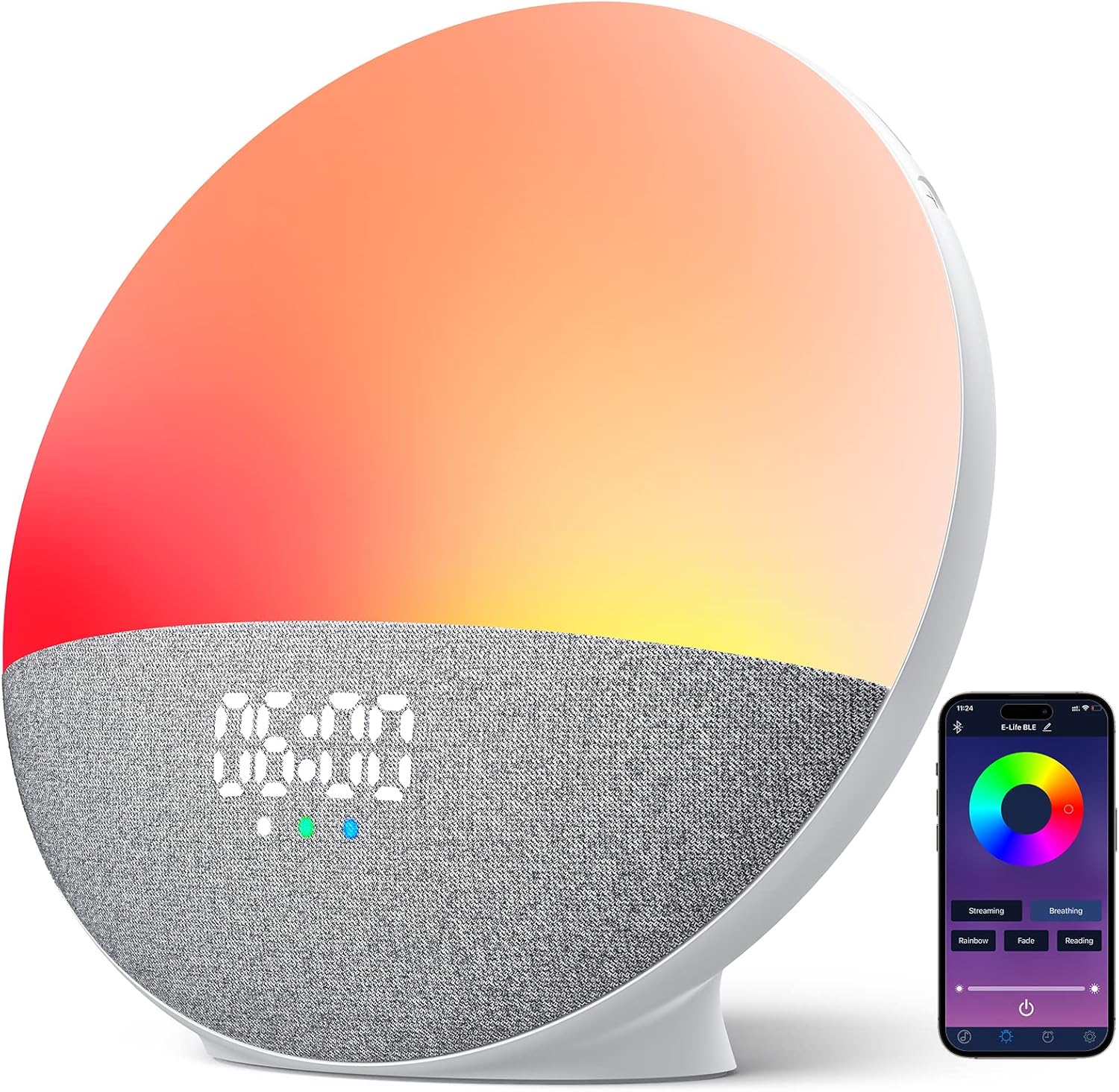
- アプリコントロール: Open the Light Setting interface in the app. Click and choose your desired light mode (Streaming, Breathing, Rainbow, Fade, Reading) or select a fixed color from the color disk. Adjust brightness using the slider.

Image: The alarm clock showcasing different light modes and the corresponding app interface for control.
Video: Demonstration of touch button controls for light modes.
3.3 Sound Machine Features
The device includes 15 soothing sounds for better sleep, categorized into Natural Sounds, White Noises, and Piano Music.
- サウンドの選択: Use the app or the touch buttons on the device to cycle through available sounds.
- 音量調整: Adjust the sound volume by swiping up/down on the designated touch area on the device or using the volume slider in the app.

Image: Visual representation of the 15 soothing sounds available on the alarm clock.
3.4 Alarm Settings (Sunrise Simulation)
Set up to 3 alarms with sunrise simulation and 5 wake-up sounds. Snooze function is supported.
- Add or Revise Alarm: Use the app to add or modify alarm settings.
- 時間の選択: Select your desired alarm time.
- サウンドを選択: Select a wake-up sound from the available options.
- 再生時間: Choose the duration for the alarm sound.
- Sunset/Sunrise Setting: Choose to turn on or off the sunset/sunrise simulation.
- 音量を調整: Adjust the alarm volume as needed.
- 保存: Save your alarm settings in the app.

Image: The alarm clock simulating a sunrise for a gentle wake-up experience.
3.5 Bluetoothスピーカー機能
The device features a premium loud Bluetooth speaker. After connecting your phone via Bluetooth (as described in Section 2.2), you can stream music from your device.
- 音楽再生: Play your favorite music through the alarm clock's speaker.
- トラック制御: Use the touch buttons on the device to skip tracks (last/next) or control playback from your phone.

Image: A user enjoying music played through the alarm clock's Bluetooth speaker.
4. メンテナンス
To ensure the longevity and optimal performance of your YIZEELFAR Wake Up Light, follow these simple maintenance guidelines:
- クリーニング: Gently wipe the device with a soft, dry cloth. Do not use abrasive cleaners or solvents, as they may damage the surface.
- 配置: デバイスは、直射日光、過度の熱、湿気を避け、安定した平らな面に置いてください。
- ストレージ: デバイスを長期間保管する場合は、プラグを抜いて涼しく乾燥した場所に保管してください。
5。 トラブルシューティング
If you encounter issues with your Wake Up Light, please refer to the following common problems and solutions:
| 問題 | 考えられる原因 / 解決策 |
|---|---|
| App connectivity issues (Bluetooth disconnects, app doesn't work) |
|
| Time display is in 24-hour format and cannot be changed to 12-hour. | The device's time display is fixed to a 24-hour format. This is a design feature and cannot be adjusted to 12-hour format. |
| Touch buttons are unresponsive or have a significant lag. | Ensure your fingers are clean and dry. Apply a firm but gentle touch. If issues persist, try restarting the device by unplugging and re-plugging it. |
| Alarm light works but sound doesn't, or vice-versa. |
|
6. 仕様
- ブランド: イーゼルファー
- モデル番号: S202
- ASIN: B0BPMFP7L2
- 色: 多色
- 表示タイプ: デジタル
- 電源: コード式電気
- 部屋タイプ: 寝室
- 形: 長方形
- 屋内/屋外での使用: 屋内
- フレーム素材: プラスチック
- 商品の重量: 1.81ポンド
- 製品寸法: 3.7 x 7.4 x 7.9インチ
- 取り付けタイプ: テーブルトップ
- 目覚まし時計: はい
- 時計ムーブメント: 自動
7.保証とサポート
This product comes with a manufacturer's warranty. For detailed warranty information and support, please refer to the official User Manual (PDF) available for download or contact YIZEELFAR customer service.
公式ユーザーマニュアル(PDF): ダウンロードはこちら