
導入
ご購入ありがとうございますasing the Andoer D2 Handheld RGB LED Video Light Wand. This manual provides detailed instructions for the safe and effective use of your new light wand. Please read this manual thoroughly before operation and retain it for future reference.
安全情報
- デバイスを水や高湿度にさらさないでください。
- 光源が目に直接当たらないようにしてください。
- 本製品を分解または改造しないでください。修理は資格のある担当者のみが行ってください。
- お子様の手の届かない場所に保管してください。
- 付属または認定された充電ケーブルのみを使用してください。
- Do not operate in environments with flammable gases or liquids.
パッケージ内容
開封後はパッケージの内容をご確認ください。不足品や破損品がございましたら、販売店までご連絡ください。
- Andoer D2 Handheld RGB LED Video Light Wand
- USB Type-C充電ケーブル
- ユーザーマニュアル(このドキュメント)
製品終了view
Familiarize yourself with the components and controls of the Andoer D2 light wand.
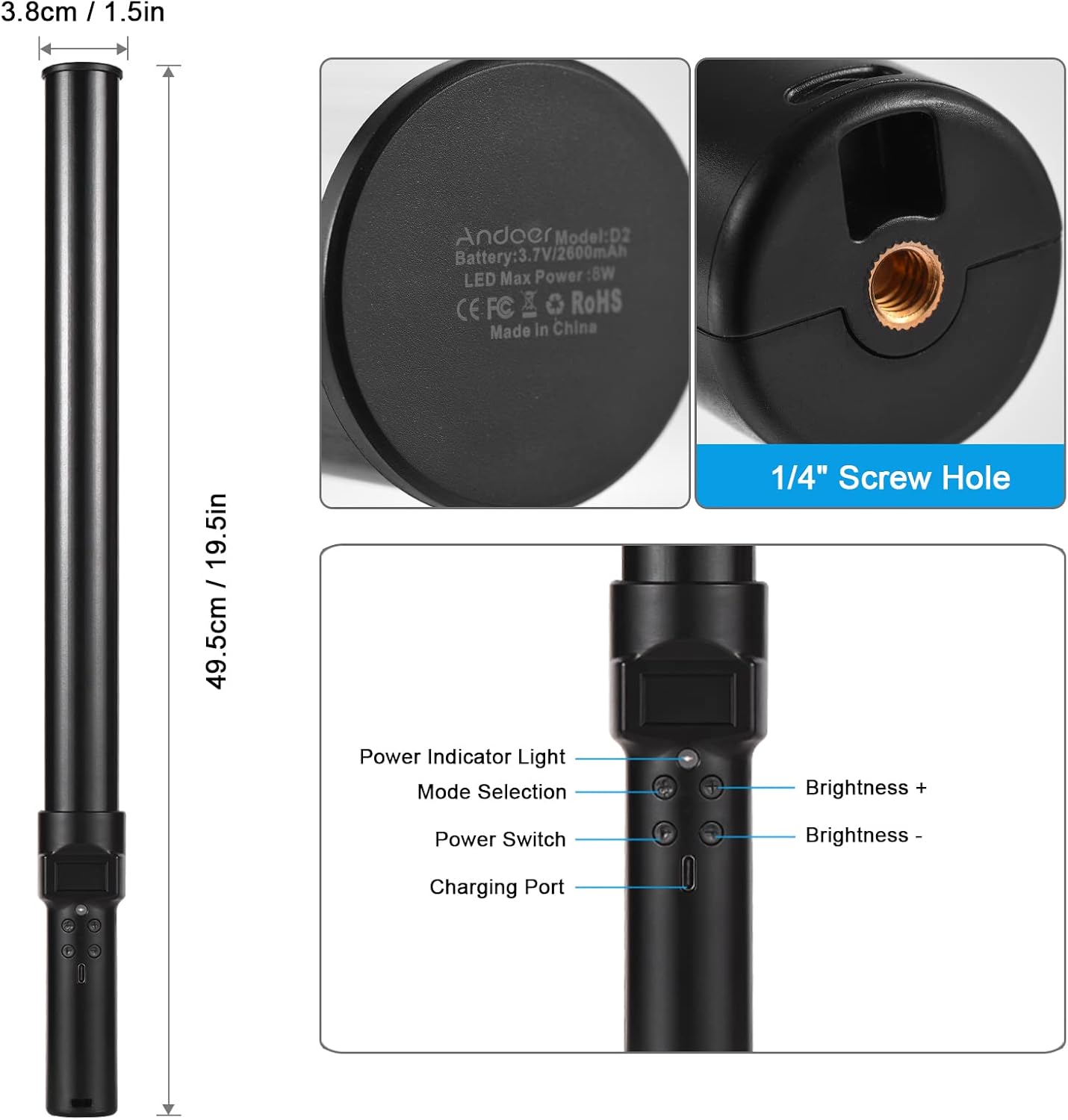
画像: 以上view of the Andoer D2 light wand, showing its dimensions (approximately 49.5cm / 19.5in long and 3.8cm / 1.5in diameter) and control panel. The control panel includes a Power Indicator Light, Mode Selection button, Power Switch, Brightness + button, Brightness - button, and a Charging Port.
コントロールパネルの機能:
- 電源スイッチ: Turns the light wand on or off.
- モード選択: Cycles through different lighting modes (e.g., CCT mode, RGB color effects).
- 明るさ+: Increases the light brightness.
- 明るさ-: Decreases the light brightness.
- 電源インジケータライト: Shows the power status and charging status.
- 充電ポート(Type-C): 内蔵バッテリーの充電に使用します。
設定
初期費用:
Before first use, fully charge the light wand. Connect the provided USB Type-C cable to the charging port on the device and the other end to a USB power adapter (not included) or a computer USB port. The power indicator light will show charging status.

画像: クローズアップ view of the Type-C charging port, indicating where to connect the charging cable.

画像: The Andoer D2 light wand shown alongside its USB Type-C charging cable, illustrating the charging setup.
取り付けオプション:
The Andoer D2 light wand can be used handheld for flexible lighting or mounted for stable positioning. It features a standard 1/4-inch screw hole at the bottom.

画像: 詳細な view of the 1/4-inch screw hole located at the base of the light wand, demonstrating how it can be attached to a light stand or tripod for stable use. Note that the light stand/tripod is sold separately.
- ハンドヘルド使用: Simply hold the light wand to direct light as needed.
- Tripod/Light Stand Mounting: Screw the 1/4-inch thread at the bottom of the light wand onto a compatible tripod or light stand. Ensure it is securely fastened before use.
操作手順
電源オン/オフ:
を押し続けます 電源スイッチ ライトワンドのオン/オフを切り替えるボタン。
明るさの調整:
The light wand offers 12 levels of adjustable brightness. Use the 明るさ+ ボタンを押すと明るさが上がり、 明るさ - それを減らすためのボタン。

画像: Illustration of the 12 levels of adjustable brightness, demonstrating the range from dim to bright light output.
色温度の調整(CCTモード):
In CCT mode, you can adjust the color temperature between 2500K (warm light), 5500K (neutral/daylight), and 8500K (cold light). Press the モード選択 button to cycle to CCT mode, then use the 明るさ+ そして 明るさ - buttons to adjust the color temperature.

画像: Visual representation of the adjustable color temperatures, ranging from warm (2500K) to neutral (5500K) to cool (8500K) light.
Activating Colorful Light Effects (RGB Mode):
The light wand features 7 colorful light effects: red, green, blue, orange, purple, light blue, and red & blue flash. Press the モード選択 button to cycle through these RGB effects. Brightness can still be adjusted in these modes using the 明るさ+ そして 明るさ - ボタン。
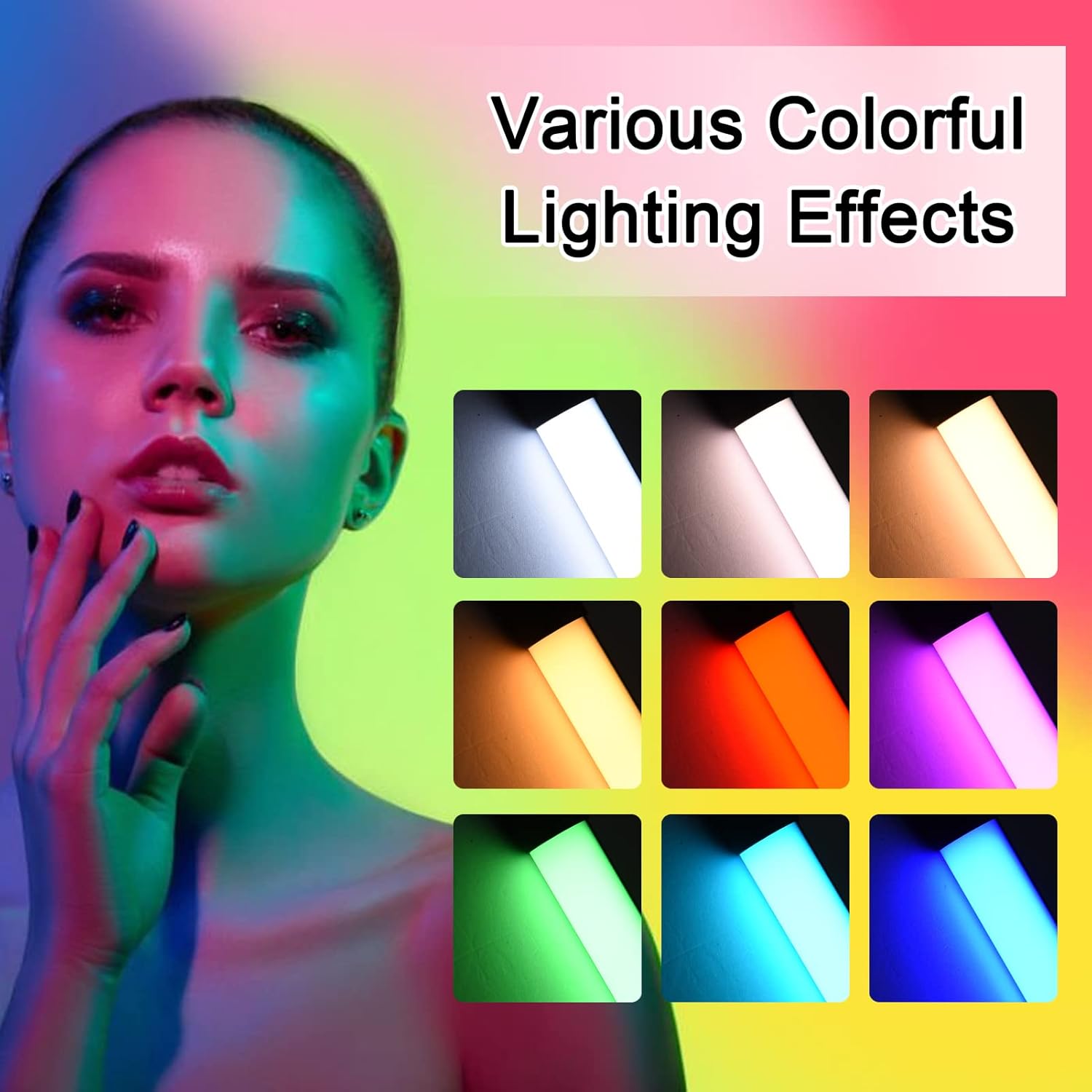
画像: A visual guide to the 7 colorful light effects available, showcasing the vibrant range of colors the light wand can produce.
充電
The Andoer D2 light wand has a built-in 2600mAh rechargeable lithium battery. When the battery is low, the power indicator light will signal. To charge:
- Connect the small end of the USB Type-C charging cable to the charging port on the light wand.
- Connect the standard USB end of the cable to a USB power source (e.g., wall adapter, power bank, computer USB port).
- The power indicator light will illuminate or change color to indicate charging. It will change again or turn off when fully charged.
A full charge provides approximately 2.5 hours of continuous use at maximum brightness.
メンテナンス
- Clean the light wand with a soft, dry cloth. Do not use abrasive cleaners or solvents.
- デバイスは直射日光や極端な温度を避け、涼しく乾燥した場所に保管してください。
- If not used for extended periods, charge the battery every 3 months to maintain battery health.
トラブルシューティング
| 問題 | 考えられる原因 | 解決 |
|---|---|---|
| ライトが点灯しません。 | 電池が消耗しています。 | Charge the light wand using the provided USB Type-C cable. |
| 光が暗かったりちらついたりします。 | バッテリー残量が少なくなりました。 | デバイスを充電します。 |
| 色やモードを変更できません。 | ボタンの押し間違いまたは一時的なソフトウェアの不具合。 | Ensure you are pressing the Mode Selection button. Try turning the device off and on again. |
| デバイスが充電されていません。 | ケーブル、電源アダプター、または充電ポートに障害があります。 | 別のUSB Type-Cケーブルまたは電源アダプターをお試しください。ケーブルがしっかりと差し込まれていることを確認してください。 |
仕様
| 特徴 | 詳細 |
|---|---|
| モデル | D2 (SJI3033515989406YA) |
| ブランド | アンドーア |
| 色温度 | 2500K / 5500K / 8500K(調整可能) |
| 明るさレベル | 12レベル |
| カラフルな光の効果 | 7 effects (Red, Green, Blue, Orange, Purple, Light Blue, Red & Blue Flash) |
| バッテリー容量 | 2600mAhリチウム電池 |
| 充電ポート | USBタイプC |
| バッテリー寿命(最大輝度) | 約2.5時間 |
| 取り付け | 1/4-inch screw hole |
| 寸法 | Approx. 49.5cm (19.5in) length, 3.8cm (1.5in) diameter |
保証とサポート
Andoer products are designed and manufactured to the highest quality standards. For warranty information or technical support, please refer to the warranty card included with your purchase or visit the official Andoer webサイトでご確認ください。保証請求のために購入証明書を保管してください。
Andoer Official Webサイト: Andoer Store on Amazon