
1. はじめに
This manual provides essential instructions for the safe and efficient operation of your Rigol DHO1074 Digital Oscilloscope. The DHO1074 is a 4-channel, 70 MHz digital oscilloscope featuring a 12-bit resolution and a 2 GSa/s real-time sample rate, designed for precise signal analysis in various applications. Please read this manual thoroughly before using the device to ensure proper functionality and to prevent damage.
2. 安全情報
怪我や機器の損傷を防ぐために、次の安全上の注意事項を守ってください。
- Use only the power cord specified for this instrument.
- 感電を防ぐため、機器が適切に接地されていることを確認してください。
- 濡れた場所や高温の場所では機器を操作しないでください。amp 条件。
- 爆発性雰囲気での操作は避けてください。
- Do not remove the instrument cover. Refer servicing to qualified personnel.
- Use appropriate probes and accessories.
- 清掃する前に電源を切ってください。
3. パッケージ内容
以下にリストされているすべてのアイテムがパッケージに含まれていることを確認してください。
- Rigol DHO1074 Digital Oscilloscope (1 unit)
- 電源コード(1本)
- Passive Probes (4 units, one for each channel)
- USBケーブル(1本)
- クイックガイド(1冊)
- Resource CD (1 unit)
4. セットアップ
4.1 電源の接続
- オシロスコープの電源スイッチがオフになっていることを確認します。
- 付属の電源コードをオシロスコープの背面パネルの AC 電源入力に接続します。
- 電源コードのもう一方の端をアース付き AC 電源コンセントに差し込みます。
4.2 プローブの接続
- Connect the BNC connector of a passive probe to one of the input channels (CH1, CH2, CH3, or CH4) on the front panel.
- Attach the probe ground clip to a common ground point in your circuit.
- プローブの先端を回路内のテスト ポイントに接続します。
- For accurate measurements, compensate the probe before use. Refer to the "Probe Compensation" section in the full user manual for detailed instructions.
4.3 初回電源投入
- Press the power switch on the front panel to turn on the oscilloscope.
- The instrument will perform a self-test and display the startup screen.
- メイン インターフェイスが表示されたら、オシロスコープが使用できるようになります。
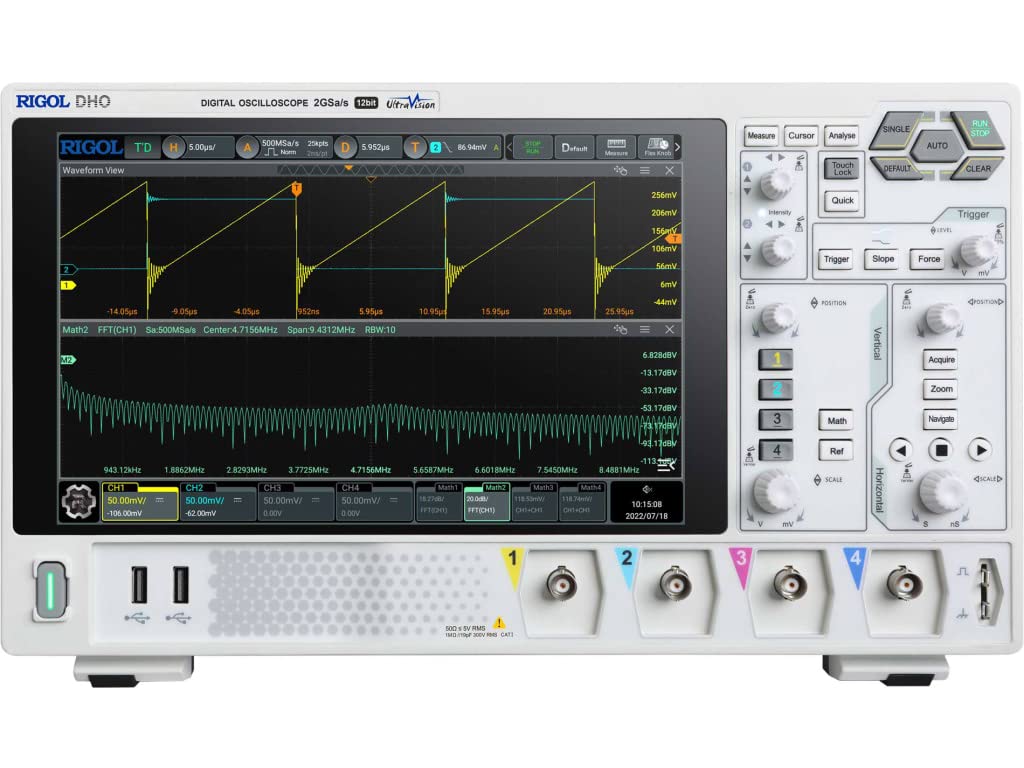
図4.1: 前面 view of the Rigol DHO1074 Digital Oscilloscope, showing the display, control panel, and input channels.
5. オシロスコープの操作
The Rigol DHO1074 offers a user-friendly interface for capturing and analyzing waveforms. Key features include 4 analog channels, 70 MHz bandwidth, and a 12-bit vertical resolution for enhanced signal fidelity.
5.1 基本的な波形取得
- 電源オン: Ensure the oscilloscope is powered on as described in Section 4.3.
- 接続信号: Connect your signal source to an input channel using a compensated probe.
- 自動セットアップ: を押す オート button on the front panel. The oscilloscope will automatically adjust vertical, horizontal, and trigger settings to display a stable waveform.
- 手動調整:
- 使用 垂直 knobs (VOLTS/DIV) to adjust the vertical scale (voltage per division) for each channel.
- 使用 水平 knob (SEC/DIV) to adjust the horizontal scale (time per division).
- 使用 トリガー controls to set the trigger level and mode for stable waveform capture.
5.2つの高度な機能
- 高解像度: Benefit from the 12-bit vertical resolution, providing 16 times more quantization levels than standard 8-bit oscilloscopes, which improves measurement accuracy and reduces quantization noise.
- ディープメモリ: The DHO1074 features a 50 Mpts maximum memory depth (expandable to 100 Mpts with option DHO1000-RLU-01), allowing for longer waveform captures at high sampルレート。
- Serial Decoding: Standard serial decoding capabilities include SPI, I2C, RS232/UART, CAN, and LIN, simplifying the analysis of common serial bus communications.
- 測定機能: Access various automatic measurement functions (e.g., Vpp, Vrms, Frequency, Period) via the 測定 メニュー。
- 数学関数: Utilize built-in math functions (e.g., Add, Subtract, Multiply, Divide, FFT) to perform waveform analysis.
6. メンテナンス
6.1 装置の清掃
- 清掃する前に、必ず電源コードを抜いてください。
- 柔らかい布を使用してください。ampened with a mild detergent solution to clean the exterior surfaces.
- Do not use abrasive cleaners or solvents that could damage the plastic parts.
- 液体を機器に直接吹きかけないでください。
6.2 ストレージ
- Store the oscilloscope in a clean, dry environment, away from direct sunlight and extreme temperatures.
- 画面を傷から守ります。
6.3 キャリブレーション
For optimal performance and measurement accuracy, periodic calibration by qualified service personnel is recommended. Refer to Rigol's official support channels for calibration services.
7。 トラブルシューティング
| 問題 | 考えられる原因 | 解決 |
|---|---|---|
| 電源を入れても電源が入らない。 | Power cord not connected; power outlet faulty; instrument fuse blown. | 電源コードの接続を確認し、電源コンセントをテストし、ヒューズの交換についてはサービスに問い合わせてください。 |
| 波形が表示されません。 | Probe not connected; signal source off; vertical/horizontal scale incorrect; trigger not set correctly. | Verify probe connection; check signal source; adjust VOLTS/DIV and SEC/DIV; adjust trigger level or use AUTO button. |
| Unstable waveform. | Trigger settings incorrect; noisy signal. | Adjust trigger mode, source, and level; ensure proper grounding of the probe. |
| Incorrect measurements. | Probe compensation incorrect; wrong measurement settings. | Compensate probes; verify measurement parameters. |
If the problem persists after attempting these solutions, please contact Rigol customer support.
8. 仕様
| パラメータ | 価値 |
|---|---|
| モデル | DHO1074 |
| 帯域幅 | 70 MHz |
| アナログチャンネル | 4 |
| 分解能 | 12ビット |
| マックスSampルレート | 2 GSa/s (real-time) |
| メモリ深度 | 50 Mpts (100 Mpts with DHO1000-RLU-01 option) |
| Serial Decoding | SPI, I2C, RS232/UART, CAN, LIN |
| 製品寸法 | 18 x 11 x 12インチ |
| アイテム重量 | 12ポンド |
| メーカー | リゴルテクノロジーズUSA株式会社 |
9. 保証とサポート
Rigol products are designed for reliability and performance. This instrument is covered by a standard manufacturer's warranty. For specific warranty terms and conditions, please refer to the warranty card included with your product or visit the official Rigol webサイト。
For technical support, service, or inquiries regarding your Rigol DHO1074 Digital Oscilloscope, please contact Rigol Technologies USA Inc. customer service through their official webサイトまたは製品ドキュメントに記載されている連絡先情報を参照してください。
Online resources and additional documentation may be available on the リゴル webサイト.


