導入
This manual provides comprehensive instructions for the Thomson ROC4301 4-in-1 Web-Programmable Universal Remote Control. This device allows you to control up to four different infrared-controlled electronic devices, such as TVs, DVD players, Blu-ray players, Set-Top Boxes (STB), VCRs, and audio equipment, using a single remote.
The ROC4301 features web-based programming for easy setup and a continuously updated code database to ensure compatibility with a wide range of brands and models.
主な特徴
- Controls up to 4 devices via one infrared remote control.
- Fast and easy programming via a web-based database accessible on PC, laptop, or tablet.
- Data transfer to the remote control is facilitated by a 3.5 mm jack cable (30 cm).
- Up to 4 devices can be programmed simultaneously.
- Compatible with TV, DVD, Blu-ray player, STB, VCR, and audio equipment.
- Continuously updated code database available online.
セットアップとプログラミング
The Thomson ROC4301 remote control is programmed using an online database, ensuring access to the latest device codes. This method requires a computer (PC, laptop, or tablet) with internet access and the included 3.5 mm jack cable.
手順 Web-Based Programming:
- リモコンを準備します: Ensure fresh AAA batteries are installed in the remote control. (See "Maintenance" section for battery installation).
- Access the Programming Webサイト: 開く web browser on your PC, laptop, or tablet and navigate to the official Thomson remote control programming web(製品パッケージまたは製造元の web正確なサイト URL).
- リモコンを接続します: Plug one end of the supplied 3.5 mm jack cable into the designated port on the remote control and the other end into the headphone jack of your computer.
- デバイスを選択: On the programming website, follow the on-screen instructions to select the types of devices (e.g., TV, DVD, STB) and their respective brands and models you wish to control. The database will provide the necessary codes.
- Transfer Codes: Once you have selected your devices, initiate the data transfer process on the website. The codes will be transmitted through the audio jack to your remote control. Ensure your computer's volume is set to a suitable level as instructed by the webサイト。
- リモコンをテストします。 After the transfer is complete, disconnect the remote control from your computer. Test the remote with each programmed device to ensure all functions work correctly. If a device does not respond or functions are incorrect, repeat the programming process, trying alternative codes if available on the webサイト。
の web database is continuously updated, providing access to codes for new devices. You can program up to four devices simultaneously.
リモコンの操作
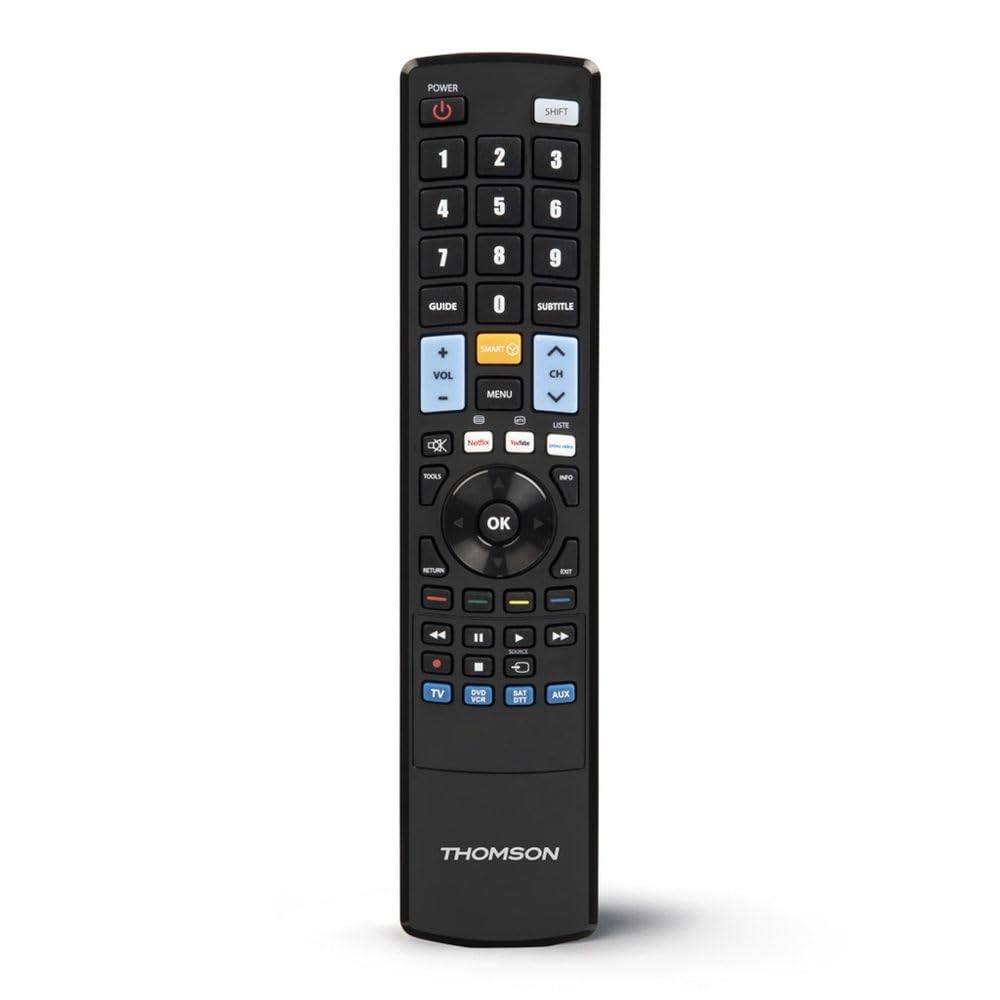
Once programmed, the Thomson ROC4301 functions like a standard remote control for your selected devices. It features 48 buttons designed for intuitive control.
一般的な操作:
- デバイスの選択: Use the dedicated device buttons (e.g., TV, DVD, STB, AUDIO) at the top of the remote to switch between controlling different devices. The remote will typically indicate which device is currently selected (e.g., via an LED indicator).
- 電源オン/オフ: を押す 力 選択したデバイスの電源をオンまたはオフにするボタン。
- チャンネル/音量: 使用 チャンネル+/- そして ボリューム+/- buttons to adjust channels and volume respectively.
- ナビゲーション: The directional pad (up, down, left, right) and OK button are used for menu navigation on most devices.
- テンキー: Use the numeric buttons (0-9) to directly enter channel numbers or other numerical inputs.
- 機能ボタン: Other buttons such as Play, Pause, Stop, Fast Forward, Rewind, Menu, Exit, and colored function buttons will perform their corresponding actions on the selected device.
Ensure there is a clear line of sight between the remote control and the infrared receiver of the device you are operating. The maximum effective range is approximately 10 meters.
メンテナンス
バッテリーの取り付けと交換:
The Thomson ROC4301 remote control requires two AAA batteries (included). When the remote's performance degrades or it stops responding, it's time to replace the batteries.
- リモコンの背面にある電池ボックスのカバーを見つけます。
- カバーを下方向にスライドさせるか、ラッチを押して持ち上げ、コンパートメントを開きます。
- Remove the old batteries, if any.
- Insert two new AAA batteries, ensuring the positive (+) and negative (-) terminals match the markings inside the compartment.
- 電池ボックスのカバーを、カチッと音がしてしっかりと固定されるまで元に戻します。
重要: Always dispose of used batteries responsibly according to local regulations. Do not mix old and new batteries, or different types of batteries.
クリーニング:
リモコンを清掃するには、柔らかく乾いた布を使用してください。頑固な汚れには、軽くamp布に水を含ませて拭いてください。研磨剤入りの洗剤、溶剤、アルコールは使用しないでください。リモコンの表面や内部部品を損傷する恐れがあります。
トラブルシューティング
If you encounter issues with your Thomson ROC4301 universal remote control, try the following troubleshooting steps:
- リモコンが応答しない:
- Check the batteries. Ensure they are correctly inserted and have sufficient charge. Replace them if necessary.
- Ensure there is a clear line of sight between the remote's IR emitter and the device's IR receiver. Obstructions can block the signal.
- Make sure you have selected the correct device mode (e.g., TV, DVD) on the remote.
- プログラミング後にデバイスが応答しない:
- Re-program the remote for that specific device. The web database often provides multiple codes for a single brand/model. Try the next available code if the first one doesn't work.
- Ensure the 3.5 mm jack cable connection was secure and the computer's volume was adequate during programming.
- Verify that the device you are trying to control is indeed an infrared-controlled device.
- 一部の機能が動作しません:
- Even with the correct code, some advanced functions might not be fully supported by a universal remote.
- Try alternative codes for your device, as some codes might offer better functionality mapping.
- Programming Issues (e.g., data transfer failure):
- インターネット接続を確認してください。
- コンピュータのオーディオ ドライバーが最新であることを確認してください。
- Temporarily disable any sound enhancements or equalizers on your computer that might interfere with the audio signal.
- Try using a different computer or web browser if problems persist.
これらの手順で問題が解決しない場合は、「サポート」セクションを参照してさらにサポートを受けてください。
仕様
| ブランド | トムソン |
| モデル名 | ROC006 Web-Programmable Universal Remote Control 4-in-1 |
| 商品型番 | 00132679 |
| 接続技術 | 赤外線(IR) |
| サポートされるデバイスの最大数 | 4 |
| 対応デバイス | TV, DVD, Blu-ray player, STB, VCR, Audio equipment |
| コントローラータイプ | ボタンコントロール |
| ボタンの数 | 48 |
| 最大範囲 | 10メートル |
| 色 | 黒 |
| バッテリー | 単2電池XNUMX本(付属) |
| 製品寸法 | 22.9 x 5.2 x 2.5 cm |
| アイテム重量 | 149.32グラム |
| メーカー | トムソン |
| 原産国 | 中国 |
保証情報
The Thomson ROC4301 Universal Remote Control comes with a 2年間のメーカー保証. Please retain your proof of purchase for warranty claims. For specific terms and conditions, refer to the warranty documentation included with your product or visit the official Thomson webサイト。
サポート
For further assistance, updated device codes, or to access the web-based programming tool, please visit the official Thomson support webこちらのサイトをご覧ください。よくある質問や追加リソースもご覧いただけます。
If you require technical support, please contact Thomson customer service through the channels provided on their official webサイト。
製品終了view