
1. はじめに
This manual provides instructions for the setup, operation, and maintenance of your FightBox F1-UFB-UP5 All Buttons Leverless Arcade Game Controller. This controller is designed for use with various gaming platforms including PlayStation 5, PlayStation 4, PlayStation 3, PC, Xbox Series X, and Nintendo Switch.
2.製品オーバーview
The FightBox F1-UFB-UP5 is a high-performance leverless arcade controller, featuring an all-button layout for precise input. It incorporates the Brook Universal Fighting Board (UFB) and UFB-UP5 for broad platform compatibility and low-latency performance. The controller is equipped with Sanwa buttons, known for their responsiveness and durability.

This image illustrates the FightBox F1-UFB-UP5 controller alongside its internal components, specifically highlighting the Brook Universal Fighting Board and the UFB-UP5 module, which enable multi-platform compatibility.

トップダウン view of the FightBox F1-UFB-UP5 controller, showcasing its all-button layout with red and black Sanwa buttons and the 'FIGHTBOX' branding.
3. セットアップ
The FightBox F1-UFB-UP5 controller connects to your gaming platform via a standard USB cable. No additional drivers are typically required for console use, but PC users may need to ensure proper drivers are installed for optimal performance.
- Connect the USB cable from the controller to an available USB port on your gaming console (PlayStation 5, PlayStation 4, PlayStation 3, Xbox Series X, Nintendo Switch) or PC.
- The controller should be automatically recognized by most systems. For PC, if not automatically recognized, check your operating system's device manager for driver updates or visit the Brook web特定のドライバーをダウンロードするためのサイト。
- Ensure the correct input mode is selected if your console requires it (refer to your console's documentation).
4. 操作手順
The F1-UFB-UP5 features a leverless button layout, replacing the traditional joystick with directional buttons for precise movement inputs. The primary action buttons are arranged for intuitive gameplay.

This diagram illustrates the button assignments for the PlayStation versions of the FightBox F1-UFB-UP5 controller. It identifies the USB port, Touchpad, Share, R3, L3, Option, and Home buttons, along with the directional and action buttons.
- 方向ボタン: The four red buttons on the left side control movement (Up, Down, Left, Right).
- アクションボタン: The eight black buttons on the right side are for primary game actions.
- オプションボタン: Typically used for pausing games or accessing menus.
- ホームボタン: Returns to the console's main menu or dashboard.
- 共有ボタン: Used for sharing gameplay content (on PlayStation platforms).
- タッチパッド: Functions as a touchpad input (on PlayStation platforms).
- R3/L3 Buttons: These buttons correspond to pressing down the right and left analog sticks on a standard controller.
For specific button mappings on different platforms (Xbox, Nintendo Switch), the controller automatically adapts. Consult your game's control settings for customization options.
5. メンテナンス
Proper maintenance ensures the longevity and performance of your FightBox F1-UFB-UP5 controller.
- クリーニング: Use a soft, dry cloth to wipe down the surface of the controller. For stubborn marks, a slightly damp cloth with mild soap can be used, followed by a dry wipe. Avoid abrasive cleaners or solvents.
- ストレージ: コントローラーは、直射日光や極端な温度を避け、涼しく乾燥した場所に保管してください。
- ケーブルケア: Avoid sharp bends or kinks in the USB cable. Disconnect by pulling the plug, not the cable itself.
- ボタンケア: Do not apply excessive force to the buttons. If a button feels sticky, it may require professional cleaning or replacement.
6。 トラブルシューティング
If you encounter issues with your FightBox F1-UFB-UP5 controller, refer to the following common solutions.
- Controller Not Recognized:
- USB ケーブルがコントローラーとコンソール/PC の両方にしっかりと接続されていることを確認します。
- 別のUSBポートを試してください。
- コンソールまたは PC を再起動します。
- For PC, check device manager for driver issues and update if necessary.
- ボタンが反応しない:
- Verify the controller is powered on and connected.
- Test buttons in a different game or system menu to isolate the issue.
- If only specific buttons are affected, they may require cleaning or replacement.
- 入力遅延:
- Ensure you are using a direct USB connection, avoiding unpowered USB hubs.
- Check for any background processes on your PC that might be consuming resources.
- Ensure your console's firmware and game software are up to date.
7. 仕様
Detailed specifications for the FightBox F1-UFB-UP5 All Buttons Leverless Arcade Game Controller.
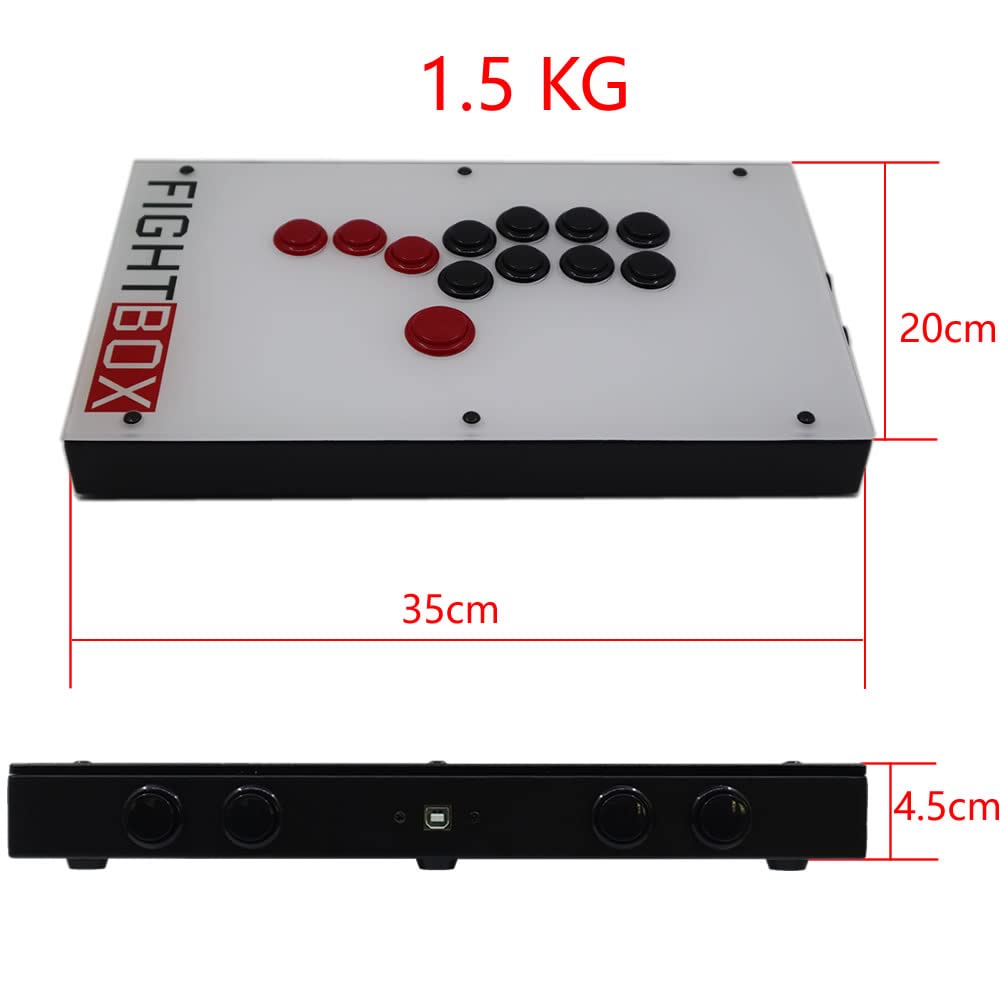
This image provides the physical dimensions of the FightBox F1-UFB-UP5 controller, showing a length of 35cm, width of 20cm, and height of 4.5cm, with a total weight of 1.5 kg.
| 特徴 | 詳細 |
|---|---|
| モデル | F1-UFB-UP5 |
| ブランド | FightBox |
| 接続性 | USB |
| コントローラータイプ | Leverless Arcade Controller |
| ボタンの数量 | 12 |
| 特集 | タッチパッド |
| 対応デバイス | PlayStation 5, PlayStation 4, PlayStation 3, PC, Xbox Series X, Nintendo Switch |
| 寸法(長さ×幅×高さ) | 15.75 x 9.84 x 3.94インチ(約35 x 20 x 4.5 cm) |
| 重さ | 1.5キログラム |
| 内部委員会 | Brook Universal Fighting Board (UFB) + UFB-UP5 |
| ボタン | 三和 |
| UPC/GTIN | 635648885254 |
8. 保証とサポート
For warranty information and technical support, please refer to the official FightBox webご購入の際は、サイトをご覧いただくか、販売店にお問い合わせください。購入証明書としてレシートを保管してください。
さらにサポートが必要な場合は、次のサイトをご覧ください。 FightBox Official Store