
FLEXISPOT EW8Q8
FLEXISPOT Q8 55インチ 竹製スタンディングデスク ユーザーマニュアル
Model: EW8Q8
1. はじめに
Thank you for choosing the FLEXISPOT Q8 55-inch Bamboo Standing Desk. This electric height-adjustable desk is designed to enhance your workspace with its durable bamboo tabletop, powerful dual motors, integrated wireless charging, and convenient storage drawer. This manual provides essential information for safe assembly, operation, maintenance, and troubleshooting to ensure optimal performance and longevity of your desk.
2. 重要な安全情報
- 重量容量: Do not exceed the maximum weight limit of 220 lbs (100 kg) on the desktop. Overloading can cause damage and pose a safety risk.
- 安定性: Ensure the desk is placed on a level surface. For taller heights, proper anchoring or counterweighting may be necessary to maintain stability.
- 組み立て: Follow all assembly instructions carefully. Incorrect assembly can lead to instability and potential injury. It is recommended that two people assemble this desk due to its weight.
- 子供とペット: 事故を防ぐため、操作中は子供やペットをデスクから遠ざけてください。
- 液体: Avoid spilling liquids on the control panel or electrical components. In case of spillage, immediately unplug the desk and allow it to dry completely before use.
- 電源コード: Ensure the power cord is not pinched or damaged. Do not operate the desk with a damaged power cord.
- 移動クリアランス: 机の高さを調整するときは、机の上または下に障害物がないことを確認してください。
3. パッケージ内容
Your FLEXISPOT Q8 desk is shipped in two separate boxes. Please verify that all components are present before beginning assembly.
- Bamboo Desktop with Integrated Drawer and Control Panel (Pre-assembled)
- デスク脚(2)
- デスク脚 (2)
- ケーブル管理トレイ
- 電源アダプターとケーブル
- Assembly Hardware and Tools (Screwdriver, Allen wrenches)
- 取扱説明書

This image illustrates the desk's dimensions (55.3 inches wide, 27.7 inches deep) and its robust 220 lbs weight capacity. It also highlights that the product ships in two separate packages.
4. セットアップと組み立て
The FLEXISPOT Q8 desk features a quick-install design, allowing for assembly in approximately 15 minutes. The tabletop and drawer come pre-assembled, simplifying the process.

The desk components are shown ready for assembly, emphasizing the quick 15-minute installation process with included tools and instructions.
組み立て手順:
- コンポーネントを解凍します: Carefully remove all parts from the packaging. Lay the desktop upside down on a soft, clean surface to prevent scratches.
- 脚を取り付ける: Securely attach the two desk legs to the pre-drilled holes on the underside of the desktop using the provided hardware.
- 足を取り付ける: Connect the desk feet to the bottom of each leg column.
- ケーブルを接続する: Connect the motor cables from the legs to the control box, and then connect the control panel cable to the control box. Ensure all connections are firm.
- ケーブル管理トレイを取り付けます。 Attach the cable management tray to the designated area under the desk to organize wires.
- フリップデスクアップライト: With assistance, carefully flip the assembled desk upright and move it to its desired location. Due to the desk's weight (approximately 85 lbs / 38.7 kg), two people are recommended for this step.
- 接続電源: 電源アダプターをコントロールボックスに差し込み、電源ケーブルを壁のコンセントに接続します。
- 初期キャリブレーション(必要な場合): Upon first power-on, the desk may perform a brief calibration cycle, moving to its lowest point and then slightly up. This is normal. If the desk does not respond, refer to the troubleshooting section for reset procedures.

A visual representation of the desk's main components, demonstrating the simplified assembly process.
5. 操作手順
5.1 Smart Control Panel
The integrated control panel allows for easy height adjustment and includes memory presets for your preferred sitting and standing positions.

The smart control panel is detailed, showing buttons for height adjustment, four programmable memory presets, and integrated USB-A and USB-C charging ports.
- 上/下ボタン(▲/▼): ボタンを長押しすると、デスクの高さをスムーズに上下に調整できます。希望の高さでボタンを離すと停止します。
- メモリプリセット(1、2、3、4): これらのボタンを使用すると、最大 4 つの異なる高さ設定を保存して呼び出すことができます。
- 上/下ボタンを使用して、デスクを希望の高さに調整します。
- Press the 'M' button (or similar memory set button, if present, otherwise directly press the number).
- Within 3 seconds, press the desired number button (1, 2, 3, or 4) to save the current height. The display will show 'S-' followed by the number to confirm.
- 保存した高さを呼び出すには、対応する数字ボタン(1、2、3、または4)を押すだけです。デスクは自動的にその高さに移動します。
5.2 統合充電機能
The FLEXISPOT Q8 desk offers multiple charging options for your devices.
- ワイヤレス充電: A 10W wireless charging pad is discreetly integrated under the tabletop. Place your compatible smartphone or other Qi-enabled device directly on the designated area on the desktop (indicated by a subtle marking) to begin charging.
- 有線充電ポート: The control panel includes a Type-A (18W) and a Type-C (45W) port for fast wired charging of smartphones, tablets, and laptops.
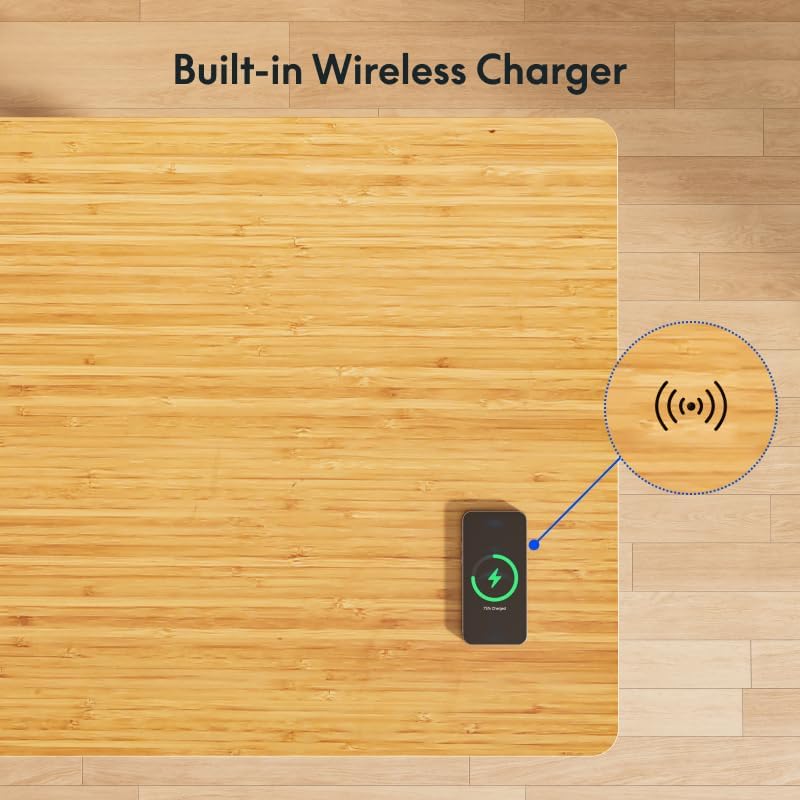
A smartphone is shown charging wirelessly on the desk's surface, illustrating the convenient built-in wireless charging feature.
5.3 Spacious Desk Drawer
The desk features an embedded drawer for convenient storage of your desktop essentials, helping to keep your workspace tidy.

The integrated drawer is displayed open, demonstrating its capacity for storing notebooks, pens, and other small office supplies.
6. メンテナンス
- デスクトップのクリーニング: 柔らかくてamp cloth to clean the bamboo surface. Avoid abrasive cleaners or harsh chemicals that could damage the finish. Wipe spills immediately.
- フレームのクリーニング: Wipe the metal frame with a soft, dry cloth.
- ケーブル管理 Periodically check the cable management tray and ensure all cables are neatly organized and not pinched.
- 接続チェック: Occasionally inspect all electrical connections to ensure they are secure.
7。 トラブルシューティング
| 問題 | 考えられる原因 | 解決 |
|---|---|---|
| 机が動かない / 電源がない | Power cable disconnected; Outlet issue; Control box malfunction. | Check power cable connection to wall and control box. Test the outlet with another device. If still no power, contact support. |
| 机の動きが不均一であったり、止まったりする | Overload; Obstruction; Motor cable issue. | Reduce weight on desk. Check for obstructions. Ensure motor cables are securely connected. Perform a reset. |
| エラーコードが表示されました | 特定の故障。 | Refer to the full user manual for specific error code meanings and solutions, or perform a reset. |
| ワイヤレス充電が機能しない | Device not Qi-compatible; Incorrect placement; Thick phone case. | Ensure device supports Qi wireless charging. Adjust device placement on the charging area. Remove thick phone cases. |
リセット手順:
If the desk encounters an issue or displays an error code, a reset may resolve the problem:
- デスクの電源プラグをコンセントから抜きます。
- 少なくとも10〜15秒お待ちください。
- デスクを電源コンセントに差し込みます。
- Press and hold the down (▼) button until the desk reaches its lowest position and then slightly rises. This indicates a successful reset.
8. 仕様
| 特徴 | 詳細 |
|---|---|
| ブランド | フレキシポット |
| モデル番号 | EW8Q8 |
| デスクトップ素材 | 竹 |
| フレーム素材 | Bamboo (Base) |
| 製品寸法(奥行き×幅×高さ) | 28インチ x 55インチ x 49.2インチ (71.1 cm x 139.7 cm x 125 cm) |
| 高さ範囲 | 24インチ - 49.2インチ (61 cm - 125 cm) |
| 重量容量 | 220ポンド(100kg) |
| モータータイプ | デュアルモーター、3Stage脚 |
| リフト速度 | 1.5インチ/秒(3.8 cm/秒) |
| 騒音レベル | 約45dB |
| ワイヤレス充電出力 | 10W |
| 有線充電ポート | 1x タイプA (18W)、1x タイプC (45W) |
| 引き出し寸法(長さ x 幅 x 高さ) | 28.3インチ x 12.8インチ x 1.97インチ (71.9 cm x 32.5 cm x 5 cm) |
| 組み立て時間 | 約15分 |
| アイテム重量 | 38.7キログラム(約85ポンド) |

This image highlights the desk's quiet operation, comparing its noise level (45dB) to common sounds like falling leaves (10dB) and normal voice (60dB).

This image focuses on the desk's genuine bamboo tabletop, emphasizing its eco-friendly nature, durability, and unique grain pattern.
9. 保証とサポート
9.1 限定保証
The FLEXISPOT Q8 55-inch Bamboo Standing Desk comes with a limited warranty. Please refer to the warranty card included with your product or visit the official FLEXISPOT web補償範囲、期間、請求手続きに関する詳細な利用規約については、こちらのサイトをご覧ください。
9.2 カスタマーサポート
For any questions, technical assistance, or warranty claims, please contact FLEXISPOT customer support. You can find contact information on the official FLEXISPOT webサイトまたは購入プラットフォームを通じて購入できます。
詳細については、FLEXISPOT 公式ストアをご覧ください。 FLEXISPOTストア
関連文書EW8Q8


Ask a question about this manual
Ask about setup, troubleshooting, compatibility, parts, safety, or missing instructions. Manuals+ will review the question and use this page’s manual context to help answer it.