
1.製品オーバーview
The Phanteks Eclipse G500A DRGB is a high-performance mid-tower chassis designed to accommodate modern PC components with excellent airflow and integrated D-RGB lighting. It features an Ultra-fine Performance Mesh on both the front and top panels, ensuring optimal cooling and dust filtration.

Figure 1: Phanteks Eclipse G500A DRGB Mid Tower Case, Matte White.
主な特徴:
- 高気流設計: Ultra-fine Performance Mesh on front and top panels for superior cooling and dust filtration.
- 統合D-RGB照明: Built-in D-RGB lighting on the front and side, controllable via manual buttons or motherboard synchronization.
- プレインストールされたファン: Includes three high-performance M25-140 D-RGB fans.
- 広範な冷却サポート: Supports up to 420mm radiators in the front and 360mm in the top.
- 広々とした室内: Accommodates full-length GPUs and offers vertical GPU mounting options (with optional bracket).
- 柔軟なストレージ: Multiple HDD and SSD locations, including dedicated SSD brackets and stackable HDD bays.
- 最新のフロントI/O: Features 10Gbps USB-C, 2x USB 3.0, Microphone/Headphone Combo, Power button, and D-RGB controls.
2. セットアップとインストール
This section provides general guidelines for installing components into your Phanteks Eclipse G500A DRGB chassis. Always refer to your component manuals for specific installation instructions.
2.1 シャーシの準備
Before installing components, ensure the chassis is placed on a stable, flat surface. Remove the side panels by gently pulling them open (they are hinged) to access the interior.
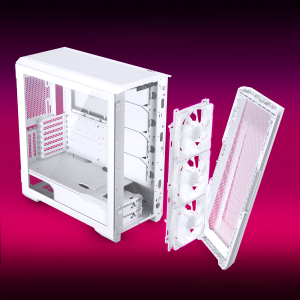
Figure 2: The removable front panel allows for easy installation of fans and radiators.
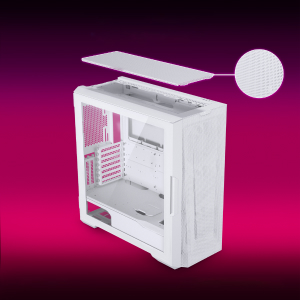
Figure 3: The removable top mesh panel facilitates fan and radiator installation.
2.2マザーボードの取り付け
The G500A supports ATX, micro-ATX, mini-ITX, and E-ATX motherboards (up to 280mm wide). Install the necessary standoffs for your motherboard form factor, then secure the motherboard with screws.
2.3電源ユニット(PSU)の設置
Install the PSU at the bottom rear of the chassis. The G500A supports PSUs up to 250mm in length (195mm if all 4 bottom HDD positions are used).
2.4 ストレージデバイスのインストール
The case offers extensive storage options:
- 2.5インチSSD: Up to 9 dedicated 2.5" drive bays are included.
- 3.5インチHDD: Two stackable 3.5" HDD bays are included, expandable up to a total of 10 HDD bays.

Figure 4: Multiple storage options for 2.5" and 3.5" drives.
2.5 グラフィックカード(GPU)のインストール
The G500A supports graphics cards up to 435mm in length. For vertical GPU mounting, an optional bracket (PH-VGPUKT4.0_03) or riser cable is required.
2.6 冷却システムの設置
シャーシはさまざまなファンとラジエーターの構成をサポートします。
- ファンサポート:
- Front: 3x 120mm or 3x 140mm (3x 140mm pre-installed)
- 上:3x 120mmまたは3x 140mm
- リア: 1x 120mm または 1x 140mm
- 液体冷却ラジエーターサポート:
- Front: Up to 360mm (120mm radiator) or 420mm (140mm radiator)
- Top: Up to 360mm (120mm radiator) or 280mm (140mm radiator)
- リア: 120mm
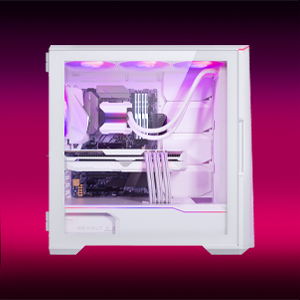
Figure 5: High-end cooling compatibility with various fan and radiator sizes.
2.7 ケーブル管理
The G500A provides ample space and Velcro ties for efficient cable management, ensuring a clean interior and optimal airflow. Cover doors help to conceal cables on the backside of the motherboard tray.
2.8 インストールビデオ
Video 1: Detailed PC Build Guide in the Phanteks Eclipse G500A (13:33).
Video 2: Another comprehensive PC assembly guide featuring the Phanteks Eclipse G500A (14:01).
3. 操作手順
3.1 フロントI/Oパネル
フロント I/O パネルでは、重要なポートやコントロールに簡単にアクセスできます。
- 電源ボタン: システムの電源をオン/オフにします。
- USB 3.0 ポート (x2): USB 3.0 デバイスを接続します。
- USB-C Gen2 Port (x1): For high-speed USB-C connectivity.
- マイク/ヘッドフォンコンボジャック: オーディオの入出力用。
- D-RGB Mode Button: Cycles through pre-programmed D-RGB lighting effects.
- D-RGB Color Button: Changes the color of the D-RGB lighting.

Figure 6: Front I/O panel with USB-C, USB 3.0, audio, and D-RGB controls.
3.2 D-RGB照明制御
The integrated D-RGB lighting can be controlled in two ways:
- 手動制御: Use the D-RGB Mode and Color buttons on the front I/O panel to cycle through effects and colors without software.
- マザーボードの同期: Connect the D-RGB controller to a compatible motherboard's D-RGB header to enable software control and synchronization with other D-RGB components.

Figure 7: Integrated D-RGB lighting with included M25-140 D-RGB fans.
4. メンテナンス
定期的なメンテナンスは、PC コンポーネントの最適なパフォーマンスと寿命の延長に役立ちます。
- ダストフィルター: The Ultra-fine Performance Mesh on the front and top panels acts as a dust filter. Periodically remove these panels and clean the mesh to maintain optimal airflow.
- インテリアクリーニング: Use compressed air to remove dust from inside the chassis, especially from fans, heatsinks, and other components. Ensure the system is powered off and unplugged before cleaning.
- 外装清掃: 外側の表面を柔らかい布で拭きます。amp 布で拭いてください。研磨剤入りの洗剤や溶剤は使用しないでください。
5。 トラブルシューティング
このセクションでは、PC ケースで発生する可能性のある一般的な問題について説明します。
5.1 電源の問題
- システムが電源オンにならない:
- Ensure all power cables (24-pin ATX, 8-pin CPU, GPU power) are securely connected to the motherboard and components.
- PSU スイッチが「オン」の位置にあることを確認します。
- フロントパネルの電源スイッチ ケーブルがマザーボードの F_PANEL ヘッダーに正しく接続されていることを確認します。
5.2 D-RGB Lighting Issues
- D-RGB not lighting up or incorrect colors:
- Ensure the D-RGB cables from the fans and LED strips are correctly connected to the integrated D-RGB controller.
- If using motherboard synchronization, ensure the D-RGB controller is connected to the motherboard's D-RGB header and that the motherboard's lighting software is configured correctly.
- Verify the D-RGB controller is receiving power (e.g., via SATA power connector).
- Try cycling through modes and colors using the front I/O buttons to rule out software issues.
5.3 ファンの騒音または故障
- ファンの騒音が大きすぎる:
- ファンブレードにほこりが付着していないか確認し、必要に応じて清掃します。
- Ensure fans are securely mounted and not vibrating against the chassis.
- Verify fan speeds are controlled appropriately by the motherboard or fan controller.
- ファンが回転しない:
- マザーボードまたはファン ハブへのファン電源接続を確認します。
- Ensure fan headers are enabled in the BIOS/UEFI settings.
6. 仕様
Detailed technical specifications for the Phanteks Eclipse G500A DRGB Mid Tower Case.
| 特徴 | 仕様 |
|---|---|
| モデル名 | Eclipse G500A DRGB, White |
| 商品型番 | PH-EC500GA_DMW01A |
| フォームファクター | ミッドタワー |
| 寸法(長さx幅x高さ) | 19.69 x 9.45 x 20.28 インチ (500 x 240 x 515 mm) |
| アイテム重量 | 23.2ポンド |
| 材料 | スチールシャーシ、強化ガラス |
| マザーボードのサポート | ATX、マイクロATX、ミニITX、E-ATX(最大幅280mm) |
| 拡張スロット | 7 |
| 垂直GPUのサポート | Yes (with optional bracket PH-VGPUKT4.0_03 or riser cable) |
| 内部3.5インチドライブベイ | 10 (2x included, expandable) |
| 内部2.5インチドライブベイ | 9個(9個付属) |
| フロントI/O | 2x USB 3.0, USB-C Gen2, Microphone/Headphone Combo, Power Button, D-RGB Mode, D-RGB Color |
| プレインストールされたファン | 3x M25-140 D-RGB (Front) |
| GPUの最大長 | 435 mm / 17.2インチ |
| CPUクーラーの最大高さ | 185ミリメートル |
| PSU の最大長 | 195mm (if all 4 bottom HDD positions used) / 250mm (if 2 bottom HDD used) |
| 冷却方法 | ファン、水 |
7. 保証とサポート
Phanteks products are manufactured with high-quality standards. For warranty information and technical support, please refer to the official Phanteks webサイトにアクセスするか、カスタマーサービスにお問い合わせください。
連絡先:
- Webサイト: www.phanteks.com
- Phanteks Taiwan Inc.: 新北市中和区建一路11号150階1
- Importer EU (Axpertec Int B.V.): Sydneystraat 33, 3047 BP Rotterdam, The Netherlands
- Importer US (Axpertec Inc.): 20465 E Walnut Dr. N, City of Industry, California 91789, United States

Figure 8: Phanteks company and importer details, along with compliance markings (CE, UKCA, RoHS).


