1. はじめに
Thank you for choosing the Mavpet 6L Automatic Pet Feeder. This device is designed to provide scheduled and controlled feeding for your pets, enhancing convenience and ensuring consistent meal times. It features WiFi connectivity for app control, a voice recording function, and a dual power supply system for reliability.
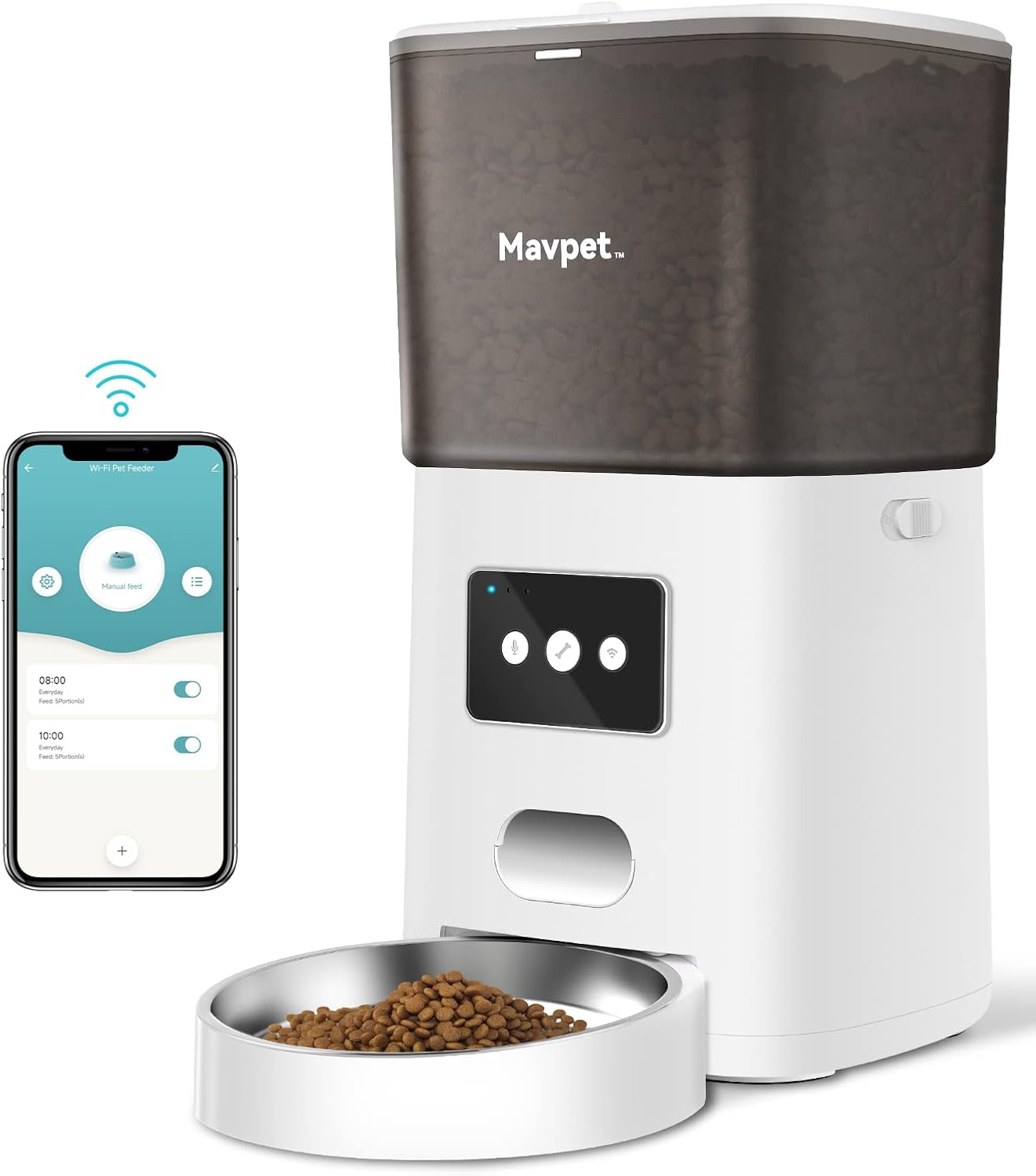
Image 1.1: The Mavpet 6L Automatic Pet Feeder, showcasing its design and the accompanying mobile application interface for remote control.
2.製品コンポーネント
Carefully unpack your Mavpet Automatic Pet Feeder and ensure all components are present:
- Automatic Feeder Unit x 1
- Power Adapter and Power Cord x 1
- 取扱説明書 x 1 (本書)
- 乾燥剤袋×1

図2.1: 爆発した view diagram illustrating the internal components of the Mavpet 6L Automatic Pet Feeder, including the desiccant bag, top lid, safety lock, low food sensor, clog-free design, and stainless steel bowl.
3. セットアップ手順
3.1 電源
フィーダーはデュアル電源オプションをサポートします:
- ACアダプター: Connect the provided 5V USB power adapter to a wall outlet and the feeder.
- バッテリーバックアップ: パワーouのためにtage protection, insert three D-size batteries (not included) into the battery compartment at the bottom of the unit.
The dual power system ensures continuous operation even during electrical interruptions.

Image 3.1: Illustration of the dual power supply feature, showing the connection for the power adapter and the compartment for D-size batteries (not included).
3.2 アプリのダウンロードとWiFi接続
- Download the "Pet Zero" app from your smartphone's app store (iOS or Android).
- アプリを開き、画面の指示に従ってアカウントを作成し、デバイスを追加します。
- スマートフォンがインターネットに接続されていることを確認してください 2.4GHz WiFiネットワーク. The feeder does not support 5GHz WiFi networks.
- Follow the app prompts to connect the feeder to your home WiFi network.

Image 3.2: A smartphone displaying the "Pet Zero" app interface, demonstrating the process of connecting the feeder to a 2.4GHz WiFi network.
3.3 フードホッパーへの充填
- フィーダーの上蓋を開けます。
- Place the provided desiccant bag into the designated slot under the lid to keep food fresh.
- Pour dry pet food into the 6L hopper. The feeder is suitable for dry food only, with a maximum kibble size of 15mm.
- Close the lid securely, ensuring the safety latch is engaged to prevent pets from accessing the food.
4. 操作手順
4.1 Scheduled Feeding via App
Use the "Pet Zero" app to create and manage your pet's feeding schedule:
- You can set up to 15日XNUMX食.
- Each meal can be configured with up to 20人分. Each portion is approximately 7-8 grams.
- Adjust meal times and portion sizes according to your pet's dietary needs.

Image 4.1: A smartphone screen displaying the "Pet Zero" app with a feeding schedule set for multiple meals throughout the day, indicating the flexibility of meal and portion settings.
4.2 手動給餌
いつでも手動で餌を与えることができます。
- Through the "Pet Zero" app, select the manual feed option and choose the number of portions.
- Alternatively, press the manual feed button on the feeder unit (refer to the product diagram for button location).
4.3音声録音
Record a personalized 10-second voice message to call your pet at meal times:
- Locate the voice recording button on the feeder.
- Press and hold the button to record your message. Release to save.
- The message will play up to 5 times when food is dispensed, configurable via the app.

Image 4.2: A dog and cat looking towards the feeder, illustrating the voice message feature that calls pets to their meal.
4.4 Smart Notifications and Indicator Light
The feeder provides important alerts:
- 食料不足警告: If the food level in the hopper is low, the indicator light will turn red, and a notification will be sent to your "Pet Zero" app.
- バッテリー残量低下: The indicator light will also signal low battery, and an app notification will be sent.
- The indicator LED can be turned off manually via the app if desired.
5. メンテナンスと清掃
定期的な清掃により、ペットのパフォーマンスと衛生が最適に保たれます。
5.1 フィーダーの清掃
- 清掃する前に、フィーダーの電源プラグが抜かれ、電池が取り外されていることを確認してください。
- The food hopper and stainless steel bowl are detachable for easy cleaning.
- Wash detachable parts with mild soap and water. Rinse thoroughly and dry completely before reassembling.
- 本体を拭いてamp 布で拭いてください。本体を水に浸さないでください。
- The product care instructions specify "Hand Wash Only" for relevant components.
5.2 乾燥剤袋の交換
Replace the desiccant bag periodically (e.g., monthly) to maintain food freshness. New desiccant bags can be purchased separately.
6。 トラブルシューティング
If you encounter issues with your Mavpet feeder, refer to the following common solutions:
| 問題 | 考えられる原因 | 解決 |
|---|---|---|
| 給餌器から餌が出ない | Food hopper empty; Food stuck; Power issue | Refill hopper; Check for obstructions (auto reversal mechanism helps); Verify power adapter connection or battery level. |
| WiFiに接続できません | Incorrect WiFi band; Weak signal; Incorrect password | Ensure connection to 2.4GHz WiFi; Move feeder closer to router; Re-enter WiFi password in app. |
| 音声メッセージが再生されない | No message recorded; Volume too low | Record a new message; Check app settings for voice play times. |
| アプリの通知が受信されない | App permissions; Phone settings | Check app notification permissions on your smartphone; Ensure phone is connected to internet. |
For further assistance, please refer to the "Pet Zero" app's help section or contact customer support.
7. 仕様
Detailed technical specifications for the Mavpet 6L Automatic Pet Feeder:
- モデル番号: PP014
- ホッパー容量: 6リットル
- 食品の種類: ドライフードのみ
- 食品サイズ: 最大15mm
- Auto-feeding Meals: 15日XNUMX食まで
- Feeding Portions per Meal: Up to 20 portions (approx. 7-8g per portion)
- 音声メッセージの制限: 10秒
- Voice Message Play Times: Up to 5, configurable
- 力: DC 5V 1.0A
- バッテリーバックアップ: D cell battery x3 (not included)
- 消費電力: 5W
- 動作温度: 0 to +55 ℃
- 保管温度: -10~+60℃
- 動作湿度: 20~80%RH
- 保管湿度: 0~95%RH
- 接続性: 2.4GHz WiFi
- Food Tray Material: ステンレス鋼
- 製品寸法: 20.98 x 38.99 x 34.19 cm
- 商品の重量: 2.09キログラム

Image 7.1: Diagram illustrating the dimensions of the Mavpet 6L Automatic Pet Feeder in inches.
8. 安全情報
- この機器は屋内専用です。
- Use only with dry pet food. Do not use wet food, canned food, or treats.
- お子様やペットの手の届かないところに保管してください。amp事故や怪我。
- 電源コードがペットに噛まれないように注意してください。
- Do not disassemble or repair the unit yourself. Contact customer support for service.
9. 保証とサポート
For warranty information or technical support, please refer to the contact details provided with your purchase documentation or visit the official Mavpet website. Please have your model number (PP014) and purchase date available when contacting support.