
1. はじめに
The Yoidesu HDMI Transmitter and Receiver system provides a reliable solution for extending HDMI signals over long distances using a single Cat5e/6/7 Ethernet cable. This adapter supports high-definition video up to 1080p at 60Hz, including 3D signals, and ensures synchronous audio and video output. It is designed for various applications, including home theaters, conference rooms, data control centers, and security monitoring.
The system features an automatic adjustment system for clear and stable image transmission and includes ESD protection for enhanced security. Its plug-and-play design simplifies installation, requiring only an Ethernet cable and USB power for operation.
2. パッケージ内容
パッケージにすべてのアイテムが含まれていることを確認してください。
- 1 x HDMI Transmitter Unit (TX)
- 1 x HDMI Receiver Unit (RX)
- 1 x USB Power Cable (USB-A to Micro USB)

Image: The Yoidesu HDMI Transmitter (TX) and Receiver (RX) units, along with the included USB power cable.
3. 仕様
| 特徴 | 詳細 |
|---|---|
| モデル番号 | Yoidesudyntggcesm6619 |
| ブランド | よいです |
| コネクタタイプ | HDMI、USB、RJ45 |
| 対応デバイス | Personal Computer, TV Box, Gaming Consoles (e.g., PS3/4), Displays, Projectors, HDTVs |
| ビデオ解像度 | Up to 1920x1080 @ 60Hz (Full HD) |
| 3Dサポート | はい |
| Extension Distance (Cat6/7) | 最大50メートル(165フィート) |
| Extension Distance (Cat5e) | 最大40メートル |
| 電源 | Micro USB (5V, cable included, adapter not included) |
| 特徴 | Audio/Video Sync, ESD System, Automatic Adjustment, Plug and Play |
4. セットアップ手順
Follow these steps to set up your Yoidesu HDMI Extender:
- ユニットを識別します: Locate the Transmitter (TX) unit and the Receiver (RX) unit. The TX unit connects to your source device, and the RX unit connects to your display device.
- 送信機(TX)を接続する: Plug the HDMI male connector of the TX unit directly into the HDMI output port of your source device (e.g., PC, TV Box, gaming console).
- 受信機(RX)を接続する: Plug the HDMI male connector of the RX unit directly into the HDMI input port of your display device (e.g., Monitor, Projector, HDTV).
- イーサネットケーブルを接続します: Connect a single Cat5e, Cat6, or Cat7 Ethernet cable between the RJ45 port on the TX unit and the RJ45 port on the RX unit. Ensure the cable is securely seated in both ports. For optimal performance, use a Cat6 or Cat7 cable.
- 電力供給: Connect the included USB power cable to the Micro USB port on 両方 the TX unit and the RX unit. Plug the USB-A end of the cable into a 5V USB power source (e.g., a USB port on your TV, computer, or a USB wall adapter). Both units require power to function correctly.
- デバイスの電源をオンにします: Ensure your source device and display device are powered on. The extender system is plug-and-play and should automatically detect and transmit the signal.
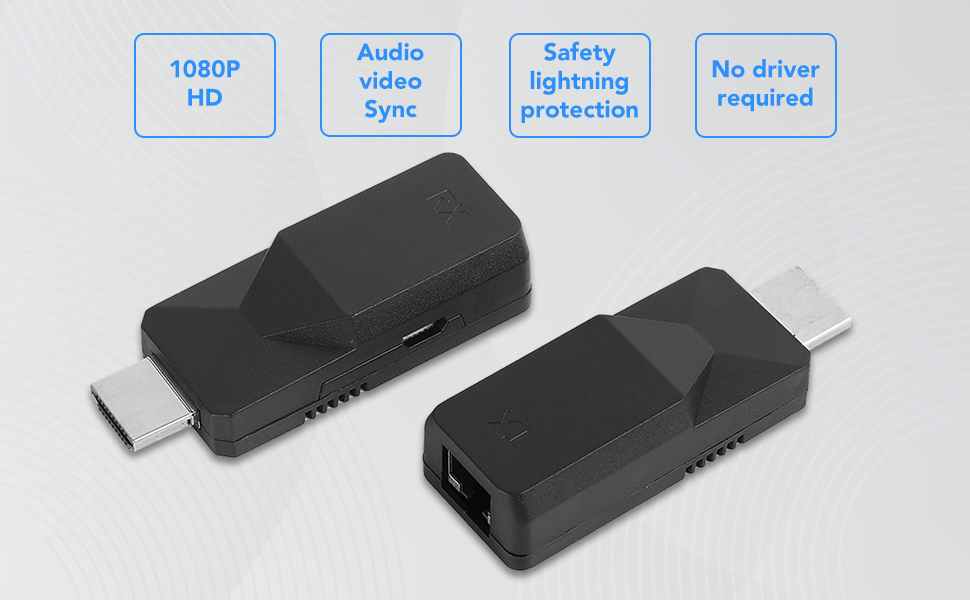
Image: A diagram illustrating the connection flow: Input devices (Laptop, TV Box, PS3/4) connect to the TX unit, which connects via a Cat6 cable to the RX unit, which then connects to output devices (Display, Projector, HDTV).
5. 操作
Once properly set up, the Yoidesu HDMI Extender operates automatically:
- 自動信号検出: The extender will automatically detect the HDMI signal from your source device and transmit it to the display.
- 高解像度出力: Enjoy full HD video resolution of 1920x1080 at 60Hz. The system also supports 3D video signals.
- Synchronous Audio and Video: Audio and video signals are transmitted synchronously, ensuring a consistent multimedia experience.
- 自動調整: The built-in automatic adjustment system optimizes the image quality for a glossy, clear, and stable display.

Image: Visual representation of key features including 1080P HD resolution, audio-video synchronization, safety lightning protection, and no driver requirement.
6. メンテナンス
To ensure the longevity and optimal performance of your HDMI Extender, follow these maintenance guidelines:
- ストレージ: ユニットは直射日光や極端な温度を避け、涼しく乾燥した場所に保管してください。
- クリーニング: 本体の外装を清掃する際は、柔らかく乾いた布をご使用ください。液体クリーナーや研磨剤は使用しないでください。
- 取り扱い: 内部コンポーネントが損傷する可能性があるため、ユニットを落としたり、強い衝撃を与えたりしないでください。
- ケーブル管理 Ensure all cables are routed neatly and are not bent sharply or under excessive tension.
7。 トラブルシューティング
If you encounter issues with your Yoidesu HDMI Extender, refer to the following common problems and solutions:
- ディスプレイに信号なし:
- 電力を確認します: Ensure both the TX and RX units are receiving power via their Micro USB ports. Both units must be powered.
- 接続を確認します。 Confirm that all HDMI cables are securely connected to the source and display, and the Ethernet cable is firmly connected to both TX and RX units.
- Cable Quality/Length: Ensure the Ethernet cable is Cat5e, Cat6, or Cat7 and within the specified maximum length (50m for Cat6/7, 40m for Cat5e). A damaged or excessively long cable can cause signal loss.
- テストコンポーネント: Try connecting the source directly to the display with a short HDMI cable to confirm both devices are working independently.
- デバイスを再起動します。 Power cycle the source device, display, and the extender units.
- 画像のちらつきや不安定さ:
- イーサネットケーブル: Replace the Ethernet cable with a higher quality Cat6 or Cat7 cable, especially if using a longer run.
- 干渉: Ensure the Ethernet cable is not running parallel to power cables or other sources of electromagnetic interference.
- 解像度設定: Check if the source device's output resolution is compatible with the extender (up to 1080p@60Hz).
- 音声なし:
- ソースオーディオ設定: ソース デバイスのオーディオ出力設定が HDMI に対して正しく構成されていることを確認します。
- オーディオ設定を表示します: Check the audio input settings on your display device.
- HDMIケーブル: Ensure the HDMI cables are functioning correctly and support audio transmission.
- 接続が頻繁に切断される:
- 安定した電力: Ensure both TX and RX units receive stable power from reliable USB sources. Avoid using low-power USB ports.
- ケーブルの完全性: すべてのケーブルに損傷がないか検査します。
- 環境要因: High temperatures or poor ventilation can affect performance. Ensure adequate airflow around the units.
8.保証とサポート
For warranty information or technical support regarding your Yoidesu HDMI Transmitter and Receiver, please refer to the documentation provided at the time of purchase or contact Yoidesu customer service directly through their official website or the retailer where the product was purchased. Please have your model number (Yoidesudyntggcesm6619) and purchase details ready when contacting support.