
テンビス IP602W
TENVIS IP602W 屋外IPカメラ ユーザーマニュアル
モデル: IP602W
ブランド: テンビス
導入
The TENVIS IP602W is a robust outdoor IP camera designed for reliable surveillance. It offers broad compatibility, supporting not only Windows OS but also Mac OS and other platforms accessible via an internet browser. Its design facilitates easy installation, allowing for wall mounting and wireless connectivity.
Equipped with a 1/4 CMOS image sensor and a 6mm lens, the IP602W delivers video at a maximum frame rate of 30 frames per second, with a resolution of up to 640 x 480 pixels. For low-light and nighttime environments, the camera features 30 infrared LEDs, providing high levels of invisible light for clear visibility. Mobile viewing is supported across multiple platforms via 3G networks, including iPhone, Android, Windows Mobile, and Java phones, enabling remote monitoring from any location with internet access.
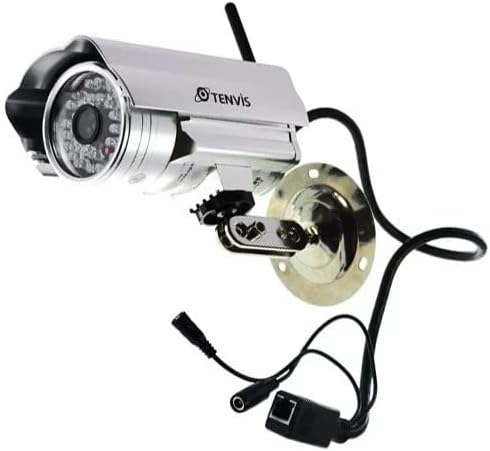
Image: The TENVIS IP602W Outdoor IP Camera, showcasing its durable build, integrated mounting bracket, and connectivity cables.
箱の中身
パッケージを開封したら、以下のコンポーネントがすべて含まれていることを確認してください。
- 1 x IP602W WiFi IP Camera
- 1 x Power Adaptor (AU Plug)
- 1×WiFiアンテナ
- 1 x取付金具
- 1 x CD (containing software/drivers)
- 取り付け用ネジセット x 1
- ユーザーマニュアル x 1

Image: All components included in the TENVIS IP602W package, laid out for verification.
製品の特徴
The TENVIS IP602W camera is equipped with several key features to enhance its performance and usability:
- Night Version: Integrated infrared LEDs provide clear visibility in low-light and complete darkness.
- ワイヤレスサポート: Connects to your network via Wi-Fi for flexible placement.
- Metal and Waterproof Shell: Designed for outdoor use with a durable, weather-resistant casing.
- 動作を検知する: Configurable motion detection alerts for security monitoring.
- クロスプラットフォームの互換性: サポート viewing and control from various operating systems and browsers, including Windows, Mac OS, Firefox, Chrome, and Safari.
- 携帯 View: Access live feeds and controls from mobile devices via 3G network, supporting iPhone, Android, Windows Mobile, and Java phones.

Image: Visual representation of the TENVIS IP602W camera, emphasizing its key features such as night vision and wireless capabilities.
セットアップとインストール
コンポーネントの識別
Familiarize yourself with the camera's ports and components before installation:
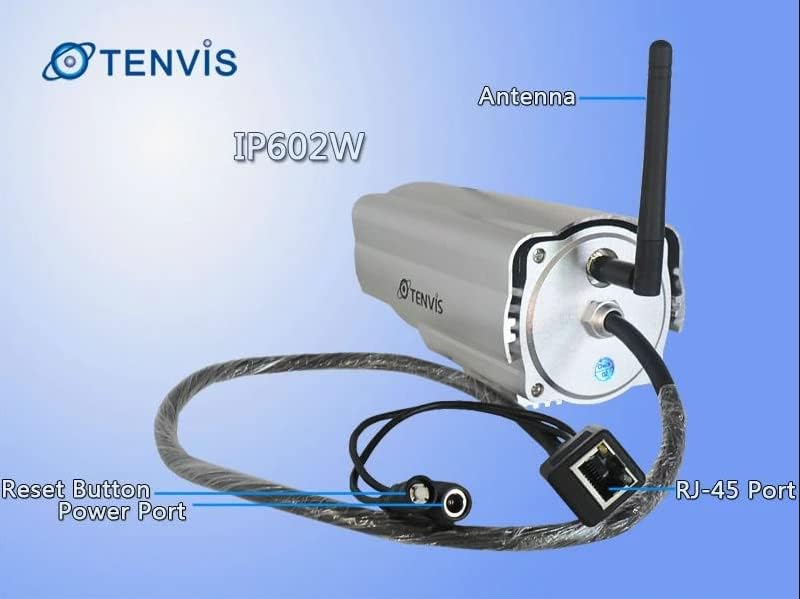
画像: 詳細 view of the TENVIS IP602W camera's rear, showing the antenna, RJ-45 Ethernet port, power input, and reset button.
- アンテナ: ワイヤレス ネットワーク接続用。
- RJ-45ポート: For wired Ethernet connection to your router.
- 電源ポート: 付属の電源アダプターをここに接続します。
- リセットボタン: 工場出荷時の設定を復元するために使用されます。
ネットワーク接続
The IP602W can connect to your network wirelessly or via an Ethernet cable. For initial setup, a wired connection is often recommended for stability.

Image: Network diagram showing how the IP602W camera connects to a router, allowing access from a LAN PC, Internet PC, and 3G phone.
- Connect the camera to your router using an Ethernet cable (if using wired setup).
- 電源アダプターをカメラに接続し、電源コンセントに差し込みます。
- Allow the camera a few minutes to power on and initialize.
- Refer to the included CD or the TENVIS website for software installation and detailed network configuration instructions, especially for wireless setup.
取り付け
The camera comes with a mounting bracket for easy installation on a wall or other suitable surface. Ensure the mounting location provides a clear view and is within range of your Wi-Fi signal or Ethernet cable.
- 取り付けには適切な屋外の場所を選択してください。
- 取り付けブラケットをテンプレートとして使用し、ドリル穴をマークします。
- 必要な穴を開け、必要に応じて壁アンカーを挿入します。
- 付属のネジを使用して取り付けブラケットを表面に固定します。
- カメラをマウントブラケットに取り付け、最適な角度に調整します。 viewing。
手術
Once the camera is set up and connected to your network, you can begin monitoring. The IP602W supports various viewing methods:
- PC/Mac アクセス: Use the provided software or a compatible web browser (Firefox, Chrome, Safari) to access the camera's live feed and settings from your computer.
- Mobile Device Access: Download the TENVIS mobile application (if available) or use a compatible mobile browser on your iPhone, Android, Windows Mobile, or Java phone to view the camera remotely via a 3G network connection.
- ビデオ品質: The camera streams video at up to 640x480 resolution with a frame rate of 30fps, providing clear and smooth surveillance footage.
- モーション検出: Configure motion detection settings through the camera's interface to receive alerts when movement is detected in the monitored area.
メンテナンス
Regular maintenance helps ensure the longevity and optimal performance of your TENVIS IP602W camera:
- クリーニング: カメラのレンズとハウジングを定期的に柔らかくてきれいな布で拭いてください。amp 布で拭いてください。研磨剤入りの洗剤や溶剤は使用しないでください。
- ケーブル検査: Check all cables (power, Ethernet) for any signs of wear, damage, or loose connections.
- ファームウェアの更新: TENVIS公式をチェック webファームウェアのアップデートが利用可能かどうか、定期的にサイトをご確認ください。ファームウェアを最新の状態に保つことで、パフォーマンスとセキュリティが向上します。
- 環境チェック: Ensure the camera's mounting remains secure and that no obstructions are blocking its field of view.
トラブルシューティング
If you encounter issues with your IP602W camera, try the following steps:
- 電源なし: 電源アダプターがカメラと電源コンセントの両方にしっかりと接続されていることを確認してください。
- ネットワーク接続なし:
- 有線接続の場合は、イーサネット ケーブルとルーターの状態を確認してください。
- For wireless connection, ensure the Wi-Fi antenna is properly attached and the camera is within range of your router. Verify Wi-Fi settings in the camera's configuration.
- カメラにアクセスできません: Verify the camera's IP address. Ensure your computer or mobile device is on the same network or has proper internet access for remote viewing. Check firewall settings on your computer.
- ビデオ品質が悪い: Ensure the lens is clean. Check network bandwidth and signal strength.
- カメラのリセット: If issues persist, use the reset button (refer to Component Identification) to restore factory default settings. You will need to reconfigure the camera after a reset.
仕様
| 特徴 | 詳細 |
|---|---|
| モデル名 | IP602W |
| ブランド | テンビス |
| 屋内/屋外での使用 | 屋外 |
| 接続技術 | ワイヤレス(Wi-Fi) |
| コントローラータイプ | Android (and other platforms) |
| 取り付けタイプ | 壁掛け |
| ビデオキャプチャ解像度 | 480p(640は480をX) |
| フレームレート | 30fps |
| フォトセンサー技術 | CMOS(1/4インチ) |
| レンズ | 6mm |
| 低照度テクノロジー | Night Color (Infrared LEDs) |
| アラートの種類 | モーションのみ |
| 製品寸法 | 10 x 9.5 x 4インチ |
| GTIN | 06928446299816 |
保証とサポート
For warranty information, technical support, or further inquiries regarding your TENVIS IP602W camera, please refer to the official TENVIS website or contact their customer service directly. The included CD may also contain support contact details.
You can visit the official TENVIS store for more information: TENVIS Store on Amazon
Ask a question about this manual
Ask about setup, troubleshooting, compatibility, parts, safety, or missing instructions. Manuals+ will review the question and use this page’s manual context to help answer it.