
Bmax B1プラス
Bmax B1 Plus ミニ PC ユーザーマニュアル
モデル: B1 Plus
1. はじめに
This user manual provides detailed instructions for setting up, operating, maintaining, and troubleshooting your Bmax B1 Plus Mini PC. Please read this manual thoroughly before using the device to ensure proper functionality and longevity.
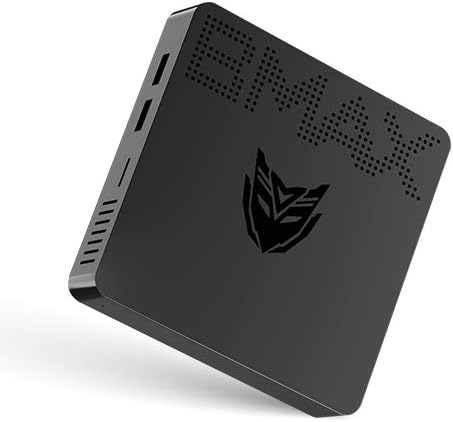
Image: Bmax B1 Plus Mini PC, showcasinコンパクトなデザイン。
2.製品オーバーview
The Bmax B1 Plus is a compact and versatile mini PC designed for various computing needs, from daily tasks to 4K media playback. It features an Intel Celeron N3350 processor, 6GB DDR3 RAM, and 64GB eMMC storage.
2.1. パッケージ内容

Image: Contents of the Bmax B1 Plus Mini PC retail box, including the mini PC, user guide, power adapter, HDMI cable, metal bracket, and screws.
- Bmax B1 Plus Mini PC
- 電源アダプター
- HDMIケーブル
- 金属ブラケット
- ネジ
- ユーザーガイド(このマニュアル)
2.2. デバイスのレイアウトとポート
Familiarize yourself with the various ports and buttons on your Bmax B1 Plus Mini PC:

Image: Detailed diagram of the Bmax B1 Plus Mini PC's ports, including VGA, HDMI, USB 3.0, USB 2.0, RJ45 Gigabit Ethernet, 3.5mm Audio/Mic, Power In, Power Button, and Reset Button.
- VGAポート: For connecting to displays with VGA input (up to 1920x1080P@60Hz).
- HDMIポート: For connecting to displays with HDMI input (up to 4K Resolution & 2560*1600P@60Hz).
- USB 3.0 データポート (x2): For high-speed data transfer (Super Speed | 5Gbps).
- USB 2.0 データポート (x2): For standard data transfer (480Mbps).
- RJ45 ギガビット イーサネット ポート: For wired network connection (10/100/1000 Mbps).
- 3.5mm Audio/Mic (2-in-1): For connecting headphones or external speakers with microphone functionality.
- Power In (12V): 付属の電源アダプターをここに接続します。
- 電源ボタン: デバイスの電源をオンまたはオフにします。
- リセットボタン: To reset the device (often requires a pin).
3. セットアップ
3.1. 初期接続
- Connect your monitor(s) to the HDMI and/or VGA ports on the Bmax B1 Plus.
- キーボードとマウスを利用可能な USB ポートに接続します。
- For wired internet, connect an Ethernet cable to the RJ45 port. For wireless, ensure your Wi-Fi network is available.
- Connect the power adapter to the 'Power In' port and then plug it into a power outlet.
- Press the Power Button to turn on the Mini PC.
3.2. Dual Screen Display Setup
The Bmax B1 Plus supports dual-screen display, allowing you to extend your desktop across two monitors for increased productivity or enhanced media viewing。

Image: Illustration of the Bmax B1 Plus Mini PC connected to two monitors for a dual-screen display setup.
For a visual guide on setting up dual screens, please refer to the official video below:
Video: Official guide demonstrating the dual-screen display operation of the Bmax B1 Plus Mini PC.
3.3. VESAマウントの取り付け
The Bmax B1 Plus can be mounted on the back of a VESA-compatible monitor or TV, transforming it into an all-in-one PC solution and saving desk space.

Image: Step-by-step illustration of installing the Bmax B1 Plus Mini PC using the included VESA mount bracket on the back of a monitor.
3.4. ストレージの拡張
You can expand the storage of your Bmax B1 Plus Mini PC by adding an M.2-2280 SATA SSD (up to 1TB) or connecting an external hard drive via USB 3.0.

Image: Diagram showing how to install an M.2-2280 SATA SSD into the Bmax B1 Plus Mini PC for storage expansion.
To install an M.2-2280 SATA SSD:
- ミニ PC の電源がオフになっており、プラグが抜かれていることを確認します。
- Locate the M.2 SSD slot cover on the bottom of the device.
- Remove the screw securing the cover and gently open it.
- Insert the M.2 SSD into the slot at an angle and press down to secure it.
- Replace the screw to hold the SSD in place and close the cover.
4. 操作手順
4.1. 電源のオン/オフ
- 電源オン: Press the Power Button once. The power indicator light will illuminate.
- 電源を切る: From the operating system, select 'Shut down'. Alternatively, press and hold the Power Button for a few seconds to force a shutdown (not recommended for regular use).
4.2. 接続性
The Bmax B1 Plus offers robust connectivity options:
- Wi-Fi: Supports 2.4GHz/5GHz Dual Band Wi-Fi (802.11ac) for fast wireless internet access.
- ブルートゥース: キーボード、マウス、ヘッドフォンなどのワイヤレス周辺機器を接続するための Bluetooth 4.2 を統合。
- イーサネット: Gigabit Ethernet port for stable and high-speed wired network connections.

Image: Visual representation of the Bmax B1 Plus Mini PC's dual-band Wi-Fi capabilities and integrated Intel HD Graphics 500 supporting 4K UHD output.
4.3. Portability and Use Cases
The compact size and lightweight design of the Bmax B1 Plus make it highly portable and suitable for various environments:

Image: Collage demonstrating the portability of the Bmax B1 Plus Mini PC, showing it being carried in a pocket and used in various settings such as an office, home theater, and conference room.
- Personal Office: Ideal for daily productivity tasks.
- 教育: Suitable for learning environments.
- ホームシアター: Supports 4K video playback for entertainment.
- Conference Projection: Easily connect to projectors for presentations.
5. メンテナンス
To ensure optimal performance and extend the lifespan of your Bmax B1 Plus Mini PC, follow these maintenance guidelines:
- 清潔に保つ: Regularly wipe the exterior with a soft, dry cloth. Avoid using liquid cleaners directly on the device.
- 換気を確保してください: 通気孔を塞がないでください。過熱を防ぐため、デバイス周囲に十分な空気の流れを確保してください。
- ソフトウェアアップデート: セキュリティとパフォーマンスを向上させるために、オペレーティング システムとドライバーを最新バージョンに更新してください。
- 静かな動作: The Bmax B1 Plus is designed for quiet operation. If you notice unusual fan noise (though it's fanless, some internal components might generate minimal sound or external fans might be used), ensure it's not obstructed.
- 安全なシャットダウン: データの破損を防ぐために、必ずオペレーティング システムを介して Mini PC を適切にシャットダウンしてください。
6。 トラブルシューティング
Bmax B1 Plus Mini PC で問題が発生した場合は、次の一般的なトラブルシューティング手順を参照してください。
| 問題 | 考えられる解決策 |
|---|---|
| モニターに何も表示されない |
|
| インターネット接続なし |
|
| デバイスが遅い、または反応しない |
|
| USBデバイスが認識されない |
|
If the problem persists after trying these steps, please contact Bmax customer support for further assistance.
7. 仕様
| 特徴 | 詳細 |
|---|---|
| ブランド | ビーマックス |
| モデル番号 | B1プラス |
| プロセッサ | インテル Celeron N3350 (1.1 GHz、最大 2.4 GHz) |
| ラム | 6 GB DDR3 SDRAM |
| ストレージ | 64 GB eMMC (expandable with M.2-2280 SATA SSD up to 1TB) |
| グラフィックスコプロセッサ | インテル HD グラフィックス 500 |
| 最大画面解像度 | 3840 x 2160 ピクセル (4K) |
| ワイヤレスタイプ | 802.11ac (2.4GHz/5GHz Dual WiFi), Bluetooth 4.2 |
| イーサネット | ギガビット イーサネット (10/100/1000 Mbps) |
| ポート | HDMI, VGA, 2x USB 3.0, 2x USB 2.0, RJ45, 3.5mm Audio/Mic, Power In |
| オペレーティング·システム | OS(通常はWindows 10 Pro) |
| アイテム重量 | 1.37ポンド |
| 色 | 黒 |
8. 保証とサポート
保証情報およびテクニカルサポートについては、製品に付属のマニュアルを参照するか、Bmaxの公式ウェブサイトをご覧ください。 webサイトでご確認ください。保証請求の際は購入証明として領収書を保管してください。
また、 AmazonのBmaxストア 追加の製品情報およびサポート リソースについては、こちらをご覧ください。